In Opal, you can use nested groups (also called “group-group propagation”) to add a group to another group and automatically sync memberships between the groups.
Use nested groups to easily manage access to resources while maintaining existing user group structures. You can:
Define requestable groups containing resources; for example, a group called Prod Resources, composed of prod AWS and PagerDuty resources
Define non-requestable groups containing users; for example, a group called Software Engineers pulled from an Okta group rule
From the Prod Resources detail page under Group Access, add the Software Engineers group as a nested group, and set an access duration
In this example, users in the Software Engineers group are then automatically granted access to resources within the Prod Resources group, and changes in group membership are automatically pulled from Okta.
You can also use nested groups to connect disparate groups that require access to the same resources, e.g., a Google Group and Okta group, two Okta groups, etc.
Go to Inventory > Apps and find the group you’d like to serve as the containing group. The containing group contains the member group you’ll add.
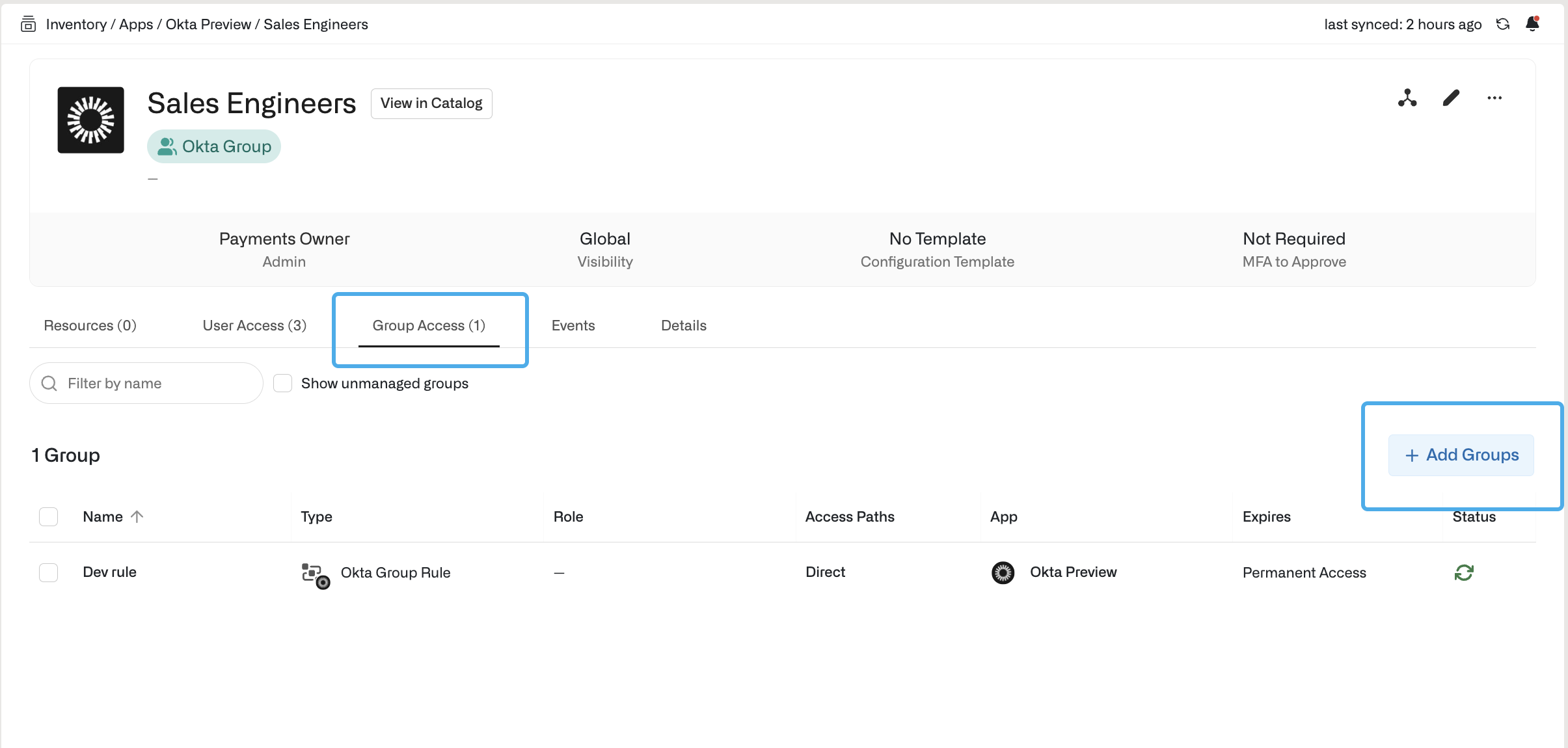
Go to the Group Access tab on the containing group.
Select Add Groups and search for the member group(s) to add.
Optionally, set the access to be timebound.
Select Add Groups to save the group.
Users in the member group are now automatically granted access to any resources or groups in the containing group.
Last modified on September 11, 2025
Was this page helpful?
{"docsConfig":{"theme":"mint","$schema":"https://mintlify.com/docs.json","name":"Opal Security Docs","colors":{"primary":"#0C7997","light":"#EDFCFC","dark":"#074055"},"logo":{"light":"https://mintcdn.com/opalsecurity/FBbZyeMPZrA69UcV/logo/logo-dark.svg?fit=max\u0026auto=format\u0026n=FBbZyeMPZrA69UcV\u0026q=85\u0026s=93a4bd75f157f9f0ab43cdf4d715b5cd","dark":"https://mintcdn.com/opalsecurity/FBbZyeMPZrA69UcV/logo/logo-light.svg?fit=max\u0026auto=format\u0026n=FBbZyeMPZrA69UcV\u0026q=85\u0026s=1774b545e4f1c5cad647f5194f7b26d9"},"favicon":{"light":"https://mintcdn.com/opalsecurity/DRAwGKUXMxLRQouh/logo/icon-opal-black.svg?fit=max\u0026auto=format\u0026n=DRAwGKUXMxLRQouh\u0026q=85\u0026s=9c8bd1204b6b5b83542c2ab5be549858","dark":"https://mintcdn.com/opalsecurity/DRAwGKUXMxLRQouh/logo/icon-opal-white.svg?fit=max\u0026auto=format\u0026n=DRAwGKUXMxLRQouh\u0026q=85\u0026s=73b53b4ceab6ae0b00e30b2042a6020a"},"icons":{"library":"lucide"},"styling":{"eyebrows":"breadcrumbs","latex":false},"integrations":{"ga4":{"measurementId":"G-1PPPM1WF6D"}},"errors":{"404":{"redirect":false,"title":"Page can't be found","description":"Sorry! This page might have been moved, or the link might be broken. Go back to our documentation via https://docs.opal.dev/docs/welcome."}},"metadata":{"timestamp":true},"navigation":{"pages":[]}},"deployment":{"deploymentMetadataValue":{"subdomain":"opalsecurity","hasAudioNarration":false,"actualSubdomain":"opalsecurity","customDomains":["docs.opal.dev"],"gitSource":{"type":"github","owner":"opalsecurity","repo":"docs","deployBranch":"main","contentDirectory":"","isPrivate":true,"mountPath":"","label":""},"chroma":{"liveDeploymentHistoryId":"6adfa8cfe2a4938765af0d69","collectionId":"b6bc7c4e-4a8f-4a35-bccb-f15822febfda","schemaVersion":"v3","latestBuiltDeploymentHistoryId":"6adfa8cfe2a4938765af0d69"},"feedback":{"thumbs":true},"entitlements":{"AI_CHAT":{"status":"ENABLED"},"WEB_MCP":{"status":"ENABLED"},"NARRATION":{"status":"ENABLED"}},"buildId":"6adfa8cfe2a4938765af0d69","clientVersion":"0.0.3971","searchFilterCounts":[{"language":"default","tag":"API Reference","count":209},{"language":"default","tag":"Opal API","count":204},{"language":"default","tag":"Documentation","count":99},{"language":"default","tag":"Integrations","count":92},{"language":"default","tag":"Entitlement Management","count":62},{"language":"default","tag":"resources","count":34},{"language":"default","tag":"groups","count":31},{"language":"default","tag":"Getting Started","count":25},{"language":"default","tag":"Access Management","count":22},{"language":"default","tag":"Infrastructure","count":22}]},"assistantConfig":{"enableStarterQuestions":true,"enableContextualStarterQuestions":true,"deflection":{"enabled":true,"email":"support@opal.dev","showHelpButton":true}},"basePath":"","hasChatPermissions":true,"hasWebMcpPermissions":true,"toggles":[],"isAtlas":false,"googleFontsInlined":false},"customCss":[],"page":{"pagePath":"docs/nested-groups","slug":"/docs/nested-groups","pageMetadata":{"title":"Nested groups","description":"Learn how to set up nested groups in Opal.","href":"/docs/nested-groups"},"description":{"compiledSource":"\"use strict\";\nconst {jsx: _jsx} = arguments[0];\nconst {useMDXComponents: _provideComponents} = arguments[0];\nfunction _createMdxContent(props) {\n const _components = {\n p: \"p\",\n ..._provideComponents(),\n ...props.components\n };\n return _jsx(_components.p, {\n children: \"Learn how to set up nested groups in Opal.\"\n });\n}\nfunction MDXContent(props = {}) {\n const {wrapper: MDXLayout} = {\n ..._provideComponents(),\n ...props.components\n };\n return MDXLayout ? _jsx(MDXLayout, {\n ...props,\n children: _jsx(_createMdxContent, {\n ...props\n })\n }) : _createMdxContent(props);\n}\nreturn {\n default: MDXContent\n};\n","frontmatter":{},"scope":{}},"pageType":"default","mdx":{"mdxSource":{"compiledSource":"\"use strict\";const{Fragment:_Fragment,jsx:_jsx,jsxs:_jsxs}=arguments[0];const{useMDXComponents:_provideComponents}=arguments[0];function _createMdxContent(props){const _components={em:`em`,li:`li`,ol:`ol`,p:`p`,strong:`strong`,ul:`ul`,..._provideComponents(),...props.components},{Heading,OptimizedImage}=_components;if(!Heading)_missingMdxReference(`Heading`,true);if(!OptimizedImage)_missingMdxReference(`OptimizedImage`,true);return _jsxs(_Fragment,{children:[_jsx(_components.p,{children:`In Opal, you can use nested groups (also called “group-group propagation”) to add a group to another group and automatically sync memberships between the groups.`}),`\n`,_jsx(Heading,{level:`2`,id:`use-cases`,children:`Use cases`}),`\n`,_jsx(Heading,{level:`3`,id:`connect-role-and-resource-groups`,children:`Connect role and resource groups`}),`\n`,_jsx(_components.p,{children:`Use nested groups to easily manage access to resources while maintaining existing user group structures. You can:`}),`\n`,_jsxs(_components.ul,{children:[`\n`,_jsxs(_components.li,{children:[`Define requestable groups containing resources; for example, a group called `,_jsx(_components.em,{children:`Prod Resources`}),`, composed of prod AWS and PagerDuty resources`]}),`\n`,_jsxs(_components.li,{children:[`Define non-requestable groups containing users; for example, a group called `,_jsx(_components.em,{children:`Software Engineers`}),` pulled from an Okta group rule`]}),`\n`,_jsxs(_components.li,{children:[`From the `,_jsx(_components.em,{children:`Prod Resources`}),` detail page under `,_jsx(_components.strong,{children:`Group Access`}),`, add the `,_jsx(_components.em,{children:`Software Engineers`}),` group as a nested group, and set an access duration`]}),`\n`]}),`\n`,_jsxs(_components.p,{children:[`In this example, users in the `,_jsx(_components.em,{children:`Software Engineers`}),` group are then automatically granted access to resources within the `,_jsx(_components.em,{children:`Prod Resources`}),` group, and changes in group membership are automatically pulled from Okta.`]}),`\n`,_jsx(Heading,{level:`3`,id:`connect-disparate-groups`,children:`Connect disparate groups`}),`\n`,_jsx(_components.p,{children:`You can also use nested groups to connect disparate groups that require access to the same resources, e.g., a Google Group and Okta group, two Okta groups, etc.`}),`\n`,_jsx(Heading,{level:`2`,id:`configuration`,children:`Configuration`}),`\n`,_jsx(_components.p,{children:`To set up a nested group:`}),`\n`,_jsxs(_components.ol,{children:[`\n`,_jsxs(_components.li,{children:[`Go to `,_jsx(_components.strong,{children:`Inventory`}),` > `,_jsx(_components.strong,{children:`Apps`}),` and find the group you’d like to serve as the containing group. The `,_jsx(_components.em,{children:`containing group`}),` contains the `,_jsx(_components.em,{children:`member group`}),` you’ll add.`]}),`\n`,_jsxs(_components.li,{children:[`Go to the `,_jsx(_components.strong,{children:`Group Access`}),` tab on the containing group.`]}),`\n`,_jsxs(_components.li,{children:[`Select `,_jsx(_components.strong,{children:`Add Groups`}),` and search for the `,_jsx(_components.em,{children:`member group(s)`}),` to add.`]}),`\n`,_jsx(_components.li,{children:`Optionally, set the access to be timebound.`}),`\n`,_jsxs(_components.li,{children:[`Select `,_jsx(_components.strong,{children:`Add Groups`}),` to save the group.`]}),`\n`]}),`\n`,_jsxs(_components.p,{children:[`Users in the `,_jsx(_components.em,{children:`member group`}),` are now automatically granted access to any resources or groups in the `,_jsx(_components.em,{children:`containing group.`})]}),`\n`,_jsx(OptimizedImage,{src:`https://mintcdn.com/opalsecurity/CCjTTkaW-43B4efd/images/docs/ff245c724a037209c8557c94cc110574aed0d92ac679581ae873b9881aeb632b-add-member-groups.png?fit=max\u0026auto=format\u0026n=CCjTTkaW-43B4efd\u0026q=85\u0026s=60136f653c358b1c2acda7ad70e05e43`,alt:``,\"data-og-width\":`2410`,width:`2410`,\"data-og-height\":`1150`,height:`1150`,\"data-path\":`images/docs/ff245c724a037209c8557c94cc110574aed0d92ac679581ae873b9881aeb632b-add-member-groups.png`,\"data-optimize\":`true`,\"data-opv\":`3`,srcset:`https://mintcdn.com/opalsecurity/CCjTTkaW-43B4efd/images/docs/ff245c724a037209c8557c94cc110574aed0d92ac679581ae873b9881aeb632b-add-member-groups.png?w=280\u0026fit=max\u0026auto=format\u0026n=CCjTTkaW-43B4efd\u0026q=85\u0026s=d4110e6c9328ec55fa17f8625abe460a 280w, https://mintcdn.com/opalsecurity/CCjTTkaW-43B4efd/images/docs/ff245c724a037209c8557c94cc110574aed0d92ac679581ae873b9881aeb632b-add-member-groups.png?w=560\u0026fit=max\u0026auto=format\u0026n=CCjTTkaW-43B4efd\u0026q=85\u0026s=acb37061943e9321750a52ccbfb4a3c7 560w, https://mintcdn.com/opalsecurity/CCjTTkaW-43B4efd/images/docs/ff245c724a037209c8557c94cc110574aed0d92ac679581ae873b9881aeb632b-add-member-groups.png?w=840\u0026fit=max\u0026auto=format\u0026n=CCjTTkaW-43B4efd\u0026q=85\u0026s=9795692fabaaf952bb37d1f268baa245 840w, https://mintcdn.com/opalsecurity/CCjTTkaW-43B4efd/images/docs/ff245c724a037209c8557c94cc110574aed0d92ac679581ae873b9881aeb632b-add-member-groups.png?w=1100\u0026fit=max\u0026auto=format\u0026n=CCjTTkaW-43B4efd\u0026q=85\u0026s=5f9d998ea7248c1c8429c43a2295305e 1100w, https://mintcdn.com/opalsecurity/CCjTTkaW-43B4efd/images/docs/ff245c724a037209c8557c94cc110574aed0d92ac679581ae873b9881aeb632b-add-member-groups.png?w=1650\u0026fit=max\u0026auto=format\u0026n=CCjTTkaW-43B4efd\u0026q=85\u0026s=116b8609419339f144d7b6bb4ab89b98 1650w, https://mintcdn.com/opalsecurity/CCjTTkaW-43B4efd/images/docs/ff245c724a037209c8557c94cc110574aed0d92ac679581ae873b9881aeb632b-add-member-groups.png?w=2500\u0026fit=max\u0026auto=format\u0026n=CCjTTkaW-43B4efd\u0026q=85\u0026s=5e2349d593fe29245f5e9d360c11fb78 2500w`})]})}function MDXContent(props={}){const{wrapper:MDXLayout}={..._provideComponents(),...props.components};return MDXLayout?_jsx(MDXLayout,{...props,children:_jsx(_createMdxContent,{...props})}):_createMdxContent(props)}return{default:MDXContent};function _missingMdxReference(id,component){throw new Error(`Expected `+(component?`component`:`object`)+\" `\"+id+\"` to be defined: you likely forgot to import, pass, or provide it.\")}","frontmatter":{},"scope":{"config":{},"pageMetadata":{"title":"Nested groups","description":"Learn how to set up nested groups in Opal.","href":"/docs/nested-groups"}}},"mdxSourceWithNoJs":null},"mdxExtracts":{"tableOfContents":[{"title":"Use cases","slug":"use-cases","depth":2,"children":[{"title":"Connect role and resource groups","slug":"connect-role-and-resource-groups","depth":3,"children":[]},{"title":"Connect disparate groups","slug":"connect-disparate-groups","depth":3,"children":[]}]},{"title":"Configuration","slug":"configuration","depth":2,"children":[]}],"codeExamples":{}},"jsLinks":["/_mintlify/custom/opalsecurity/d0e14c3cf9bbd682/changelog-scraper.js"],"subdomain":"opalsecurity","siteName":"Opal Security Docs","title":"Nested groups - Opal Security Docs","contextualStarterQuestions":[{"_id":"69b0b48b0e8c1bf71a51a262","deploymentId":"68ddaa9a3f8b7de5bc3a7b47","questionText":"How do I set up nested groups?","status":"active","generatedBy":"contextual","path":"docs/nested-groups","createdAt":"2026-03-11T00:17:15.169Z","updatedAt":"2026-03-11T00:17:15.169Z","__v":0},{"_id":"69b0b48b0e8c1bf71a51a264","deploymentId":"68ddaa9a3f8b7de5bc3a7b47","questionText":"Can I set access duration limits?","status":"active","generatedBy":"contextual","path":"docs/nested-groups","createdAt":"2026-03-11T00:17:15.169Z","updatedAt":"2026-03-11T00:17:15.169Z","__v":0},{"_id":"69b0b48b0e8c1bf71a51a263","deploymentId":"68ddaa9a3f8b7de5bc3a7b47","questionText":"What are nested groups used for?","status":"active","generatedBy":"contextual","path":"docs/nested-groups","createdAt":"2026-03-11T00:17:15.169Z","updatedAt":"2026-03-11T00:17:15.169Z","__v":0}],"navMaps":{"firstHrefInVersion":{},"firstHrefInLanguage":{}},"lastModified":"2026-01-28T20:32:08.439Z","gitLastModified":"2025-09-11T21:35:51.000Z","originalFileLocation":"docs/nested-groups.mdx"},"headHtml":"\u003cscript data-mint-head>(function(){var d=document.documentElement,p=null;if(!p){try{p=localStorage.getItem(\"isDarkMode\")}catch(e){}if(p==='true')p='dark';else if(p==='false')p='light';if(p!=='light'\u0026\u0026p!=='dark'\u0026\u0026p!=='system')p=\"system\"}var r=p==='system'?(matchMedia(\"(prefers-color-scheme: dark)\").matches?'dark':'light'):p;d.classList.remove(r==='dark'?'light':'dark');d.classList.add(r);d.setAttribute(\"data-theme-preference\",p)})();\u003c/script>\u003cmeta data-mint-head name=\"description\" content=\"Learn how to set up nested groups in Opal.\">\u003cmeta data-mint-head name=\"application-name\" content=\"Opal Security Docs\">\u003cmeta data-mint-head name=\"generator\" content=\"Mintlify\">\u003clink data-mint-head rel=\"icon\" type=\"image/png\" sizes=\"192x192\" href=\"/mintlify-assets/_mintlify/favicons/opalsecurity/t501z2uOx-XXqevB/_generated/favicon/android-chrome-192x192.png\" media=\"(prefers-color-scheme: light)\">\u003clink data-mint-head rel=\"apple-touch-icon\" type=\"image/png\" sizes=\"180x180\" href=\"/mintlify-assets/_mintlify/favicons/opalsecurity/t501z2uOx-XXqevB/_generated/favicon/apple-touch-icon.png\">\u003clink data-mint-head rel=\"icon\" type=\"image/png\" sizes=\"16x16\" href=\"/mintlify-assets/_mintlify/favicons/opalsecurity/t501z2uOx-XXqevB/_generated/favicon/favicon-16x16.png\" media=\"(prefers-color-scheme: light)\">\u003clink data-mint-head rel=\"icon\" type=\"image/png\" sizes=\"32x32\" href=\"/mintlify-assets/_mintlify/favicons/opalsecurity/t501z2uOx-XXqevB/_generated/favicon/favicon-32x32.png\" media=\"(prefers-color-scheme: light)\">\u003clink data-mint-head rel=\"shortcut icon\" type=\"image/x-icon\" href=\"/mintlify-assets/_mintlify/favicons/opalsecurity/t501z2uOx-XXqevB/_generated/favicon/favicon.ico\" media=\"(prefers-color-scheme: light)\">\u003clink data-mint-head rel=\"icon\" type=\"image/png\" sizes=\"192x192\" href=\"/mintlify-assets/_mintlify/favicons/opalsecurity/t501z2uOx-XXqevB/_generated/favicon-dark/android-chrome-192x192.png\" media=\"(prefers-color-scheme: dark)\">\u003clink data-mint-head rel=\"icon\" type=\"image/png\" sizes=\"16x16\" href=\"/mintlify-assets/_mintlify/favicons/opalsecurity/t501z2uOx-XXqevB/_generated/favicon-dark/favicon-16x16.png\" media=\"(prefers-color-scheme: dark)\">\u003clink data-mint-head rel=\"icon\" type=\"image/png\" sizes=\"32x32\" href=\"/mintlify-assets/_mintlify/favicons/opalsecurity/t501z2uOx-XXqevB/_generated/favicon-dark/favicon-32x32.png\" media=\"(prefers-color-scheme: dark)\">\u003clink data-mint-head rel=\"shortcut icon\" type=\"image/x-icon\" href=\"/mintlify-assets/_mintlify/favicons/opalsecurity/t501z2uOx-XXqevB/_generated/favicon-dark/favicon.ico\" media=\"(prefers-color-scheme: dark)\">\u003cmeta data-mint-head property=\"og:title\" content=\"Nested groups - Opal Security Docs\">\u003cmeta data-mint-head property=\"og:description\" content=\"Learn how to set up nested groups in Opal.\">\u003cmeta data-mint-head property=\"og:site_name\" content=\"Opal Security Docs\">\u003cmeta data-mint-head property=\"og:url\" content=\"https://docs.opal.dev/docs/nested-groups\">\u003cmeta data-mint-head property=\"og:type\" content=\"website\">\u003cmeta data-mint-head property=\"og:image\" content=\"https://opalsecurity.mintlify.app/_mintlify/api/og/v2?division=Manage+groups+in+Opal\u0026amp;title=Nested+groups\u0026amp;description=Learn+how+to+set+up+nested+groups+in+Opal.\u0026amp;theme=287ef1256bbb1bf2a61f3fd2\u0026amp;signature=f2f0c4ceb8c7172ba0c6c964b937089f2c5a8edc97f204c31cc2211440c45e52\">\u003cmeta data-mint-head property=\"og:image:width\" content=\"1200\">\u003cmeta data-mint-head property=\"og:image:height\" content=\"630\">\u003cmeta data-mint-head name=\"twitter:card\" content=\"summary_large_image\">\u003cmeta data-mint-head name=\"twitter:title\" content=\"Nested groups - Opal Security Docs\">\u003cmeta data-mint-head name=\"twitter:description\" content=\"Learn how to set up nested groups in Opal.\">\u003cmeta data-mint-head name=\"twitter:image\" content=\"https://opalsecurity.mintlify.app/_mintlify/api/og/v2?division=Manage+groups+in+Opal\u0026amp;title=Nested+groups\u0026amp;description=Learn+how+to+set+up+nested+groups+in+Opal.\u0026amp;theme=287ef1256bbb1bf2a61f3fd2\u0026amp;signature=f2f0c4ceb8c7172ba0c6c964b937089f2c5a8edc97f204c31cc2211440c45e52\">\u003cmeta data-mint-head name=\"twitter:image:width\" content=\"1200\">\u003cmeta data-mint-head name=\"twitter:image:height\" content=\"630\">\u003cmeta data-mint-head name=\"msapplication-config\" content=\"/mintlify-assets/_mintlify/favicons/opalsecurity/t501z2uOx-XXqevB/_generated/favicon/browserconfig.xml\">\u003cmeta data-mint-head name=\"apple-mobile-web-app-title\" content=\"Opal Security Docs\">\u003cmeta data-mint-head name=\"msapplication-TileColor\" content=\"#0C7997\">\u003clink data-mint-head rel=\"canonical\" href=\"https://docs.opal.dev/docs/nested-groups\">\u003clink data-mint-head rel=\"alternate\" type=\"application/xml\" href=\"/sitemap.xml\">\u003clink data-mint-head rel=\"alternate\" type=\"text/markdown\" href=\"/docs/nested-groups.md\">\u003cscript data-mint-head type=\"application/ld+json\">{\"@context\":\"https://schema.org\",\"@graph\":[{\"@type\":\"Organization\",\"@id\":\"https://docs.opal.dev/#organization\",\"name\":\"Opal Security Docs\",\"url\":\"https://docs.opal.dev\",\"logo\":{\"@type\":\"ImageObject\",\"url\":\"https://mintcdn.com/opalsecurity/FBbZyeMPZrA69UcV/logo/logo-dark.svg?fit=max\u0026auto=format\u0026n=FBbZyeMPZrA69UcV\u0026q=85\u0026s=93a4bd75f157f9f0ab43cdf4d715b5cd\"}},{\"@type\":\"WebSite\",\"@id\":\"https://docs.opal.dev#website\",\"name\":\"Opal Security Docs\",\"url\":\"https://docs.opal.dev\",\"publisher\":{\"@id\":\"https://docs.opal.dev/#organization\"}},{\"@type\":\"WebPage\",\"@id\":\"https://docs.opal.dev/docs/nested-groups#webpage\",\"url\":\"https://docs.opal.dev/docs/nested-groups\",\"name\":\"Nested groups\",\"description\":\"Learn how to set up nested groups in Opal.\",\"dateModified\":\"2025-09-11T21:35:51.000Z\",\"isPartOf\":{\"@id\":\"https://docs.opal.dev#website\"},\"breadcrumb\":{\"@id\":\"https://docs.opal.dev/docs/nested-groups#breadcrumb\"}},{\"@type\":\"BreadcrumbList\",\"@id\":\"https://docs.opal.dev/docs/nested-groups#breadcrumb\",\"itemListElement\":[{\"@type\":\"ListItem\",\"position\":1,\"name\":\"Access Management\",\"item\":\"https://docs.opal.dev/docs/curate-catalog\"},{\"@type\":\"ListItem\",\"position\":2,\"name\":\"Manage groups in Opal\",\"item\":\"https://docs.opal.dev/docs/manage-groups-in-opal\"},{\"@type\":\"ListItem\",\"position\":3,\"name\":\"Nested groups\",\"item\":\"https://docs.opal.dev/docs/nested-groups\"}]},{\"@type\":[\"Article\",\"TechArticle\"],\"@id\":\"https://docs.opal.dev/docs/nested-groups#article\",\"headline\":\"Nested groups\",\"name\":\"Nested groups\",\"description\":\"Learn how to set up nested groups in Opal.\",\"url\":\"https://docs.opal.dev/docs/nested-groups\",\"mainEntityOfPage\":{\"@id\":\"https://docs.opal.dev/docs/nested-groups#webpage\"},\"dateModified\":\"2025-09-11T21:35:51.000Z\",\"publisher\":{\"@id\":\"https://docs.opal.dev/#organization\"},\"isPartOf\":{\"@id\":\"https://docs.opal.dev#website\"}}]}\u003c/script>\u003cscript data-mint-head type=\"application/ld+json\">{\"@context\":\"https://schema.org\",\"@type\":\"WebSite\",\"name\":\"Opal Security Docs\",\"creator\":{\"@type\":\"Organization\",\"name\":\"Mintlify\",\"url\":\"https://mintlify.com\"}}\u003c/script>","siteName":"Opal Security Docs","nav":{"global":null,"tabs":[{"tab":"Documentation","groups":[{"group":"Welcome","icon":"leaf","pages":[{"title":"Quickstart","mode":"wide","href":"/docs/welcome"},{"title":"Overview","href":"/docs/opal-overview"},{"title":"Concepts","href":"/docs/opal-101"},{"title":"Opal architecture","href":"/docs/opal-architecture"},{"group":"Best practices","pages":[{"title":"Best practices for access requests","href":"/docs/best-practices-for-access-requests"},{"title":"Best practices for access reviews","href":"/docs/best-practices-for-user-access-reviews"}]}]},{"group":"End user","icon":"book-open","pages":[{"title":"Access Request FAQs","sidebarTitle":"How to request access","href":"/docs/end-user-faq"},{"title":"Tips on searching","href":"/docs/tips-on-searching"},{"title":"Complete Access Reviews","sidebarTitle":"How to complete access reviews","href":"/docs/complete-access-reviews"}]},{"group":"Getting Started","icon":"rocket","pages":[{"title":"Set up Cloud","href":"/docs/set-up-cloud"},{"group":"Set up Self-Hosted","pages":[{"title":"Set up Self-Hosted","href":"/docs/self-host-overview"},{"title":"Self-Hosted on AWS EKS","href":"/docs/self-host-opal-aws-guide"},{"title":"Self-Hosted on GKE","href":"/docs/self-host-opal-gke-guide"},{"title":"Disaster recovery guide","href":"/docs/disaster-recovery-guide"},{"title":"Update your Opal installation","href":"/docs/update-self-hosted-opal"},{"title":"Install Opal using Helm","href":"/docs/install-opal-using-helm"},{"title":"Set up an Airgapped Opal Environment","href":"/docs/setup-an-airgapped-opal-environment"},{"title":"Configure Async Exports Storage (Self-Hosted)","href":"/docs/configure-async-exports-storage"},{"title":"Kubernetes Components and Health Monitoring","href":"/docs/kubernetes-components-and-health-monitoring-guide"}]},{"group":"Connect Identity or HR Providers","pages":[{"title":"Connect Identity or HR Providers","sidebarTitle":"Overview","href":"/docs/connect-your-identity-provider-idp"},{"title":"Add your first IDP/HR provider","href":"/docs/add-your-first-idphr-provider"},{"title":"Add additional IDP/HR providers","href":"/docs/add-additional-idphr-providers"},{"title":"Import user secondary emails","href":"/docs/importing-user-secondary-email"}]},{"title":"Connect Productivity Tools","sidebarTitle":"Connect Productivity Tools","href":"/docs/connect-your-productivity-tools"},{"group":"Connect Apps and Infrastructure","pages":[{"title":"Connect Apps and Infrastructure","sidebarTitle":"Overview","href":"/docs/set-up-connections"},{"title":"Import and configure resources","href":"/docs/import-and-configure-resources-and-groups"},{"title":"Opal's server IP ranges","href":"/docs/ip-ranges"}]},{"group":"Configure SSO and MFA","pages":[{"title":"Configure SSO and MFA","sidebarTitle":"Overview","href":"/docs/configure-sso-and-mfa"},{"group":"SSO with SAML","pages":[{"title":"SSO with SAML","href":"/docs/sso-with-saml"},{"title":"Google SAML Setup","href":"/docs/google-saml-setup"},{"title":"Okta SAML Setup","href":"/docs/okta-saml-setup"}]},{"title":"Okta Multifactor Authentication","href":"/docs/okta-multifactor-authentication"},{"title":"Okta SCIM: Provision Opal Users","href":"/docs/okta-scim-integration"},{"title":"OIDC Provider Setup for Opal Actions","href":"/docs/oidc-provider-setup-for-opal-actions"}]}]},{"group":"Access Management","icon":"shield","pages":[{"group":"Manage end-user catalog","pages":[{"title":"Curate end-user catalog","href":"/docs/curate-catalog"},{"title":"Bundles","href":"/docs/bundles"},{"title":"Configure reviewers","href":"/docs/configure-reviewers"},{"title":"Escalate if no response","href":"/docs/escalate-if-no-response"},{"title":"Request on behalf rules","href":"/docs/request-on-behalf"},{"title":"Delegate reviews","href":"/docs/delegate-reviews"}]},{"title":"Configuration templates","href":"/docs/configuration-templates"},{"title":"Manage access with ticketing","href":"/docs/ticket-propagation"},{"title":"Access Rules","href":"/docs/access-rules"},{"title":"Risk Center","href":"/docs/least-privilege-posture-management"},{"group":"Manage groups in Opal","pages":[{"title":"Overview","href":"/docs/manage-groups-in-opal"},{"title":"Manage break-glass access","description":"Learn how to set up groups and users to support break-glass access paths.","href":"/docs/manage-breakglass-access"},{"title":"Nested groups","href":"/docs/nested-groups"},{"title":"Group aliasing","description":null,"href":"/docs/okta-group-aliasing"},{"title":"Linked groups","href":"/docs/linked-groups"},{"title":"Group leaders","href":"/docs/group-projects"}]},{"title":"Notifications","href":"/docs/notifications"},{"title":"Special roles in Opal","href":"/docs/roles-in-opal"},{"title":"Owner Permissions","href":"/docs/owner-permissions"},{"title":"Custom Opal roles","href":"/docs/custom-opal-roles"},{"title":"User provisioning","href":"/docs/user-provisioning"},{"title":"Access Comparison","sidebarTitle":"Access Comparison","tag":"NEW","href":"/docs/access-comparison"}]},{"group":"AI Agent Governance","icon":"cpu","pages":[{"title":"Agent Inventory","href":"/docs/agent-inventory"},{"title":"OpenAI and ChatGPT","href":"/docs/openai-chatgpt-setup"},{"title":"Anthropic Setup","href":"/docs/anthropic-agent-setup"}]},{"group":"OpalScript","icon":"scroll","tag":"NEW","pages":[{"title":"Use OpalScript to automate access workflows","sidebarTitle":"Overview","href":"/docs/opalscript-overview"},{"title":"Work with scripts in the OpalScript editor","sidebarTitle":"Using the editor","href":"/docs/opalscript-editor"},{"title":"Write OpalScript with AI","sidebarTitle":"Write with AI","href":"/docs/opalscript-ai-assistant"},{"title":"Utility Modules for OpalScript","sidebarTitle":"Utility Modules","href":"/docs/opalscript-utilitymodules"},{"group":"Request Review Scripts","pages":[{"title":"Start automating workflows around requests","sidebarTitle":"Request Review","href":"/docs/requestreview-getstarted"},{"title":"Request Review Example Scripts","sidebarTitle":"Examples","href":"/docs/requestreview-examples"}]},{"title":"Control who can cover a request with delegation conditions","sidebarTitle":"Delegation Conditions","href":"/docs/opalscript-delegation-conditions"},{"title":"Give Paladin extra context with context provider scripts","sidebarTitle":"Paladin Context","tag":"BETA","href":"/docs/opalscript-context-provider"},{"title":"Manage OpalScripts with Terraform","sidebarTitle":"Terraform","href":"/docs/opalscript-terraform"},{"title":"OpalScript Reference","sidebarTitle":"Reference","href":"/docs/opalscript-reference"}]},{"group":"Paladin","icon":"bot","tag":"NEW","pages":[{"title":"Use Paladin to scale your security function","sidebarTitle":"Overview","href":"/docs/paladin/overview"},{"title":"Review access requests with Paladin","sidebarTitle":"Access Requests","href":"/docs/paladin/access-request"},{"title":"Review access campaigns with Paladin Insights","sidebarTitle":"Access Reviews","href":"/docs/paladin/access-reviews"},{"title":"Model providers","sidebarTitle":"Model Providers","href":"/docs/paladin/model-providers"},{"title":"Set up Paladin on self-hosted Opal","sidebarTitle":"Self-Hosted Setup","href":"/docs/paladin/self-hosted-setup"}]},{"group":"OpalQuery","icon":"search","tag":"NEW","pages":[{"title":"Overview","href":"/docs/opal-query"},{"title":"Node queries","href":"/docs/opal-query-node"},{"title":"Access queries","href":"/docs/opal-query-access"},{"title":"Query API","href":"/docs/opal-query-api"}]},{"group":"Auditing and Security","icon":"user-round-search","pages":[{"group":"Access Campaigns","tag":"NEW","pages":[{"title":"Create Access Campaigns","sidebarTitle":"Create access campaigns","href":"/docs/access-campaigns"},{"title":"Manage Access Campaign","sidebarTitle":"Manage your access campaign","href":"/docs/managing-access-campaigns"},{"group":"Legacy UARs","pages":[{"title":"Create Access Reviews","tag":"LEGACY","href":"/docs/access-reviews-legacy"},{"title":"Assign and complete reviews","tag":"LEGACY","href":"/docs/assigning-and-completing-reviews-legacy"},{"title":"Manage reviews","tag":"LEGACY","href":"/docs/managing-user-access-reviews-legacy"}]}]},{"title":"Events","href":"/docs/event-types"},{"title":"Events Streaming","href":"/docs/events-streaming"},{"title":"Metrics dashboard","href":"/docs/metrics"},{"title":"Sync schedules and triggers","href":"/docs/sync-schedules-and-triggers"}]},{"group":"Custom Integrations","icon":"pencil-line","pages":[{"title":"Overview","href":"/docs/custom-integrations-overview"},{"title":"Create your own connector","href":"/docs/how-to-create-your-own-connector"},{"title":"Custom Connector API Spec","href":"/docs/api-spec"},{"title":"Webhooks","href":"/docs/webhooks"}]},{"group":"For Developers","icon":"terminal","pages":[{"title":"Opal CLI","href":"/docs/opal-cli"},{"title":"Use Terraform with Opal","href":"/docs/use-terraform-with-opal"},{"group":"Model Context Protocol (MCP) Server","tag":"NEW","pages":[{"title":"Model Context Protocol (MCP)","mode":"wide","sidebarTitle":"Overview","href":"/docs/mcp/overview"},{"title":"End User MCP Server","sidebarTitle":"End Users","href":"/docs/mcp/end-user"},{"title":"Admin Provisioning MCP Server","sidebarTitle":"Admin Provisioning","href":"/docs/mcp/admin-provisioning"},{"title":"Admin Auditing MCP Server","sidebarTitle":"Admin Auditing","href":"/docs/mcp/admin-auditing"},{"title":"Okta Cross App Access (XAA)","sidebarTitle":"Okta Cross App Access","href":"/docs/mcp/okta-cross-app-access"},{"title":"Legacy MCP","deprecated":true,"href":"/docs/mcp/gram-mcp-servers"}]}]}]},{"tab":"Integrations","pages":[{"title":"Integrations","href":"/integrations/overview"}]},{"tab":"API Reference","pages":[{"title":"API Reference","href":"/reference/authentication"}]},{"tab":"Changelog","pages":[{"title":"Changelog","href":"/changelog/changelog"}]}]},"title":"Nested groups - Opal Security Docs","buildId":"dpl_DFJrtvUi8HS5F9nkooKuDJsuD5BM","deploymentId":"dpl_DFJrtvUi8HS5F9nkooKuDJsuD5BM","dynamics":["a74be98ba7"],"chunks":["zoom-image-lightbox-BZxD9MAj.js","lightbox-handle-r17bVUz3.js"]}