Opal lets your developers find and request access to SSH into GCP Compute instances. Use the following steps to add Compute instances to your Opal dashboard.
1. Set up OS Login on the VM Instance
Follow Steps 1 and 3 in the following guide. By the end of it, you should have added the enable-oslogin key with value TRUE in the VM instance metadata.
2. Configure osLoginExternalUser for users
This step is optional and only applies to Opal users who you want to grant GCP Compute instance access and who are outside of your Google Cloud organization. Read this guide to enable osLoginExternalUser for a user. The user email must correspond to the Opal user’s email.
3. Grant the compute.Viewer permission for users
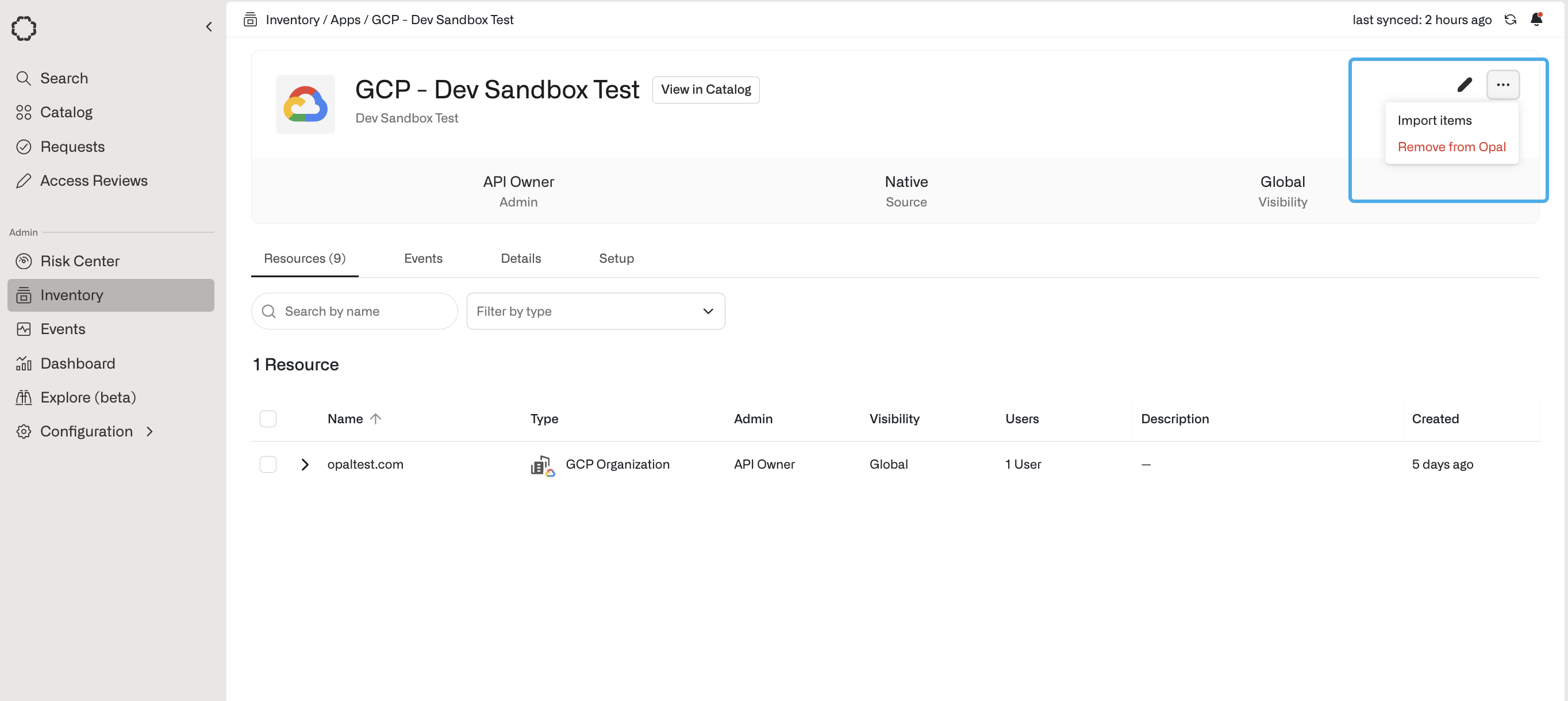
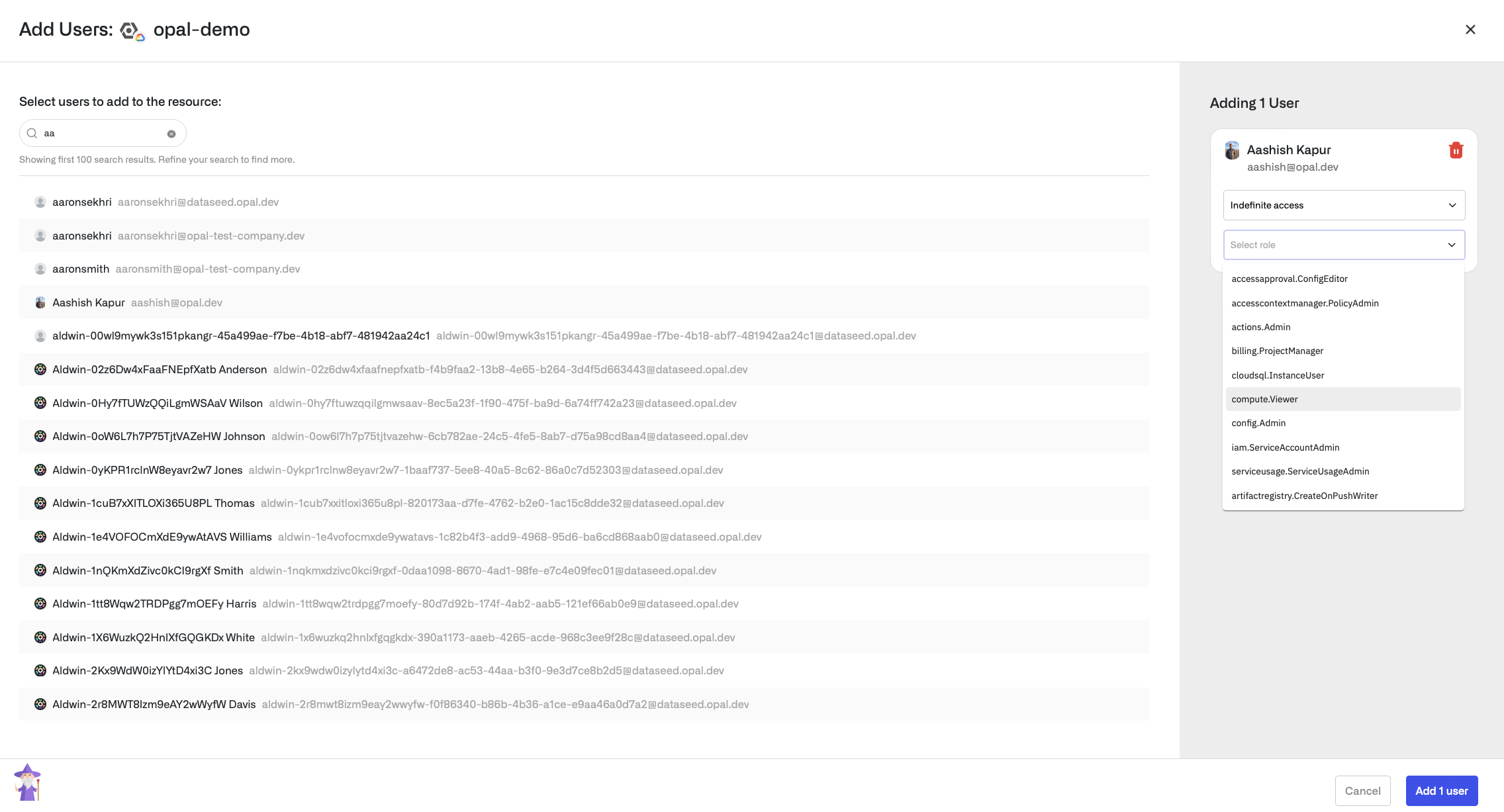
The Opal user who you want to grant access to needs the compute.Viewer permission on the Project to be able to find and SSH into the instance. This can be done via the following:First, import the GCP Project corresponding to the Compute instance in Opal. Go to the Inventory, then your Google Cloud App, then on the Assets tab select Import assets. There you can import your GCP Project as a Resource.Go to the Project resource you just added and select the User Access tab. You can click +Add Users on the right to browse and select a user to add to the project with the compute.Viewer role.
4. Grant the compute.OsLogin permission
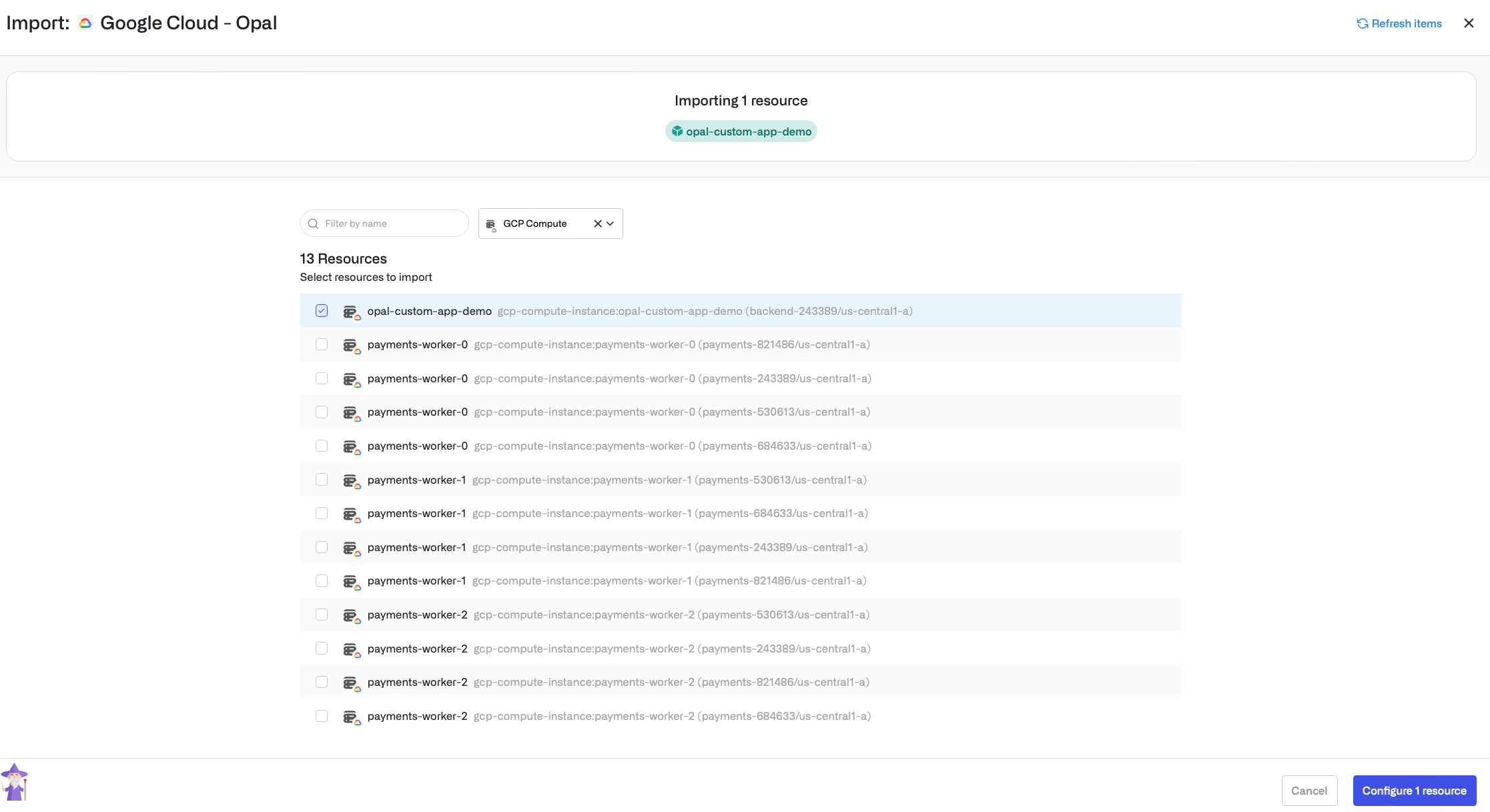
First, import the Compute instance into Opal. Go to the Inventory, then your Google Cloud App, then on the Assets tab select Import assets. There you can filter by type GCP Compute and import your Compute instance as a Resource.Next, go to Resources on the left sidebar, then to the Compute resource you just added, and select the User Access tab of the resource. Add the user to the Compute instance with the compute.OsLogin access level. If no choice to set the access level is presented, add the user without specifying the access level.
5. If needed, install gcloud
Install the gcloud binary, as described in this guide. This command will be used to SSH into the instance.
6. Log in to gcloud
The user who was granted permission must perform gcloud auth login in the shell, logging in with an email matching the Opal user.
7. SSH into the VM instance
A couple minutes or so after the user was granted the compute.OsLogin permission, the user should be able to SSH into the instance with a command of the form:gcloud compute ssh --project=PROJECT_ID --zone=ZONE_ID COMPUTE_INSTANCE_NAME.For example, gcloud compute ssh --project=my-project --zone=us-central1-a my-compute-instance.
Last modified on November 9, 2026
Was this page helpful?
{"docsConfig":{"theme":"mint","$schema":"https://mintlify.com/docs.json","name":"Opal Security Docs","colors":{"primary":"#0C7997","light":"#EDFCFC","dark":"#074055"},"logo":{"light":"https://mintcdn.com/opalsecurity/FBbZyeMPZrA69UcV/logo/logo-dark.svg?fit=max\u0026auto=format\u0026n=FBbZyeMPZrA69UcV\u0026q=85\u0026s=93a4bd75f157f9f0ab43cdf4d715b5cd","dark":"https://mintcdn.com/opalsecurity/FBbZyeMPZrA69UcV/logo/logo-light.svg?fit=max\u0026auto=format\u0026n=FBbZyeMPZrA69UcV\u0026q=85\u0026s=1774b545e4f1c5cad647f5194f7b26d9"},"favicon":{"light":"https://mintcdn.com/opalsecurity/DRAwGKUXMxLRQouh/logo/icon-opal-black.svg?fit=max\u0026auto=format\u0026n=DRAwGKUXMxLRQouh\u0026q=85\u0026s=9c8bd1204b6b5b83542c2ab5be549858","dark":"https://mintcdn.com/opalsecurity/DRAwGKUXMxLRQouh/logo/icon-opal-white.svg?fit=max\u0026auto=format\u0026n=DRAwGKUXMxLRQouh\u0026q=85\u0026s=73b53b4ceab6ae0b00e30b2042a6020a"},"icons":{"library":"lucide"},"styling":{"eyebrows":"breadcrumbs","latex":false},"integrations":{"ga4":{"measurementId":"G-1PPPM1WF6D"}},"errors":{"404":{"redirect":false,"title":"Page can't be found","description":"Sorry! This page might have been moved, or the link might be broken. Go back to our documentation via https://docs.opal.dev/docs/welcome."}},"metadata":{"timestamp":true},"navigation":{"pages":[]}},"deployment":{"deploymentMetadataValue":{"subdomain":"opalsecurity","hasAudioNarration":false,"actualSubdomain":"opalsecurity","customDomains":["docs.opal.dev"],"gitSource":{"type":"github","owner":"opalsecurity","repo":"docs","deployBranch":"main","contentDirectory":"","isPrivate":true,"mountPath":"","label":""},"feedback":{"thumbs":true},"entitlements":{"AI_CHAT":{"status":"ENABLED"},"WEB_MCP":{"status":"ENABLED"},"NARRATION":{"status":"ENABLED"}},"buildId":"6af7bc9ca5d707e66c231413","clientVersion":"0.0.4143","searchFilterCounts":[{"language":"default","tag":"API Reference","count":218},{"language":"default","tag":"Opal API","count":213},{"language":"default","tag":"Documentation","count":104},{"language":"default","tag":"Integrations","count":103},{"language":"default","tag":"Entitlement Management","count":69},{"language":"default","tag":"resources","count":34},{"language":"default","tag":"groups","count":32},{"language":"default","tag":"Getting Started","count":25},{"language":"default","tag":"Access Management","count":22},{"language":"default","tag":"Infrastructure","count":22}]},"assistantConfig":{"enableStarterQuestions":true,"enableContextualStarterQuestions":true,"deflection":{"enabled":true,"email":"support@opal.dev","showHelpButton":true}},"basePath":"","hasChatPermissions":true,"hasWebMcpPermissions":true,"toggles":[{"name":"kill-isr","enabled":true,"variant":{"name":"disabled","enabled":false,"feature_enabled":true},"impressionData":false},{"name":"custom-rbac-roles","enabled":true,"variant":{"name":"disabled","enabled":false,"feature_enabled":true},"impressionData":false},{"name":"agent-mintlify-slack","enabled":true,"variant":{"name":"disabled","enabled":false,"feature_enabled":true},"impressionData":false},{"name":"agent-integrations-settings","enabled":true,"variant":{"name":"disabled","enabled":false,"feature_enabled":true},"impressionData":false},{"name":"rbac-expansion","enabled":true,"variant":{"name":"disabled","enabled":false,"feature_enabled":true},"impressionData":false},{"name":"automations-pr-grouping","enabled":true,"variant":{"name":"disabled","enabled":false,"feature_enabled":true},"impressionData":false},{"name":"custom-prefix","enabled":true,"variant":{"name":"disabled","enabled":false,"feature_enabled":true},"impressionData":false},{"name":"analytics-v7","enabled":true,"variant":{"name":"disabled","enabled":false,"feature_enabled":true},"impressionData":false},{"name":"user-flows-analytics","enabled":true,"variant":{"name":"disabled","enabled":false,"feature_enabled":true},"impressionData":false},{"name":"no-publish-flow","enabled":true,"variant":{"name":"disabled","enabled":false,"feature_enabled":true},"impressionData":false},{"name":"workos-onboarding","enabled":true,"variant":{"name":"disabled","enabled":false,"feature_enabled":true},"impressionData":false},{"name":"snapshot-serving-live","enabled":true,"variant":{"name":"disabled","enabled":false,"feature_enabled":true},"impressionData":false},{"name":"stripTemperatureMiddleware","enabled":true,"variant":{"name":"disabled","enabled":false,"feature_enabled":true},"impressionData":false},{"name":"support-platform-pylon-zendesk","enabled":true,"variant":{"name":"disabled","enabled":false,"feature_enabled":true},"impressionData":false},{"name":"snapshot-serving","enabled":true,"variant":{"name":"disabled","enabled":false,"feature_enabled":true},"impressionData":false},{"name":"instant-rollback","enabled":true,"variant":{"name":"disabled","enabled":false,"feature_enabled":true},"impressionData":false},{"name":"granular-notifications-server","enabled":true,"variant":{"name":"disabled","enabled":false,"feature_enabled":true},"impressionData":false},{"name":"granular-notifications","enabled":true,"variant":{"name":"disabled","enabled":false,"feature_enabled":true},"impressionData":false},{"name":"automations-fable","enabled":true,"variant":{"name":"disabled","enabled":false,"feature_enabled":true},"impressionData":false},{"name":"fixed-ai-action-pricing","enabled":true,"variant":{"name":"disabled","enabled":false,"feature_enabled":true},"impressionData":false},{"name":"automation-resolve-merge-conflict","enabled":true,"variant":{"name":"disabled","enabled":false,"feature_enabled":true},"impressionData":false},{"name":"scoped-publishing","enabled":true,"variant":{"name":"disabled","enabled":false,"feature_enabled":true},"impressionData":false},{"name":"mintql","enabled":true,"variant":{"name":"disabled","enabled":false,"feature_enabled":true},"impressionData":false},{"name":"page-level-analytics","enabled":true,"variant":{"name":"disabled","enabled":false,"feature_enabled":true},"impressionData":false},{"name":"editor-version-history-v2","enabled":true,"variant":{"name":"disabled","enabled":false,"feature_enabled":true},"impressionData":false},{"name":"billing-page-v2","enabled":true,"variant":{"name":"disabled","enabled":false,"feature_enabled":true},"impressionData":false},{"name":"full-page-search","enabled":true,"variant":{"name":"disabled","enabled":false,"feature_enabled":true},"impressionData":false},{"name":"workspace-projects","enabled":true,"variant":{"name":"disabled","enabled":false,"feature_enabled":true},"impressionData":false},{"name":"assistant-v5","enabled":true,"variant":{"name":"disabled","enabled":false,"feature_enabled":true},"impressionData":false},{"name":"fork-pr-previews","enabled":true,"variant":{"name":"disabled","enabled":false,"feature_enabled":true},"impressionData":false},{"name":"revalidation-jwt","enabled":true,"variant":{"name":"disabled","enabled":false,"feature_enabled":true},"impressionData":false},{"name":"workos-sso-scim","enabled":true,"variant":{"name":"disabled","enabled":false,"feature_enabled":true},"impressionData":false},{"name":"hobby-abuse-scan","enabled":true,"variant":{"name":"disabled","enabled":false,"feature_enabled":true},"impressionData":false},{"name":"dashboard-inbox","enabled":true,"variant":{"name":"disabled","enabled":false,"feature_enabled":true},"impressionData":false},{"name":"workos-signup","enabled":true,"variant":{"name":"disabled","enabled":false,"feature_enabled":true},"impressionData":false},{"name":"turbopuffer-dual-write","enabled":true,"variant":{"name":"disabled","enabled":false,"feature_enabled":true},"impressionData":false},{"name":"workos-enabled","enabled":true,"variant":{"name":"disabled","enabled":false,"feature_enabled":true},"impressionData":false},{"name":"approve-review-flow","enabled":true,"variant":{"name":"disabled","enabled":false,"feature_enabled":true},"impressionData":false},{"name":"editor-metadata","enabled":true,"variant":{"name":"disabled","enabled":false,"feature_enabled":true},"impressionData":false},{"name":"sso-setup-deadline-banner","enabled":true,"variant":{"name":"disabled","enabled":false,"feature_enabled":true},"impressionData":false},{"name":"turbopuffer-serve","enabled":true,"variant":{"name":"disabled","enabled":false,"feature_enabled":true},"impressionData":false},{"name":"live-agents","enabled":true,"variant":{"name":"disabled","enabled":false,"feature_enabled":true},"impressionData":false},{"name":"llms-txt-v2","enabled":true,"variant":{"name":"disabled","enabled":false,"feature_enabled":true},"impressionData":false}],"googleFontsInlined":false},"customCss":[],"page":{"pagePath":"integrations/adding-compute-instance","slug":"/integrations/adding-compute-instance","pageMetadata":{"title":"Add a Compute Engine Instance","description":null,"href":"/integrations/adding-compute-instance"},"pageType":"default","mdx":{"mdxSource":{"compiledSource":"\"use strict\";const{Fragment:_Fragment,jsx:_jsx,jsxs:_jsxs}=arguments[0];const{useMDXComponents:_provideComponents}=arguments[0];function _createMdxContent(props){const _components={a:`a`,code:`code`,p:`p`,strong:`strong`,..._provideComponents(),...props.components},{Heading,OptimizedImage}=_components;if(!Heading)_missingMdxReference(`Heading`,true);if(!OptimizedImage)_missingMdxReference(`OptimizedImage`,true);return _jsxs(_Fragment,{children:[_jsx(_components.p,{children:`Opal lets your developers find and request access to SSH into GCP Compute instances. Use the following steps to add Compute instances to your Opal dashboard.`}),`\n`,_jsx(Heading,{level:`2`,id:`1-set-up-os-login-on-the-vm-instance`,children:`1. Set up OS Login on the VM Instance`}),`\n`,_jsxs(_components.p,{children:[`Follow Steps 1 and 3 in the `,_jsx(_components.a,{href:`https://cloud.google.com/compute/docs/instances/managing-instance-access#console`,children:`following guide`}),`. By the end of it, you should have added the `,_jsx(_components.code,{children:`enable-oslogin`}),` key with value `,_jsx(_components.code,{children:`TRUE`}),` in the VM instance metadata.`]}),`\n`,_jsx(Heading,{level:`2`,id:`2-configure-osloginexternaluser-for-users`,children:`2. Configure osLoginExternalUser for users`}),`\n`,_jsxs(_components.p,{children:[`This step is optional and only applies to Opal users who you want to grant GCP Compute instance access and who are outside of your Google Cloud organization. Read this `,_jsx(_components.a,{href:`https://cloud.google.com/compute/docs/oslogin/manage-oslogin-in-an-org#external-user`,children:`guide`}),` to enable `,_jsx(_components.code,{children:`osLoginExternalUser`}),` for a user. The user email must correspond to the Opal user’s email.`]}),`\n`,_jsx(Heading,{level:`2`,id:`3-grant-the-compute-viewer-permission-for-users`,children:`3. Grant the compute.Viewer permission for users`}),`\n`,_jsxs(_components.p,{children:[`The Opal user who you want to grant access to needs the `,_jsx(_components.code,{children:`compute.Viewer`}),` permission on the Project to be able to find and SSH into the instance. This can be done via the following:`]}),`\n`,_jsxs(_components.p,{children:[`First, import the GCP Project corresponding to the Compute instance in Opal. Go to the `,_jsx(_components.strong,{children:`Inventory`}),`, then your Google Cloud App, then on the `,_jsx(_components.strong,{children:`Assets`}),` tab select `,_jsx(_components.strong,{children:`Import assets`}),`. There you can import your GCP Project as a Resource.`]}),`\n`,_jsx(OptimizedImage,{src:`https://mintcdn.com/opalsecurity/fu-nWazMe1LxLhxi/images/docs/2f69737fb99495f1e97755fed5e651ce8fb1055e9fdddb486c0af1b2253a90a9-import-gcp.png?fit=max\u0026auto=format\u0026n=fu-nWazMe1LxLhxi\u0026q=85\u0026s=9fbac5438128b12a12c005e955f49f06`,alt:`2312`,\"data-og-width\":`2728`,width:`2728`,\"data-og-height\":`1219`,height:`1219`,\"data-path\":`images/docs/2f69737fb99495f1e97755fed5e651ce8fb1055e9fdddb486c0af1b2253a90a9-import-gcp.png`,\"data-optimize\":`true`,\"data-opv\":`3`,srcset:`https://mintcdn.com/opalsecurity/fu-nWazMe1LxLhxi/images/docs/2f69737fb99495f1e97755fed5e651ce8fb1055e9fdddb486c0af1b2253a90a9-import-gcp.png?w=280\u0026fit=max\u0026auto=format\u0026n=fu-nWazMe1LxLhxi\u0026q=85\u0026s=62836bafdeebe9c752686b0514c09a81 280w, https://mintcdn.com/opalsecurity/fu-nWazMe1LxLhxi/images/docs/2f69737fb99495f1e97755fed5e651ce8fb1055e9fdddb486c0af1b2253a90a9-import-gcp.png?w=560\u0026fit=max\u0026auto=format\u0026n=fu-nWazMe1LxLhxi\u0026q=85\u0026s=7dd6750bdd1e19e2b24e4eb3011aab4e 560w, https://mintcdn.com/opalsecurity/fu-nWazMe1LxLhxi/images/docs/2f69737fb99495f1e97755fed5e651ce8fb1055e9fdddb486c0af1b2253a90a9-import-gcp.png?w=840\u0026fit=max\u0026auto=format\u0026n=fu-nWazMe1LxLhxi\u0026q=85\u0026s=16213f2ffdaa64aac5dc32a988b84640 840w, https://mintcdn.com/opalsecurity/fu-nWazMe1LxLhxi/images/docs/2f69737fb99495f1e97755fed5e651ce8fb1055e9fdddb486c0af1b2253a90a9-import-gcp.png?w=1100\u0026fit=max\u0026auto=format\u0026n=fu-nWazMe1LxLhxi\u0026q=85\u0026s=67788a30b67039fe611973c861acdae8 1100w, https://mintcdn.com/opalsecurity/fu-nWazMe1LxLhxi/images/docs/2f69737fb99495f1e97755fed5e651ce8fb1055e9fdddb486c0af1b2253a90a9-import-gcp.png?w=1650\u0026fit=max\u0026auto=format\u0026n=fu-nWazMe1LxLhxi\u0026q=85\u0026s=d4275b3ba65208834951945593b44b14 1650w, https://mintcdn.com/opalsecurity/fu-nWazMe1LxLhxi/images/docs/2f69737fb99495f1e97755fed5e651ce8fb1055e9fdddb486c0af1b2253a90a9-import-gcp.png?w=2500\u0026fit=max\u0026auto=format\u0026n=fu-nWazMe1LxLhxi\u0026q=85\u0026s=a388e36a25dc24eff421a05c598ee2b7 2500w`}),`\n`,_jsxs(_components.p,{children:[`Go to the Project resource you just added and select the `,_jsx(_components.strong,{children:`User Access`}),` tab. You can click `,_jsx(_components.strong,{children:`+Add Users`}),` on the right to browse and select a user to add to the project with the `,_jsx(_components.code,{children:`compute.Viewer`}),` role.`]}),`\n`,_jsx(OptimizedImage,{src:`https://mintcdn.com/opalsecurity/4Xj9diJ3E3kX-9Xd/images/docs/e6dd68f-Screenshot_2024-03-15_at_12.09.54_PM.png?fit=max\u0026auto=format\u0026n=4Xj9diJ3E3kX-9Xd\u0026q=85\u0026s=edb116808774512e4a85a9f1924213e5`,alt:`463`,\"data-og-width\":`2272`,width:`2272`,\"data-og-height\":`1227`,height:`1227`,\"data-path\":`images/docs/e6dd68f-Screenshot_2024-03-15_at_12.09.54_PM.png`,\"data-optimize\":`true`,\"data-opv\":`3`,srcset:`https://mintcdn.com/opalsecurity/4Xj9diJ3E3kX-9Xd/images/docs/e6dd68f-Screenshot_2024-03-15_at_12.09.54_PM.png?w=280\u0026fit=max\u0026auto=format\u0026n=4Xj9diJ3E3kX-9Xd\u0026q=85\u0026s=12b785ffd70e13ab2b4fd36dc0abd425 280w, https://mintcdn.com/opalsecurity/4Xj9diJ3E3kX-9Xd/images/docs/e6dd68f-Screenshot_2024-03-15_at_12.09.54_PM.png?w=560\u0026fit=max\u0026auto=format\u0026n=4Xj9diJ3E3kX-9Xd\u0026q=85\u0026s=4df66bc71abd45f5c273d44c28710177 560w, https://mintcdn.com/opalsecurity/4Xj9diJ3E3kX-9Xd/images/docs/e6dd68f-Screenshot_2024-03-15_at_12.09.54_PM.png?w=840\u0026fit=max\u0026auto=format\u0026n=4Xj9diJ3E3kX-9Xd\u0026q=85\u0026s=4cbcae3a1979584c7edcac7976524dfa 840w, https://mintcdn.com/opalsecurity/4Xj9diJ3E3kX-9Xd/images/docs/e6dd68f-Screenshot_2024-03-15_at_12.09.54_PM.png?w=1100\u0026fit=max\u0026auto=format\u0026n=4Xj9diJ3E3kX-9Xd\u0026q=85\u0026s=82db3a43dce1e893b652a1362b61bab5 1100w, https://mintcdn.com/opalsecurity/4Xj9diJ3E3kX-9Xd/images/docs/e6dd68f-Screenshot_2024-03-15_at_12.09.54_PM.png?w=1650\u0026fit=max\u0026auto=format\u0026n=4Xj9diJ3E3kX-9Xd\u0026q=85\u0026s=6d2baac774e8621da35f4d23b4eab71d 1650w, https://mintcdn.com/opalsecurity/4Xj9diJ3E3kX-9Xd/images/docs/e6dd68f-Screenshot_2024-03-15_at_12.09.54_PM.png?w=2500\u0026fit=max\u0026auto=format\u0026n=4Xj9diJ3E3kX-9Xd\u0026q=85\u0026s=93c639940592f6ff625f2c17c126a6e6 2500w`}),`\n`,_jsx(Heading,{level:`2`,id:`4-grant-the-compute-oslogin-permission`,children:`4. Grant the compute.OsLogin permission`}),`\n`,_jsxs(_components.p,{children:[`First, import the Compute instance into Opal. Go to the `,_jsx(_components.strong,{children:`Inventory`}),`, then your Google Cloud App, then on the `,_jsx(_components.strong,{children:`Assets`}),` tab select `,_jsx(_components.strong,{children:`Import assets`}),`. There you can filter by type `,_jsx(_components.strong,{children:`GCP Compute`}),` and import your Compute instance as a Resource.`]}),`\n`,_jsx(OptimizedImage,{src:`https://mintcdn.com/opalsecurity/lwwIeFbsleftxaXx/images/docs/c2e5302-Screenshot_2024-03-15_at_12.36.28_PM.png?fit=max\u0026auto=format\u0026n=lwwIeFbsleftxaXx\u0026q=85\u0026s=560423da82f3000c8fe0676b2c5407fa`,alt:`463`,\"data-og-width\":`2233`,width:`2233`,\"data-og-height\":`1217`,height:`1217`,\"data-path\":`images/docs/c2e5302-Screenshot_2024-03-15_at_12.36.28_PM.png`,\"data-optimize\":`true`,\"data-opv\":`3`,srcset:`https://mintcdn.com/opalsecurity/lwwIeFbsleftxaXx/images/docs/c2e5302-Screenshot_2024-03-15_at_12.36.28_PM.png?w=280\u0026fit=max\u0026auto=format\u0026n=lwwIeFbsleftxaXx\u0026q=85\u0026s=ed5c0160bc016b18d3ae61abb59cf3d4 280w, https://mintcdn.com/opalsecurity/lwwIeFbsleftxaXx/images/docs/c2e5302-Screenshot_2024-03-15_at_12.36.28_PM.png?w=560\u0026fit=max\u0026auto=format\u0026n=lwwIeFbsleftxaXx\u0026q=85\u0026s=c2c9d8adbd2594c08c07c11ef21b7b95 560w, https://mintcdn.com/opalsecurity/lwwIeFbsleftxaXx/images/docs/c2e5302-Screenshot_2024-03-15_at_12.36.28_PM.png?w=840\u0026fit=max\u0026auto=format\u0026n=lwwIeFbsleftxaXx\u0026q=85\u0026s=c1763e57975de5910bb208bdc01ae435 840w, https://mintcdn.com/opalsecurity/lwwIeFbsleftxaXx/images/docs/c2e5302-Screenshot_2024-03-15_at_12.36.28_PM.png?w=1100\u0026fit=max\u0026auto=format\u0026n=lwwIeFbsleftxaXx\u0026q=85\u0026s=6d863a25b4d19edb7ca6213fb4ce3c89 1100w, https://mintcdn.com/opalsecurity/lwwIeFbsleftxaXx/images/docs/c2e5302-Screenshot_2024-03-15_at_12.36.28_PM.png?w=1650\u0026fit=max\u0026auto=format\u0026n=lwwIeFbsleftxaXx\u0026q=85\u0026s=7971c16915656cc912f69e8dc34fb346 1650w, https://mintcdn.com/opalsecurity/lwwIeFbsleftxaXx/images/docs/c2e5302-Screenshot_2024-03-15_at_12.36.28_PM.png?w=2500\u0026fit=max\u0026auto=format\u0026n=lwwIeFbsleftxaXx\u0026q=85\u0026s=687cab9e5fbf1673eebd83b3395b4b89 2500w`}),`\n`,_jsxs(_components.p,{children:[`Next, go to `,_jsx(_components.strong,{children:`Resources`}),` on the left sidebar, then to the Compute resource you just added, and select the `,_jsx(_components.strong,{children:`User Access`}),` tab of the resource. Add the user to the Compute instance with the `,_jsx(_components.code,{children:`compute.OsLogin`}),` access level. If no choice to set the access level is presented, add the user without specifying the access level.`]}),`\n`,_jsx(Heading,{level:`2`,id:`5-if-needed-install-gcloud`,children:`5. If needed, install gcloud`}),`\n`,_jsxs(_components.p,{children:[`Install the `,_jsx(_components.code,{children:`gcloud`}),` binary, as described in this `,_jsx(_components.a,{href:`https://cloud.google.com/sdk/docs/install`,children:`guide`}),`. This command will be used to SSH into the instance.`]}),`\n`,_jsx(Heading,{level:`2`,id:`6-log-in-to-gcloud`,children:`6. Log in to gcloud`}),`\n`,_jsxs(_components.p,{children:[`The user who was granted permission must perform `,_jsx(_components.code,{children:`gcloud auth login`}),` in the shell, logging in with an email matching the Opal user.`]}),`\n`,_jsx(Heading,{level:`2`,id:`7-ssh-into-the-vm-instance`,children:`7. SSH into the VM instance`}),`\n`,_jsxs(_components.p,{children:[`A couple minutes or so after the user was granted the `,_jsx(_components.code,{children:`compute.OsLogin`}),` permission, the user should be able to SSH into the instance with a command of the form:`]}),`\n`,_jsxs(_components.p,{children:[_jsx(_components.code,{children:`gcloud compute ssh --project=PROJECT_ID --zone=ZONE_ID COMPUTE_INSTANCE_NAME`}),`.`]}),`\n`,_jsxs(_components.p,{children:[`For example, `,_jsx(_components.code,{children:`gcloud compute ssh --project=my-project --zone=us-central1-a my-compute-instance`}),`.`]})]})}function MDXContent(props={}){const{wrapper:MDXLayout}={..._provideComponents(),...props.components};return MDXLayout?_jsx(MDXLayout,{...props,children:_jsx(_createMdxContent,{...props})}):_createMdxContent(props)}return{default:MDXContent};function _missingMdxReference(id,component){throw new Error(`Expected `+(component?`component`:`object`)+\" `\"+id+\"` to be defined: you likely forgot to import, pass, or provide it.\")}","frontmatter":{},"scope":{"config":{},"pageMetadata":{"title":"Add a Compute Engine Instance","description":null,"href":"/integrations/adding-compute-instance"}}},"mdxSourceWithNoJs":null},"mdxExtracts":{"tableOfContents":[{"title":"1. Set up OS Login on the VM Instance","slug":"1-set-up-os-login-on-the-vm-instance","depth":2,"children":[]},{"title":"2. Configure osLoginExternalUser for users","slug":"2-configure-osloginexternaluser-for-users","depth":2,"children":[]},{"title":"3. Grant the compute.Viewer permission for users","slug":"3-grant-the-compute-viewer-permission-for-users","depth":2,"children":[]},{"title":"4. Grant the compute.OsLogin permission","slug":"4-grant-the-compute-oslogin-permission","depth":2,"children":[]},{"title":"5. If needed, install gcloud","slug":"5-if-needed-install-gcloud","depth":2,"children":[]},{"title":"6. Log in to gcloud","slug":"6-log-in-to-gcloud","depth":2,"children":[]},{"title":"7. SSH into the VM instance","slug":"7-ssh-into-the-vm-instance","depth":2,"children":[]}],"codeExamples":{}},"jsLinks":["/_mintlify/custom/opalsecurity/d0e14c3cf9bbd682/changelog-scraper.js"],"subdomain":"opalsecurity","siteName":"Opal Security Docs","title":"Add a Compute Engine Instance - Opal Security Docs","contextualStarterQuestions":[{"_id":"6af2097cc779f12ffaede02d","deploymentId":"68ddaa9a3f8b7de5bc3a7b47","questionText":"How do I import a GCP Project?","status":"active","generatedBy":"contextual","path":"integrations/adding-compute-instance","createdAt":"2026-11-09T17:57:16.277Z","updatedAt":"2026-11-09T17:57:16.277Z","__v":0},{"_id":"6af2097cc779f12ffaede02b","deploymentId":"68ddaa9a3f8b7de5bc3a7b47","questionText":"How do I enable OS Login?","status":"active","generatedBy":"contextual","path":"integrations/adding-compute-instance","createdAt":"2026-11-09T17:57:16.277Z","updatedAt":"2026-11-09T17:57:16.277Z","__v":0},{"_id":"6af2097cc779f12ffaede02c","deploymentId":"68ddaa9a3f8b7de5bc3a7b47","questionText":"What permissions do users need?","status":"active","generatedBy":"contextual","path":"integrations/adding-compute-instance","createdAt":"2026-11-09T17:57:16.277Z","updatedAt":"2026-11-09T17:57:16.277Z","__v":0}],"navMaps":{"firstHrefInVersion":{},"firstHrefInLanguage":{}},"lastModified":"2026-11-09T17:57:01.679Z","gitLastModified":"2026-11-09T17:56:39.000Z","originalFileLocation":"integrations/adding-compute-instance.mdx"},"headHtml":"\u003cscript data-mint-head>(function(){var d=document.documentElement,p=null;if(!p){try{p=localStorage.getItem(\"isDarkMode\")}catch(e){}if(p==='true')p='dark';else if(p==='false')p='light';if(p!=='light'\u0026\u0026p!=='dark'\u0026\u0026p!=='system')p=\"system\"}var r=p==='system'?(matchMedia(\"(prefers-color-scheme: dark)\").matches?'dark':'light'):p;d.classList.remove(r==='dark'?'light':'dark');d.classList.add(r);d.setAttribute(\"data-theme-preference\",p)})();\u003c/script>\u003cmeta data-mint-head name=\"application-name\" content=\"Opal Security Docs\">\u003cmeta data-mint-head name=\"generator\" content=\"Mintlify\">\u003clink data-mint-head rel=\"icon\" type=\"image/png\" sizes=\"192x192\" href=\"/mintlify-assets/_mintlify/favicons/opalsecurity/t501z2uOx-XXqevB/_generated/favicon/android-chrome-192x192.png\" media=\"(prefers-color-scheme: light)\">\u003clink data-mint-head rel=\"apple-touch-icon\" type=\"image/png\" sizes=\"180x180\" href=\"/mintlify-assets/_mintlify/favicons/opalsecurity/t501z2uOx-XXqevB/_generated/favicon/apple-touch-icon.png\">\u003clink data-mint-head rel=\"icon\" type=\"image/png\" sizes=\"16x16\" href=\"/mintlify-assets/_mintlify/favicons/opalsecurity/t501z2uOx-XXqevB/_generated/favicon/favicon-16x16.png\" media=\"(prefers-color-scheme: light)\">\u003clink data-mint-head rel=\"icon\" type=\"image/png\" sizes=\"32x32\" href=\"/mintlify-assets/_mintlify/favicons/opalsecurity/t501z2uOx-XXqevB/_generated/favicon/favicon-32x32.png\" media=\"(prefers-color-scheme: light)\">\u003clink data-mint-head rel=\"shortcut icon\" type=\"image/x-icon\" href=\"/mintlify-assets/_mintlify/favicons/opalsecurity/t501z2uOx-XXqevB/_generated/favicon/favicon.ico\" media=\"(prefers-color-scheme: light)\">\u003clink data-mint-head rel=\"icon\" type=\"image/png\" sizes=\"192x192\" href=\"/mintlify-assets/_mintlify/favicons/opalsecurity/t501z2uOx-XXqevB/_generated/favicon-dark/android-chrome-192x192.png\" media=\"(prefers-color-scheme: dark)\">\u003clink data-mint-head rel=\"icon\" type=\"image/png\" sizes=\"16x16\" href=\"/mintlify-assets/_mintlify/favicons/opalsecurity/t501z2uOx-XXqevB/_generated/favicon-dark/favicon-16x16.png\" media=\"(prefers-color-scheme: dark)\">\u003clink data-mint-head rel=\"icon\" type=\"image/png\" sizes=\"32x32\" href=\"/mintlify-assets/_mintlify/favicons/opalsecurity/t501z2uOx-XXqevB/_generated/favicon-dark/favicon-32x32.png\" media=\"(prefers-color-scheme: dark)\">\u003clink data-mint-head rel=\"shortcut icon\" type=\"image/x-icon\" href=\"/mintlify-assets/_mintlify/favicons/opalsecurity/t501z2uOx-XXqevB/_generated/favicon-dark/favicon.ico\" media=\"(prefers-color-scheme: dark)\">\u003cmeta data-mint-head property=\"og:title\" content=\"Add a Compute Engine Instance - Opal Security Docs\">\u003cmeta data-mint-head property=\"og:site_name\" content=\"Opal Security Docs\">\u003cmeta data-mint-head property=\"og:url\" content=\"https://docs.opal.dev/integrations/adding-compute-instance\">\u003cmeta data-mint-head property=\"og:type\" content=\"website\">\u003cmeta data-mint-head property=\"og:image\" content=\"https://opalsecurity.mintlify.site/_mintlify/api/og/v2?division=Google+Cloud+Platform+%28GCP%29\u0026amp;title=Add+a+Compute+Engine+Instance\u0026amp;theme=156eb1ba223f12a303f95077\u0026amp;signature=60e4ed6c6ef04876cea4f9aae3093dc6d02f0b1de5009b6dd36051d234546b82\">\u003cmeta data-mint-head property=\"og:image:width\" content=\"1200\">\u003cmeta data-mint-head property=\"og:image:height\" content=\"630\">\u003cmeta data-mint-head name=\"twitter:card\" content=\"summary_large_image\">\u003cmeta data-mint-head name=\"twitter:title\" content=\"Add a Compute Engine Instance - Opal Security Docs\">\u003cmeta data-mint-head name=\"twitter:image\" content=\"https://opalsecurity.mintlify.site/_mintlify/api/og/v2?division=Google+Cloud+Platform+%28GCP%29\u0026amp;title=Add+a+Compute+Engine+Instance\u0026amp;theme=156eb1ba223f12a303f95077\u0026amp;signature=60e4ed6c6ef04876cea4f9aae3093dc6d02f0b1de5009b6dd36051d234546b82\">\u003cmeta data-mint-head name=\"twitter:image:width\" content=\"1200\">\u003cmeta data-mint-head name=\"twitter:image:height\" content=\"630\">\u003cmeta data-mint-head name=\"msapplication-config\" content=\"/mintlify-assets/_mintlify/favicons/opalsecurity/t501z2uOx-XXqevB/_generated/favicon/browserconfig.xml\">\u003cmeta data-mint-head name=\"apple-mobile-web-app-title\" content=\"Opal Security Docs\">\u003cmeta data-mint-head name=\"msapplication-TileColor\" content=\"#0C7997\">\u003clink data-mint-head rel=\"canonical\" href=\"https://docs.opal.dev/integrations/adding-compute-instance\">\u003clink data-mint-head rel=\"alternate\" type=\"application/xml\" href=\"/sitemap.xml\">\u003clink data-mint-head rel=\"alternate\" type=\"text/markdown\" href=\"/integrations/adding-compute-instance.md\">\u003cscript data-mint-head type=\"application/ld+json\">{\"@context\":\"https://schema.org\",\"@graph\":[{\"@type\":\"Organization\",\"@id\":\"https://docs.opal.dev/#organization\",\"name\":\"Opal Security Docs\",\"url\":\"https://docs.opal.dev\",\"logo\":{\"@type\":\"ImageObject\",\"url\":\"https://mintcdn.com/opalsecurity/FBbZyeMPZrA69UcV/logo/logo-dark.svg?fit=max\u0026auto=format\u0026n=FBbZyeMPZrA69UcV\u0026q=85\u0026s=93a4bd75f157f9f0ab43cdf4d715b5cd\"}},{\"@type\":\"WebSite\",\"@id\":\"https://docs.opal.dev#website\",\"name\":\"Opal Security Docs\",\"url\":\"https://docs.opal.dev\",\"publisher\":{\"@id\":\"https://docs.opal.dev/#organization\"}},{\"@type\":\"WebPage\",\"@id\":\"https://docs.opal.dev/integrations/adding-compute-instance#webpage\",\"url\":\"https://docs.opal.dev/integrations/adding-compute-instance\",\"name\":\"Add a Compute Engine Instance\",\"dateModified\":\"2026-11-09T17:56:39.000Z\",\"isPartOf\":{\"@id\":\"https://docs.opal.dev#website\"},\"breadcrumb\":{\"@id\":\"https://docs.opal.dev/integrations/adding-compute-instance#breadcrumb\"}},{\"@type\":\"BreadcrumbList\",\"@id\":\"https://docs.opal.dev/integrations/adding-compute-instance#breadcrumb\",\"itemListElement\":[{\"@type\":\"ListItem\",\"position\":1,\"name\":\"Entitlement Management\",\"item\":\"https://docs.opal.dev/integrations/setting-up-your-aws-organization-in-opal\"},{\"@type\":\"ListItem\",\"position\":2,\"name\":\"Infrastructure\",\"item\":\"https://docs.opal.dev/integrations/setting-up-your-aws-organization-in-opal\"},{\"@type\":\"ListItem\",\"position\":3,\"name\":\"Google Cloud Platform (GCP)\",\"item\":\"https://docs.opal.dev/integrations/google-cloud-platform\"},{\"@type\":\"ListItem\",\"position\":4,\"name\":\"Add a Compute Engine Instance\",\"item\":\"https://docs.opal.dev/integrations/adding-compute-instance\"}]},{\"@type\":[\"Article\",\"TechArticle\"],\"@id\":\"https://docs.opal.dev/integrations/adding-compute-instance#article\",\"headline\":\"Add a Compute Engine Instance\",\"name\":\"Add a Compute Engine Instance\",\"url\":\"https://docs.opal.dev/integrations/adding-compute-instance\",\"mainEntityOfPage\":{\"@id\":\"https://docs.opal.dev/integrations/adding-compute-instance#webpage\"},\"dateModified\":\"2026-11-09T17:56:39.000Z\",\"publisher\":{\"@id\":\"https://docs.opal.dev/#organization\"},\"isPartOf\":{\"@id\":\"https://docs.opal.dev#website\"}}]}\u003c/script>\u003cscript data-mint-head type=\"application/ld+json\">{\"@context\":\"https://schema.org\",\"@type\":\"WebSite\",\"name\":\"Opal Security Docs\",\"publisher\":{\"@type\":\"Organization\",\"name\":\"Opal Security Docs\"},\"provider\":{\"@type\":\"Organization\",\"name\":\"Mintlify\",\"url\":\"https://mintlify.com\"}}\u003c/script>","agentPointerHref":"/integrations/adding-compute-instance.md","siteName":"Opal Security Docs","nav":{"global":null,"tabs":[{"tab":"Documentation","pages":[{"title":"Documentation","href":"/docs/welcome"}]},{"tab":"Integrations","pages":[{"title":"Integrations","sidebarTitle":"Overview","mode":"wide","href":"/integrations/overview"},{"group":"IDP \u0026 HRIDP","pages":[{"group":"Okta","pages":[{"title":"Okta","sidebarTitle":"Connect to Okta","href":"/integrations/okta"},{"title":"Okta IDP/HRIS Integration","href":"/integrations/okta-idphris-integration"},{"title":"Import Okta apps","href":"/integrations/okta-apps"},{"title":"Okta rate limits","href":"/integrations/okta-rate-limits"}]},{"group":"OneLogin","pages":[{"title":"OneLogin IDP/HRIS Integration","tag":"NEW","href":"/integrations/onelogin-idphris-integration"}]},{"group":"Google","pages":[{"title":"Google","sidebarTitle":"Connect to Google","href":"/integrations/google"},{"title":"Google IDP/HRIS Integration","href":"/integrations/google-idphris-integration"},{"title":"Google Groups","href":"/integrations/google-groups"},{"title":"Google Shared Drive","tag":"NEW","href":"/integrations/google-shared-drive"},{"title":"Google Workspace","href":"/integrations/google-workspace"}]},{"group":"Azure","pages":[{"title":"Azure","sidebarTitle":"Connect to Azure","href":"/integrations/azure"},{"title":"Azure Entra IDP/HRIS Integration","href":"/integrations/azure-entra-idphris-integration"},{"title":"Azure Infrastructure Setup","href":"/integrations/azure-infrastructure-setup"},{"title":"Add Azure Databases","href":"/integrations/adding-azure-sql-databases"},{"title":"Azure Real Time Sync Setup","href":"/integrations/azure-real-time-sync"}]},{"group":"Active Directory","pages":[{"title":"Overview","sidebarTitle":"Connect to Active Directory","href":"/integrations/active-directory"},{"title":"Active Directory IDP/HRIS Integration","href":"/integrations/active-directory-idphris-integration"}]},{"group":"Workday","pages":[{"title":"Overview","sidebarTitle":"Connect to Workday","href":"/integrations/workday"},{"title":"Workday IDP/HRIS Integration","href":"/integrations/workday-idphris-integration"}]},{"group":"Rippling","pages":[{"title":"Rippling IDP/HRIS Integration","tag":"NEW","href":"/integrations/rippling-idphris-integration"}]}]},{"group":"Entitlement Management","pages":[{"group":"Infrastructure","expanded":true,"pages":[{"group":"Amazon Web Services (AWS)","expanded":false,"pages":[{"title":"Amazon Web Services (AWS)","href":"/integrations/setting-up-your-aws-organization-in-opal"},{"title":"Configure AWS for self-hosted Opal","href":"/integrations/aws-integration-on-prem-setup"},{"title":"Configure additional AWS accounts to manage in Opal","href":"/integrations/configure-additional-aws-accounts-to-manage-in-opal"},{"title":"AWS IAM Identity Center Workflows","href":"/integrations/aws-iam-identity-center-formerly-aws-sso"},{"title":"Add an IAM role","href":"/integrations/adding-an-iam-role"},{"title":"Add an RDS database","href":"/integrations/adding-an-rds-database"},{"title":"Add an EC2 instance","href":"/integrations/adding-an-ec2-instance"},{"title":"Add an EKS cluster","href":"/integrations/adding-an-eks-cluster"},{"title":"Adding AWS Resources to Opal Groups via AWS Tags","href":"/integrations/adding-aws-resources-to-opal-groups-via-aws-tags"},{"title":"AWS Real Time Sync Setup","href":"/integrations/aws-real-time-sync"}]},{"group":"Google Cloud Platform (GCP)","expanded":false,"pages":[{"title":"Google Cloud Platform (GCP)","sidebarTitle":"Connect to GCP","href":"/integrations/google-cloud-platform"},{"title":"Add an organization","href":"/integrations/adding-gcp-organization"},{"title":"Add a project","href":"/integrations/adding-gcp-project"},{"title":"Add a folder","href":"/integrations/adding-gcp-folder"},{"title":"Add a BigQuery Dataset","href":"/integrations/adding-bigquery-dataset"},{"title":"Add a Cloud Storage bucket","href":"/integrations/adding-gcp-bucket"},{"title":"Add a Cloud SQL Instance","description":null,"href":"/integrations/adding-sql-instance"},{"title":"Add a Compute Engine Instance","href":"/integrations/adding-compute-instance"},{"title":"Google Kubernetes Engine (GKE)","description":"Learn how to manage user access with Google Kubernetes Engine (GKE).","href":"/integrations/google-kubernetes-engine-getting-started"},{"title":"GCP Service Accounts","href":"/integrations/gcp-service-accounts"}]},{"group":"Snowflake","expanded":false,"pages":[{"title":"Snowflake","sidebarTitle":"Connect to Snowflake","href":"/integrations/snowflake"},{"title":"Snowflake User Provisioning","href":"/integrations/snowflake-user-provisioning"}]}]},{"title":"1Password","tag":"NEW","href":"/integrations/1password"},{"title":"Anthropic Platform","href":"/integrations/anthropic"},{"title":"Astra","href":"/integrations/astra"},{"title":"Axiom","href":"/integrations/axiom"},{"title":"Box","tag":"NEW","href":"/integrations/box"},{"title":"Clickhouse","href":"/integrations/clickhouse"},{"title":"Atlassian Confluence","sidebarTitle":"Atlassian Confluence","href":"/integrations/confluence"},{"title":"Coupa","href":"/integrations/coupa"},{"title":"Cursor","href":"/integrations/cursor"},{"title":"Databricks","href":"/integrations/databricks"},{"title":"Datadog","href":"/integrations/datadog"},{"title":"Devin AI","href":"/integrations/devin"},{"title":"Docusign","href":"/integrations/docusign"},{"title":"Duo","href":"/integrations/duo"},{"title":"GitGuardian","tag":"NEW","href":"/integrations/gitguardian"},{"title":"GitHub","href":"/integrations/github"},{"title":"GitHub Enterprise","href":"/integrations/github-enterprise"},{"title":"GitLab","href":"/integrations/gitlab"},{"title":"Grafana","href":"/integrations/grafana"},{"title":"Hubspot","href":"/integrations/hubspot"},{"title":"Incident.io","href":"/integrations/incidentio"},{"title":"Atlassian Jira","sidebarTitle":"Atlassian Jira","href":"/integrations/jira"},{"title":"LDAP","href":"/integrations/ldap"},{"title":"Linear","sidebarTitle":"Linear","href":"/integrations/linear"},{"title":"NetSuite","href":"/integrations/netsuite"},{"title":"Okta CIAM","href":"/integrations/okta-ciam"},{"title":"OneLogin","tag":"NEW","href":"/integrations/onelogin"},{"title":"OpenAI Platform","href":"/integrations/openai"},{"title":"Oracle Fusion Cloud","href":"/integrations/oracle-fusion-cloud"},{"title":"PagerDuty","href":"/integrations/pagerduty-entitlements"},{"title":"Ramp","href":"/integrations/ramp"},{"title":"Rippling","href":"/integrations/rippling"},{"title":"Rootly","href":"/integrations/rootly"},{"title":"Salesforce","href":"/integrations/salesforce"},{"title":"Sentry","tag":"NEW","href":"/integrations/sentry"},{"title":"Slack users, groups, and roles","href":"/integrations/slack-user-groups"},{"title":"Square","tag":"NEW","href":"/integrations/square"},{"title":"Salesforce Tableau","href":"/integrations/tableau"},{"title":"Tailscale","href":"/integrations/tailscale"},{"title":"Teleport","href":"/integrations/teleport"},{"title":"Twingate","href":"/integrations/twingate"},{"title":"Vercel","href":"/integrations/vercel"},{"title":"Workato","tag":"NEW","href":"/integrations/workato"},{"title":"Workday groups and roles","href":"/integrations/workday-groups-and-roles"},{"title":"Wrike","href":"/integrations/wrike"},{"title":"Zendesk","href":"/integrations/zendesk"},{"title":"Zoom","href":"/integrations/zoom"}]},{"group":"Productivity Tools","pages":[{"group":"Communication","expanded":true,"pages":[{"title":"Google Chat","href":"/integrations/google-chat"},{"title":"Lark","href":"/integrations/lark"},{"title":"Microsoft Teams","href":"/integrations/microsoft-teams"},{"title":"Slack","href":"/integrations/slack"}]},{"group":"Ticketing","expanded":true,"pages":[{"title":"Freshservice","href":"/integrations/freshservice"},{"title":"Jira","href":"/integrations/jira-ticketing"},{"title":"Linear","href":"/integrations/linear-ticketing"},{"title":"Notion","href":"/integrations/notion"},{"title":"Risotto","tag":"BETA","href":"/integrations/risotto"},{"title":"ServiceNow","href":"/integrations/servicenow"},{"title":"Shortcut","href":"/integrations/shortcut"}]},{"group":"On-call","expanded":true,"pages":[{"title":"Opsgenie","deprecated":true,"href":"/integrations/opsgenie"},{"title":"PagerDuty","deprecated":true,"href":"/integrations/pagerduty-oncall"}]}]}]},{"tab":"API Reference","pages":[{"title":"API Reference","href":"/reference/authentication"}]},{"tab":"Changelog","pages":[{"title":"Changelog","href":"/changelog/changelog"}]}]},"basePath":"","title":"Add a Compute Engine Instance - Opal Security Docs","buildId":"dpl_Fyv1NbzwP68g2bEH2Roy98uY1zmE","deploymentId":"dpl_Fyv1NbzwP68g2bEH2Roy98uY1zmE","dynamics":["a74be98ba7"],"chunks":["zoom-image-lightbox-BbK2OBGL.js","lightbox-handle-r17bVUz3.js"]}