Learn how to connect Opal to Microsoft Teams to send notifications and manage access requests.
You can connect Opal to Microsoft Teams to send notifications to requesters and reviewers about access requests. People can request access from Teams, and reviewers can approve or deny a request from a card.With Opal’s Microsoft Teams integration:
Users can request access to resources and groups from Teams, and get notified in Teams about their requests.
Reviewers can approve, deny, or admin-approve requests from a card in Teams.
Admins can send access request notifications to Teams reviewer channels and audit channels.
Have a Microsoft 365 administrator consent to Opal reading directory users and operating the Teams app. Consent grants the Microsoft Graph permissions User.Read and User.Read.All, which Opal uses to match people to Entra users. Permission to create channels (Channel.Create.Group) is granted separately by each team owner when they install the Opal app in a team.
Use Opal Cloud. Opal provides the Teams app. Self-hosted Opal does not set up this connection.
If Microsoft Teams does not appear under Productivity Integrations, it is not enabled for your organization yet.
In the Opal dashboard, go to Configuration > Productivity Integrations.
Click Connect on Microsoft Teams.
Confirm that a Microsoft 365 administrator will consent to Opal reading directory users and operating the Teams app.
Complete admin consent in Microsoft.
When consent succeeds, Opal shows that Microsoft Teams is connected. Opal then matches people in Opal to Microsoft Entra users by email. It compares each Opal email, including secondary emails, with the Entra user’s mail address and user principal name.If admin consent is cancelled, Opal shows that Microsoft Teams admin consent was not granted. A Microsoft tenant can be connected to only one Opal organization. If it is already connected, Opal shows that the Microsoft Teams tenant is already connected. If Microsoft does not accept the consent, Opal shows that the consent could not be verified.People with no matching Entra user do not receive Teams notifications.
Connecting the tenant does not by itself give Opal a conversation to message.
Install the Opal app in each team where Opal should post or create channels. A team owner grants Opal permission to create standard channels in that team only. Opal does not receive tenant-wide permission to create channels.
Each person who should receive a direct message needs the Opal app installed for themselves. Installing the app personally is enough. If an administrator pre-installs the app for someone through a Teams policy, Opal can message them only after they send the Opal bot a message.
To receive Opal messages in Teams, open your avatar in the Opal dashboard, select Settings, and under Notification Preferences enable Microsoft Teams.The Microsoft Teams option appears only after your organization has connected Microsoft Teams. Organization notification defaults apply until a person saves their own preferences. Teams is off by default; an admin can change the organization default in the organization notification settings.
The app name in Teams is Opal.In a channel or group chat, use the slash command:
/Opal request posts a card with a Request access button.
/Opal search aws searches for requestable resources and groups. Replace aws with the term you want. Opal shows up to 8 matches, and each match has a Request button.
In a 1:1 chat with the Opal bot, request and search aws work with or without a leading slash.These do not start a request:
A message that is only opal
An @mention of the bot
An ordinary channel or group-chat message that is not a slash command
You can also choose Request access from the compose box.Requesting has two steps:
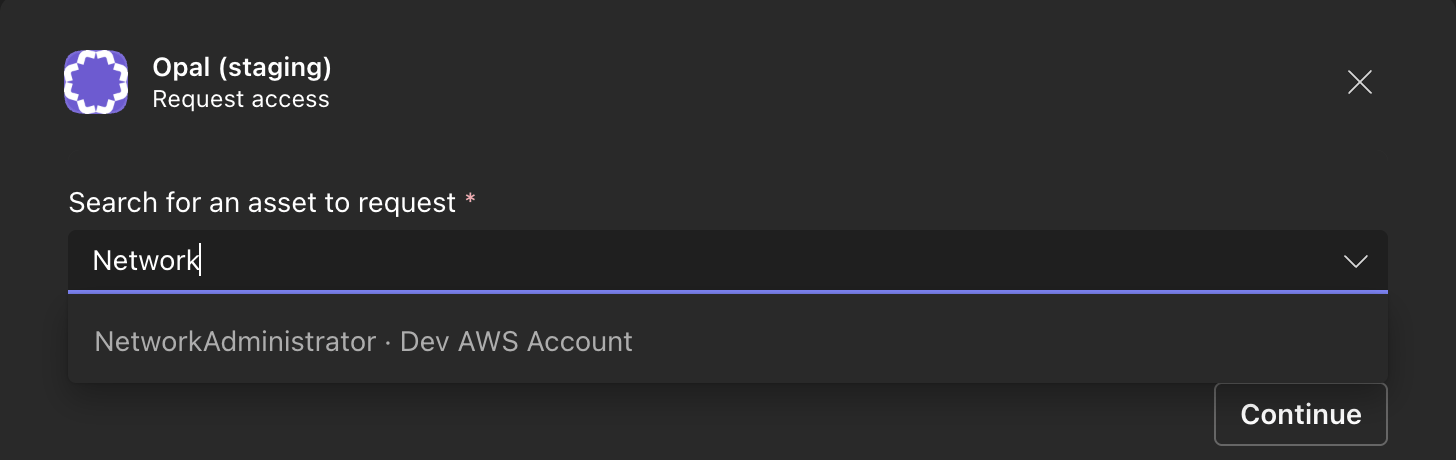
Search for an asset to request. Select a resource or group, then Continue. If the item is not listed, the card links to the catalog in Opal.
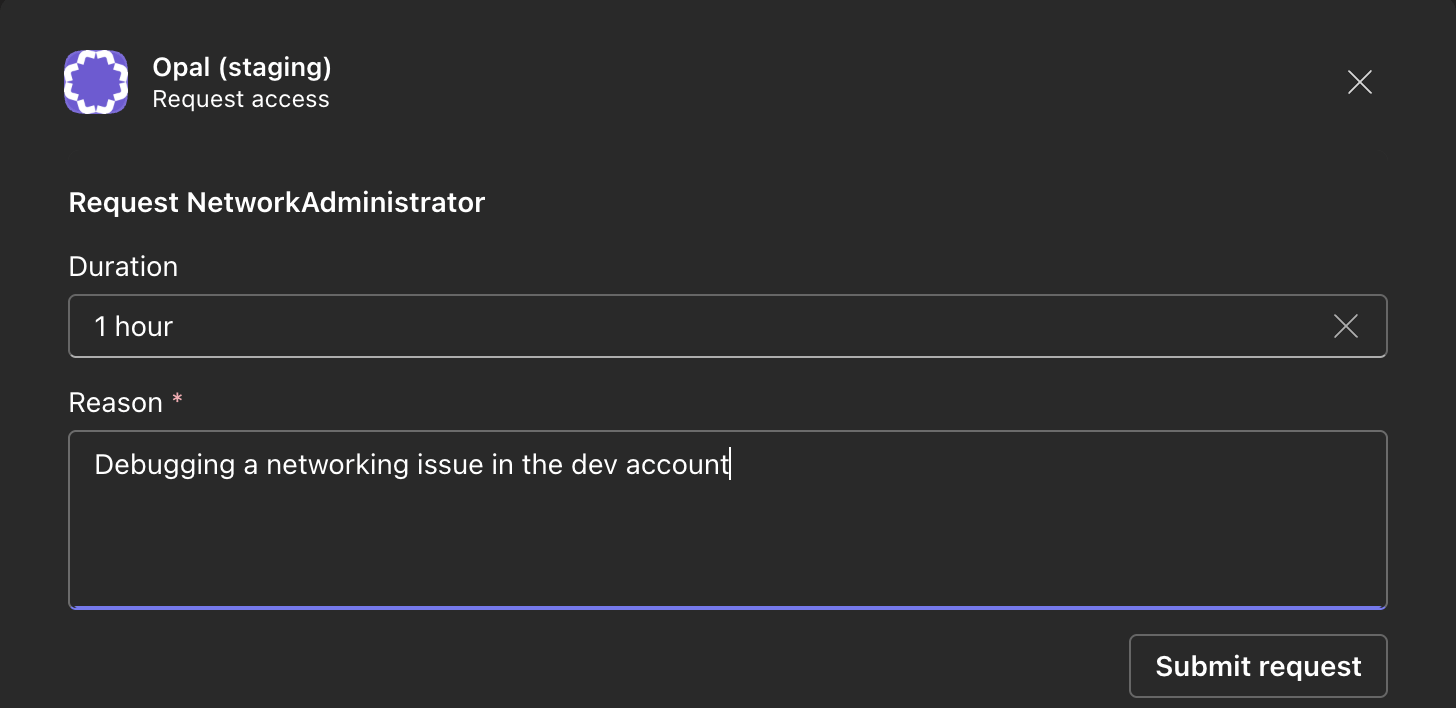
Fill in the request. When the item has named access levels, choose one. Choose a duration: 1 hour (the default), 8 hours, 1 day, 7 days, or Indefinite. Enter a reason, which is always required in Teams, then choose Submit request. Opal confirms that the request was submitted and links to it.
The duration list is the same for every item and does not reflect the item’s maximum duration. If Opal cannot submit the request from Teams, request it in Opal instead.A search with no term asks you to provide a query after the search command. If Teams cannot match the person to an Opal user, Opal says it couldn’t find an Opal user for this Teams account.
Opal sends cards in Teams for access requests.Reviewers can Approve or Deny from the card. Admin Approve is included when that reviewer can admin-approve the request. Type a reason in the card before Deny or Admin Approve. A reason on Approve is optional.Opal confirms the action in Teams. Approval and admin approval report that propagation is in progress. A denial reports that the request was denied. When the request is resolved, the card updates in place.An expiration alert includes Extend access when an extension is allowed. Otherwise, its Request button opens the request in Opal. If external request approvals are turned off, the alert still shows the button, and choosing it says that external request approvals are disabled in Opal.Comments on a request are sent to each reviewer’s chat with the Opal bot. Teams 1:1 chats have no reply threads, so each comment arrives as a new message.If the request was already approved or denied, Opal says that it has already been actioned. If the person who clicks does not have permission to review the request, Opal says so. If the request requires MFA to approve, Opal asks the reviewer to complete MFA in Opal.Requesters receive a card for their own request, with Cancel and, when the request requires manager approval, Escalate to skip-manager.If external request approvals are turned off for your organization, new request cards do not show review or requester buttons, and people act on the request in Opal. A button on a card sent before the setting was turned off tells the person that external request approvals are disabled in Opal.
A Teams channel can be the reviewer message channel for an owner. Opal notifies that channel when there is an access request to review for the owner. The channel is available to select after the Opal app is installed in that team.
Opal can notify a Teams channel about events for a resource or group.On the resource or group, open Audit channels and choose Create a Teams channel. Select a team where the Opal app is installed, enter a channel name, and create it.Opal creates a standard channel. If that name is already taken, Opal shows that a channel with this name already exists in Microsoft Teams. If the installed app is out of date, Opal asks you to update the Opal Teams app to grant channel creation access.Audit channels receive access request cards and notices when access is added or removed.Existing standard channels in a team are added automatically when the Opal app is installed in that team, and you can select them from the list. Opal does not link an existing Teams channel by pasting a channel ID, and it does not create private Teams channels.
This connection is for Opal Cloud. Self-hosted Opal does not configure the Teams app.
A Microsoft tenant can be connected to only one Opal organization.
Direct messages require the Opal app installed for that person. If an administrator pre-installed it, the person must message the bot once first.
Disconnecting Microsoft Teams in Opal stops Opal from sending to or receiving from Teams for your organization.
Opal creates standard channels only in teams where the app is installed.
The Teams request form is a two-step dialog. The duration choices are always 1 hour, 8 hours, 1 day, 7 days, and Indefinite, and a reason is always required.
Some notifications are not sent to Teams, including access expired, access extended, and access review revocations. See Notifications for which notifications reach Teams.
People enable Microsoft Teams in their own notification preferences. Someone with no matching Entra user, or with no conversation with the bot, does not receive a direct message.
Last modified on November 3, 2026
Was this page helpful?
{"docsConfig":{"theme":"mint","$schema":"https://mintlify.com/docs.json","name":"Opal Security Docs","colors":{"primary":"#0C7997","light":"#EDFCFC","dark":"#074055"},"logo":{"light":"https://mintcdn.com/opalsecurity/FBbZyeMPZrA69UcV/logo/logo-dark.svg?fit=max\u0026auto=format\u0026n=FBbZyeMPZrA69UcV\u0026q=85\u0026s=93a4bd75f157f9f0ab43cdf4d715b5cd","dark":"https://mintcdn.com/opalsecurity/FBbZyeMPZrA69UcV/logo/logo-light.svg?fit=max\u0026auto=format\u0026n=FBbZyeMPZrA69UcV\u0026q=85\u0026s=1774b545e4f1c5cad647f5194f7b26d9"},"favicon":{"light":"https://mintcdn.com/opalsecurity/DRAwGKUXMxLRQouh/logo/icon-opal-black.svg?fit=max\u0026auto=format\u0026n=DRAwGKUXMxLRQouh\u0026q=85\u0026s=9c8bd1204b6b5b83542c2ab5be549858","dark":"https://mintcdn.com/opalsecurity/DRAwGKUXMxLRQouh/logo/icon-opal-white.svg?fit=max\u0026auto=format\u0026n=DRAwGKUXMxLRQouh\u0026q=85\u0026s=73b53b4ceab6ae0b00e30b2042a6020a"},"icons":{"library":"lucide"},"styling":{"eyebrows":"breadcrumbs","latex":false},"integrations":{"ga4":{"measurementId":"G-1PPPM1WF6D"}},"errors":{"404":{"redirect":false,"title":"Page can't be found","description":"Sorry! This page might have been moved, or the link might be broken. Go back to our documentation via https://docs.opal.dev/docs/welcome."}},"metadata":{"timestamp":true},"navigation":{"pages":[]}},"deployment":{"deploymentMetadataValue":{"subdomain":"opalsecurity","hasAudioNarration":false,"actualSubdomain":"opalsecurity","customDomains":["docs.opal.dev"],"gitSource":{"type":"github","owner":"opalsecurity","repo":"docs","deployBranch":"main","contentDirectory":"","isPrivate":true,"mountPath":"","label":""},"chroma":{"liveDeploymentHistoryId":"6ae939c29f472f227a033762","collectionId":"d0ce0c96-77d0-4b9a-acd6-bfeaeead69cd","schemaVersion":"v3","latestBuiltDeploymentHistoryId":"6ae939c29f472f227a033762"},"feedback":{"thumbs":true},"entitlements":{"AI_CHAT":{"status":"ENABLED"},"WEB_MCP":{"status":"ENABLED"},"NARRATION":{"status":"ENABLED"}},"buildId":"6ae939c29f472f227a033762","clientVersion":"0.0.4045","searchFilterCounts":[{"language":"default","tag":"API Reference","count":212},{"language":"default","tag":"Opal API","count":207},{"language":"default","tag":"Documentation","count":99},{"language":"default","tag":"Integrations","count":95},{"language":"default","tag":"Entitlement Management","count":63},{"language":"default","tag":"resources","count":34},{"language":"default","tag":"groups","count":32},{"language":"default","tag":"Getting Started","count":25},{"language":"default","tag":"Access Management","count":22},{"language":"default","tag":"Infrastructure","count":22}]},"assistantConfig":{"enableStarterQuestions":true,"enableContextualStarterQuestions":true,"deflection":{"enabled":true,"email":"support@opal.dev","showHelpButton":true}},"basePath":"","hasChatPermissions":true,"hasWebMcpPermissions":true,"toggles":[{"name":"kill-isr","enabled":true,"variant":{"name":"disabled","enabled":false,"feature_enabled":true},"impressionData":false},{"name":"agent-mintlify-slack","enabled":true,"variant":{"name":"disabled","enabled":false,"feature_enabled":true},"impressionData":false},{"name":"agent-integrations-settings","enabled":true,"variant":{"name":"disabled","enabled":false,"feature_enabled":true},"impressionData":false},{"name":"automations-pr-grouping","enabled":true,"variant":{"name":"disabled","enabled":false,"feature_enabled":true},"impressionData":false},{"name":"custom-prefix","enabled":true,"variant":{"name":"disabled","enabled":false,"feature_enabled":true},"impressionData":false},{"name":"analytics-v7","enabled":true,"variant":{"name":"disabled","enabled":false,"feature_enabled":true},"impressionData":false},{"name":"user-flows-analytics","enabled":true,"variant":{"name":"disabled","enabled":false,"feature_enabled":true},"impressionData":false},{"name":"no-publish-flow","enabled":true,"variant":{"name":"disabled","enabled":false,"feature_enabled":true},"impressionData":false},{"name":"workos-onboarding","enabled":true,"variant":{"name":"disabled","enabled":false,"feature_enabled":true},"impressionData":false},{"name":"llms-txt-v2","enabled":true,"variant":{"name":"disabled","enabled":false,"feature_enabled":true},"impressionData":false},{"name":"snapshot-serving-live","enabled":true,"variant":{"name":"disabled","enabled":false,"feature_enabled":true},"impressionData":false},{"name":"stripTemperatureMiddleware","enabled":true,"variant":{"name":"disabled","enabled":false,"feature_enabled":true},"impressionData":false},{"name":"support-platform-pylon-zendesk","enabled":true,"variant":{"name":"disabled","enabled":false,"feature_enabled":true},"impressionData":false},{"name":"snapshot-serving","enabled":true,"variant":{"name":"disabled","enabled":false,"feature_enabled":true},"impressionData":false},{"name":"instant-rollback","enabled":true,"variant":{"name":"disabled","enabled":false,"feature_enabled":true},"impressionData":false},{"name":"granular-notifications-server","enabled":true,"variant":{"name":"disabled","enabled":false,"feature_enabled":true},"impressionData":false},{"name":"granular-notifications","enabled":true,"variant":{"name":"disabled","enabled":false,"feature_enabled":true},"impressionData":false},{"name":"automations-fable","enabled":true,"variant":{"name":"disabled","enabled":false,"feature_enabled":true},"impressionData":false},{"name":"fixed-ai-action-pricing","enabled":true,"variant":{"name":"disabled","enabled":false,"feature_enabled":true},"impressionData":false},{"name":"automation-resolve-merge-conflict","enabled":true,"variant":{"name":"disabled","enabled":false,"feature_enabled":true},"impressionData":false},{"name":"scoped-publishing","enabled":true,"variant":{"name":"disabled","enabled":false,"feature_enabled":true},"impressionData":false},{"name":"mintql","enabled":true,"variant":{"name":"disabled","enabled":false,"feature_enabled":true},"impressionData":false},{"name":"page-level-analytics","enabled":true,"variant":{"name":"disabled","enabled":false,"feature_enabled":true},"impressionData":false},{"name":"editor-version-history-v2","enabled":true,"variant":{"name":"disabled","enabled":false,"feature_enabled":true},"impressionData":false},{"name":"billing-page-v2","enabled":true,"variant":{"name":"disabled","enabled":false,"feature_enabled":true},"impressionData":false},{"name":"full-page-search","enabled":true,"variant":{"name":"disabled","enabled":false,"feature_enabled":true},"impressionData":false},{"name":"workspace-projects","enabled":true,"variant":{"name":"disabled","enabled":false,"feature_enabled":true},"impressionData":false},{"name":"assistant-v5","enabled":true,"variant":{"name":"disabled","enabled":false,"feature_enabled":true},"impressionData":false},{"name":"byok-sep-25","enabled":true,"variant":{"name":"disabled","enabled":false,"feature_enabled":true},"impressionData":false},{"name":"fork-pr-previews","enabled":true,"variant":{"name":"disabled","enabled":false,"feature_enabled":true},"impressionData":false},{"name":"revalidation-jwt","enabled":true,"variant":{"name":"disabled","enabled":false,"feature_enabled":true},"impressionData":false},{"name":"vite-origin","enabled":true,"variant":{"name":"disabled","enabled":false,"feature_enabled":true},"impressionData":false},{"name":"billing-updated-9-15","enabled":true,"variant":{"name":"disabled","enabled":false,"feature_enabled":true},"impressionData":false},{"name":"workos-sso-scim","enabled":true,"variant":{"name":"disabled","enabled":false,"feature_enabled":true},"impressionData":false},{"name":"hobby-abuse-scan","enabled":true,"variant":{"name":"disabled","enabled":false,"feature_enabled":true},"impressionData":false},{"name":"dashboard-inbox","enabled":true,"variant":{"name":"disabled","enabled":false,"feature_enabled":true},"impressionData":false},{"name":"workos-signup","enabled":true,"variant":{"name":"disabled","enabled":false,"feature_enabled":true},"impressionData":false},{"name":"turbopuffer-dual-write","enabled":true,"variant":{"name":"disabled","enabled":false,"feature_enabled":true},"impressionData":false},{"name":"workos-enabled","enabled":true,"variant":{"name":"disabled","enabled":false,"feature_enabled":true},"impressionData":false},{"name":"approve-review-flow","enabled":true,"variant":{"name":"disabled","enabled":false,"feature_enabled":true},"impressionData":false},{"name":"sso-setup-deadline-banner","enabled":true,"variant":{"name":"disabled","enabled":false,"feature_enabled":true},"impressionData":false}],"googleFontsInlined":false},"customCss":[],"page":{"pagePath":"integrations/microsoft-teams","slug":"/integrations/microsoft-teams","pageMetadata":{"title":"Microsoft Teams","description":"Learn how to connect Opal to Microsoft Teams to send notifications and manage access requests.","tag":"NEW","href":"/integrations/microsoft-teams"},"description":{"compiledSource":"\"use strict\";\nconst {jsx: _jsx} = arguments[0];\nconst {useMDXComponents: _provideComponents} = arguments[0];\nfunction _createMdxContent(props) {\n const _components = {\n p: \"p\",\n ..._provideComponents(),\n ...props.components\n };\n return _jsx(_components.p, {\n children: \"Learn how to connect Opal to Microsoft Teams to send notifications and manage access requests.\"\n });\n}\nfunction MDXContent(props = {}) {\n const {wrapper: MDXLayout} = {\n ..._provideComponents(),\n ...props.components\n };\n return MDXLayout ? _jsx(MDXLayout, {\n ...props,\n children: _jsx(_createMdxContent, {\n ...props\n })\n }) : _createMdxContent(props);\n}\nreturn {\n default: MDXContent\n};\n","frontmatter":{},"scope":{}},"pageType":"default","mdx":{"mdxSource":{"compiledSource":"\"use strict\";const{Fragment:_Fragment,jsx:_jsx,jsxs:_jsxs}=arguments[0];const{useMDXComponents:_provideComponents}=arguments[0];function _createMdxContent(props){const _components={a:`a`,code:`code`,li:`li`,ol:`ol`,p:`p`,strong:`strong`,ul:`ul`,..._provideComponents(),...props.components},{Heading,OptimizedImage}=_components;if(!Heading)_missingMdxReference(`Heading`,true);if(!OptimizedImage)_missingMdxReference(`OptimizedImage`,true);return _jsxs(_Fragment,{children:[_jsx(_components.p,{children:`You can connect Opal to Microsoft Teams to send notifications to requesters and reviewers about access requests. People can request access from Teams, and reviewers can approve or deny a request from a card.`}),`\n`,_jsx(_components.p,{children:`With Opal’s Microsoft Teams integration:`}),`\n`,_jsxs(_components.ul,{children:[`\n`,_jsxs(_components.li,{children:[_jsx(_components.strong,{children:`Users can`}),` request access to resources and groups from Teams, and get notified in Teams about their requests.`]}),`\n`,_jsxs(_components.li,{children:[_jsx(_components.strong,{children:`Reviewers can`}),` approve, deny, or admin-approve requests from a card in Teams.`]}),`\n`,_jsxs(_components.li,{children:[_jsx(_components.strong,{children:`Admins can`}),` send access request notifications to Teams reviewer channels and audit channels.`]}),`\n`]}),`\n`,_jsx(Heading,{level:`2`,id:`requirements`,children:`Requirements`}),`\n`,_jsx(_components.p,{children:`To connect Microsoft Teams, you must:`}),`\n`,_jsxs(_components.ul,{children:[`\n`,_jsxs(_components.li,{children:[`Be an `,_jsx(_components.a,{href:`/docs/roles-in-opal`,children:`Opal Admin`}),`.`]}),`\n`,_jsxs(_components.li,{children:[`Have a Microsoft 365 administrator consent to Opal reading directory users and operating the Teams app. Consent grants the Microsoft Graph permissions `,_jsx(_components.code,{children:`User.Read`}),` and `,_jsx(_components.code,{children:`User.Read.All`}),`, which Opal uses to match people to Entra users. Permission to create channels (`,_jsx(_components.code,{children:`Channel.Create.Group`}),`) is granted separately by each team owner when they install the Opal app in a team.`]}),`\n`,_jsx(_components.li,{children:`Use Opal Cloud. Opal provides the Teams app. Self-hosted Opal does not set up this connection.`}),`\n`]}),`\n`,_jsxs(_components.p,{children:[`If Microsoft Teams does not appear under `,_jsx(_components.strong,{children:`Productivity Integrations`}),`, it is not enabled for your organization yet.`]}),`\n`,_jsx(Heading,{level:`2`,id:`1-connect-microsoft-teams-in-opal`,children:`1. Connect Microsoft Teams in Opal`}),`\n`,_jsxs(_components.ol,{children:[`\n`,_jsxs(_components.li,{children:[`In the Opal dashboard, go to `,_jsx(_components.strong,{children:`Configuration`}),` > `,_jsx(_components.strong,{children:`Productivity Integrations`}),`.`]}),`\n`,_jsxs(_components.li,{children:[`Click `,_jsx(_components.strong,{children:`Connect`}),` on Microsoft Teams.`]}),`\n`,_jsx(_components.li,{children:`Confirm that a Microsoft 365 administrator will consent to Opal reading directory users and operating the Teams app.`}),`\n`,_jsx(_components.li,{children:`Complete admin consent in Microsoft.`}),`\n`]}),`\n`,_jsx(OptimizedImage,{src:`https://mintcdn.com/opalsecurity/qRshVqcvyMC1wZin/images/docs/microsoft-teams-connect.png?fit=max\u0026auto=format\u0026n=qRshVqcvyMC1wZin\u0026q=85\u0026s=4cc14fdb5480241ca5b37f29f04a801a`,alt:`Microsoft Teams on the Productivity Integrations page, showing it as connected`,\"data-og-width\":`1568`,width:`1568`,\"data-og-height\":`155`,height:`155`,\"data-path\":`images/docs/microsoft-teams-connect.png`,\"data-optimize\":`true`,\"data-opv\":`3`,srcset:`https://mintcdn.com/opalsecurity/qRshVqcvyMC1wZin/images/docs/microsoft-teams-connect.png?w=280\u0026fit=max\u0026auto=format\u0026n=qRshVqcvyMC1wZin\u0026q=85\u0026s=bf792e290709ef3f44a22b7a7da0d202 280w, https://mintcdn.com/opalsecurity/qRshVqcvyMC1wZin/images/docs/microsoft-teams-connect.png?w=560\u0026fit=max\u0026auto=format\u0026n=qRshVqcvyMC1wZin\u0026q=85\u0026s=63e74dddb66963095968dd13b5a0820a 560w, https://mintcdn.com/opalsecurity/qRshVqcvyMC1wZin/images/docs/microsoft-teams-connect.png?w=840\u0026fit=max\u0026auto=format\u0026n=qRshVqcvyMC1wZin\u0026q=85\u0026s=fc2696363b2c10eb1a87ba634f128fa4 840w, https://mintcdn.com/opalsecurity/qRshVqcvyMC1wZin/images/docs/microsoft-teams-connect.png?w=1100\u0026fit=max\u0026auto=format\u0026n=qRshVqcvyMC1wZin\u0026q=85\u0026s=35ada7daad2262bb037fc0d372168102 1100w, https://mintcdn.com/opalsecurity/qRshVqcvyMC1wZin/images/docs/microsoft-teams-connect.png?w=1650\u0026fit=max\u0026auto=format\u0026n=qRshVqcvyMC1wZin\u0026q=85\u0026s=fb9518ffdf3e8a38859a23ae29a8377f 1650w, https://mintcdn.com/opalsecurity/qRshVqcvyMC1wZin/images/docs/microsoft-teams-connect.png?w=2500\u0026fit=max\u0026auto=format\u0026n=qRshVqcvyMC1wZin\u0026q=85\u0026s=f524eea946d8ab04592d4d23b2dd4a9a 2500w`}),`\n`,_jsx(_components.p,{children:`When consent succeeds, Opal shows that Microsoft Teams is connected. Opal then matches people in Opal to Microsoft Entra users by email. It compares each Opal email, including secondary emails, with the Entra user’s mail address and user principal name.`}),`\n`,_jsx(_components.p,{children:`If admin consent is cancelled, Opal shows that Microsoft Teams admin consent was not granted. A Microsoft tenant can be connected to only one Opal organization. If it is already connected, Opal shows that the Microsoft Teams tenant is already connected. If Microsoft does not accept the consent, Opal shows that the consent could not be verified.`}),`\n`,_jsx(_components.p,{children:`People with no matching Entra user do not receive Teams notifications.`}),`\n`,_jsx(Heading,{level:`2`,id:`2-install-the-opal-app-in-teams`,children:`2. Install the Opal app in Teams`}),`\n`,_jsx(_components.p,{children:`Connecting the tenant does not by itself give Opal a conversation to message.`}),`\n`,_jsxs(_components.ul,{children:[`\n`,_jsx(_components.li,{children:`Install the Opal app in each team where Opal should post or create channels. A team owner grants Opal permission to create standard channels in that team only. Opal does not receive tenant-wide permission to create channels.`}),`\n`,_jsx(_components.li,{children:`Each person who should receive a direct message needs the Opal app installed for themselves. Installing the app personally is enough. If an administrator pre-installs the app for someone through a Teams policy, Opal can message them only after they send the Opal bot a message.`}),`\n`]}),`\n`,_jsx(Heading,{level:`2`,id:`3-turn-on-teams-notifications`,children:`3. Turn on Teams notifications`}),`\n`,_jsxs(_components.p,{children:[`To receive Opal messages in Teams, open your avatar in the Opal dashboard, select `,_jsx(_components.strong,{children:`Settings`}),`, and under `,_jsx(_components.strong,{children:`Notification Preferences`}),` enable `,_jsx(_components.strong,{children:`Microsoft Teams`}),`.`]}),`\n`,_jsx(OptimizedImage,{src:`https://mintcdn.com/opalsecurity/qRshVqcvyMC1wZin/images/docs/microsoft-teams-notification-preferences.png?fit=max\u0026auto=format\u0026n=qRshVqcvyMC1wZin\u0026q=85\u0026s=d6c4ba9626fcd15e08807e56cee89680`,alt:`Notification Preferences with the Microsoft Teams toggle turned on`,\"data-og-width\":`1568`,width:`1568`,\"data-og-height\":`565`,height:`565`,\"data-path\":`images/docs/microsoft-teams-notification-preferences.png`,\"data-optimize\":`true`,\"data-opv\":`3`,srcset:`https://mintcdn.com/opalsecurity/qRshVqcvyMC1wZin/images/docs/microsoft-teams-notification-preferences.png?w=280\u0026fit=max\u0026auto=format\u0026n=qRshVqcvyMC1wZin\u0026q=85\u0026s=07ea664c4b70b6777c3e8d7ea5be1ea2 280w, https://mintcdn.com/opalsecurity/qRshVqcvyMC1wZin/images/docs/microsoft-teams-notification-preferences.png?w=560\u0026fit=max\u0026auto=format\u0026n=qRshVqcvyMC1wZin\u0026q=85\u0026s=7df1fce605d412d001570bdb4029c0c4 560w, https://mintcdn.com/opalsecurity/qRshVqcvyMC1wZin/images/docs/microsoft-teams-notification-preferences.png?w=840\u0026fit=max\u0026auto=format\u0026n=qRshVqcvyMC1wZin\u0026q=85\u0026s=35506121e394a3ce80bc156a1dc37756 840w, https://mintcdn.com/opalsecurity/qRshVqcvyMC1wZin/images/docs/microsoft-teams-notification-preferences.png?w=1100\u0026fit=max\u0026auto=format\u0026n=qRshVqcvyMC1wZin\u0026q=85\u0026s=8a7e6e23a1a666e3b3a1a33e7d65283f 1100w, https://mintcdn.com/opalsecurity/qRshVqcvyMC1wZin/images/docs/microsoft-teams-notification-preferences.png?w=1650\u0026fit=max\u0026auto=format\u0026n=qRshVqcvyMC1wZin\u0026q=85\u0026s=a067545b5af4b420f1d46b29201e8924 1650w, https://mintcdn.com/opalsecurity/qRshVqcvyMC1wZin/images/docs/microsoft-teams-notification-preferences.png?w=2500\u0026fit=max\u0026auto=format\u0026n=qRshVqcvyMC1wZin\u0026q=85\u0026s=8a8275cc158e5b878498d5d1ea493388 2500w`}),`\n`,_jsx(_components.p,{children:`The Microsoft Teams option appears only after your organization has connected Microsoft Teams. Organization notification defaults apply until a person saves their own preferences. Teams is off by default; an admin can change the organization default in the organization notification settings.`}),`\n`,_jsx(Heading,{level:`2`,id:`request-access-from-teams`,children:`Request access from Teams`}),`\n`,_jsxs(_components.p,{children:[`The app name in Teams is `,_jsx(_components.strong,{children:`Opal`}),`.`]}),`\n`,_jsx(_components.p,{children:`In a channel or group chat, use the slash command:`}),`\n`,_jsxs(_components.ul,{children:[`\n`,_jsxs(_components.li,{children:[_jsx(_components.code,{children:`/Opal request`}),` posts a card with a `,_jsx(_components.strong,{children:`Request access`}),` button.`]}),`\n`,_jsxs(_components.li,{children:[_jsx(_components.code,{children:`/Opal search aws`}),` searches for requestable resources and groups. Replace `,_jsx(_components.code,{children:`aws`}),` with the term you want. Opal shows up to 8 matches, and each match has a `,_jsx(_components.strong,{children:`Request`}),` button.`]}),`\n`]}),`\n`,_jsxs(_components.p,{children:[`In a 1:1 chat with the Opal bot, `,_jsx(_components.code,{children:`request`}),` and `,_jsx(_components.code,{children:`search aws`}),` work with or without a leading slash.`]}),`\n`,_jsx(_components.p,{children:`These do not start a request:`}),`\n`,_jsxs(_components.ul,{children:[`\n`,_jsxs(_components.li,{children:[`A message that is only `,_jsx(_components.code,{children:`opal`})]}),`\n`,_jsx(_components.li,{children:`An @mention of the bot`}),`\n`,_jsx(_components.li,{children:`An ordinary channel or group-chat message that is not a slash command`}),`\n`]}),`\n`,_jsxs(_components.p,{children:[`You can also choose `,_jsx(_components.strong,{children:`Request access`}),` from the compose box.`]}),`\n`,_jsx(_components.p,{children:`Requesting has two steps:`}),`\n`,_jsxs(_components.ol,{children:[`\n`,_jsxs(_components.li,{children:[`Search for an asset to request. Select a resource or group, then `,_jsx(_components.strong,{children:`Continue`}),`. If the item is not listed, the card links to the catalog in Opal.`]}),`\n`,_jsxs(_components.li,{children:[`Fill in the request. When the item has named access levels, choose one. Choose a duration: 1 hour (the default), 8 hours, 1 day, 7 days, or Indefinite. Enter a reason, which is always required in Teams, then choose `,_jsx(_components.strong,{children:`Submit request`}),`. Opal confirms that the request was submitted and links to it.`]}),`\n`]}),`\n`,_jsx(OptimizedImage,{src:`https://mintcdn.com/opalsecurity/qRshVqcvyMC1wZin/images/docs/microsoft-teams-request-search.png?fit=max\u0026auto=format\u0026n=qRshVqcvyMC1wZin\u0026q=85\u0026s=80a852a3655f49622e19b702f10721d6`,alt:`Step 1 of the Teams request dialog, searching for an asset to request`,\"data-og-width\":`1456`,width:`1456`,\"data-og-height\":`460`,height:`460`,\"data-path\":`images/docs/microsoft-teams-request-search.png`,\"data-optimize\":`true`,\"data-opv\":`3`,srcset:`https://mintcdn.com/opalsecurity/qRshVqcvyMC1wZin/images/docs/microsoft-teams-request-search.png?w=280\u0026fit=max\u0026auto=format\u0026n=qRshVqcvyMC1wZin\u0026q=85\u0026s=cadcccbb31bab1b7e67aa7e455e79eca 280w, https://mintcdn.com/opalsecurity/qRshVqcvyMC1wZin/images/docs/microsoft-teams-request-search.png?w=560\u0026fit=max\u0026auto=format\u0026n=qRshVqcvyMC1wZin\u0026q=85\u0026s=1486b875e688503636cb882116f0fe86 560w, https://mintcdn.com/opalsecurity/qRshVqcvyMC1wZin/images/docs/microsoft-teams-request-search.png?w=840\u0026fit=max\u0026auto=format\u0026n=qRshVqcvyMC1wZin\u0026q=85\u0026s=92329a69fe0b7c7d3a60c0381fb3906c 840w, https://mintcdn.com/opalsecurity/qRshVqcvyMC1wZin/images/docs/microsoft-teams-request-search.png?w=1100\u0026fit=max\u0026auto=format\u0026n=qRshVqcvyMC1wZin\u0026q=85\u0026s=8501124a8e27cd0e3a9c69dd4845270a 1100w, https://mintcdn.com/opalsecurity/qRshVqcvyMC1wZin/images/docs/microsoft-teams-request-search.png?w=1650\u0026fit=max\u0026auto=format\u0026n=qRshVqcvyMC1wZin\u0026q=85\u0026s=44e04d9e1e0a22258d99f879816bcb18 1650w, https://mintcdn.com/opalsecurity/qRshVqcvyMC1wZin/images/docs/microsoft-teams-request-search.png?w=2500\u0026fit=max\u0026auto=format\u0026n=qRshVqcvyMC1wZin\u0026q=85\u0026s=ba21c771b92c8cc0699336be16ba5b1a 2500w`}),`\n`,_jsx(OptimizedImage,{src:`https://mintcdn.com/opalsecurity/qRshVqcvyMC1wZin/images/docs/microsoft-teams-request-details.png?fit=max\u0026auto=format\u0026n=qRshVqcvyMC1wZin\u0026q=85\u0026s=3de974fcf1f64c94a1678f7cb5e8294f`,alt:`Step 2 of the Teams request dialog, with duration and reason fields`,\"data-og-width\":`1456`,width:`1456`,\"data-og-height\":`708`,height:`708`,\"data-path\":`images/docs/microsoft-teams-request-details.png`,\"data-optimize\":`true`,\"data-opv\":`3`,srcset:`https://mintcdn.com/opalsecurity/qRshVqcvyMC1wZin/images/docs/microsoft-teams-request-details.png?w=280\u0026fit=max\u0026auto=format\u0026n=qRshVqcvyMC1wZin\u0026q=85\u0026s=f8441b8b4c922b5158d17d2f3f415c66 280w, https://mintcdn.com/opalsecurity/qRshVqcvyMC1wZin/images/docs/microsoft-teams-request-details.png?w=560\u0026fit=max\u0026auto=format\u0026n=qRshVqcvyMC1wZin\u0026q=85\u0026s=c348815367f6b25ffcfa0f2316a42e5c 560w, https://mintcdn.com/opalsecurity/qRshVqcvyMC1wZin/images/docs/microsoft-teams-request-details.png?w=840\u0026fit=max\u0026auto=format\u0026n=qRshVqcvyMC1wZin\u0026q=85\u0026s=30c2999fe4a02dc07a60180818e819b6 840w, https://mintcdn.com/opalsecurity/qRshVqcvyMC1wZin/images/docs/microsoft-teams-request-details.png?w=1100\u0026fit=max\u0026auto=format\u0026n=qRshVqcvyMC1wZin\u0026q=85\u0026s=2f5efc8e973746ee27ce74c72dd27028 1100w, https://mintcdn.com/opalsecurity/qRshVqcvyMC1wZin/images/docs/microsoft-teams-request-details.png?w=1650\u0026fit=max\u0026auto=format\u0026n=qRshVqcvyMC1wZin\u0026q=85\u0026s=c11f0089a822775687042d66443d457a 1650w, https://mintcdn.com/opalsecurity/qRshVqcvyMC1wZin/images/docs/microsoft-teams-request-details.png?w=2500\u0026fit=max\u0026auto=format\u0026n=qRshVqcvyMC1wZin\u0026q=85\u0026s=87409861c24fe827202d7ab644110b28 2500w`}),`\n`,_jsx(_components.p,{children:`The duration list is the same for every item and does not reflect the item’s maximum duration. If Opal cannot submit the request from Teams, request it in Opal instead.`}),`\n`,_jsx(_components.p,{children:`A search with no term asks you to provide a query after the search command. If Teams cannot match the person to an Opal user, Opal says it couldn’t find an Opal user for this Teams account.`}),`\n`,_jsx(Heading,{level:`2`,id:`act-on-requests-from-cards`,children:`Act on requests from cards`}),`\n`,_jsx(_components.p,{children:`Opal sends cards in Teams for access requests.`}),`\n`,_jsxs(_components.p,{children:[`Reviewers can `,_jsx(_components.strong,{children:`Approve`}),` or `,_jsx(_components.strong,{children:`Deny`}),` from the card. `,_jsx(_components.strong,{children:`Admin Approve`}),` is included when that reviewer can admin-approve the request. Type a reason in the card before `,_jsx(_components.strong,{children:`Deny`}),` or `,_jsx(_components.strong,{children:`Admin Approve`}),`. A reason on `,_jsx(_components.strong,{children:`Approve`}),` is optional.`]}),`\n`,_jsx(OptimizedImage,{src:`https://mintcdn.com/opalsecurity/LoClk8Jrd62X2oU_/images/docs/microsoft-teams-reviewer-card.png?fit=max\u0026auto=format\u0026n=LoClk8Jrd62X2oU_\u0026q=85\u0026s=b76434eaff13310ec4425fccba63d8a3`,alt:`A reviewer card in Teams with a reason field and Approve, Deny, and Admin Approve buttons`,\"data-og-width\":`910`,width:`910`,\"data-og-height\":`890`,height:`890`,\"data-path\":`images/docs/microsoft-teams-reviewer-card.png`,\"data-optimize\":`true`,\"data-opv\":`3`,srcset:`https://mintcdn.com/opalsecurity/LoClk8Jrd62X2oU_/images/docs/microsoft-teams-reviewer-card.png?w=280\u0026fit=max\u0026auto=format\u0026n=LoClk8Jrd62X2oU_\u0026q=85\u0026s=6e29ff57b5a69f1a296d25c5a21b4af4 280w, https://mintcdn.com/opalsecurity/LoClk8Jrd62X2oU_/images/docs/microsoft-teams-reviewer-card.png?w=560\u0026fit=max\u0026auto=format\u0026n=LoClk8Jrd62X2oU_\u0026q=85\u0026s=1ed0d1800bcea2f38386298120ae5335 560w, https://mintcdn.com/opalsecurity/LoClk8Jrd62X2oU_/images/docs/microsoft-teams-reviewer-card.png?w=840\u0026fit=max\u0026auto=format\u0026n=LoClk8Jrd62X2oU_\u0026q=85\u0026s=d844bb62fa79b3bb9e320bb6f20c131a 840w, https://mintcdn.com/opalsecurity/LoClk8Jrd62X2oU_/images/docs/microsoft-teams-reviewer-card.png?w=1100\u0026fit=max\u0026auto=format\u0026n=LoClk8Jrd62X2oU_\u0026q=85\u0026s=cfc48f5438aa55048338eccdcafeb0f3 1100w, https://mintcdn.com/opalsecurity/LoClk8Jrd62X2oU_/images/docs/microsoft-teams-reviewer-card.png?w=1650\u0026fit=max\u0026auto=format\u0026n=LoClk8Jrd62X2oU_\u0026q=85\u0026s=9759a90a88b5ae86afef25b4237aae63 1650w, https://mintcdn.com/opalsecurity/LoClk8Jrd62X2oU_/images/docs/microsoft-teams-reviewer-card.png?w=2500\u0026fit=max\u0026auto=format\u0026n=LoClk8Jrd62X2oU_\u0026q=85\u0026s=bd84fa78660d71ed01eeefc61eeb1e06 2500w`}),`\n`,_jsx(_components.p,{children:`Opal confirms the action in Teams. Approval and admin approval report that propagation is in progress. A denial reports that the request was denied. When the request is resolved, the card updates in place.`}),`\n`,_jsxs(_components.p,{children:[`An expiration alert includes `,_jsx(_components.strong,{children:`Extend access`}),` when an extension is allowed. Otherwise, its `,_jsx(_components.strong,{children:`Request`}),` button opens the request in Opal. If external request approvals are turned off, the alert still shows the button, and choosing it says that external request approvals are disabled in Opal.`]}),`\n`,_jsx(_components.p,{children:`Comments on a request are sent to each reviewer’s chat with the Opal bot. Teams 1:1 chats have no reply threads, so each comment arrives as a new message.`}),`\n`,_jsx(_components.p,{children:`If the request was already approved or denied, Opal says that it has already been actioned. If the person who clicks does not have permission to review the request, Opal says so. If the request requires MFA to approve, Opal asks the reviewer to complete MFA in Opal.`}),`\n`,_jsxs(_components.p,{children:[`Requesters receive a card for their own request, with `,_jsx(_components.strong,{children:`Cancel`}),` and, when the request requires manager approval, `,_jsx(_components.strong,{children:`Escalate to skip-manager`}),`.`]}),`\n`,_jsx(OptimizedImage,{src:`https://mintcdn.com/opalsecurity/qRshVqcvyMC1wZin/images/docs/microsoft-teams-requester-card.png?fit=max\u0026auto=format\u0026n=qRshVqcvyMC1wZin\u0026q=85\u0026s=2952822150740d58db68822d63e01af7`,alt:`A requester card in Teams with a Cancel button`,\"data-og-width\":`1012`,width:`1012`,\"data-og-height\":`764`,height:`764`,\"data-path\":`images/docs/microsoft-teams-requester-card.png`,\"data-optimize\":`true`,\"data-opv\":`3`,srcset:`https://mintcdn.com/opalsecurity/qRshVqcvyMC1wZin/images/docs/microsoft-teams-requester-card.png?w=280\u0026fit=max\u0026auto=format\u0026n=qRshVqcvyMC1wZin\u0026q=85\u0026s=72ea05fe413b8de5fec45b924cf3eaea 280w, https://mintcdn.com/opalsecurity/qRshVqcvyMC1wZin/images/docs/microsoft-teams-requester-card.png?w=560\u0026fit=max\u0026auto=format\u0026n=qRshVqcvyMC1wZin\u0026q=85\u0026s=7b27247c99fb74cb9bf7301e59e8ac67 560w, https://mintcdn.com/opalsecurity/qRshVqcvyMC1wZin/images/docs/microsoft-teams-requester-card.png?w=840\u0026fit=max\u0026auto=format\u0026n=qRshVqcvyMC1wZin\u0026q=85\u0026s=339ca498e4b2b8faa5ff0c24221a2fec 840w, https://mintcdn.com/opalsecurity/qRshVqcvyMC1wZin/images/docs/microsoft-teams-requester-card.png?w=1100\u0026fit=max\u0026auto=format\u0026n=qRshVqcvyMC1wZin\u0026q=85\u0026s=f7013b6643a637fc842e64ff49bc7402 1100w, https://mintcdn.com/opalsecurity/qRshVqcvyMC1wZin/images/docs/microsoft-teams-requester-card.png?w=1650\u0026fit=max\u0026auto=format\u0026n=qRshVqcvyMC1wZin\u0026q=85\u0026s=ecd3fd3041eb252987858a1796f0cb1a 1650w, https://mintcdn.com/opalsecurity/qRshVqcvyMC1wZin/images/docs/microsoft-teams-requester-card.png?w=2500\u0026fit=max\u0026auto=format\u0026n=qRshVqcvyMC1wZin\u0026q=85\u0026s=1d90aa43d73b5b35b7283575f317bc29 2500w`}),`\n`,_jsx(_components.p,{children:`If external request approvals are turned off for your organization, new request cards do not show review or requester buttons, and people act on the request in Opal. A button on a card sent before the setting was turned off tells the person that external request approvals are disabled in Opal.`}),`\n`,_jsx(Heading,{level:`2`,id:`reviewer-channels`,children:`Reviewer channels`}),`\n`,_jsx(_components.p,{children:`A Teams channel can be the reviewer message channel for an owner. Opal notifies that channel when there is an access request to review for the owner. The channel is available to select after the Opal app is installed in that team.`}),`\n`,_jsx(Heading,{level:`2`,id:`audit-channels`,children:`Audit channels`}),`\n`,_jsx(_components.p,{children:`Opal can notify a Teams channel about events for a resource or group.`}),`\n`,_jsxs(_components.p,{children:[`On the resource or group, open `,_jsx(_components.strong,{children:`Audit channels`}),` and choose `,_jsx(_components.strong,{children:`Create a Teams channel`}),`. Select a team where the Opal app is installed, enter a channel name, and create it.`]}),`\n`,_jsx(OptimizedImage,{src:`https://mintcdn.com/opalsecurity/qRshVqcvyMC1wZin/images/docs/microsoft-teams-create-channel.png?fit=max\u0026auto=format\u0026n=qRshVqcvyMC1wZin\u0026q=85\u0026s=d9dd98717afeb104c49b6ac6625565a1`,alt:`The Create a Teams channel dialog with a team and channel name`,\"data-og-width\":`680`,width:`680`,\"data-og-height\":`391`,height:`391`,\"data-path\":`images/docs/microsoft-teams-create-channel.png`,\"data-optimize\":`true`,\"data-opv\":`3`,srcset:`https://mintcdn.com/opalsecurity/qRshVqcvyMC1wZin/images/docs/microsoft-teams-create-channel.png?w=280\u0026fit=max\u0026auto=format\u0026n=qRshVqcvyMC1wZin\u0026q=85\u0026s=d04a3660fd4ba677cc8e97d8136d87d3 280w, https://mintcdn.com/opalsecurity/qRshVqcvyMC1wZin/images/docs/microsoft-teams-create-channel.png?w=560\u0026fit=max\u0026auto=format\u0026n=qRshVqcvyMC1wZin\u0026q=85\u0026s=c86a45d202155cda432b686f5845b6a7 560w, https://mintcdn.com/opalsecurity/qRshVqcvyMC1wZin/images/docs/microsoft-teams-create-channel.png?w=840\u0026fit=max\u0026auto=format\u0026n=qRshVqcvyMC1wZin\u0026q=85\u0026s=97a32fa56747d905eb95086945a8476c 840w, https://mintcdn.com/opalsecurity/qRshVqcvyMC1wZin/images/docs/microsoft-teams-create-channel.png?w=1100\u0026fit=max\u0026auto=format\u0026n=qRshVqcvyMC1wZin\u0026q=85\u0026s=9578dbbaa4288cc29f11138ac15d2235 1100w, https://mintcdn.com/opalsecurity/qRshVqcvyMC1wZin/images/docs/microsoft-teams-create-channel.png?w=1650\u0026fit=max\u0026auto=format\u0026n=qRshVqcvyMC1wZin\u0026q=85\u0026s=517fdb71ff00e5a09c580f335cd4973d 1650w, https://mintcdn.com/opalsecurity/qRshVqcvyMC1wZin/images/docs/microsoft-teams-create-channel.png?w=2500\u0026fit=max\u0026auto=format\u0026n=qRshVqcvyMC1wZin\u0026q=85\u0026s=985b9407049abea433dc4c0a32102f3d 2500w`}),`\n`,_jsx(_components.p,{children:`Opal creates a standard channel. If that name is already taken, Opal shows that a channel with this name already exists in Microsoft Teams. If the installed app is out of date, Opal asks you to update the Opal Teams app to grant channel creation access.`}),`\n`,_jsx(_components.p,{children:`Audit channels receive access request cards and notices when access is added or removed.`}),`\n`,_jsx(_components.p,{children:`Existing standard channels in a team are added automatically when the Opal app is installed in that team, and you can select them from the list. Opal does not link an existing Teams channel by pasting a channel ID, and it does not create private Teams channels.`}),`\n`,_jsx(Heading,{level:`2`,id:`limitations`,children:`Limitations`}),`\n`,_jsxs(_components.ul,{children:[`\n`,_jsx(_components.li,{children:`This connection is for Opal Cloud. Self-hosted Opal does not configure the Teams app.`}),`\n`,_jsx(_components.li,{children:`A Microsoft tenant can be connected to only one Opal organization.`}),`\n`,_jsx(_components.li,{children:`Direct messages require the Opal app installed for that person. If an administrator pre-installed it, the person must message the bot once first.`}),`\n`,_jsx(_components.li,{children:`Disconnecting Microsoft Teams in Opal stops Opal from sending to or receiving from Teams for your organization.`}),`\n`,_jsx(_components.li,{children:`Opal creates standard channels only in teams where the app is installed.`}),`\n`,_jsx(_components.li,{children:`The Teams request form is a two-step dialog. The duration choices are always 1 hour, 8 hours, 1 day, 7 days, and Indefinite, and a reason is always required.`}),`\n`,_jsxs(_components.li,{children:[`Some notifications are not sent to Teams, including access expired, access extended, and access review revocations. See `,_jsx(_components.a,{href:`/docs/notifications`,children:`Notifications`}),` for which notifications reach Teams.`]}),`\n`,_jsx(_components.li,{children:`People enable Microsoft Teams in their own notification preferences. Someone with no matching Entra user, or with no conversation with the bot, does not receive a direct message.`}),`\n`]})]})}function MDXContent(props={}){const{wrapper:MDXLayout}={..._provideComponents(),...props.components};return MDXLayout?_jsx(MDXLayout,{...props,children:_jsx(_createMdxContent,{...props})}):_createMdxContent(props)}return{default:MDXContent};function _missingMdxReference(id,component){throw new Error(`Expected `+(component?`component`:`object`)+\" `\"+id+\"` to be defined: you likely forgot to import, pass, or provide it.\")}","frontmatter":{},"scope":{"config":{},"pageMetadata":{"title":"Microsoft Teams","description":"Learn how to connect Opal to Microsoft Teams to send notifications and manage access requests.","tag":"NEW","href":"/integrations/microsoft-teams"}}},"mdxSourceWithNoJs":null},"mdxExtracts":{"tableOfContents":[{"title":"Requirements","slug":"requirements","depth":2,"children":[]},{"title":"1. Connect Microsoft Teams in Opal","slug":"1-connect-microsoft-teams-in-opal","depth":2,"children":[]},{"title":"2. Install the Opal app in Teams","slug":"2-install-the-opal-app-in-teams","depth":2,"children":[]},{"title":"3. Turn on Teams notifications","slug":"3-turn-on-teams-notifications","depth":2,"children":[]},{"title":"Request access from Teams","slug":"request-access-from-teams","depth":2,"children":[]},{"title":"Act on requests from cards","slug":"act-on-requests-from-cards","depth":2,"children":[]},{"title":"Reviewer channels","slug":"reviewer-channels","depth":2,"children":[]},{"title":"Audit channels","slug":"audit-channels","depth":2,"children":[]},{"title":"Limitations","slug":"limitations","depth":2,"children":[]}],"codeExamples":{}},"jsLinks":["/_mintlify/custom/opalsecurity/d0e14c3cf9bbd682/changelog-scraper.js"],"subdomain":"opalsecurity","siteName":"Opal Security Docs","title":"Microsoft Teams - Opal Security Docs","contextualStarterQuestions":[{"_id":"6ae929fbe5cdd9b6bd9862e8","deploymentId":"68ddaa9a3f8b7de5bc3a7b47","questionText":"Can reviewers approve requests in Teams?","status":"active","generatedBy":"contextual","path":"integrations/microsoft-teams","createdAt":"2026-11-03T00:25:31.992Z","updatedAt":"2026-11-03T00:25:31.992Z","__v":0},{"_id":"6ae929fbe5cdd9b6bd9862e6","deploymentId":"68ddaa9a3f8b7de5bc3a7b47","questionText":"How do I connect Teams to Opal?","status":"active","generatedBy":"contextual","path":"integrations/microsoft-teams","createdAt":"2026-11-03T00:25:31.992Z","updatedAt":"2026-11-03T00:25:31.992Z","__v":0},{"_id":"6ae929fbe5cdd9b6bd9862e7","deploymentId":"68ddaa9a3f8b7de5bc3a7b47","questionText":"What permissions does Opal need?","status":"active","generatedBy":"contextual","path":"integrations/microsoft-teams","createdAt":"2026-11-03T00:25:31.992Z","updatedAt":"2026-11-03T00:25:31.992Z","__v":0}],"navMaps":{"firstHrefInVersion":{},"firstHrefInLanguage":{}},"lastModified":"2026-11-03T00:25:21.141Z","gitLastModified":"2026-11-03T00:24:59.000Z","originalFileLocation":"integrations/microsoft-teams.mdx"},"headHtml":"\u003cscript data-mint-head>(function(){var d=document.documentElement,p=null;if(!p){try{p=localStorage.getItem(\"isDarkMode\")}catch(e){}if(p==='true')p='dark';else if(p==='false')p='light';if(p!=='light'\u0026\u0026p!=='dark'\u0026\u0026p!=='system')p=\"system\"}var r=p==='system'?(matchMedia(\"(prefers-color-scheme: dark)\").matches?'dark':'light'):p;d.classList.remove(r==='dark'?'light':'dark');d.classList.add(r);d.setAttribute(\"data-theme-preference\",p)})();\u003c/script>\u003cmeta data-mint-head name=\"description\" content=\"Learn how to connect Opal to Microsoft Teams to send notifications and manage access requests.\">\u003cmeta data-mint-head name=\"application-name\" content=\"Opal Security Docs\">\u003cmeta data-mint-head name=\"generator\" content=\"Mintlify\">\u003clink data-mint-head rel=\"icon\" type=\"image/png\" sizes=\"192x192\" href=\"/mintlify-assets/_mintlify/favicons/opalsecurity/t501z2uOx-XXqevB/_generated/favicon/android-chrome-192x192.png\" media=\"(prefers-color-scheme: light)\">\u003clink data-mint-head rel=\"apple-touch-icon\" type=\"image/png\" sizes=\"180x180\" href=\"/mintlify-assets/_mintlify/favicons/opalsecurity/t501z2uOx-XXqevB/_generated/favicon/apple-touch-icon.png\">\u003clink data-mint-head rel=\"icon\" type=\"image/png\" sizes=\"16x16\" href=\"/mintlify-assets/_mintlify/favicons/opalsecurity/t501z2uOx-XXqevB/_generated/favicon/favicon-16x16.png\" media=\"(prefers-color-scheme: light)\">\u003clink data-mint-head rel=\"icon\" type=\"image/png\" sizes=\"32x32\" href=\"/mintlify-assets/_mintlify/favicons/opalsecurity/t501z2uOx-XXqevB/_generated/favicon/favicon-32x32.png\" media=\"(prefers-color-scheme: light)\">\u003clink data-mint-head rel=\"shortcut icon\" type=\"image/x-icon\" href=\"/mintlify-assets/_mintlify/favicons/opalsecurity/t501z2uOx-XXqevB/_generated/favicon/favicon.ico\" media=\"(prefers-color-scheme: light)\">\u003clink data-mint-head rel=\"icon\" type=\"image/png\" sizes=\"192x192\" href=\"/mintlify-assets/_mintlify/favicons/opalsecurity/t501z2uOx-XXqevB/_generated/favicon-dark/android-chrome-192x192.png\" media=\"(prefers-color-scheme: dark)\">\u003clink data-mint-head rel=\"icon\" type=\"image/png\" sizes=\"16x16\" href=\"/mintlify-assets/_mintlify/favicons/opalsecurity/t501z2uOx-XXqevB/_generated/favicon-dark/favicon-16x16.png\" media=\"(prefers-color-scheme: dark)\">\u003clink data-mint-head rel=\"icon\" type=\"image/png\" sizes=\"32x32\" href=\"/mintlify-assets/_mintlify/favicons/opalsecurity/t501z2uOx-XXqevB/_generated/favicon-dark/favicon-32x32.png\" media=\"(prefers-color-scheme: dark)\">\u003clink data-mint-head rel=\"shortcut icon\" type=\"image/x-icon\" href=\"/mintlify-assets/_mintlify/favicons/opalsecurity/t501z2uOx-XXqevB/_generated/favicon-dark/favicon.ico\" media=\"(prefers-color-scheme: dark)\">\u003cmeta data-mint-head property=\"og:title\" content=\"Microsoft Teams - Opal Security Docs\">\u003cmeta data-mint-head property=\"og:description\" content=\"Learn how to connect Opal to Microsoft Teams to send notifications and manage access requests.\">\u003cmeta data-mint-head property=\"og:site_name\" content=\"Opal Security Docs\">\u003cmeta data-mint-head property=\"og:url\" content=\"https://docs.opal.dev/integrations/microsoft-teams\">\u003cmeta data-mint-head property=\"og:type\" content=\"website\">\u003cmeta data-mint-head property=\"og:image\" content=\"https://opalsecurity.mintlify.app/_mintlify/api/og/v2?division=Communication\u0026amp;title=Microsoft+Teams\u0026amp;description=Learn+how+to+connect+Opal+to+Microsoft+Teams+to+send+notifications+and+manage+access+requests.\u0026amp;theme=287ef1256bbb1bf2a61f3fd2\u0026amp;signature=a612d33d971a2a10f5029d32a2c9a390db538b72836f5f75cbf2fa72c6a1cd98\">\u003cmeta data-mint-head property=\"og:image:width\" content=\"1200\">\u003cmeta data-mint-head property=\"og:image:height\" content=\"630\">\u003cmeta data-mint-head name=\"twitter:card\" content=\"summary_large_image\">\u003cmeta data-mint-head name=\"twitter:title\" content=\"Microsoft Teams - Opal Security Docs\">\u003cmeta data-mint-head name=\"twitter:description\" content=\"Learn how to connect Opal to Microsoft Teams to send notifications and manage access requests.\">\u003cmeta data-mint-head name=\"twitter:image\" content=\"https://opalsecurity.mintlify.app/_mintlify/api/og/v2?division=Communication\u0026amp;title=Microsoft+Teams\u0026amp;description=Learn+how+to+connect+Opal+to+Microsoft+Teams+to+send+notifications+and+manage+access+requests.\u0026amp;theme=287ef1256bbb1bf2a61f3fd2\u0026amp;signature=a612d33d971a2a10f5029d32a2c9a390db538b72836f5f75cbf2fa72c6a1cd98\">\u003cmeta data-mint-head name=\"twitter:image:width\" content=\"1200\">\u003cmeta data-mint-head name=\"twitter:image:height\" content=\"630\">\u003cmeta data-mint-head name=\"msapplication-config\" content=\"/mintlify-assets/_mintlify/favicons/opalsecurity/t501z2uOx-XXqevB/_generated/favicon/browserconfig.xml\">\u003cmeta data-mint-head name=\"apple-mobile-web-app-title\" content=\"Opal Security Docs\">\u003cmeta data-mint-head name=\"msapplication-TileColor\" content=\"#0C7997\">\u003clink data-mint-head rel=\"canonical\" href=\"https://docs.opal.dev/integrations/microsoft-teams\">\u003clink data-mint-head rel=\"alternate\" type=\"application/xml\" href=\"/sitemap.xml\">\u003clink data-mint-head rel=\"alternate\" type=\"text/markdown\" href=\"/integrations/microsoft-teams.md\">\u003cscript data-mint-head type=\"application/ld+json\">{\"@context\":\"https://schema.org\",\"@graph\":[{\"@type\":\"Organization\",\"@id\":\"https://docs.opal.dev/#organization\",\"name\":\"Opal Security Docs\",\"url\":\"https://docs.opal.dev\",\"logo\":{\"@type\":\"ImageObject\",\"url\":\"https://mintcdn.com/opalsecurity/FBbZyeMPZrA69UcV/logo/logo-dark.svg?fit=max\u0026auto=format\u0026n=FBbZyeMPZrA69UcV\u0026q=85\u0026s=93a4bd75f157f9f0ab43cdf4d715b5cd\"}},{\"@type\":\"WebSite\",\"@id\":\"https://docs.opal.dev#website\",\"name\":\"Opal Security Docs\",\"url\":\"https://docs.opal.dev\",\"publisher\":{\"@id\":\"https://docs.opal.dev/#organization\"}},{\"@type\":\"WebPage\",\"@id\":\"https://docs.opal.dev/integrations/microsoft-teams#webpage\",\"url\":\"https://docs.opal.dev/integrations/microsoft-teams\",\"name\":\"Microsoft Teams\",\"description\":\"Learn how to connect Opal to Microsoft Teams to send notifications and manage access requests.\",\"dateModified\":\"2026-11-03T00:24:59.000Z\",\"isPartOf\":{\"@id\":\"https://docs.opal.dev#website\"},\"breadcrumb\":{\"@id\":\"https://docs.opal.dev/integrations/microsoft-teams#breadcrumb\"}},{\"@type\":\"BreadcrumbList\",\"@id\":\"https://docs.opal.dev/integrations/microsoft-teams#breadcrumb\",\"itemListElement\":[{\"@type\":\"ListItem\",\"position\":1,\"name\":\"Productivity Tools\",\"item\":\"https://docs.opal.dev/integrations/google-chat\"},{\"@type\":\"ListItem\",\"position\":2,\"name\":\"Communication\",\"item\":\"https://docs.opal.dev/integrations/google-chat\"},{\"@type\":\"ListItem\",\"position\":3,\"name\":\"Microsoft Teams\",\"item\":\"https://docs.opal.dev/integrations/microsoft-teams\"}]},{\"@type\":[\"Article\",\"TechArticle\"],\"@id\":\"https://docs.opal.dev/integrations/microsoft-teams#article\",\"headline\":\"Microsoft Teams\",\"name\":\"Microsoft Teams\",\"description\":\"Learn how to connect Opal to Microsoft Teams to send notifications and manage access requests.\",\"url\":\"https://docs.opal.dev/integrations/microsoft-teams\",\"mainEntityOfPage\":{\"@id\":\"https://docs.opal.dev/integrations/microsoft-teams#webpage\"},\"dateModified\":\"2026-11-03T00:24:59.000Z\",\"publisher\":{\"@id\":\"https://docs.opal.dev/#organization\"},\"isPartOf\":{\"@id\":\"https://docs.opal.dev#website\"}}]}\u003c/script>\u003cscript data-mint-head type=\"application/ld+json\">{\"@context\":\"https://schema.org\",\"@type\":\"WebSite\",\"name\":\"Opal Security Docs\",\"creator\":{\"@type\":\"Organization\",\"name\":\"Mintlify\",\"url\":\"https://mintlify.com\"}}\u003c/script>","siteName":"Opal Security Docs","nav":{"global":null,"tabs":[{"tab":"Documentation","pages":[{"title":"Documentation","href":"/docs/welcome"}]},{"tab":"Integrations","pages":[{"title":"Integrations","sidebarTitle":"Overview","mode":"wide","href":"/integrations/overview"},{"group":"IDP \u0026 HRIDP","pages":[{"group":"Okta","pages":[{"title":"Okta","sidebarTitle":"Connect to Okta","href":"/integrations/okta"},{"title":"Okta IDP/HRIS Integration","href":"/integrations/okta-idphris-integration"},{"title":"Import Okta apps","href":"/integrations/okta-apps"},{"title":"Okta rate limits","href":"/integrations/okta-rate-limits"}]},{"group":"Google","pages":[{"title":"Google","sidebarTitle":"Connect to Google","href":"/integrations/google"},{"title":"Google IDP/HRIS Integration","href":"/integrations/google-idphris-integration"},{"title":"Google Groups","href":"/integrations/google-groups"},{"title":"Google Workspace","href":"/integrations/google-workspace"}]},{"group":"Azure","pages":[{"title":"Azure","sidebarTitle":"Connect to Azure","href":"/integrations/azure"},{"title":"Azure Entra IDP/HRIS Integration","href":"/integrations/azure-entra-idphris-integration"},{"title":"Azure Infrastructure Setup","href":"/integrations/azure-infrastructure-setup"},{"title":"Add Azure Databases","href":"/integrations/adding-azure-sql-databases"},{"title":"Azure Real Time Sync Setup","href":"/integrations/azure-real-time-sync"}]},{"group":"Active Directory","pages":[{"title":"Overview","sidebarTitle":"Connect to Active Directory","href":"/integrations/active-directory"},{"title":"Active Directory IDP/HRIS Integration","href":"/integrations/active-directory-idphris-integration"}]},{"group":"Workday","pages":[{"title":"Overview","sidebarTitle":"Connect to Workday","href":"/integrations/workday"},{"title":"Workday IDP/HRIS Integration","href":"/integrations/workday-idphris-integration"}]},{"group":"Rippling","pages":[{"title":"Rippling IDP/HRIS Integration","href":"/integrations/rippling-idphris-integration"}]}]},{"group":"Entitlement Management","pages":[{"group":"Infrastructure","expanded":true,"pages":[{"group":"Amazon Web Services (AWS)","expanded":false,"pages":[{"title":"Amazon Web Services (AWS)","href":"/integrations/setting-up-your-aws-organization-in-opal"},{"title":"Configure AWS for self-hosted Opal","href":"/integrations/aws-integration-on-prem-setup"},{"title":"Configure additional AWS accounts to manage in Opal","href":"/integrations/configure-additional-aws-accounts-to-manage-in-opal"},{"title":"AWS IAM Identity Center Workflows","href":"/integrations/aws-iam-identity-center-formerly-aws-sso"},{"title":"Add an IAM role","href":"/integrations/adding-an-iam-role"},{"title":"Add an RDS database","href":"/integrations/adding-an-rds-database"},{"title":"Add an EC2 instance","href":"/integrations/adding-an-ec2-instance"},{"title":"Add an EKS cluster","href":"/integrations/adding-an-eks-cluster"},{"title":"Adding AWS Resources to Opal Groups via AWS Tags","href":"/integrations/adding-aws-resources-to-opal-groups-via-aws-tags"},{"title":"AWS Real Time Sync Setup","href":"/integrations/aws-real-time-sync"}]},{"group":"Google Cloud Platform (GCP)","expanded":false,"pages":[{"title":"Google Cloud Platform (GCP)","sidebarTitle":"Connect to GCP","href":"/integrations/google-cloud-platform"},{"title":"Add an organization","href":"/integrations/adding-gcp-organization"},{"title":"Add a project","href":"/integrations/adding-gcp-project"},{"title":"Add a folder","href":"/integrations/adding-gcp-folder"},{"title":"Add a BigQuery Dataset","href":"/integrations/adding-bigquery-dataset"},{"title":"Add a Cloud Storage bucket","href":"/integrations/adding-gcp-bucket"},{"title":"Add a Cloud SQL Instance","href":"/integrations/adding-sql-instance"},{"title":"Add a Compute Engine Instance","href":"/integrations/adding-compute-instance"},{"title":"Google Kubernetes Engine (GKE)","href":"/integrations/google-kubernetes-engine-getting-started"},{"title":"GCP Service Accounts","href":"/integrations/gcp-service-accounts"}]},{"group":"Snowflake","expanded":false,"pages":[{"title":"Snowflake","sidebarTitle":"Connect to Snowflake","href":"/integrations/snowflake"},{"title":"Snowflake User Provisioning","href":"/integrations/snowflake-user-provisioning"}]}]},{"title":"1Password","href":"/integrations/1password"},{"title":"Anthropic Platform","href":"/integrations/anthropic"},{"title":"Astra","href":"/integrations/astra"},{"title":"Axiom","href":"/integrations/axiom"},{"title":"Clickhouse","href":"/integrations/clickhouse"},{"title":"Atlassian Confluence","sidebarTitle":"Atlassian Confluence","href":"/integrations/confluence"},{"title":"Coupa","href":"/integrations/coupa"},{"title":"Cursor","href":"/integrations/cursor"},{"title":"Databricks","href":"/integrations/databricks"},{"title":"Datadog","href":"/integrations/datadog"},{"title":"Devin AI","href":"/integrations/devin"},{"title":"Docusign","href":"/integrations/docusign"},{"title":"Duo","href":"/integrations/duo"},{"title":"GitHub","href":"/integrations/github"},{"title":"GitHub Enterprise","href":"/integrations/github-enterprise"},{"title":"GitLab","href":"/integrations/gitlab"},{"title":"Grafana","href":"/integrations/grafana"},{"title":"Hubspot","href":"/integrations/hubspot"},{"title":"Incident.io","href":"/integrations/incidentio"},{"title":"Atlassian Jira","sidebarTitle":"Atlassian Jira","href":"/integrations/jira"},{"title":"LDAP","href":"/integrations/ldap"},{"title":"Linear","sidebarTitle":"Linear","href":"/integrations/linear"},{"title":"NetSuite","href":"/integrations/netsuite"},{"title":"Okta CIAM","href":"/integrations/okta-ciam"},{"title":"OpenAI Platform","href":"/integrations/openai"},{"title":"Oracle Fusion Cloud","href":"/integrations/oracle-fusion-cloud"},{"title":"PagerDuty","href":"/integrations/pagerduty-entitlements"},{"title":"Ramp","tag":"NEW","href":"/integrations/ramp"},{"title":"Rippling","tag":"NEW","href":"/integrations/rippling"},{"title":"Rootly","href":"/integrations/rootly"},{"title":"Salesforce","href":"/integrations/salesforce"},{"title":"Slack users and groups","href":"/integrations/slack-user-groups"},{"title":"Salesforce Tableau","href":"/integrations/tableau"},{"title":"Tailscale","href":"/integrations/tailscale"},{"title":"Teleport","href":"/integrations/teleport"},{"title":"Twingate","href":"/integrations/twingate"},{"title":"Vercel","tag":"NEW","href":"/integrations/vercel"},{"title":"Workday groups and roles","href":"/integrations/workday-groups-and-roles"},{"title":"Wrike","tag":"NEW","href":"/integrations/wrike"},{"title":"Zendesk","href":"/integrations/zendesk"},{"title":"Zoom","href":"/integrations/zoom"}]},{"group":"Productivity Tools","pages":[{"group":"Communication","expanded":true,"pages":[{"title":"Google Chat","href":"/integrations/google-chat"},{"title":"Lark","description":"Learn how to connect Opal to Lark to send notifications and manage access requests.","href":"/integrations/lark"},{"title":"Microsoft Teams","tag":"NEW","href":"/integrations/microsoft-teams"},{"title":"Slack","description":"Learn how to connect your Opal instance to Slack.","href":"/integrations/slack"}]},{"group":"Ticketing","expanded":true,"pages":[{"title":"Freshservice","href":"/integrations/freshservice"},{"title":"Jira","href":"/integrations/jira-ticketing"},{"title":"Linear","href":"/integrations/linear-ticketing"},{"title":"Notion","href":"/integrations/notion"},{"title":"Risotto","tag":"BETA","href":"/integrations/risotto"},{"title":"ServiceNow","href":"/integrations/servicenow"},{"title":"Shortcut","href":"/integrations/shortcut"}]},{"group":"On-call","expanded":true,"pages":[{"title":"Opsgenie","deprecated":true,"href":"/integrations/opsgenie"},{"title":"PagerDuty","deprecated":true,"href":"/integrations/pagerduty-oncall"}]}]}]},{"tab":"API Reference","pages":[{"title":"API Reference","href":"/reference/authentication"}]},{"tab":"Changelog","pages":[{"title":"Changelog","href":"/changelog/changelog"}]}]},"basePath":"","title":"Microsoft Teams - Opal Security Docs","buildId":"dpl_36EDyZCDfRuoUD9af5CH4M1bqY2h","deploymentId":"dpl_36EDyZCDfRuoUD9af5CH4M1bqY2h","dynamics":["a74be98ba7"],"chunks":["zoom-image-lightbox-eHyQ0tlO.js","lightbox-handle-r17bVUz3.js"]}