Learn how to authenticate your requests to the Opal API.
Overview
When making requests to the Opal API, you must pass an authentication bearer token in the header to identify yourself as an authorized user.To do this, pass a header with key Authorization and value Bearer <API_TOKEN>, where <API_TOKEN> is the value of the API token you generate in Opal.
Using the API With Opal Automations
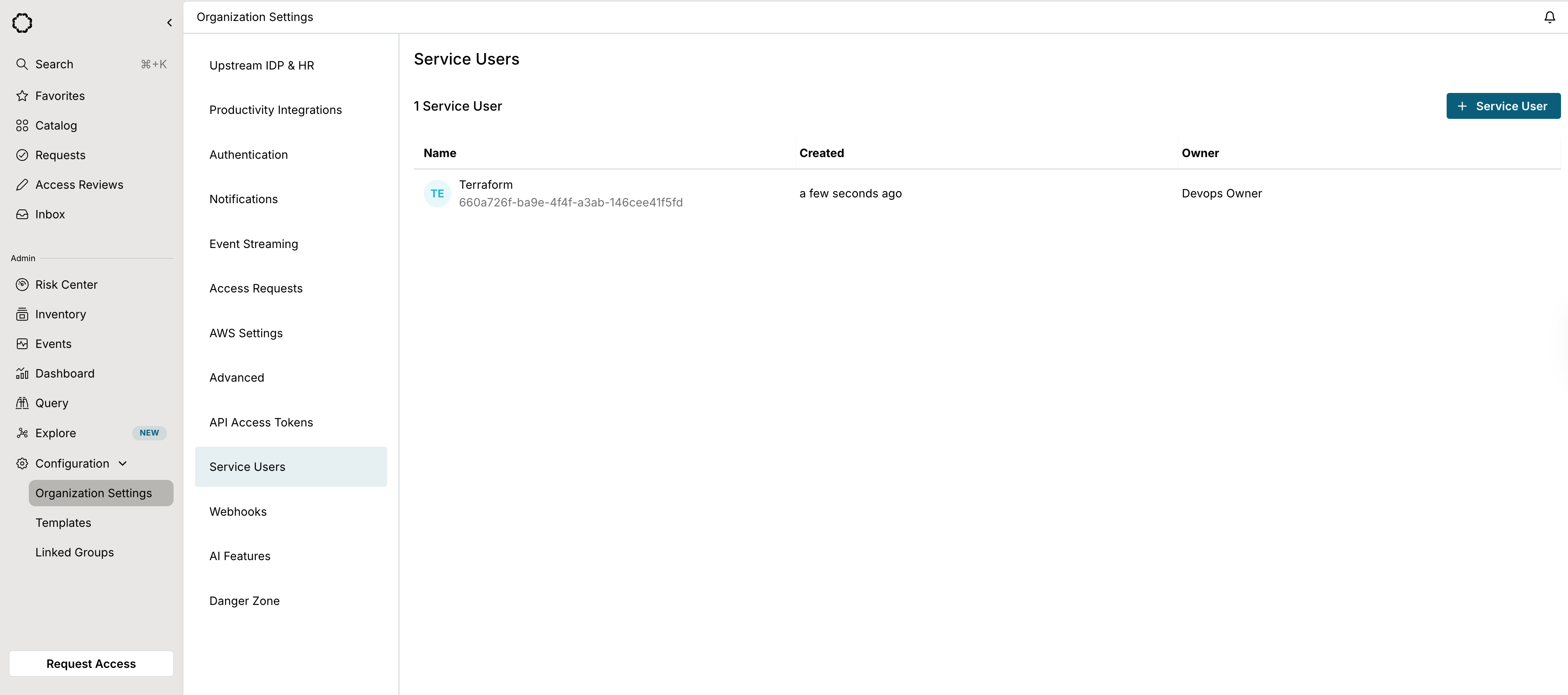
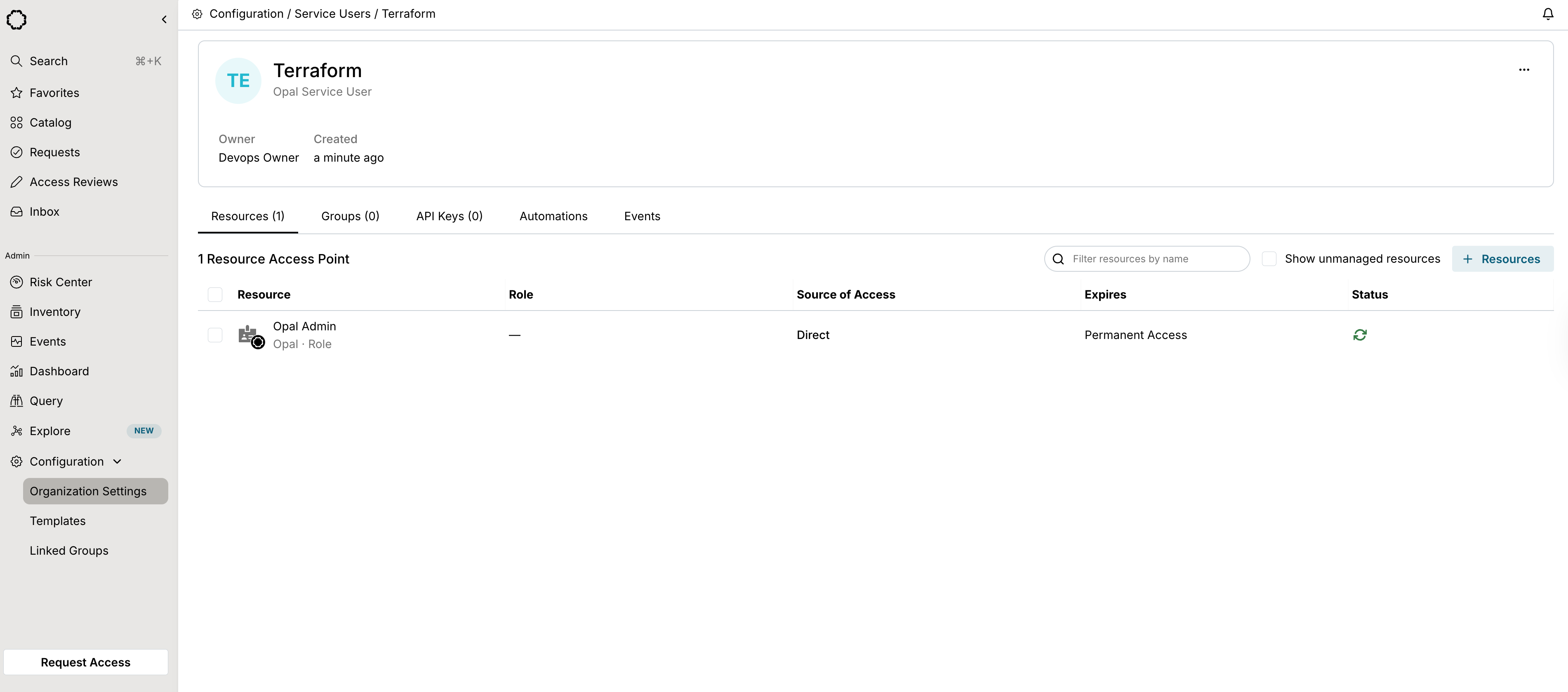
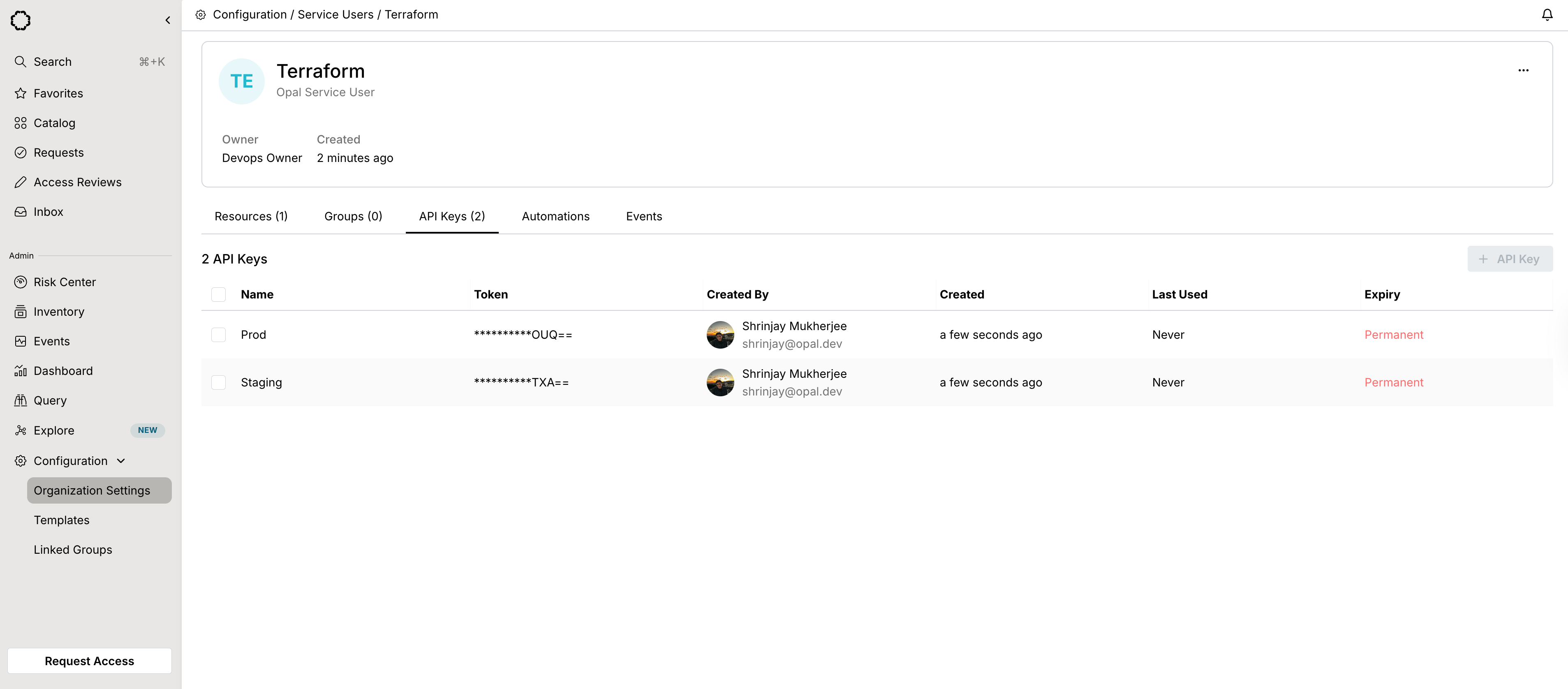
Automations have their own identity in Opal and can be assigned Opal roles to scope their permissions. Opal Admins can create an automation on the Configuration -> Automations page.Automations can be assigned to Opal roles and scoped roles under the Resources tab. Automations can be added to Opal groups under the Groups tab. These can be combined to provide granular permissions to Automations.API keys for automations can be created under the API Keys tab and can be set to expire. A maximum of 2 API Keys can be created for an automation.
Using the API with Personal Access Tokens
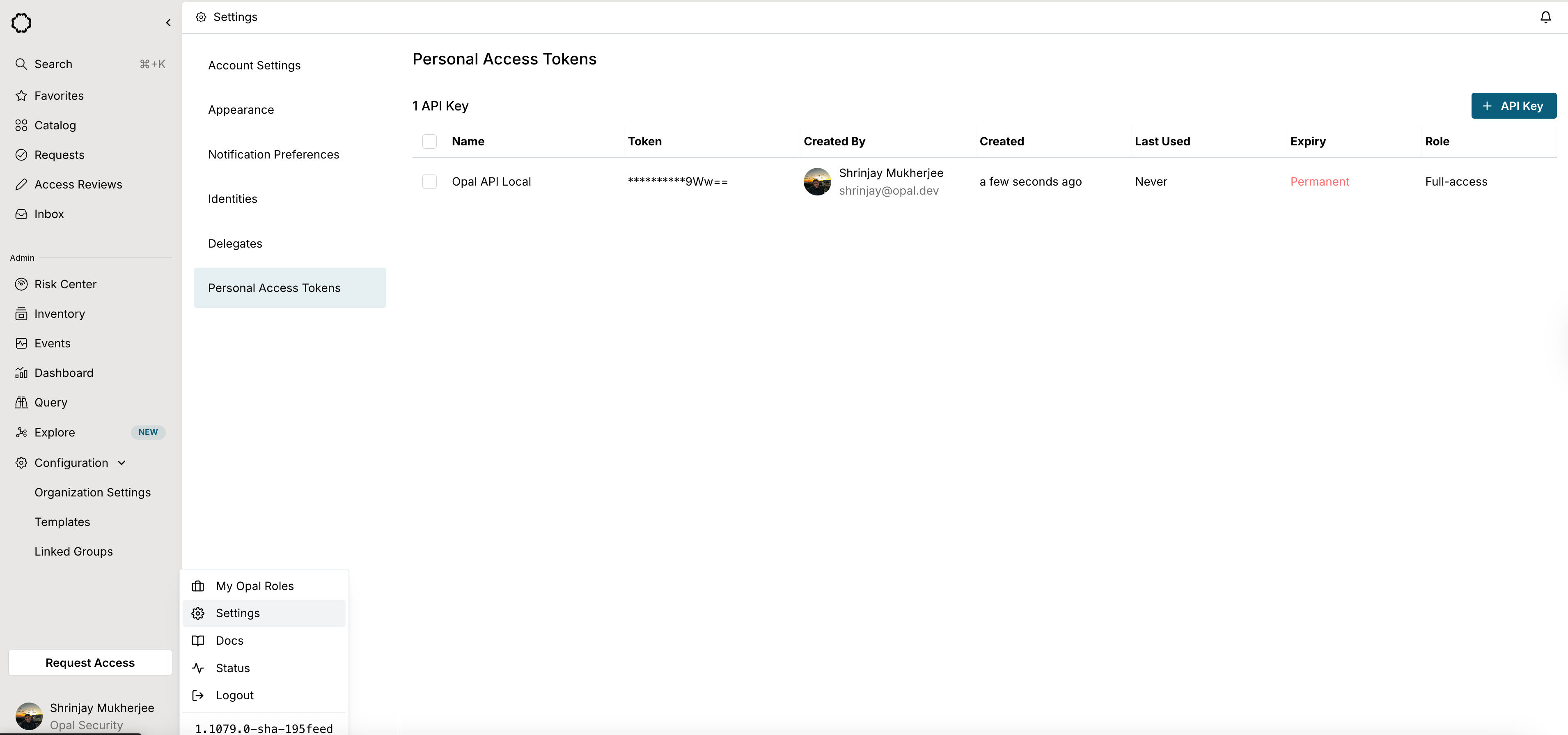
Personal access tokens are tied to your identity and have your permissions. By default, only Opal Admins can generate personal access tokens. However, admins can enable all users to create PATs by toggling the Allow all users to create PATs setting in Configuration -> Settings -> Advanced.Users can generate personal access tokens on the User -> Settings page:Personal access tokens can either be Read-only or Full-access:
Read-only tokens can only perform GET requests, limited to resources you have permission to view.
Full-access tokens can perform all API operations (GET, POST, PUT, DELETE), but are still scoped to your user permissions - you cannot access or modify resources beyond what your Opal role allows.
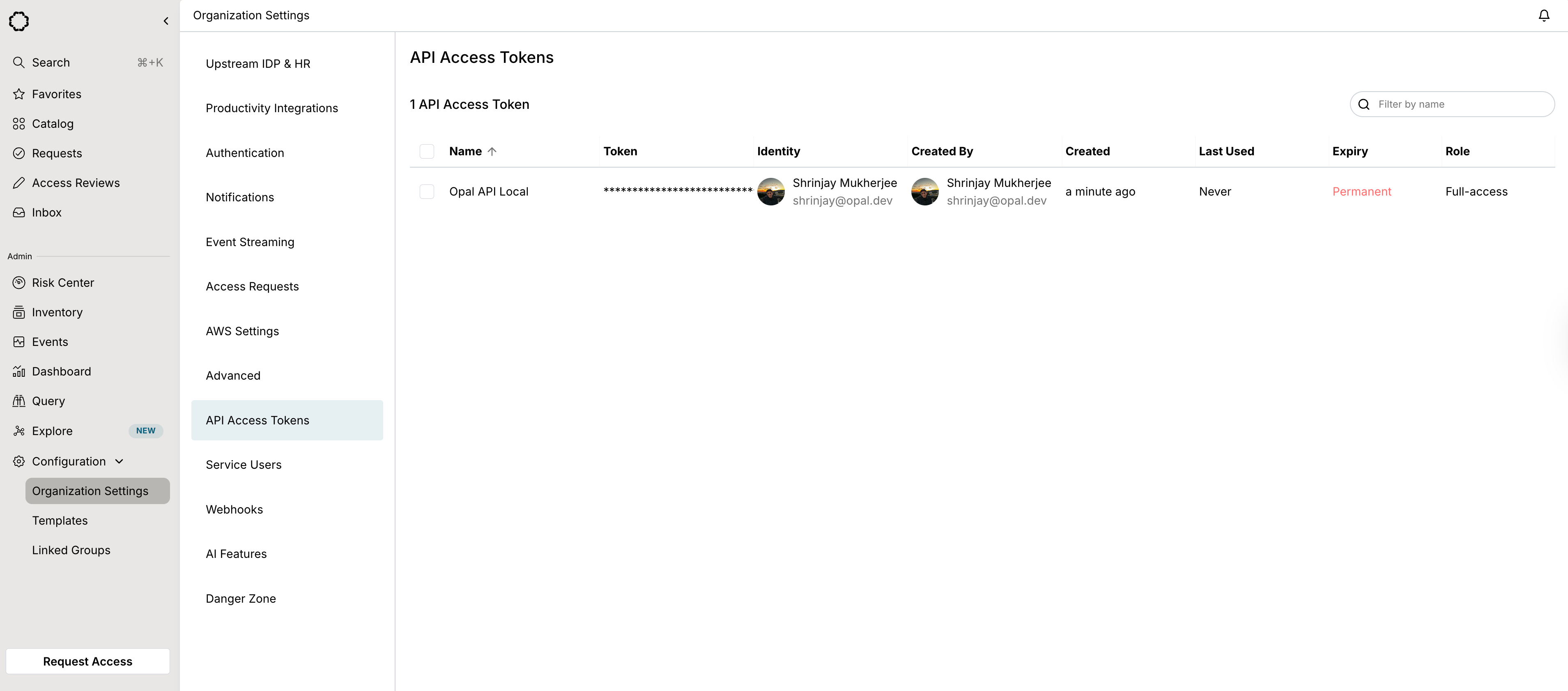
Admins can cap how long new API tokens last with Max API token lifetime in Configuration -> Settings -> Advanced (1–3650 days; leave it empty for no limit). The cap applies to personal access tokens and automation API keys. A new token created without an expiration expires at the cap, and creating one with a longer expiration fails with API tokens in your organization can last at most N days. Existing tokens keep their expiration.Once the token is generated, copy it and use it to make authenticated requests to the Opal API. If a token is compromised, you can revoke it from the same page. Any other Opal Admin can revoke your token from the Configuration -> API Access Tokens page.
Restrict API access by IP address
Admins can limit API token requests to specific IP addresses or CIDR ranges with Enable API IP Access Control in Configuration -> Settings -> Authentication. When it’s on, requests made with an API token from any other address get 403 API access is restricted to allowed IP addresses. This applies to the REST API, SCIM, and the MCP server. Signing in to the Opal web app isn’t affected.
Last modified on November 23, 2026
Was this page helpful?
{"docsConfig":{"theme":"mint","$schema":"https://mintlify.com/docs.json","name":"Opal Security Docs","colors":{"primary":"#0C7997","light":"#EDFCFC","dark":"#074055"},"logo":{"light":"https://mintcdn.com/opalsecurity/FBbZyeMPZrA69UcV/logo/logo-dark.svg?fit=max\u0026auto=format\u0026n=FBbZyeMPZrA69UcV\u0026q=85\u0026s=93a4bd75f157f9f0ab43cdf4d715b5cd","dark":"https://mintcdn.com/opalsecurity/FBbZyeMPZrA69UcV/logo/logo-light.svg?fit=max\u0026auto=format\u0026n=FBbZyeMPZrA69UcV\u0026q=85\u0026s=1774b545e4f1c5cad647f5194f7b26d9"},"favicon":{"light":"https://mintcdn.com/opalsecurity/DRAwGKUXMxLRQouh/logo/icon-opal-black.svg?fit=max\u0026auto=format\u0026n=DRAwGKUXMxLRQouh\u0026q=85\u0026s=9c8bd1204b6b5b83542c2ab5be549858","dark":"https://mintcdn.com/opalsecurity/DRAwGKUXMxLRQouh/logo/icon-opal-white.svg?fit=max\u0026auto=format\u0026n=DRAwGKUXMxLRQouh\u0026q=85\u0026s=73b53b4ceab6ae0b00e30b2042a6020a"},"icons":{"library":"lucide"},"styling":{"eyebrows":"breadcrumbs","latex":false},"integrations":{"ga4":{"measurementId":"G-1PPPM1WF6D"}},"errors":{"404":{"redirect":false,"title":"Page can't be found","description":"Sorry! This page might have been moved, or the link might be broken. Go back to our documentation via https://docs.opal.dev/docs/welcome."}},"metadata":{"timestamp":true},"navigation":{"pages":[]}},"deployment":{"deploymentMetadataValue":{"subdomain":"opalsecurity","hasAudioNarration":false,"actualSubdomain":"opalsecurity","customDomains":["docs.opal.dev"],"gitSource":{"type":"github","owner":"opalsecurity","repo":"docs","deployBranch":"main","contentDirectory":"","isPrivate":true,"mountPath":"","label":""},"feedback":{"thumbs":true},"entitlements":{"AI_CHAT":{"status":"ENABLED"},"WEB_MCP":{"status":"ENABLED"},"NARRATION":{"status":"ENABLED"}},"buildId":"6b07a5f2e817875fa67e718d","clientVersion":"0.0.4347","searchFilterCounts":[{"language":"default","tag":"API Reference","count":252},{"language":"default","tag":"Opal API","count":247},{"language":"default","tag":"Integrations","count":130},{"language":"default","tag":"Documentation","count":114},{"language":"default","tag":"Entitlement Management","count":95},{"language":"default","tag":"groups","count":41},{"language":"default","tag":"resources","count":41},{"language":"default","tag":"Getting Started","count":25},{"language":"default","tag":"Access Management","count":22},{"language":"default","tag":"Infrastructure","count":22}]},"assistantConfig":{"enableStarterQuestions":true,"enableContextualStarterQuestions":true,"deflection":{"enabled":true,"email":"support@opal.dev","showHelpButton":true}},"basePath":"","hasChatPermissions":true,"hasWebMcpPermissions":true,"toggles":[{"name":"kill-isr","enabled":true,"variant":{"name":"disabled","enabled":false,"feature_enabled":true},"impressionData":false},{"name":"custom-rbac-roles","enabled":true,"variant":{"name":"disabled","enabled":false,"feature_enabled":true},"impressionData":false},{"name":"agent-mintlify-slack","enabled":true,"variant":{"name":"disabled","enabled":false,"feature_enabled":true},"impressionData":false},{"name":"agent-integrations-settings","enabled":true,"variant":{"name":"disabled","enabled":false,"feature_enabled":true},"impressionData":false},{"name":"rbac-expansion","enabled":true,"variant":{"name":"disabled","enabled":false,"feature_enabled":true},"impressionData":false},{"name":"automations-pr-grouping","enabled":true,"variant":{"name":"disabled","enabled":false,"feature_enabled":true},"impressionData":false},{"name":"custom-prefix","enabled":true,"variant":{"name":"disabled","enabled":false,"feature_enabled":true},"impressionData":false},{"name":"analytics-v7","enabled":true,"variant":{"name":"disabled","enabled":false,"feature_enabled":true},"impressionData":false},{"name":"user-flows-analytics","enabled":true,"variant":{"name":"disabled","enabled":false,"feature_enabled":true},"impressionData":false},{"name":"no-publish-flow","enabled":true,"variant":{"name":"disabled","enabled":false,"feature_enabled":true},"impressionData":false},{"name":"snapshot-serving-live","enabled":true,"variant":{"name":"disabled","enabled":false,"feature_enabled":true},"impressionData":false},{"name":"stripTemperatureMiddleware","enabled":true,"variant":{"name":"disabled","enabled":false,"feature_enabled":true},"impressionData":false},{"name":"support-platform-pylon-zendesk","enabled":true,"variant":{"name":"disabled","enabled":false,"feature_enabled":true},"impressionData":false},{"name":"snapshot-serving","enabled":true,"variant":{"name":"disabled","enabled":false,"feature_enabled":true},"impressionData":false},{"name":"instant-rollback","enabled":true,"variant":{"name":"disabled","enabled":false,"feature_enabled":true},"impressionData":false},{"name":"granular-notifications-server","enabled":true,"variant":{"name":"disabled","enabled":false,"feature_enabled":true},"impressionData":false},{"name":"granular-notifications","enabled":true,"variant":{"name":"disabled","enabled":false,"feature_enabled":true},"impressionData":false},{"name":"automations-fable","enabled":true,"variant":{"name":"disabled","enabled":false,"feature_enabled":true},"impressionData":false},{"name":"fixed-ai-action-pricing","enabled":true,"variant":{"name":"disabled","enabled":false,"feature_enabled":true},"impressionData":false},{"name":"site-roles","enabled":true,"variant":{"name":"disabled","enabled":false,"feature_enabled":true},"impressionData":false},{"name":"automation-resolve-merge-conflict","enabled":true,"variant":{"name":"disabled","enabled":false,"feature_enabled":true},"impressionData":false},{"name":"scoped-publishing","enabled":true,"variant":{"name":"disabled","enabled":false,"feature_enabled":true},"impressionData":false},{"name":"mintql","enabled":true,"variant":{"name":"disabled","enabled":false,"feature_enabled":true},"impressionData":false},{"name":"page-level-analytics","enabled":true,"variant":{"name":"disabled","enabled":false,"feature_enabled":true},"impressionData":false},{"name":"editor-version-history-v2","enabled":true,"variant":{"name":"disabled","enabled":false,"feature_enabled":true},"impressionData":false},{"name":"billing-page-v2","enabled":true,"variant":{"name":"disabled","enabled":false,"feature_enabled":true},"impressionData":false},{"name":"full-page-search","enabled":true,"variant":{"name":"disabled","enabled":false,"feature_enabled":true},"impressionData":false},{"name":"workspace-projects","enabled":true,"variant":{"name":"disabled","enabled":false,"feature_enabled":true},"impressionData":false},{"name":"fork-pr-previews","enabled":true,"variant":{"name":"disabled","enabled":false,"feature_enabled":true},"impressionData":false},{"name":"revalidation-jwt","enabled":true,"variant":{"name":"disabled","enabled":false,"feature_enabled":true},"impressionData":false},{"name":"hobby-abuse-scan","enabled":true,"variant":{"name":"disabled","enabled":false,"feature_enabled":true},"impressionData":false},{"name":"dashboard-inbox","enabled":true,"variant":{"name":"disabled","enabled":false,"feature_enabled":true},"impressionData":false},{"name":"turbopuffer-dual-write","enabled":true,"variant":{"name":"disabled","enabled":false,"feature_enabled":true},"impressionData":false},{"name":"approve-review-flow","enabled":true,"variant":{"name":"disabled","enabled":false,"feature_enabled":true},"impressionData":false},{"name":"editor-metadata","enabled":true,"variant":{"name":"disabled","enabled":false,"feature_enabled":true},"impressionData":false},{"name":"turbopuffer-serve","enabled":true,"variant":{"name":"disabled","enabled":false,"feature_enabled":true},"impressionData":false},{"name":"live-agents","enabled":true,"variant":{"name":"disabled","enabled":false,"feature_enabled":true},"impressionData":false},{"name":"starter-pricing","enabled":true,"variant":{"name":"treatment","enabled":true,"payload":{"type":"string","value":"treatment"},"feature_enabled":true},"impressionData":false},{"name":"llms-txt-v2","enabled":true,"variant":{"name":"disabled","enabled":false,"feature_enabled":true},"impressionData":false},{"name":"wildcard-email-auth","enabled":true,"variant":{"name":"disabled","enabled":false,"feature_enabled":true},"impressionData":false}],"starterQuestions":[],"googleFontsInlined":false},"customCss":[]}
{"page":{"pagePath":"reference/authentication","slug":"/reference/authentication","pageMetadata":{"title":"Authentication","description":"Learn how to authenticate your requests to the Opal API.","href":"/reference/authentication"},"description":{"compiledSource":"\"use strict\";\nconst {jsx: _jsx} = arguments[0];\nconst {useMDXComponents: _provideComponents} = arguments[0];\nfunction _createMdxContent(props) {\n const _components = {\n p: \"p\",\n ..._provideComponents(),\n ...props.components\n };\n return _jsx(_components.p, {\n children: \"Learn how to authenticate your requests to the Opal API.\"\n });\n}\nfunction MDXContent(props = {}) {\n const {wrapper: MDXLayout} = {\n ..._provideComponents(),\n ...props.components\n };\n return MDXLayout ? _jsx(MDXLayout, {\n ...props,\n children: _jsx(_createMdxContent, {\n ...props\n })\n }) : _createMdxContent(props);\n}\nreturn {\n default: MDXContent\n};\n","frontmatter":{},"scope":{}},"pageType":"default","mdx":{"mdxSource":{"compiledSource":"\"use strict\";const{Fragment:_Fragment,jsx:_jsx,jsxs:_jsxs}=arguments[0];const{useMDXComponents:_provideComponents}=arguments[0];function _createMdxContent(props){const _components={a:`a`,code:`code`,li:`li`,p:`p`,strong:`strong`,ul:`ul`,..._provideComponents(),...props.components},{Heading,OptimizedImage}=_components;if(!Heading)_missingMdxReference(`Heading`,true);if(!OptimizedImage)_missingMdxReference(`OptimizedImage`,true);return _jsxs(_Fragment,{children:[_jsx(Heading,{level:`1`,id:`overview`,children:`Overview`}),`\n`,_jsx(_components.p,{children:`When making requests to the Opal API, you must pass an authentication bearer token in the header to identify yourself as an authorized user.`}),`\n`,_jsxs(_components.p,{children:[`To do this, pass a header with key `,_jsx(_components.strong,{children:`Authorization`}),` and value `,_jsxs(_components.strong,{children:[`Bearer `,_jsx(_components.code,{children:`\u003cAPI_TOKEN>`})]}),`, where `,_jsx(_components.code,{children:`\u003cAPI_TOKEN>`}),` is the value of the API token you generate in Opal.`]}),`\n`,_jsx(Heading,{level:`2`,id:`using-the-api-with-opal-automations`,children:`Using the API With Opal Automations`}),`\n`,_jsxs(_components.p,{children:[`Automations have their own identity in Opal and can be assigned Opal roles to scope their permissions. Opal Admins can create an automation on the `,_jsx(_components.strong,{children:`Configuration -> Automations`}),` page.`]}),`\n`,_jsx(OptimizedImage,{src:`https://mintcdn.com/opalsecurity/pMl2nbqjDrt2OITx/images/reference/f61a8ad22e1f4ec07bfb9f35b4df7ded0eb9fc8e7d5e404171c869f46f60c329-image.png?fit=max\u0026auto=format\u0026n=pMl2nbqjDrt2OITx\u0026q=85\u0026s=be0ed5cfd67c6efbae41459b2c062fed`,alt:``,\"data-og-width\":`3812`,width:`3812`,\"data-og-height\":`1690`,height:`1690`,\"data-path\":`images/reference/f61a8ad22e1f4ec07bfb9f35b4df7ded0eb9fc8e7d5e404171c869f46f60c329-image.png`,\"data-optimize\":`true`,\"data-opv\":`3`,srcset:`https://mintcdn.com/opalsecurity/pMl2nbqjDrt2OITx/images/reference/f61a8ad22e1f4ec07bfb9f35b4df7ded0eb9fc8e7d5e404171c869f46f60c329-image.png?w=280\u0026fit=max\u0026auto=format\u0026n=pMl2nbqjDrt2OITx\u0026q=85\u0026s=07cf674821b5fe295714d8d2e83eec15 280w, https://mintcdn.com/opalsecurity/pMl2nbqjDrt2OITx/images/reference/f61a8ad22e1f4ec07bfb9f35b4df7ded0eb9fc8e7d5e404171c869f46f60c329-image.png?w=560\u0026fit=max\u0026auto=format\u0026n=pMl2nbqjDrt2OITx\u0026q=85\u0026s=d18154d42582d4e7a90bc5d76fade3bf 560w, https://mintcdn.com/opalsecurity/pMl2nbqjDrt2OITx/images/reference/f61a8ad22e1f4ec07bfb9f35b4df7ded0eb9fc8e7d5e404171c869f46f60c329-image.png?w=840\u0026fit=max\u0026auto=format\u0026n=pMl2nbqjDrt2OITx\u0026q=85\u0026s=245c930efa6ecea9f6e994f5373dc9fc 840w, https://mintcdn.com/opalsecurity/pMl2nbqjDrt2OITx/images/reference/f61a8ad22e1f4ec07bfb9f35b4df7ded0eb9fc8e7d5e404171c869f46f60c329-image.png?w=1100\u0026fit=max\u0026auto=format\u0026n=pMl2nbqjDrt2OITx\u0026q=85\u0026s=55a90797be7d215c90f8057ad3e37adb 1100w, https://mintcdn.com/opalsecurity/pMl2nbqjDrt2OITx/images/reference/f61a8ad22e1f4ec07bfb9f35b4df7ded0eb9fc8e7d5e404171c869f46f60c329-image.png?w=1650\u0026fit=max\u0026auto=format\u0026n=pMl2nbqjDrt2OITx\u0026q=85\u0026s=a82bff63f85f156e36ee764fc76a709a 1650w, https://mintcdn.com/opalsecurity/pMl2nbqjDrt2OITx/images/reference/f61a8ad22e1f4ec07bfb9f35b4df7ded0eb9fc8e7d5e404171c869f46f60c329-image.png?w=2500\u0026fit=max\u0026auto=format\u0026n=pMl2nbqjDrt2OITx\u0026q=85\u0026s=cdb6ae5e1ad225d9d2c40e8042a70f91 2500w`}),`\n`,_jsxs(_components.p,{children:[`Automations can be assigned to Opal roles and scoped roles under the `,_jsx(_components.strong,{children:`Resources`}),` tab. Automations can be added to Opal groups under the `,_jsx(_components.strong,{children:`Groups`}),` tab. These can be combined to provide granular permissions to Automations.`]}),`\n`,_jsx(OptimizedImage,{src:`https://mintcdn.com/opalsecurity/pMl2nbqjDrt2OITx/images/reference/a7919b1ada3c3cccfcd49cddf08f370eb173e8f77f86f8fc6ff6d5bf3ce7c4b4-image.png?fit=max\u0026auto=format\u0026n=pMl2nbqjDrt2OITx\u0026q=85\u0026s=989f5d4f9d02d90892fe42fbd9ff5357`,alt:``,\"data-og-width\":`3802`,width:`3802`,\"data-og-height\":`1678`,height:`1678`,\"data-path\":`images/reference/a7919b1ada3c3cccfcd49cddf08f370eb173e8f77f86f8fc6ff6d5bf3ce7c4b4-image.png`,\"data-optimize\":`true`,\"data-opv\":`3`,srcset:`https://mintcdn.com/opalsecurity/pMl2nbqjDrt2OITx/images/reference/a7919b1ada3c3cccfcd49cddf08f370eb173e8f77f86f8fc6ff6d5bf3ce7c4b4-image.png?w=280\u0026fit=max\u0026auto=format\u0026n=pMl2nbqjDrt2OITx\u0026q=85\u0026s=29d9f24431571db091925ab8365ced02 280w, https://mintcdn.com/opalsecurity/pMl2nbqjDrt2OITx/images/reference/a7919b1ada3c3cccfcd49cddf08f370eb173e8f77f86f8fc6ff6d5bf3ce7c4b4-image.png?w=560\u0026fit=max\u0026auto=format\u0026n=pMl2nbqjDrt2OITx\u0026q=85\u0026s=db2471605c7488db061d2d9c30ca1aa4 560w, https://mintcdn.com/opalsecurity/pMl2nbqjDrt2OITx/images/reference/a7919b1ada3c3cccfcd49cddf08f370eb173e8f77f86f8fc6ff6d5bf3ce7c4b4-image.png?w=840\u0026fit=max\u0026auto=format\u0026n=pMl2nbqjDrt2OITx\u0026q=85\u0026s=be950bfbb57c45f3d449f2214d64c95a 840w, https://mintcdn.com/opalsecurity/pMl2nbqjDrt2OITx/images/reference/a7919b1ada3c3cccfcd49cddf08f370eb173e8f77f86f8fc6ff6d5bf3ce7c4b4-image.png?w=1100\u0026fit=max\u0026auto=format\u0026n=pMl2nbqjDrt2OITx\u0026q=85\u0026s=347fff6bcdb827215e6089c2526ea557 1100w, https://mintcdn.com/opalsecurity/pMl2nbqjDrt2OITx/images/reference/a7919b1ada3c3cccfcd49cddf08f370eb173e8f77f86f8fc6ff6d5bf3ce7c4b4-image.png?w=1650\u0026fit=max\u0026auto=format\u0026n=pMl2nbqjDrt2OITx\u0026q=85\u0026s=15fa088e7990525847b6bd226ab8bae2 1650w, https://mintcdn.com/opalsecurity/pMl2nbqjDrt2OITx/images/reference/a7919b1ada3c3cccfcd49cddf08f370eb173e8f77f86f8fc6ff6d5bf3ce7c4b4-image.png?w=2500\u0026fit=max\u0026auto=format\u0026n=pMl2nbqjDrt2OITx\u0026q=85\u0026s=240c79b9d7ffedda44827392a9b0dd8e 2500w`}),`\n`,_jsxs(_components.p,{children:[`API keys for automations can be created under the `,_jsx(_components.strong,{children:`API Keys`}),` tab and can be set to expire. A maximum of `,_jsx(_components.strong,{children:`2 API Keys`}),` can be created for an automation.`]}),`\n`,_jsx(OptimizedImage,{src:`https://mintcdn.com/opalsecurity/n_kjNlpO6oWtW2Nl/images/reference/06c980b35d65f215291f33ebc3e876c777dadfd9c86dc4e1b66f7969f3461f92-image.png?fit=max\u0026auto=format\u0026n=n_kjNlpO6oWtW2Nl\u0026q=85\u0026s=a838282353d9b7e89f84f71096af6a14`,alt:``,\"data-og-width\":`3814`,width:`3814`,\"data-og-height\":`1676`,height:`1676`,\"data-path\":`images/reference/06c980b35d65f215291f33ebc3e876c777dadfd9c86dc4e1b66f7969f3461f92-image.png`,\"data-optimize\":`true`,\"data-opv\":`3`,srcset:`https://mintcdn.com/opalsecurity/n_kjNlpO6oWtW2Nl/images/reference/06c980b35d65f215291f33ebc3e876c777dadfd9c86dc4e1b66f7969f3461f92-image.png?w=280\u0026fit=max\u0026auto=format\u0026n=n_kjNlpO6oWtW2Nl\u0026q=85\u0026s=5390d7ff2a642b486586534f7a2da75a 280w, https://mintcdn.com/opalsecurity/n_kjNlpO6oWtW2Nl/images/reference/06c980b35d65f215291f33ebc3e876c777dadfd9c86dc4e1b66f7969f3461f92-image.png?w=560\u0026fit=max\u0026auto=format\u0026n=n_kjNlpO6oWtW2Nl\u0026q=85\u0026s=572aa8e3db1eb1943205c8396708ca66 560w, https://mintcdn.com/opalsecurity/n_kjNlpO6oWtW2Nl/images/reference/06c980b35d65f215291f33ebc3e876c777dadfd9c86dc4e1b66f7969f3461f92-image.png?w=840\u0026fit=max\u0026auto=format\u0026n=n_kjNlpO6oWtW2Nl\u0026q=85\u0026s=2094cdc62d303e4bfdcbdfa99d6a28b3 840w, https://mintcdn.com/opalsecurity/n_kjNlpO6oWtW2Nl/images/reference/06c980b35d65f215291f33ebc3e876c777dadfd9c86dc4e1b66f7969f3461f92-image.png?w=1100\u0026fit=max\u0026auto=format\u0026n=n_kjNlpO6oWtW2Nl\u0026q=85\u0026s=63686a6fefdb784d72223d08abb1c6ac 1100w, https://mintcdn.com/opalsecurity/n_kjNlpO6oWtW2Nl/images/reference/06c980b35d65f215291f33ebc3e876c777dadfd9c86dc4e1b66f7969f3461f92-image.png?w=1650\u0026fit=max\u0026auto=format\u0026n=n_kjNlpO6oWtW2Nl\u0026q=85\u0026s=6737694a615383bdfa94f834cd476c5e 1650w, https://mintcdn.com/opalsecurity/n_kjNlpO6oWtW2Nl/images/reference/06c980b35d65f215291f33ebc3e876c777dadfd9c86dc4e1b66f7969f3461f92-image.png?w=2500\u0026fit=max\u0026auto=format\u0026n=n_kjNlpO6oWtW2Nl\u0026q=85\u0026s=8b821b1468b86539d1e862d211353c49 2500w`}),`\n`,_jsx(Heading,{level:`2`,id:`using-the-api-with-personal-access-tokens`,children:`Using the API with Personal Access Tokens`}),`\n`,_jsxs(_components.p,{children:[`Personal access tokens are tied to your identity and have your permissions. By default, only Opal Admins can generate personal access tokens. However, admins can enable all users to create PATs by toggling the `,_jsx(_components.strong,{children:`Allow all users to create PATs`}),` setting in `,_jsx(_components.strong,{children:`Configuration -> Settings -> Advanced`}),`.`]}),`\n`,_jsxs(_components.p,{children:[`Users can generate personal access tokens on the `,_jsx(_components.strong,{children:`User -> Settings`}),` page:`]}),`\n`,_jsx(OptimizedImage,{src:`https://mintcdn.com/opalsecurity/pMl2nbqjDrt2OITx/images/reference/61bd0ce06e34c06fdfa4ea0cbf01ba3d53e43ec1e7de8157a999c36fdce803a8-image.png?fit=max\u0026auto=format\u0026n=pMl2nbqjDrt2OITx\u0026q=85\u0026s=83b8ea9d13f60aa0a8b7f6c3fb16442b`,alt:``,\"data-og-width\":`3820`,width:`3820`,\"data-og-height\":`1790`,height:`1790`,\"data-path\":`images/reference/61bd0ce06e34c06fdfa4ea0cbf01ba3d53e43ec1e7de8157a999c36fdce803a8-image.png`,\"data-optimize\":`true`,\"data-opv\":`3`,srcset:`https://mintcdn.com/opalsecurity/pMl2nbqjDrt2OITx/images/reference/61bd0ce06e34c06fdfa4ea0cbf01ba3d53e43ec1e7de8157a999c36fdce803a8-image.png?w=280\u0026fit=max\u0026auto=format\u0026n=pMl2nbqjDrt2OITx\u0026q=85\u0026s=1bcc1e0940344e2b270a4befa4436c24 280w, https://mintcdn.com/opalsecurity/pMl2nbqjDrt2OITx/images/reference/61bd0ce06e34c06fdfa4ea0cbf01ba3d53e43ec1e7de8157a999c36fdce803a8-image.png?w=560\u0026fit=max\u0026auto=format\u0026n=pMl2nbqjDrt2OITx\u0026q=85\u0026s=cb181a0529409b327031c6b041851f0b 560w, https://mintcdn.com/opalsecurity/pMl2nbqjDrt2OITx/images/reference/61bd0ce06e34c06fdfa4ea0cbf01ba3d53e43ec1e7de8157a999c36fdce803a8-image.png?w=840\u0026fit=max\u0026auto=format\u0026n=pMl2nbqjDrt2OITx\u0026q=85\u0026s=1792b4920b0c76d1011c5e303979b8f0 840w, https://mintcdn.com/opalsecurity/pMl2nbqjDrt2OITx/images/reference/61bd0ce06e34c06fdfa4ea0cbf01ba3d53e43ec1e7de8157a999c36fdce803a8-image.png?w=1100\u0026fit=max\u0026auto=format\u0026n=pMl2nbqjDrt2OITx\u0026q=85\u0026s=62d79f16749379e80688935ae1f82a69 1100w, https://mintcdn.com/opalsecurity/pMl2nbqjDrt2OITx/images/reference/61bd0ce06e34c06fdfa4ea0cbf01ba3d53e43ec1e7de8157a999c36fdce803a8-image.png?w=1650\u0026fit=max\u0026auto=format\u0026n=pMl2nbqjDrt2OITx\u0026q=85\u0026s=0f48e81a54f5124403256869562a1f53 1650w, https://mintcdn.com/opalsecurity/pMl2nbqjDrt2OITx/images/reference/61bd0ce06e34c06fdfa4ea0cbf01ba3d53e43ec1e7de8157a999c36fdce803a8-image.png?w=2500\u0026fit=max\u0026auto=format\u0026n=pMl2nbqjDrt2OITx\u0026q=85\u0026s=68333aabc6a65b766b61638d503ac7c9 2500w`}),`\n`,_jsxs(_components.p,{children:[`Personal access tokens can either be `,_jsx(_components.strong,{children:`Read-only`}),` or `,_jsx(_components.strong,{children:`Full-access`}),`:`]}),`\n`,_jsxs(_components.ul,{children:[`\n`,_jsxs(_components.li,{children:[_jsx(_components.strong,{children:`Read-only tokens`}),` can only perform GET requests, limited to resources you have permission to view.`]}),`\n`,_jsxs(_components.li,{children:[_jsx(_components.strong,{children:`Full-access tokens`}),` can perform all API operations (GET, POST, PUT, DELETE), but are still scoped to your user permissions - you cannot access or modify resources beyond what your Opal role allows.`]}),`\n`]}),`\n`,_jsxs(_components.p,{children:[`Admins can cap how long new API tokens last with `,_jsx(_components.strong,{children:`Max API token lifetime`}),` in `,_jsx(_components.strong,{children:`Configuration -> Settings -> Advanced`}),` (1–3650 days; leave it empty for no limit). The cap applies to personal access tokens and automation API keys. A new token created without an expiration expires at the cap, and creating one with a longer expiration fails with `,_jsx(_components.code,{children:`API tokens in your organization can last at most N days`}),`. Existing tokens keep their expiration.`]}),`\n`,_jsxs(_components.p,{children:[`Once the token is generated, copy it and use it to make authenticated requests to the Opal API. If a token is compromised, you can revoke it from the same page. Any other Opal Admin can revoke your token from the `,_jsx(_components.strong,{children:`Configuration -> API Access Tokens`}),` page.`]}),`\n`,_jsx(OptimizedImage,{src:`https://mintcdn.com/opalsecurity/pMl2nbqjDrt2OITx/images/reference/850478aef24cb9d4d89076baef79bd7b612a853dc1088d31163e0069f3540c8d-image.png?fit=max\u0026auto=format\u0026n=pMl2nbqjDrt2OITx\u0026q=85\u0026s=a872614b7bfff70a2bb6aa7a43061cb0`,alt:``,\"data-og-width\":`3818`,width:`3818`,\"data-og-height\":`1682`,height:`1682`,\"data-path\":`images/reference/850478aef24cb9d4d89076baef79bd7b612a853dc1088d31163e0069f3540c8d-image.png`,\"data-optimize\":`true`,\"data-opv\":`3`,srcset:`https://mintcdn.com/opalsecurity/pMl2nbqjDrt2OITx/images/reference/850478aef24cb9d4d89076baef79bd7b612a853dc1088d31163e0069f3540c8d-image.png?w=280\u0026fit=max\u0026auto=format\u0026n=pMl2nbqjDrt2OITx\u0026q=85\u0026s=bbd4d954ba3ff70ab6f80b98ab458b30 280w, https://mintcdn.com/opalsecurity/pMl2nbqjDrt2OITx/images/reference/850478aef24cb9d4d89076baef79bd7b612a853dc1088d31163e0069f3540c8d-image.png?w=560\u0026fit=max\u0026auto=format\u0026n=pMl2nbqjDrt2OITx\u0026q=85\u0026s=87b853ce36985e197fb203e89d587c41 560w, https://mintcdn.com/opalsecurity/pMl2nbqjDrt2OITx/images/reference/850478aef24cb9d4d89076baef79bd7b612a853dc1088d31163e0069f3540c8d-image.png?w=840\u0026fit=max\u0026auto=format\u0026n=pMl2nbqjDrt2OITx\u0026q=85\u0026s=46b3c8c48aa67802194d2f0705582183 840w, https://mintcdn.com/opalsecurity/pMl2nbqjDrt2OITx/images/reference/850478aef24cb9d4d89076baef79bd7b612a853dc1088d31163e0069f3540c8d-image.png?w=1100\u0026fit=max\u0026auto=format\u0026n=pMl2nbqjDrt2OITx\u0026q=85\u0026s=efe8d3fdccd2083cabfce30334ba7b38 1100w, https://mintcdn.com/opalsecurity/pMl2nbqjDrt2OITx/images/reference/850478aef24cb9d4d89076baef79bd7b612a853dc1088d31163e0069f3540c8d-image.png?w=1650\u0026fit=max\u0026auto=format\u0026n=pMl2nbqjDrt2OITx\u0026q=85\u0026s=174775cef6f71ffea8b747bd105417b1 1650w, https://mintcdn.com/opalsecurity/pMl2nbqjDrt2OITx/images/reference/850478aef24cb9d4d89076baef79bd7b612a853dc1088d31163e0069f3540c8d-image.png?w=2500\u0026fit=max\u0026auto=format\u0026n=pMl2nbqjDrt2OITx\u0026q=85\u0026s=0bba52a175416aed0b9911544997235b 2500w`}),`\n`,_jsx(Heading,{level:`2`,id:`restrict-api-access-by-ip-address`,children:`Restrict API access by IP address`}),`\n`,_jsxs(_components.p,{children:[`Admins can limit API token requests to specific IP addresses or CIDR ranges with `,_jsx(_components.strong,{children:`Enable API IP Access Control`}),` in `,_jsx(_components.strong,{children:`Configuration -> Settings -> Authentication`}),`. When it’s on, requests made with an API token from any other address get `,_jsx(_components.code,{children:`403 API access is restricted to allowed IP addresses`}),`. This applies to the REST API, SCIM, and the `,_jsx(_components.a,{href:`/docs/mcp/overview`,children:`MCP server`}),`. Signing in to the Opal web app isn’t affected.`]})]})}function MDXContent(props={}){const{wrapper:MDXLayout}={..._provideComponents(),...props.components};return MDXLayout?_jsx(MDXLayout,{...props,children:_jsx(_createMdxContent,{...props})}):_createMdxContent(props)}return{default:MDXContent};function _missingMdxReference(id,component){throw new Error(`Expected `+(component?`component`:`object`)+\" `\"+id+\"` to be defined: you likely forgot to import, pass, or provide it.\")}","frontmatter":{},"scope":{"config":{},"pageMetadata":{"title":"Authentication","description":"Learn how to authenticate your requests to the Opal API.","href":"/reference/authentication"}}},"mdxSourceWithNoJs":null},"mdxExtracts":{"tableOfContents":[{"title":"Overview","slug":"overview","depth":1,"children":[]},{"title":"Using the API With Opal Automations","slug":"using-the-api-with-opal-automations","depth":2,"children":[]},{"title":"Using the API with Personal Access Tokens","slug":"using-the-api-with-personal-access-tokens","depth":2,"children":[]},{"title":"Restrict API access by IP address","slug":"restrict-api-access-by-ip-address","depth":2,"children":[]}],"codeExamples":{}},"jsLinks":["/_mintlify/custom/opalsecurity/d0e14c3cf9bbd682/changelog-scraper.js"],"subdomain":"opalsecurity","siteName":"Opal Security Docs","title":"Authentication - Opal Security Docs","contextualStarterQuestions":[{"_id":"6b047eabb5940a5c255754d4","deploymentId":"68ddaa9a3f8b7de5bc3a7b47","questionText":"Where do I pass the auth token?","status":"active","generatedBy":"contextual","path":"reference/authentication","createdAt":"2026-11-23T17:58:03.924Z","updatedAt":"2026-11-23T17:58:03.924Z","__v":0},{"_id":"6b047eabb5940a5c255754d5","deploymentId":"68ddaa9a3f8b7de5bc3a7b47","questionText":"How do automations authenticate?","status":"active","generatedBy":"contextual","path":"reference/authentication","createdAt":"2026-11-23T17:58:03.924Z","updatedAt":"2026-11-23T17:58:03.924Z","__v":0},{"_id":"6b047eabb5940a5c255754d3","deploymentId":"68ddaa9a3f8b7de5bc3a7b47","questionText":"How do I generate an API token?","status":"active","generatedBy":"contextual","path":"reference/authentication","createdAt":"2026-11-23T17:58:03.924Z","updatedAt":"2026-11-23T17:58:03.924Z","__v":0}],"navMaps":{"firstHrefInVersion":{},"firstHrefInLanguage":{}},"lastModified":"2026-11-23T17:57:54.167Z","gitLastModified":"2026-11-23T17:57:40.000Z","originalFileLocation":"reference/authentication.mdx"},"headHtml":"\u003cscript data-mint-head>(function(){var d=document.documentElement,p=null;if(!p){try{p=localStorage.getItem(\"isDarkMode\")}catch(e){}if(p==='true')p='dark';else if(p==='false')p='light';if(p!=='light'\u0026\u0026p!=='dark'\u0026\u0026p!=='system')p=\"system\"}var r=p==='system'?(matchMedia(\"(prefers-color-scheme: dark)\").matches?'dark':'light'):p;d.classList.remove(r==='dark'?'light':'dark');d.classList.add(r);d.setAttribute(\"data-theme-preference\",p)})();\u003c/script>\u003cmeta data-mint-head name=\"description\" content=\"Learn how to authenticate your requests to the Opal API.\">\u003cmeta data-mint-head name=\"application-name\" content=\"Opal Security Docs\">\u003cmeta data-mint-head name=\"generator\" content=\"Mintlify\">\u003clink data-mint-head rel=\"icon\" type=\"image/png\" sizes=\"192x192\" href=\"/mintlify-assets/_mintlify/favicons/opalsecurity/t501z2uOx-XXqevB/_generated/favicon/android-chrome-192x192.png\" media=\"(prefers-color-scheme: light)\">\u003clink data-mint-head rel=\"apple-touch-icon\" type=\"image/png\" sizes=\"180x180\" href=\"/mintlify-assets/_mintlify/favicons/opalsecurity/t501z2uOx-XXqevB/_generated/favicon/apple-touch-icon.png\">\u003clink data-mint-head rel=\"icon\" type=\"image/png\" sizes=\"16x16\" href=\"/mintlify-assets/_mintlify/favicons/opalsecurity/t501z2uOx-XXqevB/_generated/favicon/favicon-16x16.png\" media=\"(prefers-color-scheme: light)\">\u003clink data-mint-head rel=\"icon\" type=\"image/png\" sizes=\"32x32\" href=\"/mintlify-assets/_mintlify/favicons/opalsecurity/t501z2uOx-XXqevB/_generated/favicon/favicon-32x32.png\" media=\"(prefers-color-scheme: light)\">\u003clink data-mint-head rel=\"shortcut icon\" type=\"image/x-icon\" href=\"/mintlify-assets/_mintlify/favicons/opalsecurity/t501z2uOx-XXqevB/_generated/favicon/favicon.ico\" media=\"(prefers-color-scheme: light)\">\u003clink data-mint-head rel=\"icon\" type=\"image/png\" sizes=\"192x192\" href=\"/mintlify-assets/_mintlify/favicons/opalsecurity/t501z2uOx-XXqevB/_generated/favicon-dark/android-chrome-192x192.png\" media=\"(prefers-color-scheme: dark)\">\u003clink data-mint-head rel=\"icon\" type=\"image/png\" sizes=\"16x16\" href=\"/mintlify-assets/_mintlify/favicons/opalsecurity/t501z2uOx-XXqevB/_generated/favicon-dark/favicon-16x16.png\" media=\"(prefers-color-scheme: dark)\">\u003clink data-mint-head rel=\"icon\" type=\"image/png\" sizes=\"32x32\" href=\"/mintlify-assets/_mintlify/favicons/opalsecurity/t501z2uOx-XXqevB/_generated/favicon-dark/favicon-32x32.png\" media=\"(prefers-color-scheme: dark)\">\u003clink data-mint-head rel=\"shortcut icon\" type=\"image/x-icon\" href=\"/mintlify-assets/_mintlify/favicons/opalsecurity/t501z2uOx-XXqevB/_generated/favicon-dark/favicon.ico\" media=\"(prefers-color-scheme: dark)\">\u003cmeta data-mint-head property=\"og:title\" content=\"Authentication - Opal Security Docs\">\u003cmeta data-mint-head property=\"og:description\" content=\"Learn how to authenticate your requests to the Opal API.\">\u003cmeta data-mint-head property=\"og:site_name\" content=\"Opal Security Docs\">\u003cmeta data-mint-head property=\"og:url\" content=\"https://docs.opal.dev/reference/authentication\">\u003cmeta data-mint-head property=\"og:type\" content=\"website\">\u003cmeta data-mint-head property=\"og:image\" content=\"https://opalsecurity.mintlify.site/_mintlify/api/og/v2?division=API+Concepts\u0026amp;title=Authentication\u0026amp;description=Learn+how+to+authenticate+your+requests+to+the+Opal+API.\u0026amp;theme=156eb1ba223f12a303f95077\u0026amp;signature=24cb2d8cb48d8c78647b97d73795a7ca38534d8b3483dcb2587cc8c630b07cfa\">\u003cmeta data-mint-head property=\"og:image:width\" content=\"1200\">\u003cmeta data-mint-head property=\"og:image:height\" content=\"630\">\u003cmeta data-mint-head name=\"twitter:card\" content=\"summary_large_image\">\u003cmeta data-mint-head name=\"twitter:title\" content=\"Authentication - Opal Security Docs\">\u003cmeta data-mint-head name=\"twitter:description\" content=\"Learn how to authenticate your requests to the Opal API.\">\u003cmeta data-mint-head name=\"twitter:image\" content=\"https://opalsecurity.mintlify.site/_mintlify/api/og/v2?division=API+Concepts\u0026amp;title=Authentication\u0026amp;description=Learn+how+to+authenticate+your+requests+to+the+Opal+API.\u0026amp;theme=156eb1ba223f12a303f95077\u0026amp;signature=24cb2d8cb48d8c78647b97d73795a7ca38534d8b3483dcb2587cc8c630b07cfa\">\u003cmeta data-mint-head name=\"twitter:image:width\" content=\"1200\">\u003cmeta data-mint-head name=\"twitter:image:height\" content=\"630\">\u003cmeta data-mint-head name=\"msapplication-config\" content=\"/mintlify-assets/_mintlify/favicons/opalsecurity/t501z2uOx-XXqevB/_generated/favicon/browserconfig.xml\">\u003cmeta data-mint-head name=\"apple-mobile-web-app-title\" content=\"Opal Security Docs\">\u003cmeta data-mint-head name=\"msapplication-TileColor\" content=\"#0C7997\">\u003clink data-mint-head rel=\"canonical\" href=\"https://docs.opal.dev/reference/authentication\">\u003clink data-mint-head rel=\"alternate\" type=\"application/xml\" href=\"/sitemap.xml\">\u003clink data-mint-head rel=\"alternate\" type=\"text/markdown\" href=\"/reference/authentication.md\">\u003cscript data-mint-head type=\"application/ld+json\">{\"@context\":\"https://schema.org\",\"@graph\":[{\"@type\":\"Organization\",\"@id\":\"https://docs.opal.dev/#organization\",\"name\":\"Opal Security Docs\",\"url\":\"https://docs.opal.dev\",\"logo\":{\"@type\":\"ImageObject\",\"url\":\"https://mintcdn.com/opalsecurity/FBbZyeMPZrA69UcV/logo/logo-dark.svg?fit=max\u0026auto=format\u0026n=FBbZyeMPZrA69UcV\u0026q=85\u0026s=93a4bd75f157f9f0ab43cdf4d715b5cd\"}},{\"@type\":\"WebSite\",\"@id\":\"https://docs.opal.dev#website\",\"name\":\"Opal Security Docs\",\"url\":\"https://docs.opal.dev\",\"publisher\":{\"@id\":\"https://docs.opal.dev/#organization\"}},{\"@type\":\"WebPage\",\"@id\":\"https://docs.opal.dev/reference/authentication#webpage\",\"url\":\"https://docs.opal.dev/reference/authentication\",\"name\":\"Authentication\",\"description\":\"Learn how to authenticate your requests to the Opal API.\",\"dateModified\":\"2026-11-23T17:57:40.000Z\",\"isPartOf\":{\"@id\":\"https://docs.opal.dev#website\"},\"breadcrumb\":{\"@id\":\"https://docs.opal.dev/reference/authentication#breadcrumb\"}},{\"@type\":\"BreadcrumbList\",\"@id\":\"https://docs.opal.dev/reference/authentication#breadcrumb\",\"itemListElement\":[{\"@type\":\"ListItem\",\"position\":1,\"name\":\"Opal Security Docs\",\"item\":\"https://docs.opal.dev\"},{\"@type\":\"ListItem\",\"position\":2,\"name\":\"Authentication\",\"item\":\"https://docs.opal.dev/reference/authentication\"}]},{\"@type\":[\"Article\",\"TechArticle\"],\"@id\":\"https://docs.opal.dev/reference/authentication#article\",\"headline\":\"Authentication\",\"name\":\"Authentication\",\"description\":\"Learn how to authenticate your requests to the Opal API.\",\"url\":\"https://docs.opal.dev/reference/authentication\",\"mainEntityOfPage\":{\"@id\":\"https://docs.opal.dev/reference/authentication#webpage\"},\"dateModified\":\"2026-11-23T17:57:40.000Z\",\"publisher\":{\"@id\":\"https://docs.opal.dev/#organization\"},\"isPartOf\":{\"@id\":\"https://docs.opal.dev#website\"}}]}\u003c/script>\u003cscript data-mint-head type=\"application/ld+json\">{\"@context\":\"https://schema.org\",\"@type\":\"WebSite\",\"name\":\"Opal Security Docs\",\"publisher\":{\"@type\":\"Organization\",\"name\":\"Opal Security Docs\"},\"provider\":{\"@type\":\"Organization\",\"name\":\"Mintlify\",\"url\":\"https://mintlify.com\"}}\u003c/script>","agentPointerHref":"/reference/authentication.md","siteName":"Opal Security Docs","nav":{"global":null,"tabs":[{"tab":"Documentation","pages":[{"title":"Documentation","href":"/docs/welcome"}]},{"tab":"Integrations","pages":[{"title":"Integrations","href":"/integrations/overview"}]},{"tab":"API Reference","groups":[{"group":"API Concepts","pages":[{"title":"Authentication","href":"/reference/authentication"},{"title":"Pagination","description":"Learn how to paginate bulk data requests to the Opal API.","href":"/reference/pagination"},{"title":"Identifying End System Objects","href":"/reference/end-system-objects"},{"title":"Opal API Rate Limits","href":"/reference/opal-api-rate-limits"}]},{"group":"SDKs","pages":[{"title":"Overview","href":"/reference/opal-sdks"}]},{"group":"Opal API","pages":[{"group":"agent-activity","pages":[{"title":"Report agent activity","deprecated":null,"version":null,"openapi":"https://app.opal.dev/openapi.yaml post /agent-activity","href":"/api-reference/agent-activity/report-agent-activity"},{"title":"Get agent activity client settings","deprecated":null,"version":null,"openapi":"https://app.opal.dev/openapi.yaml get /agent-activity/client-settings","href":"/api-reference/agent-activity/get-agent-activity-client-settings"},{"title":"Report MCP server configuration","deprecated":null,"version":null,"openapi":"https://app.opal.dev/openapi.yaml post /agent-activity/mcp-config","href":"/api-reference/agent-activity/report-mcp-server-configuration"},{"title":"Anthropic inference hook verdict","deprecated":null,"version":null,"openapi":"https://app.opal.dev/openapi.yaml post /inference-hooks/anthropic","href":"/api-reference/agent-activity/anthropic-inference-hook-verdict"},{"title":"Grok Bot inference hook verdict","deprecated":null,"version":null,"openapi":"https://app.opal.dev/openapi.yaml post /inference-hooks/cursor/{connection_id}","href":"/api-reference/agent-activity/grok-bot-inference-hook-verdict"},{"title":"Get the agent kill switch","deprecated":null,"version":null,"openapi":"https://app.opal.dev/openapi.yaml get /agent-kill-switch","href":"/api-reference/agent-activity/get-the-agent-kill-switch"},{"title":"Set the agent kill switch","deprecated":null,"version":null,"openapi":"https://app.opal.dev/openapi.yaml put /agent-kill-switch","href":"/api-reference/agent-activity/set-the-agent-kill-switch"}]},{"group":"apps","pages":[{"title":"Get apps","deprecated":null,"version":null,"openapi":"https://app.opal.dev/openapi.yaml get /apps","href":"/api-reference/apps/get-apps"},{"title":"Create app","deprecated":null,"version":null,"openapi":"https://app.opal.dev/openapi.yaml post /apps","href":"/api-reference/apps/create-app"},{"title":"Get apps visibleusers","deprecated":null,"version":null,"openapi":"https://app.opal.dev/openapi.yaml get /apps/{app_id}/visible/users/{user_id}","href":"/api-reference/apps/get-apps-visibleusers"},{"title":"Get app by ID","deprecated":null,"version":null,"openapi":"https://app.opal.dev/openapi.yaml get /apps/{app_id}","href":"/api-reference/apps/get-app-by-id"},{"title":"Update app","deprecated":null,"version":null,"openapi":"https://app.opal.dev/openapi.yaml put /apps/{app_id}","href":"/api-reference/apps/update-app"},{"title":"Delete app","deprecated":null,"version":null,"openapi":"https://app.opal.dev/openapi.yaml delete /apps/{app_id}","href":"/api-reference/apps/delete-app"},{"title":"Get app visibility","deprecated":null,"version":null,"openapi":"https://app.opal.dev/openapi.yaml get /apps/{app_id}/visibility","href":"/api-reference/apps/get-app-visibility"},{"title":"Set app visibility","deprecated":null,"version":null,"openapi":"https://app.opal.dev/openapi.yaml put /apps/{app_id}/visibility","href":"/api-reference/apps/set-app-visibility"},{"title":"Get apps requestableusers","deprecated":null,"version":null,"openapi":"https://app.opal.dev/openapi.yaml get /apps/{app_id}/requestable/users/{user_id}","href":"/api-reference/apps/get-apps-requestableusers"},{"title":"Get sync errors","deprecated":null,"version":null,"openapi":"https://app.opal.dev/openapi.yaml get /sync_errors","href":"/api-reference/apps/get-sync_errors"}]},{"group":"idp-user-attribute-mappings","pages":[{"title":"List IDP user attribute mappings","deprecated":null,"version":null,"openapi":"https://app.opal.dev/openapi.yaml get /apps/{app_id}/user-attribute-mappings","href":"/api-reference/idp-user-attribute-mappings/list-idp-user-attribute-mappings"},{"title":"Create IDP user attribute mapping","deprecated":null,"version":null,"openapi":"https://app.opal.dev/openapi.yaml post /apps/{app_id}/user-attribute-mappings","href":"/api-reference/idp-user-attribute-mappings/create-idp-user-attribute-mapping"},{"title":"Get IDP user attribute mapping","deprecated":null,"version":null,"openapi":"https://app.opal.dev/openapi.yaml get /apps/{app_id}/user-attribute-mappings/{mapping_id}","href":"/api-reference/idp-user-attribute-mappings/get-idp-user-attribute-mapping"},{"title":"Delete IDP user attribute mapping","deprecated":null,"version":null,"openapi":"https://app.opal.dev/openapi.yaml delete /apps/{app_id}/user-attribute-mappings/{mapping_id}","href":"/api-reference/idp-user-attribute-mappings/delete-idp-user-attribute-mapping"}]},{"group":"bundles","pages":[{"title":"Get bundles","deprecated":null,"version":null,"openapi":"https://app.opal.dev/openapi.yaml get /bundles","href":"/api-reference/bundles/get-bundles"},{"title":"Post bundles","deprecated":null,"version":null,"openapi":"https://app.opal.dev/openapi.yaml post /bundles","href":"/api-reference/bundles/post-bundles"},{"title":"Get bundle by ID","deprecated":null,"version":null,"openapi":"https://app.opal.dev/openapi.yaml get /bundles/{bundle_id}","href":"/api-reference/bundles/get-bundle-by-id"},{"title":"Put bundles","deprecated":null,"version":null,"openapi":"https://app.opal.dev/openapi.yaml put /bundles/{bundle_id}","href":"/api-reference/bundles/put-bundles"},{"title":"Delete bundles","deprecated":null,"version":null,"openapi":"https://app.opal.dev/openapi.yaml delete /bundles/{bundle_id}","href":"/api-reference/bundles/delete-bundles"},{"title":"Get bundles resources","deprecated":null,"version":null,"openapi":"https://app.opal.dev/openapi.yaml get /bundles/{bundle_id}/resources","href":"/api-reference/bundles/get-bundles-resources"},{"title":"Post bundles resources","deprecated":null,"version":null,"openapi":"https://app.opal.dev/openapi.yaml post /bundles/{bundle_id}/resources","href":"/api-reference/bundles/post-bundles-resources"},{"title":"Delete bundles resources","deprecated":null,"version":null,"openapi":"https://app.opal.dev/openapi.yaml delete /bundles/{bundle_id}/resources/{resource_id}","href":"/api-reference/bundles/delete-bundles-resources"},{"title":"Get bundles groups","deprecated":null,"version":null,"openapi":"https://app.opal.dev/openapi.yaml get /bundles/{bundle_id}/groups","href":"/api-reference/bundles/get-bundles-groups"},{"title":"Post bundles groups","deprecated":null,"version":null,"openapi":"https://app.opal.dev/openapi.yaml post /bundles/{bundle_id}/groups","href":"/api-reference/bundles/post-bundles-groups"},{"title":"Delete bundles groups","deprecated":null,"version":null,"openapi":"https://app.opal.dev/openapi.yaml delete /bundles/{bundle_id}/groups/{group_id}","href":"/api-reference/bundles/delete-bundles-groups"},{"title":"Get bundles visibility","deprecated":null,"version":null,"openapi":"https://app.opal.dev/openapi.yaml get /bundles/{bundle_id}/visibility","href":"/api-reference/bundles/get-bundles-visibility"},{"title":"Put bundles visibility","deprecated":null,"version":null,"openapi":"https://app.opal.dev/openapi.yaml put /bundles/{bundle_id}/visibility","href":"/api-reference/bundles/put-bundles-visibility"}]},{"group":"campaigns","pages":[{"title":"Get campaigns","deprecated":null,"version":null,"openapi":"https://app.opal.dev/openapi.yaml get /campaigns","href":"/api-reference/campaigns/get-campaigns"},{"title":"Post campaigns","deprecated":null,"version":null,"openapi":"https://app.opal.dev/openapi.yaml post /campaigns","href":"/api-reference/campaigns/post-campaigns"},{"title":"Get campaign by ID","deprecated":null,"version":null,"openapi":"https://app.opal.dev/openapi.yaml get /campaigns/{campaign_id}","href":"/api-reference/campaigns/get-campaign-by-id"},{"title":"Update campaign","deprecated":null,"version":null,"openapi":"https://app.opal.dev/openapi.yaml put /campaigns/{campaign_id}","href":"/api-reference/campaigns/update-campaign"},{"title":"Start campaign","deprecated":null,"version":null,"openapi":"https://app.opal.dev/openapi.yaml post /campaigns/{campaign_id}/start","href":"/api-reference/campaigns/start-campaign"},{"title":"Stop campaign","deprecated":null,"version":null,"openapi":"https://app.opal.dev/openapi.yaml post /campaigns/{campaign_id}/stop","href":"/api-reference/campaigns/stop-campaign"},{"title":"End campaign","deprecated":null,"version":null,"openapi":"https://app.opal.dev/openapi.yaml post /campaigns/{campaign_id}/end","href":"/api-reference/campaigns/end-campaign"},{"title":"List campaign items","deprecated":null,"version":null,"openapi":"https://app.opal.dev/openapi.yaml get /campaigns/{campaign_id}/items","href":"/api-reference/campaigns/list-campaign-items"},{"title":"Update campaign item reviewers","deprecated":null,"version":null,"openapi":"https://app.opal.dev/openapi.yaml post /campaigns/{campaign_id}/item-reviewers","href":"/api-reference/campaigns/update-campaign-item-reviewers"},{"title":"Submit campaign item review decisions","deprecated":null,"version":null,"openapi":"https://app.opal.dev/openapi.yaml post /campaigns/{campaign_id}/reviews","href":"/api-reference/campaigns/submit-campaign-item-review-decisions"},{"title":"List viewer campaign items","deprecated":null,"version":null,"openapi":"https://app.opal.dev/openapi.yaml get /campaigns/{campaign_id}/viewer-items","href":"/api-reference/campaigns/list-viewer-campaign-items"}]},{"group":"configuration-templates","pages":[{"title":"Get configuration templates","deprecated":null,"version":null,"openapi":"https://app.opal.dev/openapi.yaml get /configuration-templates","href":"/api-reference/configuration-templates/get-configuration-templates"},{"title":"Put configuration templates","deprecated":null,"version":null,"openapi":"https://app.opal.dev/openapi.yaml put /configuration-templates","href":"/api-reference/configuration-templates/put-configuration-templates"},{"title":"Post configuration templates","deprecated":null,"version":null,"openapi":"https://app.opal.dev/openapi.yaml post /configuration-templates","href":"/api-reference/configuration-templates/post-configuration-templates"},{"title":"Delete configuration templates","deprecated":null,"version":null,"openapi":"https://app.opal.dev/openapi.yaml delete /configuration-templates/{configuration_template_id}","href":"/api-reference/configuration-templates/delete-configuration-templates"},{"title":"Get configuration templates custom attributes","deprecated":null,"version":null,"openapi":"https://app.opal.dev/openapi.yaml get /configuration-templates/{configuration_template_id}/custom-attributes","href":"/api-reference/configuration-templates/get-configuration-templates-custom-attributes"},{"title":"Put configuration templates custom attributes","deprecated":null,"version":null,"openapi":"https://app.opal.dev/openapi.yaml put /configuration-templates/{configuration_template_id}/custom-attributes","href":"/api-reference/configuration-templates/put-configuration-templates-custom-attributes"},{"title":"Patch configuration templates custom attributes","deprecated":null,"version":null,"openapi":"https://app.opal.dev/openapi.yaml patch /configuration-templates/{configuration_template_id}/custom-attributes","href":"/api-reference/configuration-templates/patch-configuration-templates-custom-attributes"},{"title":"Delete configuration templates custom attributes","deprecated":null,"version":null,"openapi":"https://app.opal.dev/openapi.yaml delete /configuration-templates/{configuration_template_id}/custom-attributes/{attribute_key}","href":"/api-reference/configuration-templates/delete-configuration-templates-custom-attributes"}]},{"group":"event-streams","pages":[{"title":"Get event streams","deprecated":null,"version":null,"openapi":"https://app.opal.dev/openapi.yaml get /event-streams","href":"/api-reference/event-streams/get-event-streams"},{"title":"Create event stream","deprecated":null,"version":null,"openapi":"https://app.opal.dev/openapi.yaml post /event-streams","href":"/api-reference/event-streams/create-event-stream"},{"title":"Update event stream","deprecated":null,"version":null,"openapi":"https://app.opal.dev/openapi.yaml put /event-streams/{event_stream_id}","href":"/api-reference/event-streams/update-event-stream"},{"title":"Delete event stream","deprecated":null,"version":null,"openapi":"https://app.opal.dev/openapi.yaml delete /event-streams/{event_stream_id}","href":"/api-reference/event-streams/delete-event-stream"}]},{"group":"events","pages":[{"title":"Get events","deprecated":null,"version":null,"openapi":"https://app.opal.dev/openapi.yaml get /events","href":"/api-reference/events/get-events"},{"title":"Get event by ID","deprecated":null,"version":null,"openapi":"https://app.opal.dev/openapi.yaml get /events/{event_id}","href":"/api-reference/events/get-event-by-id"}]},{"group":"groups","pages":[{"title":"Get groups","deprecated":null,"version":null,"openapi":"https://app.opal.dev/openapi.yaml get /groups","href":"/api-reference/groups/get-groups"},{"title":"Put groups","deprecated":null,"version":null,"openapi":"https://app.opal.dev/openapi.yaml put /groups","href":"/api-reference/groups/put-groups"},{"title":"Post groups","deprecated":null,"version":null,"openapi":"https://app.opal.dev/openapi.yaml post /groups","href":"/api-reference/groups/post-groups"},{"title":"Get group by ID","deprecated":null,"version":null,"openapi":"https://app.opal.dev/openapi.yaml get /groups/{group_id}","href":"/api-reference/groups/get-group-by-id"},{"title":"Delete groups","deprecated":null,"version":null,"openapi":"https://app.opal.dev/openapi.yaml delete /groups/{group_id}","href":"/api-reference/groups/delete-groups"},{"title":"Get the ID of the configuration template linked to a group","deprecated":null,"version":null,"openapi":"https://app.opal.dev/openapi.yaml get /groups/{group_id}/configuration-template","href":"/api-reference/groups/get-the-id-of-the-configuration-template-linked-to-a-group"},{"title":"Set the ID of the configuration template linked to a group","deprecated":null,"version":null,"openapi":"https://app.opal.dev/openapi.yaml put /groups/{group_id}/configuration-template","href":"/api-reference/groups/set-the-id-of-the-configuration-template-linked-to-a-group"},{"title":"Get groups break glass users","deprecated":null,"version":null,"openapi":"https://app.opal.dev/openapi.yaml get /groups/{group_id}/break-glass-users","href":"/api-reference/groups/get-groups-break-glass-users"},{"title":"Put groups break glass users","deprecated":null,"version":null,"openapi":"https://app.opal.dev/openapi.yaml put /groups/{group_id}/break-glass-users","href":"/api-reference/groups/put-groups-break-glass-users"},{"title":"Get groups message channels","deprecated":null,"version":null,"openapi":"https://app.opal.dev/openapi.yaml get /groups/{group_id}/message-channels","href":"/api-reference/groups/get-groups-message-channels"},{"title":"Put groups message channels","deprecated":null,"version":null,"openapi":"https://app.opal.dev/openapi.yaml put /groups/{group_id}/message-channels","href":"/api-reference/groups/put-groups-message-channels"},{"title":"Get groups on call schedules","deprecated":null,"version":null,"openapi":"https://app.opal.dev/openapi.yaml get /groups/{group_id}/on-call-schedules","href":"/api-reference/groups/get-groups-on-call-schedules"},{"title":"Put groups on call schedules","deprecated":null,"version":null,"openapi":"https://app.opal.dev/openapi.yaml put /groups/{group_id}/on-call-schedules","href":"/api-reference/groups/put-groups-on-call-schedules"},{"title":"Get group access levels","deprecated":null,"version":null,"openapi":"https://app.opal.dev/openapi.yaml get /groups/{group_id}/access_levels","href":"/api-reference/groups/get-group-access-levels"},{"title":"Get groups resources","deprecated":null,"version":null,"openapi":"https://app.opal.dev/openapi.yaml get /groups/{group_id}/resources","href":"/api-reference/groups/get-groups-resources"},{"title":"Put groups resources","deprecated":null,"version":null,"openapi":"https://app.opal.dev/openapi.yaml put /groups/{group_id}/resources","href":"/api-reference/groups/put-groups-resources"},{"title":"Get member groups","deprecated":null,"version":null,"openapi":"https://app.opal.dev/openapi.yaml get /groups/{group_id}/groups","href":"/api-reference/groups/get-member-groups"},{"title":"Get nested groups","deprecated":null,"version":null,"openapi":"https://app.opal.dev/openapi.yaml get /groups/{group_id}/containing-groups","href":"/api-reference/groups/get-nested-groups"},{"title":"Post groups containing groups","deprecated":null,"version":null,"openapi":"https://app.opal.dev/openapi.yaml post /groups/{group_id}/containing-groups","href":"/api-reference/groups/post-groups-containing-groups"},{"title":"Get nested group by ID","deprecated":null,"version":null,"openapi":"https://app.opal.dev/openapi.yaml get /groups/{group_id}/containing-groups/{containing_group_id}","href":"/api-reference/groups/get-nested-group-by-id"},{"title":"Delete groups containing groups","deprecated":null,"version":null,"openapi":"https://app.opal.dev/openapi.yaml delete /groups/{group_id}/containing-groups/{containing_group_id}","href":"/api-reference/groups/delete-groups-containing-groups"},{"title":"Post groups resources","deprecated":null,"version":null,"openapi":"https://app.opal.dev/openapi.yaml post /groups/{group_id}/resources/{resource_id}","href":"/api-reference/groups/post-groups-resources"},{"title":"Get groups visibility","deprecated":null,"version":null,"openapi":"https://app.opal.dev/openapi.yaml get /groups/{group_id}/visibility","href":"/api-reference/groups/get-groups-visibility"},{"title":"Put groups visibility","deprecated":null,"version":null,"openapi":"https://app.opal.dev/openapi.yaml put /groups/{group_id}/visibility","href":"/api-reference/groups/put-groups-visibility"},{"title":"Get groups requestableusers","deprecated":null,"version":null,"openapi":"https://app.opal.dev/openapi.yaml get /groups/{group_id}/requestable/users/{user_id}","href":"/api-reference/groups/get-groups-requestableusers"},{"title":"Check requestability of many groups","deprecated":null,"version":null,"openapi":"https://app.opal.dev/openapi.yaml post /groups/requestable/check","href":"/api-reference/groups/check-requestability-of-many-groups"},{"title":"Get groups visibleusers","deprecated":null,"version":null,"openapi":"https://app.opal.dev/openapi.yaml get /groups/{group_id}/visible/users/{user_id}","href":"/api-reference/groups/get-groups-visibleusers"},{"title":"Get groups reviewers","deprecated":true,"version":null,"openapi":"https://app.opal.dev/openapi.yaml get /groups/{group_id}/reviewers","href":"/api-reference/groups/get-groups-reviewers"},{"title":"Put groups reviewers","deprecated":true,"version":null,"openapi":"https://app.opal.dev/openapi.yaml put /groups/{group_id}/reviewers","href":"/api-reference/groups/put-groups-reviewers"},{"title":"Get groups reviewer stages","deprecated":true,"version":null,"openapi":"https://app.opal.dev/openapi.yaml get /groups/{group_id}/reviewer-stages","href":"/api-reference/groups/get-groups-reviewer-stages"},{"title":"Put groups reviewer stages","deprecated":true,"version":null,"openapi":"https://app.opal.dev/openapi.yaml put /groups/{group_id}/reviewer-stages","href":"/api-reference/groups/put-groups-reviewer-stages"},{"title":"Get groups tags","deprecated":null,"version":null,"openapi":"https://app.opal.dev/openapi.yaml get /groups/{group_id}/tags","href":"/api-reference/groups/get-groups-tags"},{"title":"Get groups custom attributes","deprecated":null,"version":null,"openapi":"https://app.opal.dev/openapi.yaml get /groups/{group_id}/custom-attributes","href":"/api-reference/groups/get-groups-custom-attributes"},{"title":"Put groups custom attributes","deprecated":null,"version":null,"openapi":"https://app.opal.dev/openapi.yaml put /groups/{group_id}/custom-attributes","href":"/api-reference/groups/put-groups-custom-attributes"},{"title":"Patch groups custom attributes","deprecated":null,"version":null,"openapi":"https://app.opal.dev/openapi.yaml patch /groups/{group_id}/custom-attributes","href":"/api-reference/groups/patch-groups-custom-attributes"},{"title":"Delete groups custom attributes","deprecated":null,"version":null,"openapi":"https://app.opal.dev/openapi.yaml delete /groups/{group_id}/custom-attributes/{attribute_key}","href":"/api-reference/groups/delete-groups-custom-attributes"},{"title":"Get groups users","deprecated":null,"version":null,"openapi":"https://app.opal.dev/openapi.yaml get /groups/{group_id}/users","href":"/api-reference/groups/get-groups-users"},{"title":"Put groups users","deprecated":null,"version":null,"openapi":"https://app.opal.dev/openapi.yaml put /groups/{group_id}/users/{user_id}","href":"/api-reference/groups/put-groups-users"},{"title":"Post groups users","deprecated":null,"version":null,"openapi":"https://app.opal.dev/openapi.yaml post /groups/{group_id}/users/{user_id}","href":"/api-reference/groups/post-groups-users"},{"title":"Delete groups users","deprecated":null,"version":null,"openapi":"https://app.opal.dev/openapi.yaml delete /groups/{group_id}/users/{user_id}","href":"/api-reference/groups/delete-groups-users"},{"title":"Get groupsusers","deprecated":null,"version":null,"openapi":"https://app.opal.dev/openapi.yaml get /groups/users/{user_id}","href":"/api-reference/groups/get-groupsusers"}]},{"group":"group-bindings","pages":[{"title":"Get group bindings","deprecated":null,"version":null,"openapi":"https://app.opal.dev/openapi.yaml get /group-bindings","href":"/api-reference/group-bindings/get-group-bindings"},{"title":"Put group bindings","deprecated":null,"version":null,"openapi":"https://app.opal.dev/openapi.yaml put /group-bindings","href":"/api-reference/group-bindings/put-group-bindings"},{"title":"Post group bindings","deprecated":null,"version":null,"openapi":"https://app.opal.dev/openapi.yaml post /group-bindings","href":"/api-reference/group-bindings/post-group-bindings"},{"title":"Get group binding by ID","deprecated":null,"version":null,"openapi":"https://app.opal.dev/openapi.yaml get /group-bindings/{group_binding_id}","href":"/api-reference/group-bindings/get-group-binding-by-id"},{"title":"Delete group bindings","deprecated":null,"version":null,"openapi":"https://app.opal.dev/openapi.yaml delete /group-bindings/{group_binding_id}","href":"/api-reference/group-bindings/delete-group-bindings"}]},{"group":"idp-group-mappings","pages":[{"title":"Get idp group mappings","deprecated":null,"version":null,"openapi":"https://app.opal.dev/openapi.yaml get /idp-group-mappings/{app_resource_id}","href":"/api-reference/idp-group-mappings/get-idp-group-mappings"},{"title":"Put idp group mappings","deprecated":null,"version":null,"openapi":"https://app.opal.dev/openapi.yaml put /idp-group-mappings/{app_resource_id}","href":"/api-reference/idp-group-mappings/put-idp-group-mappings"},{"title":"Get idp group mappings groups","deprecated":null,"version":null,"openapi":"https://app.opal.dev/openapi.yaml get /idp-group-mappings/{app_resource_id}/groups/{group_id}","href":"/api-reference/idp-group-mappings/get-idp-group-mappings-groups"},{"title":"Post idp group mappings groups","deprecated":null,"version":null,"openapi":"https://app.opal.dev/openapi.yaml post /idp-group-mappings/{app_resource_id}/groups/{group_id}","href":"/api-reference/idp-group-mappings/post-idp-group-mappings-groups"},{"title":"Delete idp group mappings groups","deprecated":null,"version":null,"openapi":"https://app.opal.dev/openapi.yaml delete /idp-group-mappings/{app_resource_id}/groups/{group_id}","href":"/api-reference/idp-group-mappings/delete-idp-group-mappings-groups"}]},{"group":"opal-scripts","pages":[{"title":"List OpalScripts","deprecated":null,"version":null,"openapi":"https://app.opal.dev/openapi.yaml get /opal-scripts","href":"/api-reference/opal-scripts/list-opalscripts"},{"title":"Create OpalScript","deprecated":null,"version":null,"openapi":"https://app.opal.dev/openapi.yaml post /opal-scripts","href":"/api-reference/opal-scripts/create-opalscript"},{"title":"Get OpalScript by ID","deprecated":null,"version":null,"openapi":"https://app.opal.dev/openapi.yaml get /opal-scripts/{opal_script_id}","href":"/api-reference/opal-scripts/get-opalscript-by-id"},{"title":"Update OpalScript","deprecated":null,"version":null,"openapi":"https://app.opal.dev/openapi.yaml put /opal-scripts/{opal_script_id}","href":"/api-reference/opal-scripts/update-opalscript"},{"title":"Delete OpalScript","deprecated":null,"version":null,"openapi":"https://app.opal.dev/openapi.yaml delete /opal-scripts/{opal_script_id}","href":"/api-reference/opal-scripts/delete-opalscript"},{"title":"Get OpalScript by name","deprecated":null,"version":null,"openapi":"https://app.opal.dev/openapi.yaml get /opal-scripts/name/{opal_script_name}","href":"/api-reference/opal-scripts/get-opalscript-by-name"}]},{"group":"owners","pages":[{"title":"Get owners","deprecated":null,"version":null,"openapi":"https://app.opal.dev/openapi.yaml get /owners","href":"/api-reference/owners/get-owners"},{"title":"Put owners","deprecated":null,"version":null,"openapi":"https://app.opal.dev/openapi.yaml put /owners","href":"/api-reference/owners/put-owners"},{"title":"Post owners","deprecated":null,"version":null,"openapi":"https://app.opal.dev/openapi.yaml post /owners","href":"/api-reference/owners/post-owners"},{"title":"Get owner by ID","deprecated":null,"version":null,"openapi":"https://app.opal.dev/openapi.yaml get /owners/{owner_id}","href":"/api-reference/owners/get-owner-by-id"},{"title":"Delete owners","deprecated":null,"version":null,"openapi":"https://app.opal.dev/openapi.yaml delete /owners/{owner_id}","href":"/api-reference/owners/delete-owners"},{"title":"Get ownersname","deprecated":null,"version":null,"openapi":"https://app.opal.dev/openapi.yaml get /owners/name/{owner_name}","href":"/api-reference/owners/get-ownersname"},{"title":"Get owners users","deprecated":null,"version":null,"openapi":"https://app.opal.dev/openapi.yaml get /owners/{owner_id}/users","href":"/api-reference/owners/get-owners-users"},{"title":"Put owners users","deprecated":null,"version":null,"openapi":"https://app.opal.dev/openapi.yaml put /owners/{owner_id}/users","href":"/api-reference/owners/put-owners-users"}]},{"group":"request-templates","pages":[{"title":"Get request templates","deprecated":null,"version":null,"openapi":"https://app.opal.dev/openapi.yaml get /request-templates","href":"/api-reference/request-templates/get-request-templates"},{"title":"Put request templates","deprecated":null,"version":null,"openapi":"https://app.opal.dev/openapi.yaml put /request-templates","href":"/api-reference/request-templates/put-request-templates"},{"title":"Post request templates","deprecated":null,"version":null,"openapi":"https://app.opal.dev/openapi.yaml post /request-templates","href":"/api-reference/request-templates/post-request-templates"},{"title":"Get request templates 1","deprecated":null,"version":null,"openapi":"https://app.opal.dev/openapi.yaml get /request-templates/{request_template_id}","href":"/api-reference/request-templates/get-request-templates-1"},{"title":"Delete request templates","deprecated":null,"version":null,"openapi":"https://app.opal.dev/openapi.yaml delete /request-templates/{request_template_id}","href":"/api-reference/request-templates/delete-request-templates"}]},{"group":"requests","pages":[{"title":"Get requests","deprecated":null,"version":null,"openapi":"https://app.opal.dev/openapi.yaml get /requests","href":"/api-reference/requests/get-requests"},{"title":"Post requests","deprecated":null,"version":null,"openapi":"https://app.opal.dev/openapi.yaml post /requests","href":"/api-reference/requests/post-requests"},{"title":"Get requests via Relay","deprecated":true,"version":null,"openapi":"https://app.opal.dev/openapi.yaml get /requests/relay","href":"/api-reference/requests/get-requests-via-relay"},{"title":"Get request by ID","deprecated":null,"version":null,"openapi":"https://app.opal.dev/openapi.yaml get /requests/{id}","href":"/api-reference/requests/get-request-by-id"},{"title":"Post requests approve","deprecated":null,"version":null,"openapi":"https://app.opal.dev/openapi.yaml post /requests/{id}/approve","href":"/api-reference/requests/post-requests-approve"},{"title":"Post requests deny","deprecated":null,"version":null,"openapi":"https://app.opal.dev/openapi.yaml post /requests/{id}/deny","href":"/api-reference/requests/post-requests-deny"},{"title":"Cancel request","deprecated":null,"version":null,"openapi":"https://app.opal.dev/openapi.yaml post /requests/{id}/cancel","href":"/api-reference/requests/cancel-request"},{"title":"Escalate request to skip-manager","deprecated":null,"version":null,"openapi":"https://app.opal.dev/openapi.yaml post /requests/{id}/escalate","href":"/api-reference/requests/escalate-request-to-skip-manager"},{"title":"Send request reminder","deprecated":null,"version":null,"openapi":"https://app.opal.dev/openapi.yaml post /requests/{id}/remind","href":"/api-reference/requests/send-request-reminder"},{"title":"Send reminder to a reviewer","deprecated":null,"version":null,"openapi":"https://app.opal.dev/openapi.yaml post /requests/{id}/reviewers/{reviewer_id}/remind","href":"/api-reference/requests/send-reminder-to-a-reviewer"},{"title":"Get requests comments","deprecated":null,"version":null,"openapi":"https://app.opal.dev/openapi.yaml get /requests/{id}/comments","href":"/api-reference/requests/get-requests-comments"},{"title":"Post requests comments","deprecated":null,"version":null,"openapi":"https://app.opal.dev/openapi.yaml post /requests/{id}/comments","href":"/api-reference/requests/post-requests-comments"}]},{"group":"role-assignments","pages":[{"title":"List role assignments","deprecated":null,"version":null,"openapi":"https://app.opal.dev/openapi.yaml get /role-assignments","href":"/api-reference/role-assignments/list-role-assignments"},{"title":"Add role assignments","deprecated":null,"version":null,"openapi":"https://app.opal.dev/openapi.yaml post /role-assignments","href":"/api-reference/role-assignments/add-role-assignments"},{"title":"Remove role assignments","deprecated":null,"version":null,"openapi":"https://app.opal.dev/openapi.yaml delete /role-assignments","href":"/api-reference/role-assignments/remove-role-assignments"}]},{"group":"resources","pages":[{"title":"Get resources","deprecated":null,"version":null,"openapi":"https://app.opal.dev/openapi.yaml get /resources","href":"/api-reference/resources/get-resources"},{"title":"Put resources","deprecated":null,"version":null,"openapi":"https://app.opal.dev/openapi.yaml put /resources","href":"/api-reference/resources/put-resources"},{"title":"Post resources","deprecated":null,"version":null,"openapi":"https://app.opal.dev/openapi.yaml post /resources","href":"/api-reference/resources/post-resources"},{"title":"Get resource by ID","deprecated":null,"version":null,"openapi":"https://app.opal.dev/openapi.yaml get /resources/{resource_id}","href":"/api-reference/resources/get-resource-by-id"},{"title":"Delete resources","deprecated":null,"version":null,"openapi":"https://app.opal.dev/openapi.yaml delete /resources/{resource_id}","href":"/api-reference/resources/delete-resources"},{"title":"Get the ID of the configuration template linked to a resource","deprecated":null,"version":null,"openapi":"https://app.opal.dev/openapi.yaml get /resources/{resource_id}/configuration-template","href":"/api-reference/resources/get-the-id-of-the-configuration-template-linked-to-a-resource"},{"title":"Set the ID of the configuration template linked to a resource","deprecated":null,"version":null,"openapi":"https://app.opal.dev/openapi.yaml put /resources/{resource_id}/configuration-template","href":"/api-reference/resources/set-the-id-of-the-configuration-template-linked-to-a-resource"},{"title":"Get resources message channels","deprecated":null,"version":null,"openapi":"https://app.opal.dev/openapi.yaml get /resources/{resource_id}/message-channels","href":"/api-reference/resources/get-resources-message-channels"},{"title":"Put resources message channels","deprecated":null,"version":null,"openapi":"https://app.opal.dev/openapi.yaml put /resources/{resource_id}/message-channels","href":"/api-reference/resources/put-resources-message-channels"},{"title":"Get resources visibility","deprecated":null,"version":null,"openapi":"https://app.opal.dev/openapi.yaml get /resources/{resource_id}/visibility","href":"/api-reference/resources/get-resources-visibility"},{"title":"Put resources visibility","deprecated":null,"version":null,"openapi":"https://app.opal.dev/openapi.yaml put /resources/{resource_id}/visibility","href":"/api-reference/resources/put-resources-visibility"},{"title":"Get resources requestableusers","deprecated":null,"version":null,"openapi":"https://app.opal.dev/openapi.yaml get /resources/{resource_id}/requestable/users/{user_id}","href":"/api-reference/resources/get-resources-requestableusers"},{"title":"Check requestability of many resources","deprecated":null,"version":null,"openapi":"https://app.opal.dev/openapi.yaml post /resources/requestable/check","href":"/api-reference/resources/check-requestability-of-many-resources"},{"title":"Get resources visibleusers","deprecated":null,"version":null,"openapi":"https://app.opal.dev/openapi.yaml get /resources/{resource_id}/visible/users/{user_id}","href":"/api-reference/resources/get-resources-visibleusers"},{"title":"Get resources reviewers","deprecated":null,"version":null,"openapi":"https://app.opal.dev/openapi.yaml get /resources/{resource_id}/reviewers","href":"/api-reference/resources/get-resources-reviewers"},{"title":"Put resources reviewers","deprecated":null,"version":null,"openapi":"https://app.opal.dev/openapi.yaml put /resources/{resource_id}/reviewers","href":"/api-reference/resources/put-resources-reviewers"},{"title":"Get resources reviewer stages","deprecated":null,"version":null,"openapi":"https://app.opal.dev/openapi.yaml get /resources/{resource_id}/reviewer-stages","href":"/api-reference/resources/get-resources-reviewer-stages"},{"title":"Put resources reviewer stages","deprecated":null,"version":null,"openapi":"https://app.opal.dev/openapi.yaml put /resources/{resource_id}/reviewer-stages","href":"/api-reference/resources/put-resources-reviewer-stages"},{"title":"Get resources non human identities","deprecated":null,"version":null,"openapi":"https://app.opal.dev/openapi.yaml get /resources/{resource_id}/non-human-identities","href":"/api-reference/resources/get-resources-non-human-identities"},{"title":"Get resource users","deprecated":null,"version":null,"openapi":"https://app.opal.dev/openapi.yaml get /resources/{resource_id}/users","href":"/api-reference/resources/get-resource-users"},{"title":"Post resources non human identities","deprecated":null,"version":null,"openapi":"https://app.opal.dev/openapi.yaml post /resources/{resource_id}/non-human-identities/{non_human_identity_id}","href":"/api-reference/resources/post-resources-non-human-identities"},{"title":"Delete resources non human identities","deprecated":null,"version":null,"openapi":"https://app.opal.dev/openapi.yaml delete /resources/{resource_id}/non-human-identities/{non_human_identity_id}","href":"/api-reference/resources/delete-resources-non-human-identities"},{"title":"Get resource user","deprecated":null,"version":null,"openapi":"https://app.opal.dev/openapi.yaml get /resources/{resource_id}/users/{user_id}","href":"/api-reference/resources/get-resource-user"},{"title":"Put resources users","deprecated":null,"version":null,"openapi":"https://app.opal.dev/openapi.yaml put /resources/{resource_id}/users/{user_id}","href":"/api-reference/resources/put-resources-users"},{"title":"Post resources users","deprecated":null,"version":null,"openapi":"https://app.opal.dev/openapi.yaml post /resources/{resource_id}/users/{user_id}","href":"/api-reference/resources/post-resources-users"},{"title":"Delete resources users","deprecated":null,"version":null,"openapi":"https://app.opal.dev/openapi.yaml delete /resources/{resource_id}/users/{user_id}","href":"/api-reference/resources/delete-resources-users"},{"title":"Get resource user access status ","deprecated":true,"version":null,"openapi":"https://app.opal.dev/openapi.yaml get /resource-user-access-status/{resource_id}/{user_id}","href":"/api-reference/resources/get-resource-user-access-status-"},{"title":"Get resources tags","deprecated":null,"version":null,"openapi":"https://app.opal.dev/openapi.yaml get /resources/{resource_id}/tags","href":"/api-reference/resources/get-resources-tags"},{"title":"Get resources custom attributes","deprecated":null,"version":null,"openapi":"https://app.opal.dev/openapi.yaml get /resources/{resource_id}/custom-attributes","href":"/api-reference/resources/get-resources-custom-attributes"},{"title":"Put resources custom attributes","deprecated":null,"version":null,"openapi":"https://app.opal.dev/openapi.yaml put /resources/{resource_id}/custom-attributes","href":"/api-reference/resources/put-resources-custom-attributes"},{"title":"Patch resources custom attributes","deprecated":null,"version":null,"openapi":"https://app.opal.dev/openapi.yaml patch /resources/{resource_id}/custom-attributes","href":"/api-reference/resources/patch-resources-custom-attributes"},{"title":"Delete resources custom attributes","deprecated":null,"version":null,"openapi":"https://app.opal.dev/openapi.yaml delete /resources/{resource_id}/custom-attributes/{attribute_key}","href":"/api-reference/resources/delete-resources-custom-attributes"},{"title":"Get resources scoped role permissions","deprecated":null,"version":null,"openapi":"https://app.opal.dev/openapi.yaml get /resources/{resource_id}/scoped-role-permissions","href":"/api-reference/resources/get-resources-scoped-role-permissions"},{"title":"Put resources scoped role permissions","deprecated":null,"version":null,"openapi":"https://app.opal.dev/openapi.yaml put /resources/{resource_id}/scoped-role-permissions","href":"/api-reference/resources/put-resources-scoped-role-permissions"},{"title":"Get resources custom access levels","deprecated":null,"version":null,"openapi":"https://app.opal.dev/openapi.yaml get /resources/{resource_id}/custom-access-levels","href":"/api-reference/resources/get-resources-custom-access-levels"},{"title":"Post resources custom access levels","deprecated":null,"version":null,"openapi":"https://app.opal.dev/openapi.yaml post /resources/{resource_id}/custom-access-levels","href":"/api-reference/resources/post-resources-custom-access-levels"},{"title":"Delete resources custom access levels","deprecated":null,"version":null,"openapi":"https://app.opal.dev/openapi.yaml delete /resources/{resource_id}/custom-access-levels/{access_level_remote_id}","href":"/api-reference/resources/delete-resources-custom-access-levels"},{"title":"Patch resources custom access levels","deprecated":null,"version":null,"openapi":"https://app.opal.dev/openapi.yaml patch /resources/{resource_id}/custom-access-levels/{access_level_remote_id}","href":"/api-reference/resources/patch-resources-custom-access-levels"},{"title":"Get resourcesusers","deprecated":null,"version":null,"openapi":"https://app.opal.dev/openapi.yaml get /resources/users/{user_id}","href":"/api-reference/resources/get-resourcesusers"},{"title":"Get resources groups","deprecated":null,"version":null,"openapi":"https://app.opal.dev/openapi.yaml get /resources/{resource_id}/groups","href":"/api-reference/resources/get-resources-groups"},{"title":"Get resource access levels","deprecated":null,"version":null,"openapi":"https://app.opal.dev/openapi.yaml get /resources/{resource_id}/access_levels","href":"/api-reference/resources/get-resource-access-levels"}]},{"group":"non-human-identities","pages":[{"title":"Get non human identities","deprecated":null,"version":null,"openapi":"https://app.opal.dev/openapi.yaml get /non-human-identities","href":"/api-reference/non-human-identities/get-non-human-identities"}]},{"group":"paladin","pages":[{"title":"Create Paladin","deprecated":null,"version":null,"openapi":"https://app.opal.dev/openapi.yaml post /paladin","href":"/api-reference/paladin/create-paladin"},{"title":"Get Paladin by ID","deprecated":null,"version":null,"openapi":"https://app.opal.dev/openapi.yaml get /paladin/{paladin_id}","href":"/api-reference/paladin/get-paladin-by-id"},{"title":"Update Paladin","deprecated":null,"version":null,"openapi":"https://app.opal.dev/openapi.yaml put /paladin/{paladin_id}","href":"/api-reference/paladin/update-paladin"},{"title":"Delete Paladin","deprecated":null,"version":null,"openapi":"https://app.opal.dev/openapi.yaml delete /paladin/{paladin_id}","href":"/api-reference/paladin/delete-paladin"},{"title":"Get Paladins by name","deprecated":null,"version":null,"openapi":"https://app.opal.dev/openapi.yaml get /paladin/name/{paladin_name}","href":"/api-reference/paladin/get-paladins-by-name"},{"title":"List Paladin context sources","deprecated":null,"version":null,"openapi":"https://app.opal.dev/openapi.yaml get /paladin/{paladin_id}/context-sources","href":"/api-reference/paladin/list-paladin-context-sources"},{"title":"Add a Paladin context source","deprecated":null,"version":null,"openapi":"https://app.opal.dev/openapi.yaml post /paladin/{paladin_id}/context-sources","href":"/api-reference/paladin/add-a-paladin-context-source"},{"title":"Remove a Paladin context source","deprecated":null,"version":null,"openapi":"https://app.opal.dev/openapi.yaml delete /paladin/{paladin_id}/context-sources/{context_source_id}","href":"/api-reference/paladin/remove-a-paladin-context-source"}]},{"group":"service-users","pages":[{"title":"Create service user","deprecated":null,"version":null,"openapi":"https://app.opal.dev/openapi.yaml post /service-users","href":"/api-reference/service-users/create-service-user"}]},{"group":"sessions","pages":[{"title":"Get sessions","deprecated":null,"version":null,"openapi":"https://app.opal.dev/openapi.yaml get /sessions","href":"/api-reference/sessions/get-sessions"}]},{"group":"users","pages":[{"title":"Get user","deprecated":null,"version":null,"openapi":"https://app.opal.dev/openapi.yaml get /user","href":"/api-reference/users/get-user"},{"title":"Get users","deprecated":null,"version":null,"openapi":"https://app.opal.dev/openapi.yaml get /users","href":"/api-reference/users/get-users"},{"title":"Post users","deprecated":null,"version":null,"openapi":"https://app.opal.dev/openapi.yaml post /users","href":"/api-reference/users/post-users"},{"title":"Get user by ID","deprecated":null,"version":null,"openapi":"https://app.opal.dev/openapi.yaml get /users/{user_id}","href":"/api-reference/users/get-user-by-id"},{"title":"Delete users","deprecated":null,"version":null,"openapi":"https://app.opal.dev/openapi.yaml delete /users/{user_id}","href":"/api-reference/users/delete-users"},{"title":"Patch users","deprecated":null,"version":null,"openapi":"https://app.opal.dev/openapi.yaml patch /users/{user_id}","href":"/api-reference/users/patch-users"},{"title":"Get a user's access","deprecated":null,"version":null,"openapi":"https://app.opal.dev/openapi.yaml get /users/{user_id}/access","href":"/api-reference/users/get-a-users-access"},{"title":"Reset a user's Opal MFA","deprecated":null,"version":null,"openapi":"https://app.opal.dev/openapi.yaml post /users/{user_id}/mfa/reset","href":"/api-reference/users/reset-a-users-opal-mfa"},{"title":"Revoke all of a user's access","deprecated":null,"version":null,"openapi":"https://app.opal.dev/openapi.yaml post /users/{user_id}/revoke-all","href":"/api-reference/users/revoke-all-of-a-users-access"},{"title":"Get usersremote users","deprecated":null,"version":null,"openapi":"https://app.opal.dev/openapi.yaml get /users/remote_users","href":"/api-reference/users/get-usersremote_users"},{"title":"Get userswhoami","deprecated":null,"version":null,"openapi":"https://app.opal.dev/openapi.yaml get /users/whoami","href":"/api-reference/users/get-userswhoami"},{"title":"Get users tags","deprecated":null,"version":null,"openapi":"https://app.opal.dev/openapi.yaml get /users/{user_id}/tags","href":"/api-reference/users/get-users-tags"}]},{"group":"access-rules","pages":[{"title":"Get access rules","deprecated":null,"version":null,"openapi":"https://app.opal.dev/openapi.yaml get /access-rules","href":"/api-reference/access-rules/get-access-rules"},{"title":"Post access rules","deprecated":null,"version":null,"openapi":"https://app.opal.dev/openapi.yaml post /access-rules","href":"/api-reference/access-rules/post-access-rules"},{"title":"Get access rules 1","deprecated":null,"version":null,"openapi":"https://app.opal.dev/openapi.yaml get /access-rules/{access_rule_id}","href":"/api-reference/access-rules/get-access-rules-1"},{"title":"Put access rules","deprecated":null,"version":null,"openapi":"https://app.opal.dev/openapi.yaml put /access-rules/{access_rule_id}","href":"/api-reference/access-rules/put-access-rules"}]},{"group":"tags","pages":[{"title":"Get tag by ID","deprecated":null,"version":null,"openapi":"https://app.opal.dev/openapi.yaml get /tag/{tag_id}","href":"/api-reference/tags/get-tag-by-id"},{"title":"Delete tag","deprecated":null,"version":null,"openapi":"https://app.opal.dev/openapi.yaml delete /tag/{tag_id}","href":"/api-reference/tags/delete-tag"},{"title":"Get tag","deprecated":null,"version":null,"openapi":"https://app.opal.dev/openapi.yaml get /tag","href":"/api-reference/tags/get-tag"},{"title":"Post tag","deprecated":null,"version":null,"openapi":"https://app.opal.dev/openapi.yaml post /tag","href":"/api-reference/tags/post-tag"},{"title":"Get tags","deprecated":null,"version":null,"openapi":"https://app.opal.dev/openapi.yaml get /tags","href":"/api-reference/tags/get-tags"},{"title":"Post tags users","deprecated":null,"version":null,"openapi":"https://app.opal.dev/openapi.yaml post /tags/{tag_id}/users/{user_id}","href":"/api-reference/tags/post-tags-users"},{"title":"Delete tags users","deprecated":null,"version":null,"openapi":"https://app.opal.dev/openapi.yaml delete /tags/{tag_id}/users/{user_id}","href":"/api-reference/tags/delete-tags-users"},{"title":"Post tags groups","deprecated":null,"version":null,"openapi":"https://app.opal.dev/openapi.yaml post /tags/{tag_id}/groups/{group_id}","href":"/api-reference/tags/post-tags-groups"},{"title":"Delete tags groups","deprecated":null,"version":null,"openapi":"https://app.opal.dev/openapi.yaml delete /tags/{tag_id}/groups/{group_id}","href":"/api-reference/tags/delete-tags-groups"},{"title":"Post tags resources","deprecated":null,"version":null,"openapi":"https://app.opal.dev/openapi.yaml post /tags/{tag_id}/resources/{resource_id}","href":"/api-reference/tags/post-tags-resources"},{"title":"Delete tags resources","deprecated":null,"version":null,"openapi":"https://app.opal.dev/openapi.yaml delete /tags/{tag_id}/resources/{resource_id}","href":"/api-reference/tags/delete-tags-resources"}]},{"group":"ip-acl","pages":[{"title":"Get IP zones","deprecated":null,"version":null,"openapi":"https://app.opal.dev/openapi.yaml get /ip-zones","href":"/api-reference/ip-acl/get-ip-zones"},{"title":"Create IP zone","deprecated":null,"version":null,"openapi":"https://app.opal.dev/openapi.yaml post /ip-zones","href":"/api-reference/ip-acl/create-ip-zone"},{"title":"Get IP zone","deprecated":null,"version":null,"openapi":"https://app.opal.dev/openapi.yaml get /ip-zones/{ip_zone_id}","href":"/api-reference/ip-acl/get-ip-zone"},{"title":"Update IP zone","deprecated":null,"version":null,"openapi":"https://app.opal.dev/openapi.yaml put /ip-zones/{ip_zone_id}","href":"/api-reference/ip-acl/update-ip-zone"},{"title":"Delete IP zone","deprecated":null,"version":null,"openapi":"https://app.opal.dev/openapi.yaml delete /ip-zones/{ip_zone_id}","href":"/api-reference/ip-acl/delete-ip-zone"},{"title":"Get API IP allowlist settings","deprecated":null,"version":null,"openapi":"https://app.opal.dev/openapi.yaml get /ip-acl-settings","href":"/api-reference/ip-acl/get-api-ip-allowlist-settings"},{"title":"Update API IP allowlist settings","deprecated":null,"version":null,"openapi":"https://app.opal.dev/openapi.yaml put /ip-acl-settings","href":"/api-reference/ip-acl/update-api-ip-allowlist-settings"}]},{"group":"message-channels","pages":[{"title":"Get message channels","deprecated":null,"version":null,"openapi":"https://app.opal.dev/openapi.yaml get /message-channels","href":"/api-reference/message-channels/get-message-channels"},{"title":"Post message channels","deprecated":null,"version":null,"openapi":"https://app.opal.dev/openapi.yaml post /message-channels","href":"/api-reference/message-channels/post-message-channels"},{"title":"Get message channel by ID","deprecated":null,"version":null,"openapi":"https://app.opal.dev/openapi.yaml get /message-channels/{message_channel_id}","href":"/api-reference/message-channels/get-message-channel-by-id"}]},{"group":"on-call-schedules","pages":[{"title":"Get on call schedules","deprecated":null,"version":null,"openapi":"https://app.opal.dev/openapi.yaml get /on-call-schedules","href":"/api-reference/on-call-schedules/get-on-call-schedules"},{"title":"Post on call schedules","deprecated":null,"version":null,"openapi":"https://app.opal.dev/openapi.yaml post /on-call-schedules","href":"/api-reference/on-call-schedules/post-on-call-schedules"},{"title":"Get on call schedule by ID","deprecated":null,"version":null,"openapi":"https://app.opal.dev/openapi.yaml get /on-call-schedules/{on_call_schedule_id}","href":"/api-reference/on-call-schedules/get-on-call-schedule-by-id"}]},{"group":"opal-queries","pages":[{"title":"Run an ad-hoc OpalQuery","deprecated":null,"version":null,"openapi":"https://app.opal.dev/openapi.yaml post /queries/run","href":"/api-reference/opal-queries/run-an-ad-hoc-opalquery"}]},{"group":"tokens","pages":[{"title":"Get tokens","deprecated":null,"version":null,"openapi":"https://app.opal.dev/openapi.yaml get /tokens","href":"/api-reference/tokens/get-tokens"},{"title":"Create token","deprecated":null,"version":null,"openapi":"https://app.opal.dev/openapi.yaml post /tokens","href":"/api-reference/tokens/create-token"},{"title":"Delete token","deprecated":null,"version":null,"openapi":"https://app.opal.dev/openapi.yaml delete /tokens/{token_id}","href":"/api-reference/tokens/delete-token"}]},{"group":"uars","pages":[{"title":"Get uars","deprecated":true,"version":null,"openapi":"https://app.opal.dev/openapi.yaml get /uars","href":"/api-reference/uars/get-uars"},{"title":"Post uar","deprecated":true,"version":null,"openapi":"https://app.opal.dev/openapi.yaml post /uar","href":"/api-reference/uars/post-uar"},{"title":"Get uar","deprecated":true,"version":null,"openapi":"https://app.opal.dev/openapi.yaml get /uar/{uar_id}","href":"/api-reference/uars/get-uar"}]},{"group":"delegations","pages":[{"title":"Get delegations","deprecated":null,"version":null,"openapi":"https://app.opal.dev/openapi.yaml get /delegations","href":"/api-reference/delegations/get-delegations"},{"title":"Post delegations","deprecated":null,"version":null,"openapi":"https://app.opal.dev/openapi.yaml post /delegations","href":"/api-reference/delegations/post-delegations"},{"title":"Get delegation by ID","deprecated":null,"version":null,"openapi":"https://app.opal.dev/openapi.yaml get /delegations/{delegation_id}","href":"/api-reference/delegations/get-delegation-by-id"},{"title":"Delete delegations","deprecated":null,"version":null,"openapi":"https://app.opal.dev/openapi.yaml delete /delegations/{delegation_id}","href":"/api-reference/delegations/delete-delegations"}]}]}]},{"tab":"Changelog","pages":[{"title":"Changelog","href":"/changelog/changelog"}]}]},"basePath":"","title":"Authentication - Opal Security Docs","deploymentId":"dpl_6UE2cqB47X6P7P3F2hD3UphW6ijc","buildId":"dpl_6UE2cqB47X6P7P3F2hD3UphW6ijc","dynamics":["a74be98ba7"],"chunks":["zoom-image-lightbox-BodsesVp.js","lightbox-handle-r17bVUz3.js"]}