Connect your Active Directory server to use Opal to manage and review access.
Opal’s integration with Active Directory supports the following, and more:
Users can request time-bounded access to your AD groups.
Auditors can initiate access reviews that assign managers or group admins to periodically review users with long-lived access to AD groups.
Admins can add resources from other Opal integrations to an AD group so an AD group’s members can automatically gain birthright access to, for example, a GitHub repo, AWS IAM role, etc.
All access changes are tracked as events that can be logged to a Slack channel or be exported to your favorite tools.
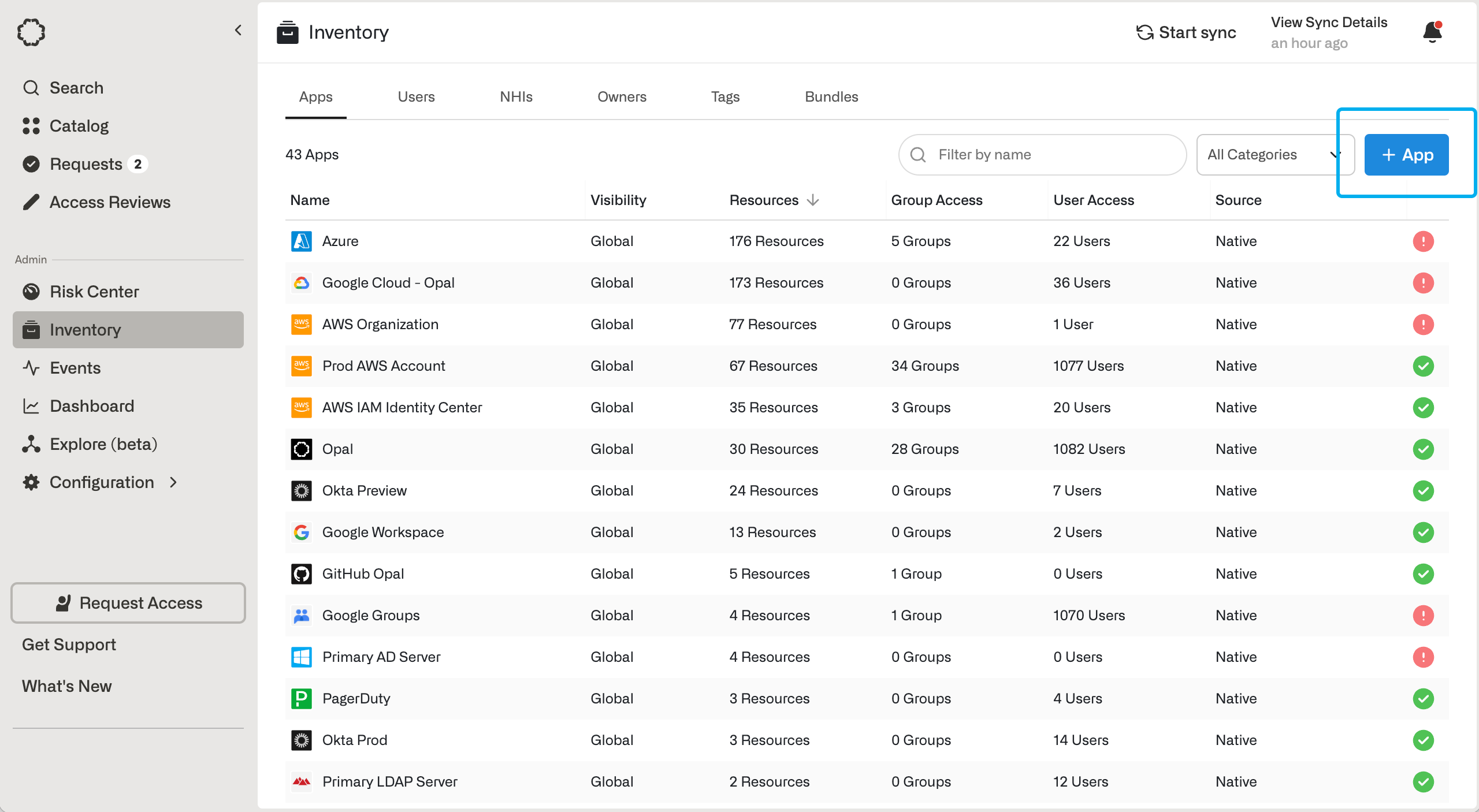
To get started, go to the Inventory > Apps page, then select +App. Select the Active Directory tile.You will see a form to be completed. Opal requires the following credentials in order to manage access to your AD groups.
Step 1 - Configure an Active Directory service account for Opal
In order for Opal to manage your Active Directory server on your behalf, you need to create an Active Directory service account for your server with proper permission scopes.
Connect to a Domain Controller or to a computer with Active Directory Remote Server Administration Tools installed.
Click Start, type “dsa.msc”, then press Enter.
Navigate to the Organizational Unit where the Opal Service Account will be located.
Right-click the Organizational Unit, select New > User.
Optional: Type “Opal” into the First Name field and “Service Account” into the Last Name field.
Type “OpalServiceAccount” into the User logon name field. Click Next.
Configure a password based on your organization’s password policy requirements, uncheck the User must change password at next logon checkbox, and check the Password never expires checkbox. Click Next. Click Finish.
Double click on the newly created service account user. On the Member Of tab, add the Domain Admins group (or if you’re using AWS Managed AD, then add AWS Delegated Administrators instead). Then save the account and click OK.
Back in the Create App form, fill in details about your Active Directory server and service account:
For Server hostname and Server port, input the hostname and port of your Domain Controller (port 636 is always treated as LDAPS; for other ports, turn on TLS Mode to connect over TLS).
Please ensure your AD hostname is reachable from the instance that is hosting the Opal app.
For Base distinguished name, enter the Distinguished Name (DN) of the OU that Opal should begin directory searches from.
For Root username and Root password, enter the credentials of the AD service account that you created above.
If this step is successful, you have completed setting up the Active Directory server connection.
Last modified on October 27, 2026
Was this page helpful?
{"docsConfig":{"theme":"mint","$schema":"https://mintlify.com/docs.json","name":"Opal Security Docs","colors":{"primary":"#0C7997","light":"#EDFCFC","dark":"#074055"},"logo":{"light":"https://mintcdn.com/opalsecurity/FBbZyeMPZrA69UcV/logo/logo-dark.svg?fit=max\u0026auto=format\u0026n=FBbZyeMPZrA69UcV\u0026q=85\u0026s=93a4bd75f157f9f0ab43cdf4d715b5cd","dark":"https://mintcdn.com/opalsecurity/FBbZyeMPZrA69UcV/logo/logo-light.svg?fit=max\u0026auto=format\u0026n=FBbZyeMPZrA69UcV\u0026q=85\u0026s=1774b545e4f1c5cad647f5194f7b26d9"},"favicon":{"light":"https://mintcdn.com/opalsecurity/DRAwGKUXMxLRQouh/logo/icon-opal-black.svg?fit=max\u0026auto=format\u0026n=DRAwGKUXMxLRQouh\u0026q=85\u0026s=9c8bd1204b6b5b83542c2ab5be549858","dark":"https://mintcdn.com/opalsecurity/DRAwGKUXMxLRQouh/logo/icon-opal-white.svg?fit=max\u0026auto=format\u0026n=DRAwGKUXMxLRQouh\u0026q=85\u0026s=73b53b4ceab6ae0b00e30b2042a6020a"},"icons":{"library":"lucide"},"styling":{"eyebrows":"breadcrumbs","latex":false},"integrations":{"ga4":{"measurementId":"G-1PPPM1WF6D"}},"errors":{"404":{"redirect":false,"title":"Page can't be found","description":"Sorry! This page might have been moved, or the link might be broken. Go back to our documentation via https://docs.opal.dev/docs/welcome."}},"metadata":{"timestamp":true},"navigation":{"pages":[]}},"deployment":{"deploymentMetadataValue":{"subdomain":"opalsecurity","hasAudioNarration":false,"actualSubdomain":"opalsecurity","customDomains":["docs.opal.dev"],"gitSource":{"type":"github","owner":"opalsecurity","repo":"docs","deployBranch":"main","contentDirectory":"","isPrivate":true,"mountPath":"","label":""},"chroma":{"liveDeploymentHistoryId":"6ae929df1f7d8250431dc268","collectionId":"98663875-4792-4d23-b456-cfd4208a26a6","schemaVersion":"v3","latestBuiltDeploymentHistoryId":"6ae929df1f7d8250431dc268"},"feedback":{"thumbs":true},"entitlements":{"AI_CHAT":{"status":"ENABLED"},"WEB_MCP":{"status":"ENABLED"},"NARRATION":{"status":"ENABLED"}},"buildId":"6ae92c7360e0446405625ac4","clientVersion":"0.0.4045","searchFilterCounts":[{"language":"default","tag":"API Reference","count":212},{"language":"default","tag":"Opal API","count":207},{"language":"default","tag":"Documentation","count":99},{"language":"default","tag":"Integrations","count":95},{"language":"default","tag":"Entitlement Management","count":63},{"language":"default","tag":"resources","count":34},{"language":"default","tag":"groups","count":32},{"language":"default","tag":"Getting Started","count":25},{"language":"default","tag":"Access Management","count":22},{"language":"default","tag":"Infrastructure","count":22}]},"assistantConfig":{"enableStarterQuestions":true,"enableContextualStarterQuestions":true,"deflection":{"enabled":true,"email":"support@opal.dev","showHelpButton":true}},"basePath":"","hasChatPermissions":true,"hasWebMcpPermissions":true,"toggles":[{"name":"kill-isr","enabled":true,"variant":{"name":"disabled","enabled":false,"feature_enabled":true},"impressionData":false},{"name":"agent-mintlify-slack","enabled":true,"variant":{"name":"disabled","enabled":false,"feature_enabled":true},"impressionData":false},{"name":"agent-integrations-settings","enabled":true,"variant":{"name":"disabled","enabled":false,"feature_enabled":true},"impressionData":false},{"name":"automations-pr-grouping","enabled":true,"variant":{"name":"disabled","enabled":false,"feature_enabled":true},"impressionData":false},{"name":"custom-prefix","enabled":true,"variant":{"name":"disabled","enabled":false,"feature_enabled":true},"impressionData":false},{"name":"analytics-v7","enabled":true,"variant":{"name":"disabled","enabled":false,"feature_enabled":true},"impressionData":false},{"name":"user-flows-analytics","enabled":true,"variant":{"name":"disabled","enabled":false,"feature_enabled":true},"impressionData":false},{"name":"no-publish-flow","enabled":true,"variant":{"name":"disabled","enabled":false,"feature_enabled":true},"impressionData":false},{"name":"workos-onboarding","enabled":true,"variant":{"name":"disabled","enabled":false,"feature_enabled":true},"impressionData":false},{"name":"llms-txt-v2","enabled":true,"variant":{"name":"disabled","enabled":false,"feature_enabled":true},"impressionData":false},{"name":"snapshot-serving-live","enabled":true,"variant":{"name":"disabled","enabled":false,"feature_enabled":true},"impressionData":false},{"name":"stripTemperatureMiddleware","enabled":true,"variant":{"name":"disabled","enabled":false,"feature_enabled":true},"impressionData":false},{"name":"support-platform-pylon-zendesk","enabled":true,"variant":{"name":"disabled","enabled":false,"feature_enabled":true},"impressionData":false},{"name":"snapshot-serving","enabled":true,"variant":{"name":"disabled","enabled":false,"feature_enabled":true},"impressionData":false},{"name":"instant-rollback","enabled":true,"variant":{"name":"disabled","enabled":false,"feature_enabled":true},"impressionData":false},{"name":"granular-notifications-server","enabled":true,"variant":{"name":"disabled","enabled":false,"feature_enabled":true},"impressionData":false},{"name":"granular-notifications","enabled":true,"variant":{"name":"disabled","enabled":false,"feature_enabled":true},"impressionData":false},{"name":"automations-fable","enabled":true,"variant":{"name":"disabled","enabled":false,"feature_enabled":true},"impressionData":false},{"name":"fixed-ai-action-pricing","enabled":true,"variant":{"name":"disabled","enabled":false,"feature_enabled":true},"impressionData":false},{"name":"automation-resolve-merge-conflict","enabled":true,"variant":{"name":"disabled","enabled":false,"feature_enabled":true},"impressionData":false},{"name":"scoped-publishing","enabled":true,"variant":{"name":"disabled","enabled":false,"feature_enabled":true},"impressionData":false},{"name":"mintql","enabled":true,"variant":{"name":"disabled","enabled":false,"feature_enabled":true},"impressionData":false},{"name":"page-level-analytics","enabled":true,"variant":{"name":"disabled","enabled":false,"feature_enabled":true},"impressionData":false},{"name":"editor-version-history-v2","enabled":true,"variant":{"name":"disabled","enabled":false,"feature_enabled":true},"impressionData":false},{"name":"billing-page-v2","enabled":true,"variant":{"name":"disabled","enabled":false,"feature_enabled":true},"impressionData":false},{"name":"full-page-search","enabled":true,"variant":{"name":"disabled","enabled":false,"feature_enabled":true},"impressionData":false},{"name":"workspace-projects","enabled":true,"variant":{"name":"disabled","enabled":false,"feature_enabled":true},"impressionData":false},{"name":"assistant-v5","enabled":true,"variant":{"name":"disabled","enabled":false,"feature_enabled":true},"impressionData":false},{"name":"byok-sep-25","enabled":true,"variant":{"name":"disabled","enabled":false,"feature_enabled":true},"impressionData":false},{"name":"fork-pr-previews","enabled":true,"variant":{"name":"disabled","enabled":false,"feature_enabled":true},"impressionData":false},{"name":"revalidation-jwt","enabled":true,"variant":{"name":"disabled","enabled":false,"feature_enabled":true},"impressionData":false},{"name":"vite-origin","enabled":true,"variant":{"name":"disabled","enabled":false,"feature_enabled":true},"impressionData":false},{"name":"billing-updated-9-15","enabled":true,"variant":{"name":"disabled","enabled":false,"feature_enabled":true},"impressionData":false},{"name":"workos-sso-scim","enabled":true,"variant":{"name":"disabled","enabled":false,"feature_enabled":true},"impressionData":false},{"name":"hobby-abuse-scan","enabled":true,"variant":{"name":"disabled","enabled":false,"feature_enabled":true},"impressionData":false},{"name":"dashboard-inbox","enabled":true,"variant":{"name":"disabled","enabled":false,"feature_enabled":true},"impressionData":false},{"name":"workos-signup","enabled":true,"variant":{"name":"disabled","enabled":false,"feature_enabled":true},"impressionData":false},{"name":"turbopuffer-dual-write","enabled":true,"variant":{"name":"disabled","enabled":false,"feature_enabled":true},"impressionData":false},{"name":"workos-enabled","enabled":true,"variant":{"name":"disabled","enabled":false,"feature_enabled":true},"impressionData":false},{"name":"approve-review-flow","enabled":true,"variant":{"name":"disabled","enabled":false,"feature_enabled":true},"impressionData":false},{"name":"sso-setup-deadline-banner","enabled":true,"variant":{"name":"disabled","enabled":false,"feature_enabled":true},"impressionData":false}],"googleFontsInlined":false},"customCss":[],"page":{"pagePath":"integrations/active-directory","slug":"/integrations/active-directory","pageMetadata":{"title":"Overview","description":"Connect your Active Directory server to use Opal to manage and review access.","sidebarTitle":"Connect to Active Directory","href":"/integrations/active-directory"},"description":{"compiledSource":"\"use strict\";\nconst {jsx: _jsx} = arguments[0];\nconst {useMDXComponents: _provideComponents} = arguments[0];\nfunction _createMdxContent(props) {\n const _components = {\n p: \"p\",\n ..._provideComponents(),\n ...props.components\n };\n return _jsx(_components.p, {\n children: \"Connect your Active Directory server to use Opal to manage and review access.\"\n });\n}\nfunction MDXContent(props = {}) {\n const {wrapper: MDXLayout} = {\n ..._provideComponents(),\n ...props.components\n };\n return MDXLayout ? _jsx(MDXLayout, {\n ...props,\n children: _jsx(_createMdxContent, {\n ...props\n })\n }) : _createMdxContent(props);\n}\nreturn {\n default: MDXContent\n};\n","frontmatter":{},"scope":{}},"pageType":"default","mdx":{"mdxSource":{"compiledSource":"\"use strict\";const{Fragment:_Fragment,jsx:_jsx,jsxs:_jsxs}=arguments[0];const{useMDXComponents:_provideComponents}=arguments[0];function _createMdxContent(props){const _components={a:`a`,code:`code`,li:`li`,p:`p`,strong:`strong`,tbody:`tbody`,td:`td`,th:`th`,thead:`thead`,tr:`tr`,ul:`ul`,..._provideComponents(),...props.components},{Heading,OptimizedImage,Table}=_components;if(!Heading)_missingMdxReference(`Heading`,true);if(!OptimizedImage)_missingMdxReference(`OptimizedImage`,true);if(!Table)_missingMdxReference(`Table`,true);return _jsxs(_Fragment,{children:[_jsx(_components.p,{children:`Opal’s integration with Active Directory supports the following, and more:`}),`\n`,_jsxs(_components.ul,{children:[`\n`,_jsxs(_components.li,{children:[`Users can `,_jsx(_components.strong,{children:`request time-bounded access`}),` to your AD groups.`]}),`\n`,_jsxs(_components.li,{children:[`Auditors can `,_jsx(_components.strong,{children:`initiate access reviews`}),` that assign managers or group admins to periodically review users with long-lived access to AD groups.`]}),`\n`,_jsxs(_components.li,{children:[`Admins can `,_jsx(_components.strong,{children:`add resources from other Opal integrations`}),` to an AD group so an AD group’s members can automatically gain birthright access to, for example, a GitHub repo, AWS IAM role, etc.`]}),`\n`,_jsxs(_components.li,{children:[`All access changes are tracked as `,_jsx(_components.a,{href:`/docs/event-types`,children:`events`}),` that can be logged to a Slack channel or be exported to your favorite tools.`]}),`\n`]}),`\n`,_jsx(Heading,{level:`2`,id:`supported-resources`,children:`Supported resources`}),`\n`,_jsxs(Table,{children:[_jsx(_components.thead,{children:_jsxs(_components.tr,{children:[_jsx(_components.th,{children:`Resource`}),_jsx(_components.th,{children:`Read`}),_jsx(_components.th,{children:`Grant and revoke access`}),_jsx(_components.th,{children:`Available in Risk Center`})]})}),_jsx(_components.tbody,{children:_jsxs(_components.tr,{children:[_jsx(_components.td,{children:`Active Directory Groups`}),_jsx(_components.td,{children:`✔️`}),_jsx(_components.td,{children:`✔️`}),_jsx(_components.td,{children:`✔️`})]})})]}),`\n`,_jsx(Heading,{level:`2`,id:`create-an-active-directory-app`,children:`Create an Active Directory app`}),`\n`,_jsxs(_components.p,{children:[`To get started, go to the `,_jsx(_components.strong,{children:`Inventory`}),` > `,_jsx(_components.strong,{children:`Apps`}),` page, then select `,_jsx(_components.strong,{children:`+App`}),`. Select the Active Directory tile.`]}),`\n`,_jsx(OptimizedImage,{src:`https://mintcdn.com/opalsecurity/4Xj9diJ3E3kX-9Xd/images/docs/ea8116616ade46f8308e30ae3eaef4b57a3626e31b7f132c9fd3ab7b39f71e7e-opal-101-apps-add-app.png?fit=max\u0026auto=format\u0026n=4Xj9diJ3E3kX-9Xd\u0026q=85\u0026s=b802bd7dcfaf72cbc59045ab1f597a39`,alt:``,\"data-og-width\":`2560`,width:`2560`,\"data-og-height\":`1406`,height:`1406`,\"data-path\":`images/docs/ea8116616ade46f8308e30ae3eaef4b57a3626e31b7f132c9fd3ab7b39f71e7e-opal-101-apps-add-app.png`,\"data-optimize\":`true`,\"data-opv\":`3`,srcset:`https://mintcdn.com/opalsecurity/4Xj9diJ3E3kX-9Xd/images/docs/ea8116616ade46f8308e30ae3eaef4b57a3626e31b7f132c9fd3ab7b39f71e7e-opal-101-apps-add-app.png?w=280\u0026fit=max\u0026auto=format\u0026n=4Xj9diJ3E3kX-9Xd\u0026q=85\u0026s=54218b580edaa33d7bda49fc2ea49019 280w, https://mintcdn.com/opalsecurity/4Xj9diJ3E3kX-9Xd/images/docs/ea8116616ade46f8308e30ae3eaef4b57a3626e31b7f132c9fd3ab7b39f71e7e-opal-101-apps-add-app.png?w=560\u0026fit=max\u0026auto=format\u0026n=4Xj9diJ3E3kX-9Xd\u0026q=85\u0026s=005114a620985db5a357cef516120e87 560w, https://mintcdn.com/opalsecurity/4Xj9diJ3E3kX-9Xd/images/docs/ea8116616ade46f8308e30ae3eaef4b57a3626e31b7f132c9fd3ab7b39f71e7e-opal-101-apps-add-app.png?w=840\u0026fit=max\u0026auto=format\u0026n=4Xj9diJ3E3kX-9Xd\u0026q=85\u0026s=1cd3adeaac1d8839bcba97405e52aa33 840w, https://mintcdn.com/opalsecurity/4Xj9diJ3E3kX-9Xd/images/docs/ea8116616ade46f8308e30ae3eaef4b57a3626e31b7f132c9fd3ab7b39f71e7e-opal-101-apps-add-app.png?w=1100\u0026fit=max\u0026auto=format\u0026n=4Xj9diJ3E3kX-9Xd\u0026q=85\u0026s=7a4d121198f358e83cdf5ed9669a742b 1100w, https://mintcdn.com/opalsecurity/4Xj9diJ3E3kX-9Xd/images/docs/ea8116616ade46f8308e30ae3eaef4b57a3626e31b7f132c9fd3ab7b39f71e7e-opal-101-apps-add-app.png?w=1650\u0026fit=max\u0026auto=format\u0026n=4Xj9diJ3E3kX-9Xd\u0026q=85\u0026s=b9ae92b08cc8486e01147107f49277a6 1650w, https://mintcdn.com/opalsecurity/4Xj9diJ3E3kX-9Xd/images/docs/ea8116616ade46f8308e30ae3eaef4b57a3626e31b7f132c9fd3ab7b39f71e7e-opal-101-apps-add-app.png?w=2500\u0026fit=max\u0026auto=format\u0026n=4Xj9diJ3E3kX-9Xd\u0026q=85\u0026s=26c88f592daa3af067c84bc8e20f8edf 2500w`}),`\n`,_jsx(_components.p,{children:`You will see a form to be completed. Opal requires the following credentials in order to manage access to your AD groups.`}),`\n`,_jsx(Heading,{level:`2`,id:`step-1-configure-an-active-directory-service-account-for-opal`,children:`Step 1 - Configure an Active Directory service account for Opal`}),`\n`,_jsx(_components.p,{children:`In order for Opal to manage your Active Directory server on your behalf, you need to create an Active Directory service account for your server with proper permission scopes.`}),`\n`,_jsxs(_components.ul,{children:[`\n`,_jsx(_components.li,{children:`Connect to a Domain Controller or to a computer with Active Directory Remote Server Administration Tools installed.`}),`\n`,_jsxs(_components.li,{children:[`Click `,_jsx(_components.strong,{children:`Start`}),`, type `,_jsx(_components.strong,{children:`“dsa.msc”`}),`, then press `,_jsx(_components.strong,{children:`Enter`}),`.`]}),`\n`,_jsx(_components.li,{children:`Navigate to the Organizational Unit where the Opal Service Account will be located.`}),`\n`,_jsxs(_components.li,{children:[`Right-click the Organizational Unit, select `,_jsx(_components.strong,{children:`New`}),` > `,_jsx(_components.strong,{children:`User`}),`.`]}),`\n`,_jsxs(_components.li,{children:[`Optional: Type `,_jsx(_components.strong,{children:`“Opal”`}),` into the `,_jsx(_components.strong,{children:`First Name`}),` field and `,_jsx(_components.strong,{children:`“Service Account”`}),` into the `,_jsx(_components.strong,{children:`Last Name`}),` field.`]}),`\n`,_jsxs(_components.li,{children:[`Type `,_jsx(_components.strong,{children:`“OpalServiceAccount”`}),` into the `,_jsx(_components.strong,{children:`User logon name`}),` field. Click `,_jsx(_components.strong,{children:`Next`}),`.`]}),`\n`,_jsxs(_components.li,{children:[`Configure a password based on your organization’s password policy requirements, uncheck the `,_jsx(_components.strong,{children:`User must change password at next logon`}),` checkbox, and check the `,_jsx(_components.strong,{children:`Password never expires`}),` checkbox. Click `,_jsx(_components.strong,{children:`Next`}),`. Click `,_jsx(_components.strong,{children:`Finish`}),`.`]}),`\n`,_jsxs(_components.li,{children:[`Double click on the newly created service account user. On the `,_jsx(_components.strong,{children:`Member Of`}),` tab, add the `,_jsx(_components.strong,{children:`Domain Admins`}),` group (or if you’re using AWS Managed AD, then add `,_jsx(_components.strong,{children:`AWS Delegated Administrators`}),` instead). Then save the account and click `,_jsx(_components.strong,{children:`OK`}),`.`]}),`\n`]}),`\n`,_jsx(Heading,{level:`2`,id:`step-2-fill-out-opal-form`,children:`Step 2 - Fill out Opal form`}),`\n`,_jsx(_components.p,{children:`Back in the Create App form, fill in details about your Active Directory server and service account:`}),`\n`,_jsxs(_components.ul,{children:[`\n`,_jsxs(_components.li,{children:[`For `,_jsx(_components.strong,{children:`Server hostname`}),` and `,_jsx(_components.strong,{children:`Server port`}),`, input the hostname and port of your Domain Controller (port `,_jsx(_components.code,{children:`636`}),` is always treated as LDAPS; for other ports, turn on `,_jsx(_components.strong,{children:`TLS Mode`}),` to connect over TLS).`,`\n`,_jsxs(_components.ul,{children:[`\n`,_jsx(_components.li,{children:`Please ensure your AD hostname is reachable from the instance that is hosting the Opal app.`}),`\n`]}),`\n`]}),`\n`,_jsxs(_components.li,{children:[`For `,_jsx(_components.strong,{children:`Base distinguished name`}),`, enter the Distinguished Name (DN) of the OU that Opal should begin directory searches from.`]}),`\n`,_jsxs(_components.li,{children:[`For `,_jsx(_components.strong,{children:`Root username`}),` and `,_jsx(_components.strong,{children:`Root password`}),`, enter the credentials of the AD service account that you created above.`]}),`\n`]}),`\n`,_jsx(_components.p,{children:`If this step is successful, you have completed setting up the Active Directory server connection.`})]})}function MDXContent(props={}){const{wrapper:MDXLayout}={..._provideComponents(),...props.components};return MDXLayout?_jsx(MDXLayout,{...props,children:_jsx(_createMdxContent,{...props})}):_createMdxContent(props)}return{default:MDXContent};function _missingMdxReference(id,component){throw new Error(`Expected `+(component?`component`:`object`)+\" `\"+id+\"` to be defined: you likely forgot to import, pass, or provide it.\")}","frontmatter":{},"scope":{"config":{},"pageMetadata":{"title":"Overview","description":"Connect your Active Directory server to use Opal to manage and review access.","sidebarTitle":"Connect to Active Directory","href":"/integrations/active-directory"}}},"mdxSourceWithNoJs":null},"mdxExtracts":{"tableOfContents":[{"title":"Supported resources","slug":"supported-resources","depth":2,"children":[]},{"title":"Create an Active Directory app","slug":"create-an-active-directory-app","depth":2,"children":[]},{"title":"Step 1 - Configure an Active Directory service account for Opal","slug":"step-1-configure-an-active-directory-service-account-for-opal","depth":2,"children":[]},{"title":"Step 2 - Fill out Opal form","slug":"step-2-fill-out-opal-form","depth":2,"children":[]}],"codeExamples":{}},"jsLinks":["/_mintlify/custom/opalsecurity/d0e14c3cf9bbd682/changelog-scraper.js"],"subdomain":"opalsecurity","siteName":"Opal Security Docs","title":"Overview - Opal Security Docs","contextualStarterQuestions":[{"_id":"6ae0ff2bc878fa74d974b612","deploymentId":"68ddaa9a3f8b7de5bc3a7b47","questionText":"How do I request AD group access?","status":"active","generatedBy":"contextual","path":"integrations/active-directory","createdAt":"2026-10-27T19:44:43.693Z","updatedAt":"2026-10-27T19:44:43.693Z","__v":0},{"_id":"6ae0ff2bc878fa74d974b613","deploymentId":"68ddaa9a3f8b7de5bc3a7b47","questionText":"What can I audit with Active Directory?","status":"active","generatedBy":"contextual","path":"integrations/active-directory","createdAt":"2026-10-27T19:44:43.693Z","updatedAt":"2026-10-27T19:44:43.693Z","__v":0},{"_id":"6ae0ff2bc878fa74d974b614","deploymentId":"68ddaa9a3f8b7de5bc3a7b47","questionText":"How do I set up an AD app?","status":"active","generatedBy":"contextual","path":"integrations/active-directory","createdAt":"2026-10-27T19:44:43.693Z","updatedAt":"2026-10-27T19:44:43.693Z","__v":0}],"navMaps":{"firstHrefInVersion":{},"firstHrefInLanguage":{}},"lastModified":"2026-10-27T19:44:25.028Z","gitLastModified":"2026-10-27T19:42:45.000Z","originalFileLocation":"integrations/active-directory.mdx"},"headHtml":"\u003cscript data-mint-head>(function(){var d=document.documentElement,p=null;if(!p){try{p=localStorage.getItem(\"isDarkMode\")}catch(e){}if(p==='true')p='dark';else if(p==='false')p='light';if(p!=='light'\u0026\u0026p!=='dark'\u0026\u0026p!=='system')p=\"system\"}var r=p==='system'?(matchMedia(\"(prefers-color-scheme: dark)\").matches?'dark':'light'):p;d.classList.remove(r==='dark'?'light':'dark');d.classList.add(r);d.setAttribute(\"data-theme-preference\",p)})();\u003c/script>\u003cmeta data-mint-head name=\"description\" content=\"Connect your Active Directory server to use Opal to manage and review access.\">\u003cmeta data-mint-head name=\"application-name\" content=\"Opal Security Docs\">\u003cmeta data-mint-head name=\"generator\" content=\"Mintlify\">\u003clink data-mint-head rel=\"icon\" type=\"image/png\" sizes=\"192x192\" href=\"/mintlify-assets/_mintlify/favicons/opalsecurity/t501z2uOx-XXqevB/_generated/favicon/android-chrome-192x192.png\" media=\"(prefers-color-scheme: light)\">\u003clink data-mint-head rel=\"apple-touch-icon\" type=\"image/png\" sizes=\"180x180\" href=\"/mintlify-assets/_mintlify/favicons/opalsecurity/t501z2uOx-XXqevB/_generated/favicon/apple-touch-icon.png\">\u003clink data-mint-head rel=\"icon\" type=\"image/png\" sizes=\"16x16\" href=\"/mintlify-assets/_mintlify/favicons/opalsecurity/t501z2uOx-XXqevB/_generated/favicon/favicon-16x16.png\" media=\"(prefers-color-scheme: light)\">\u003clink data-mint-head rel=\"icon\" type=\"image/png\" sizes=\"32x32\" href=\"/mintlify-assets/_mintlify/favicons/opalsecurity/t501z2uOx-XXqevB/_generated/favicon/favicon-32x32.png\" media=\"(prefers-color-scheme: light)\">\u003clink data-mint-head rel=\"shortcut icon\" type=\"image/x-icon\" href=\"/mintlify-assets/_mintlify/favicons/opalsecurity/t501z2uOx-XXqevB/_generated/favicon/favicon.ico\" media=\"(prefers-color-scheme: light)\">\u003clink data-mint-head rel=\"icon\" type=\"image/png\" sizes=\"192x192\" href=\"/mintlify-assets/_mintlify/favicons/opalsecurity/t501z2uOx-XXqevB/_generated/favicon-dark/android-chrome-192x192.png\" media=\"(prefers-color-scheme: dark)\">\u003clink data-mint-head rel=\"icon\" type=\"image/png\" sizes=\"16x16\" href=\"/mintlify-assets/_mintlify/favicons/opalsecurity/t501z2uOx-XXqevB/_generated/favicon-dark/favicon-16x16.png\" media=\"(prefers-color-scheme: dark)\">\u003clink data-mint-head rel=\"icon\" type=\"image/png\" sizes=\"32x32\" href=\"/mintlify-assets/_mintlify/favicons/opalsecurity/t501z2uOx-XXqevB/_generated/favicon-dark/favicon-32x32.png\" media=\"(prefers-color-scheme: dark)\">\u003clink data-mint-head rel=\"shortcut icon\" type=\"image/x-icon\" href=\"/mintlify-assets/_mintlify/favicons/opalsecurity/t501z2uOx-XXqevB/_generated/favicon-dark/favicon.ico\" media=\"(prefers-color-scheme: dark)\">\u003cmeta data-mint-head property=\"og:title\" content=\"Overview - Opal Security Docs\">\u003cmeta data-mint-head property=\"og:description\" content=\"Connect your Active Directory server to use Opal to manage and review access.\">\u003cmeta data-mint-head property=\"og:site_name\" content=\"Opal Security Docs\">\u003cmeta data-mint-head property=\"og:url\" content=\"https://docs.opal.dev/integrations/active-directory\">\u003cmeta data-mint-head property=\"og:type\" content=\"website\">\u003cmeta data-mint-head property=\"og:image\" content=\"https://opalsecurity.mintlify.app/_mintlify/api/og/v2?division=Active+Directory\u0026amp;title=Overview\u0026amp;description=Connect+your+Active+Directory+server+to+use+Opal+to+manage+and+review+access.\u0026amp;theme=287ef1256bbb1bf2a61f3fd2\u0026amp;signature=c9900c29ca1294e6b8e00b8337c96023f88580d3aaee8d2ce5c3dba4084cc870\">\u003cmeta data-mint-head property=\"og:image:width\" content=\"1200\">\u003cmeta data-mint-head property=\"og:image:height\" content=\"630\">\u003cmeta data-mint-head name=\"twitter:card\" content=\"summary_large_image\">\u003cmeta data-mint-head name=\"twitter:title\" content=\"Overview - Opal Security Docs\">\u003cmeta data-mint-head name=\"twitter:description\" content=\"Connect your Active Directory server to use Opal to manage and review access.\">\u003cmeta data-mint-head name=\"twitter:image\" content=\"https://opalsecurity.mintlify.app/_mintlify/api/og/v2?division=Active+Directory\u0026amp;title=Overview\u0026amp;description=Connect+your+Active+Directory+server+to+use+Opal+to+manage+and+review+access.\u0026amp;theme=287ef1256bbb1bf2a61f3fd2\u0026amp;signature=c9900c29ca1294e6b8e00b8337c96023f88580d3aaee8d2ce5c3dba4084cc870\">\u003cmeta data-mint-head name=\"twitter:image:width\" content=\"1200\">\u003cmeta data-mint-head name=\"twitter:image:height\" content=\"630\">\u003cmeta data-mint-head name=\"msapplication-config\" content=\"/mintlify-assets/_mintlify/favicons/opalsecurity/t501z2uOx-XXqevB/_generated/favicon/browserconfig.xml\">\u003cmeta data-mint-head name=\"apple-mobile-web-app-title\" content=\"Opal Security Docs\">\u003cmeta data-mint-head name=\"msapplication-TileColor\" content=\"#0C7997\">\u003clink data-mint-head rel=\"canonical\" href=\"https://docs.opal.dev/integrations/active-directory\">\u003clink data-mint-head rel=\"alternate\" type=\"application/xml\" href=\"/sitemap.xml\">\u003clink data-mint-head rel=\"alternate\" type=\"text/markdown\" href=\"/integrations/active-directory.md\">\u003cscript data-mint-head type=\"application/ld+json\">{\"@context\":\"https://schema.org\",\"@graph\":[{\"@type\":\"Organization\",\"@id\":\"https://docs.opal.dev/#organization\",\"name\":\"Opal Security Docs\",\"url\":\"https://docs.opal.dev\",\"logo\":{\"@type\":\"ImageObject\",\"url\":\"https://mintcdn.com/opalsecurity/FBbZyeMPZrA69UcV/logo/logo-dark.svg?fit=max\u0026auto=format\u0026n=FBbZyeMPZrA69UcV\u0026q=85\u0026s=93a4bd75f157f9f0ab43cdf4d715b5cd\"}},{\"@type\":\"WebSite\",\"@id\":\"https://docs.opal.dev#website\",\"name\":\"Opal Security Docs\",\"url\":\"https://docs.opal.dev\",\"publisher\":{\"@id\":\"https://docs.opal.dev/#organization\"}},{\"@type\":\"WebPage\",\"@id\":\"https://docs.opal.dev/integrations/active-directory#webpage\",\"url\":\"https://docs.opal.dev/integrations/active-directory\",\"name\":\"Overview\",\"description\":\"Connect your Active Directory server to use Opal to manage and review access.\",\"dateModified\":\"2026-10-27T19:42:45.000Z\",\"isPartOf\":{\"@id\":\"https://docs.opal.dev#website\"},\"breadcrumb\":{\"@id\":\"https://docs.opal.dev/integrations/active-directory#breadcrumb\"}},{\"@type\":\"BreadcrumbList\",\"@id\":\"https://docs.opal.dev/integrations/active-directory#breadcrumb\",\"itemListElement\":[{\"@type\":\"ListItem\",\"position\":1,\"name\":\"IDP \u0026 HRIDP\",\"item\":\"https://docs.opal.dev/integrations/okta\"},{\"@type\":\"ListItem\",\"position\":2,\"name\":\"Overview\",\"item\":\"https://docs.opal.dev/integrations/active-directory\"}]},{\"@type\":[\"Article\",\"TechArticle\"],\"@id\":\"https://docs.opal.dev/integrations/active-directory#article\",\"headline\":\"Overview\",\"name\":\"Overview\",\"description\":\"Connect your Active Directory server to use Opal to manage and review access.\",\"url\":\"https://docs.opal.dev/integrations/active-directory\",\"mainEntityOfPage\":{\"@id\":\"https://docs.opal.dev/integrations/active-directory#webpage\"},\"dateModified\":\"2026-10-27T19:42:45.000Z\",\"publisher\":{\"@id\":\"https://docs.opal.dev/#organization\"},\"isPartOf\":{\"@id\":\"https://docs.opal.dev#website\"}}]}\u003c/script>\u003cscript data-mint-head type=\"application/ld+json\">{\"@context\":\"https://schema.org\",\"@type\":\"WebSite\",\"name\":\"Opal Security Docs\",\"creator\":{\"@type\":\"Organization\",\"name\":\"Mintlify\",\"url\":\"https://mintlify.com\"}}\u003c/script>","siteName":"Opal Security Docs","nav":{"global":null,"tabs":[{"tab":"Documentation","pages":[{"title":"Documentation","href":"/docs/welcome"}]},{"tab":"Integrations","pages":[{"title":"Integrations","sidebarTitle":"Overview","mode":"wide","href":"/integrations/overview"},{"group":"IDP \u0026 HRIDP","pages":[{"group":"Okta","pages":[{"title":"Okta","sidebarTitle":"Connect to Okta","href":"/integrations/okta"},{"title":"Okta IDP/HRIS Integration","href":"/integrations/okta-idphris-integration"},{"title":"Import Okta apps","href":"/integrations/okta-apps"},{"title":"Okta rate limits","href":"/integrations/okta-rate-limits"}]},{"group":"Google","pages":[{"title":"Google","sidebarTitle":"Connect to Google","href":"/integrations/google"},{"title":"Google IDP/HRIS Integration","href":"/integrations/google-idphris-integration"},{"title":"Google Groups","href":"/integrations/google-groups"},{"title":"Google Workspace","href":"/integrations/google-workspace"}]},{"group":"Azure","pages":[{"title":"Azure","sidebarTitle":"Connect to Azure","href":"/integrations/azure"},{"title":"Azure Entra IDP/HRIS Integration","href":"/integrations/azure-entra-idphris-integration"},{"title":"Azure Infrastructure Setup","href":"/integrations/azure-infrastructure-setup"},{"title":"Add Azure Databases","href":"/integrations/adding-azure-sql-databases"},{"title":"Azure Real Time Sync Setup","description":null,"href":"/integrations/azure-real-time-sync"}]},{"group":"Active Directory","pages":[{"title":"Overview","sidebarTitle":"Connect to Active Directory","href":"/integrations/active-directory"},{"title":"Active Directory IDP/HRIS Integration","description":null,"href":"/integrations/active-directory-idphris-integration"}]},{"group":"Workday","pages":[{"title":"Overview","sidebarTitle":"Connect to Workday","href":"/integrations/workday"},{"title":"Workday IDP/HRIS Integration","href":"/integrations/workday-idphris-integration"}]},{"group":"Rippling","pages":[{"title":"Rippling IDP/HRIS Integration","href":"/integrations/rippling-idphris-integration"}]}]},{"group":"Entitlement Management","pages":[{"group":"Infrastructure","expanded":true,"pages":[{"group":"Amazon Web Services (AWS)","expanded":false,"pages":[{"title":"Amazon Web Services (AWS)","href":"/integrations/setting-up-your-aws-organization-in-opal"},{"title":"Configure AWS for self-hosted Opal","href":"/integrations/aws-integration-on-prem-setup"},{"title":"Configure additional AWS accounts to manage in Opal","href":"/integrations/configure-additional-aws-accounts-to-manage-in-opal"},{"title":"AWS IAM Identity Center Workflows","href":"/integrations/aws-iam-identity-center-formerly-aws-sso"},{"title":"Add an IAM role","href":"/integrations/adding-an-iam-role"},{"title":"Add an RDS database","href":"/integrations/adding-an-rds-database"},{"title":"Add an EC2 instance","href":"/integrations/adding-an-ec2-instance"},{"title":"Add an EKS cluster","href":"/integrations/adding-an-eks-cluster"},{"title":"Adding AWS Resources to Opal Groups via AWS Tags","href":"/integrations/adding-aws-resources-to-opal-groups-via-aws-tags"},{"title":"AWS Real Time Sync Setup","href":"/integrations/aws-real-time-sync"}]},{"group":"Google Cloud Platform (GCP)","expanded":false,"pages":[{"title":"Google Cloud Platform (GCP)","sidebarTitle":"Connect to GCP","href":"/integrations/google-cloud-platform"},{"title":"Add an organization","href":"/integrations/adding-gcp-organization"},{"title":"Add a project","href":"/integrations/adding-gcp-project"},{"title":"Add a folder","href":"/integrations/adding-gcp-folder"},{"title":"Add a BigQuery Dataset","href":"/integrations/adding-bigquery-dataset"},{"title":"Add a Cloud Storage bucket","href":"/integrations/adding-gcp-bucket"},{"title":"Add a Cloud SQL Instance","href":"/integrations/adding-sql-instance"},{"title":"Add a Compute Engine Instance","href":"/integrations/adding-compute-instance"},{"title":"Google Kubernetes Engine (GKE)","href":"/integrations/google-kubernetes-engine-getting-started"},{"title":"GCP Service Accounts","href":"/integrations/gcp-service-accounts"}]},{"group":"Snowflake","expanded":false,"pages":[{"title":"Snowflake","sidebarTitle":"Connect to Snowflake","href":"/integrations/snowflake"},{"title":"Snowflake User Provisioning","href":"/integrations/snowflake-user-provisioning"}]}]},{"title":"1Password","href":"/integrations/1password"},{"title":"Anthropic Platform","href":"/integrations/anthropic"},{"title":"Astra","href":"/integrations/astra"},{"title":"Axiom","href":"/integrations/axiom"},{"title":"Clickhouse","href":"/integrations/clickhouse"},{"title":"Atlassian Confluence","sidebarTitle":"Atlassian Confluence","href":"/integrations/confluence"},{"title":"Coupa","href":"/integrations/coupa"},{"title":"Cursor","href":"/integrations/cursor"},{"title":"Databricks","href":"/integrations/databricks"},{"title":"Datadog","href":"/integrations/datadog"},{"title":"Devin AI","href":"/integrations/devin"},{"title":"Docusign","href":"/integrations/docusign"},{"title":"Duo","href":"/integrations/duo"},{"title":"GitHub","href":"/integrations/github"},{"title":"GitHub Enterprise","href":"/integrations/github-enterprise"},{"title":"GitLab","href":"/integrations/gitlab"},{"title":"Grafana","href":"/integrations/grafana"},{"title":"Hubspot","href":"/integrations/hubspot"},{"title":"Incident.io","href":"/integrations/incidentio"},{"title":"Atlassian Jira","sidebarTitle":"Atlassian Jira","href":"/integrations/jira"},{"title":"LDAP","href":"/integrations/ldap"},{"title":"Linear","sidebarTitle":"Linear","href":"/integrations/linear"},{"title":"NetSuite","href":"/integrations/netsuite"},{"title":"Okta CIAM","href":"/integrations/okta-ciam"},{"title":"OpenAI Platform","href":"/integrations/openai"},{"title":"Oracle Fusion Cloud","href":"/integrations/oracle-fusion-cloud"},{"title":"PagerDuty","href":"/integrations/pagerduty-entitlements"},{"title":"Ramp","tag":"NEW","href":"/integrations/ramp"},{"title":"Rippling","tag":"NEW","href":"/integrations/rippling"},{"title":"Rootly","href":"/integrations/rootly"},{"title":"Salesforce","href":"/integrations/salesforce"},{"title":"Slack users and groups","href":"/integrations/slack-user-groups"},{"title":"Salesforce Tableau","href":"/integrations/tableau"},{"title":"Tailscale","href":"/integrations/tailscale"},{"title":"Teleport","href":"/integrations/teleport"},{"title":"Twingate","href":"/integrations/twingate"},{"title":"Vercel","tag":"NEW","href":"/integrations/vercel"},{"title":"Workday groups and roles","href":"/integrations/workday-groups-and-roles"},{"title":"Wrike","tag":"NEW","href":"/integrations/wrike"},{"title":"Zendesk","href":"/integrations/zendesk"},{"title":"Zoom","href":"/integrations/zoom"}]},{"group":"Productivity Tools","pages":[{"group":"Communication","expanded":true,"pages":[{"title":"Google Chat","href":"/integrations/google-chat"},{"title":"Lark","href":"/integrations/lark"},{"title":"Microsoft Teams","tag":"NEW","href":"/integrations/microsoft-teams"},{"title":"Slack","href":"/integrations/slack"}]},{"group":"Ticketing","expanded":true,"pages":[{"title":"Freshservice","href":"/integrations/freshservice"},{"title":"Jira","href":"/integrations/jira-ticketing"},{"title":"Linear","href":"/integrations/linear-ticketing"},{"title":"Notion","href":"/integrations/notion"},{"title":"Risotto","tag":"BETA","href":"/integrations/risotto"},{"title":"ServiceNow","href":"/integrations/servicenow"},{"title":"Shortcut","href":"/integrations/shortcut"}]},{"group":"On-call","expanded":true,"pages":[{"title":"Opsgenie","deprecated":true,"href":"/integrations/opsgenie"},{"title":"PagerDuty","deprecated":true,"href":"/integrations/pagerduty-oncall"}]}]}]},{"tab":"API Reference","pages":[{"title":"API Reference","href":"/reference/authentication"}]},{"tab":"Changelog","pages":[{"title":"Changelog","href":"/changelog/changelog"}]}]},"basePath":"","title":"Overview - Opal Security Docs","buildId":"dpl_36EDyZCDfRuoUD9af5CH4M1bqY2h","deploymentId":"dpl_36EDyZCDfRuoUD9af5CH4M1bqY2h","dynamics":["a74be98ba7"],"chunks":["zoom-image-lightbox-eHyQ0tlO.js","lightbox-handle-r17bVUz3.js"]}