Connect your Google Groups organization to Opal to manage and review access.
Opal’s integration with Google Groups supports the following, and more:
Users can request time-bounded access to your Google groups.
Auditors can initiate access reviews that assign managers or group admins to periodically review users with long-lived access to Google groups.
Admins can add resources from other Opal integrations to an Google group so an Google group’s members can automatically gain birthright access to, for example, a GitHub repo, AWS IAM role, etc.
All access changes are tracked in a permanent audit log that can be logged to a Slack channel or exported to your favorite tools.
Create a Google Groups app
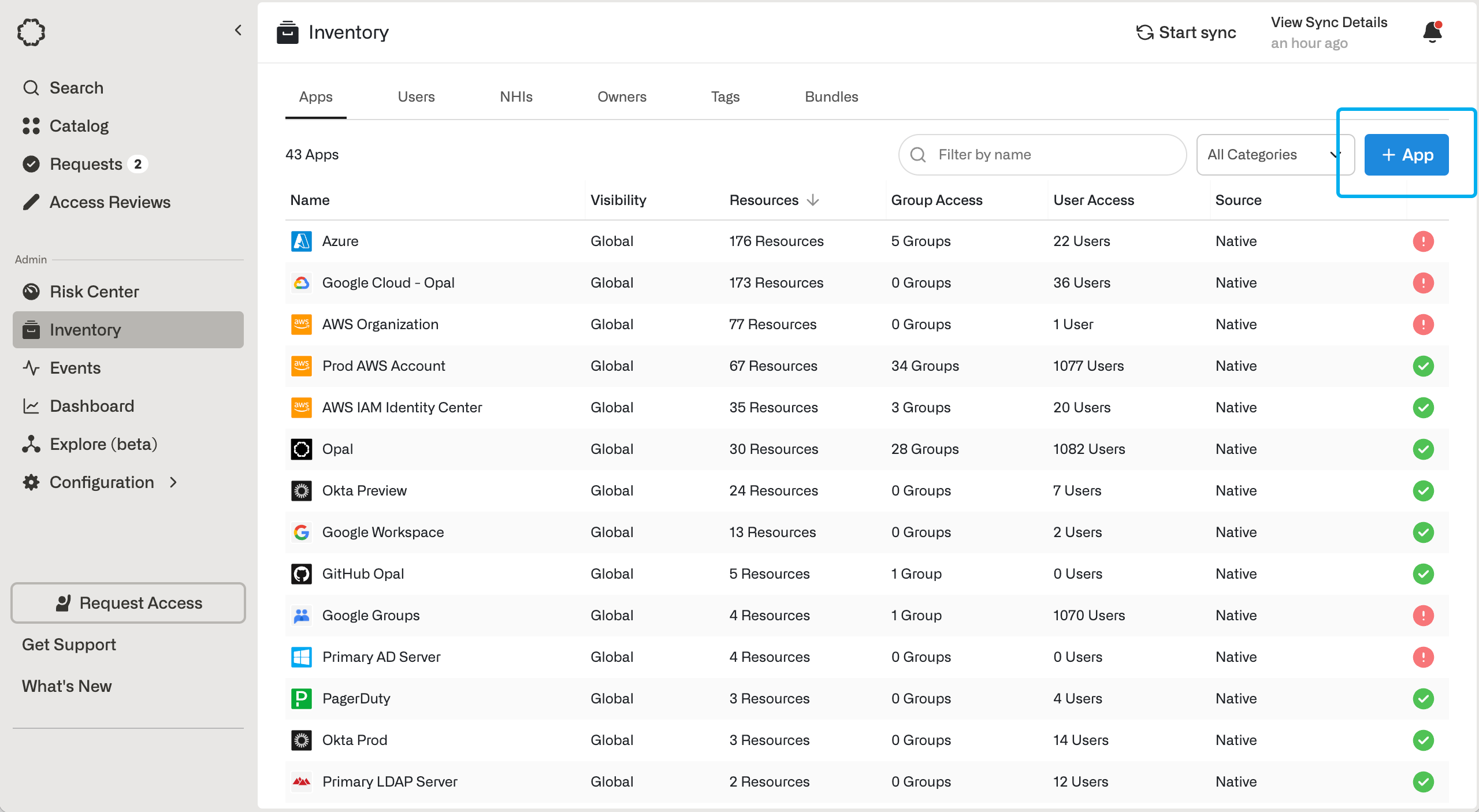
To get started, go to the Inventory page, and click + App. Then, click on the Google Groups tile.You will see a form to be completed. Opal requires the following credentials in order to manage your Google Groups.
1. Configure a service account for Opal
For Opal to manage your Google Groups on your behalf, you’ll need a Google service account with proper permission scopes to retrieve metadata, such as group name and description, as well as to update the group.Follow the instructions for creating a service account if you haven’t already, and ensure it is granted the following scope:
If you only want to view user’s access to groups and not grant/revoke them, then you can use the admin.directory.group.readonly scope.
2. Create Opal Google Group
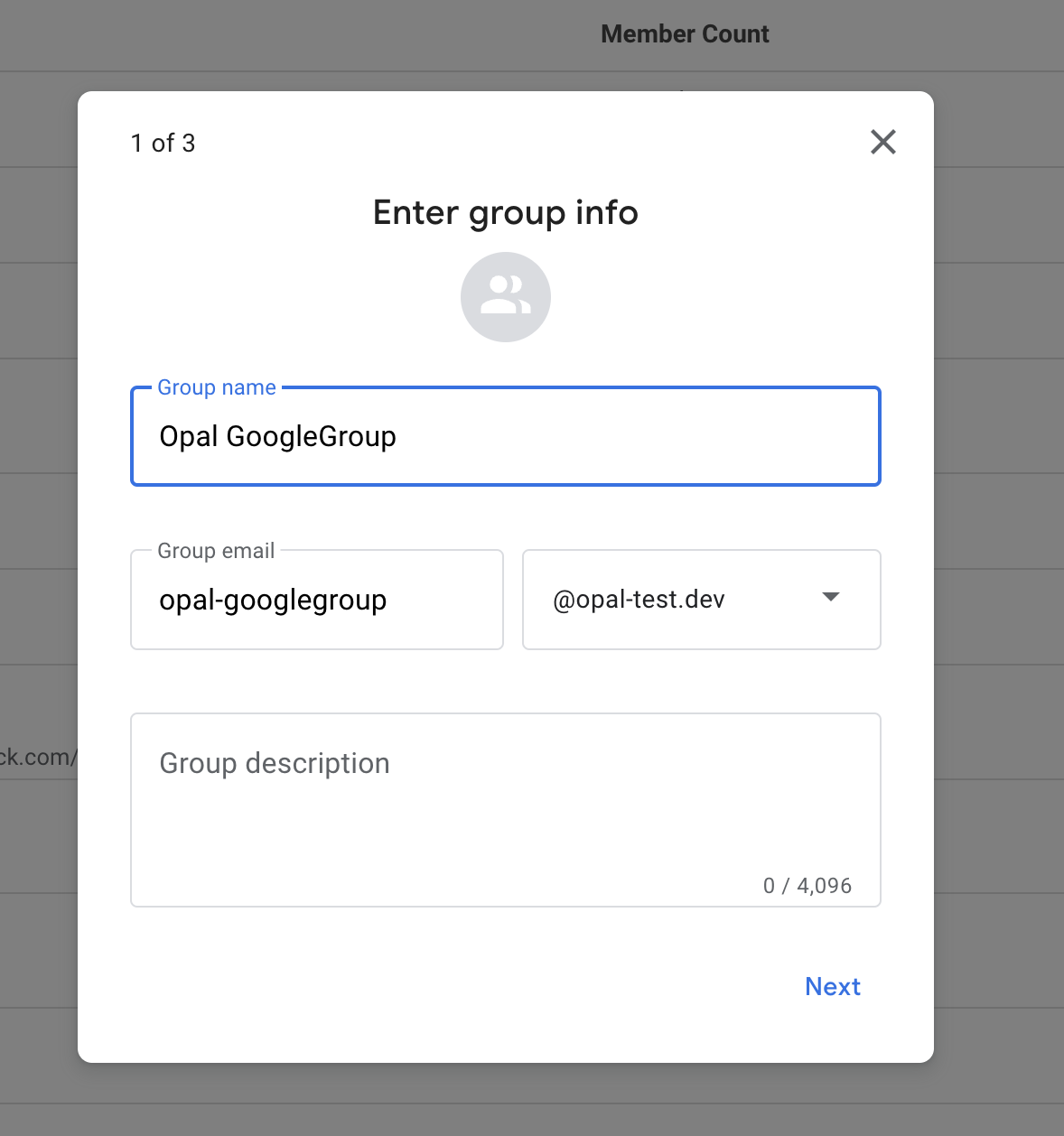
Create an Opal Google Group. We will use this Google Group’s domain to import groups during syncs.
3. Fill out Opal form
Back in Opal, fill in details about your Google Groups service account:
For Opal group email, enter the email of the Google group created in Step 2.
For Google Workspace admin email, enter the email of someone in your organization with admin privileges.
For domain, optionally enter the domain of the Google Workspace. If your Google Workspace has multiple domains, Google Groups will only import Google Groups associated with the domain you enter. By default, if this is not filled out, it is the domain of the Google Workspace admin email. Then, click to upload the downloaded JSON file for the created service account.
If this step is successful, you’ve completed setting up the Google Groups app.
Optional: Enable native Google Groups nesting
Google groups can contain other Google groups. By default, Opal flattens nested groups into user memberships. With native nesting, Opal keeps the group-in-group relationships as they exist in Google. Opal can also add and remove member groups in Google.
Native nesting can only be enabled when you create the Google Groups app. You can’t turn it on or off for an existing app. To use native nesting for an existing Google Workspace, create a new Google Groups app.
To enable it:
Contact Opal to enable native Google Groups nesting for your organization. The option is hidden until it’s enabled.
On the Google Groups app creation form, turn on Enable native Google Groups nesting.
Complete the rest of the form and save the app.
Apps created without this setting keep the flattened behavior. Opal shows the setting as Google Groups Native Nesting Enabled on the app’s Setup tab, where it’s read-only.
3. Import Google groups into Opal
You can import your Google groups into Opal manually or automatically.Note: Opal does not currently support syncing entire Organizational Units (OUs) or OU sub trees.
Manual import
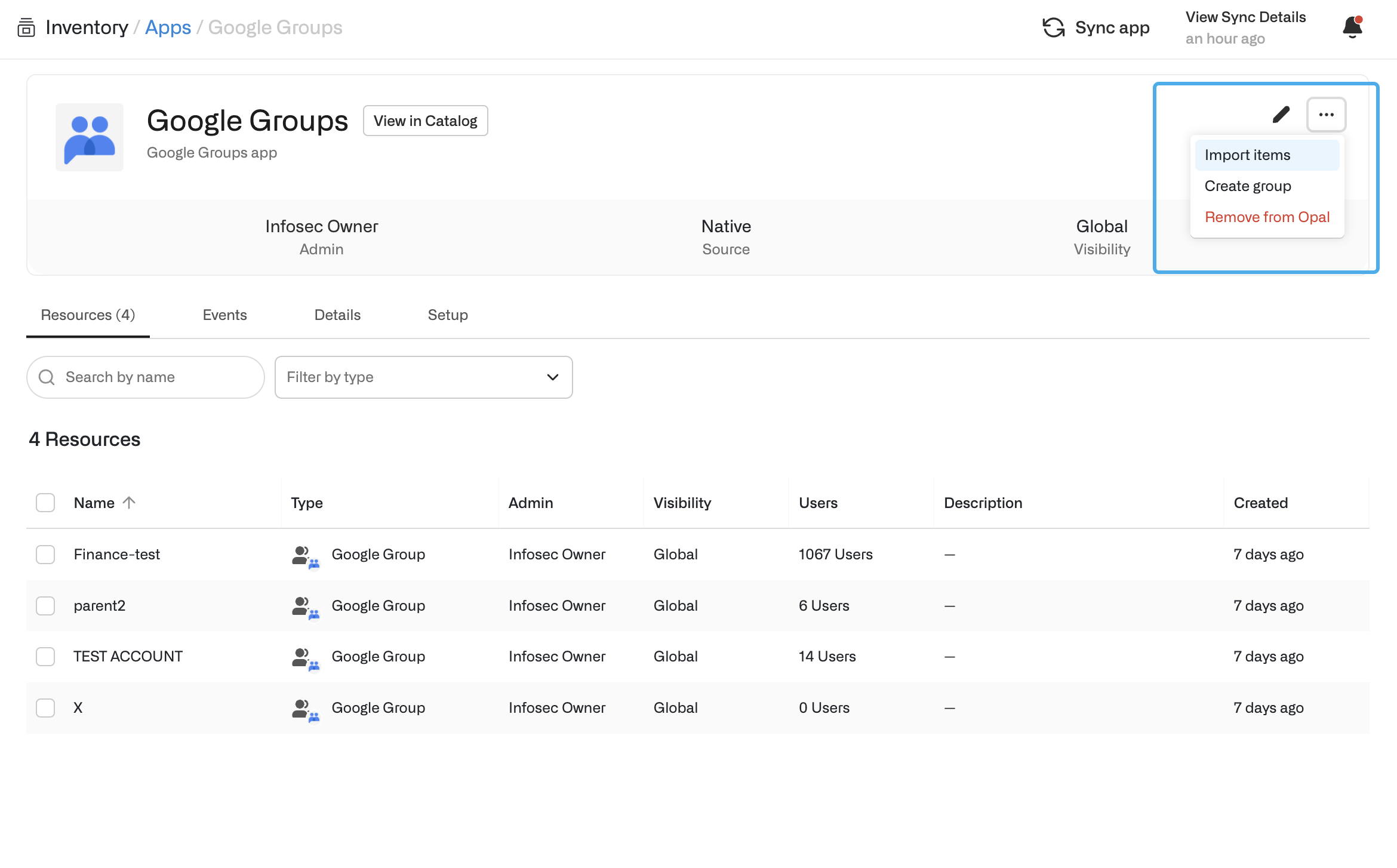
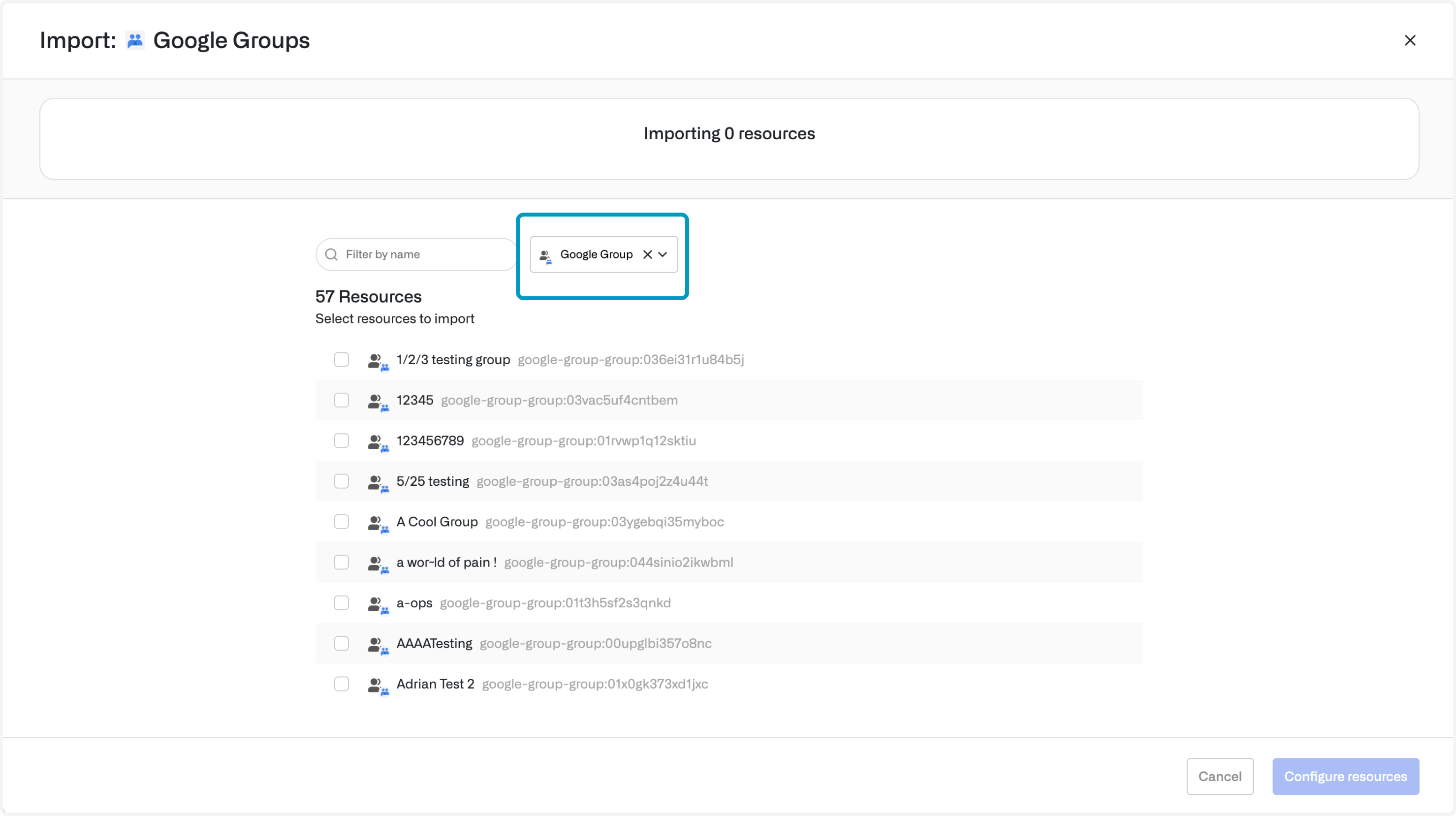
You can use the Opal UI to manually select which Google Groups to import into Opal. To do this, on the app’s Assets tab, select Import assets and then select your groups.This will query Google Groups to list all groups in your account. From here, you can select which Google Groups you’d like to import into Opal.
Automatic import
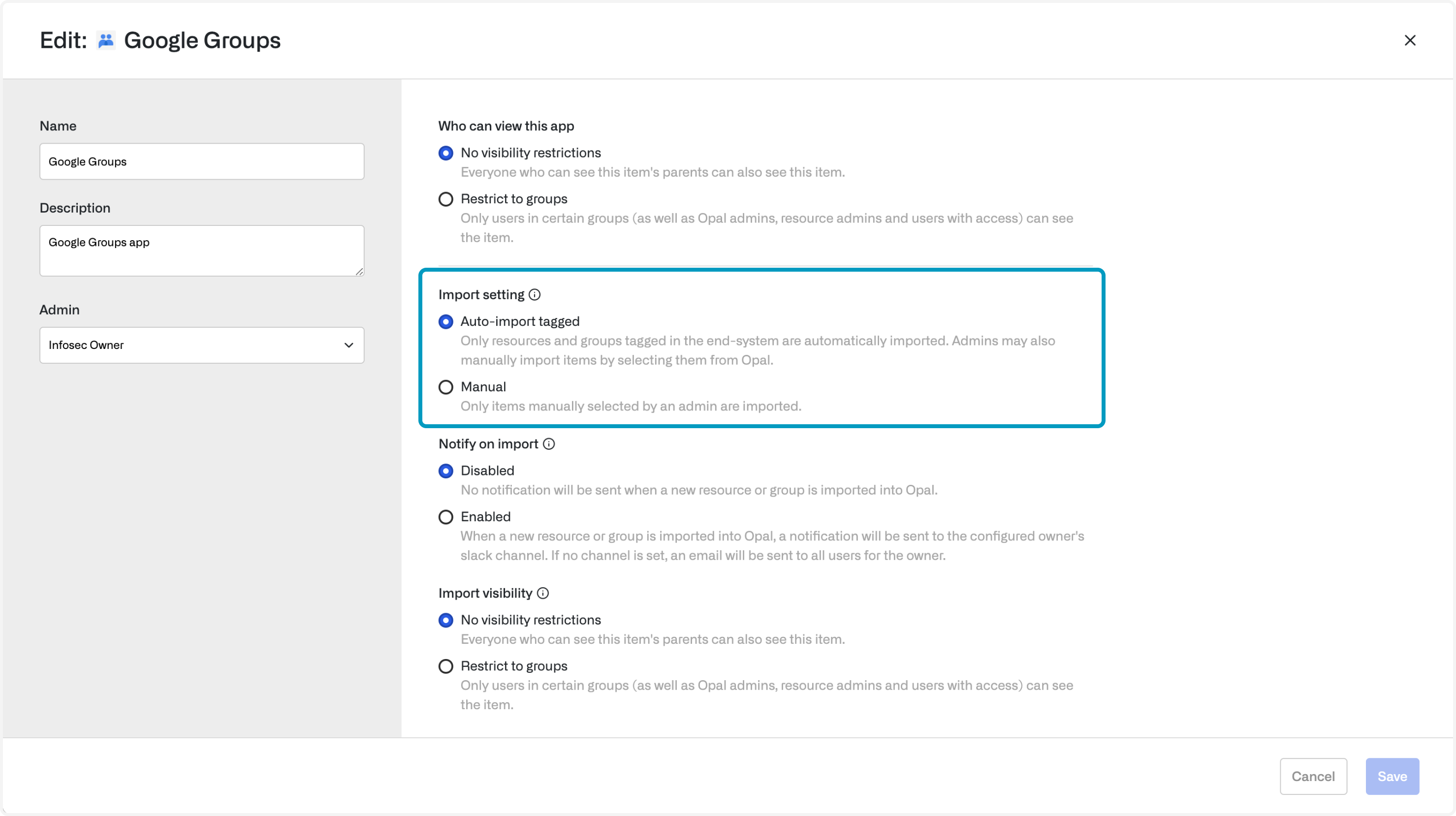
You can configure your Google Groups to be auto-imported into Opal each time the Google Groups app is synced.To automatically import your groups from Google Groups:
In Google Groups, create a Google group called Opal. Any groups that you add as members of this group will automatically be imported into Opal.
In Opal, navigate to Inventory > Google Groups App
Click the Edit button on the top right, then under Import Settings, toggle the setting to Auto-import tagged.
Last modified on November 9, 2026
Was this page helpful?
{"docsConfig":{"theme":"mint","$schema":"https://mintlify.com/docs.json","name":"Opal Security Docs","colors":{"primary":"#0C7997","light":"#EDFCFC","dark":"#074055"},"logo":{"light":"https://mintcdn.com/opalsecurity/FBbZyeMPZrA69UcV/logo/logo-dark.svg?fit=max\u0026auto=format\u0026n=FBbZyeMPZrA69UcV\u0026q=85\u0026s=93a4bd75f157f9f0ab43cdf4d715b5cd","dark":"https://mintcdn.com/opalsecurity/FBbZyeMPZrA69UcV/logo/logo-light.svg?fit=max\u0026auto=format\u0026n=FBbZyeMPZrA69UcV\u0026q=85\u0026s=1774b545e4f1c5cad647f5194f7b26d9"},"favicon":{"light":"https://mintcdn.com/opalsecurity/DRAwGKUXMxLRQouh/logo/icon-opal-black.svg?fit=max\u0026auto=format\u0026n=DRAwGKUXMxLRQouh\u0026q=85\u0026s=9c8bd1204b6b5b83542c2ab5be549858","dark":"https://mintcdn.com/opalsecurity/DRAwGKUXMxLRQouh/logo/icon-opal-white.svg?fit=max\u0026auto=format\u0026n=DRAwGKUXMxLRQouh\u0026q=85\u0026s=73b53b4ceab6ae0b00e30b2042a6020a"},"icons":{"library":"lucide"},"styling":{"eyebrows":"breadcrumbs","latex":false},"integrations":{"ga4":{"measurementId":"G-1PPPM1WF6D"}},"errors":{"404":{"redirect":false,"title":"Page can't be found","description":"Sorry! This page might have been moved, or the link might be broken. Go back to our documentation via https://docs.opal.dev/docs/welcome."}},"metadata":{"timestamp":true},"navigation":{"pages":[]}},"deployment":{"deploymentMetadataValue":{"subdomain":"opalsecurity","hasAudioNarration":false,"actualSubdomain":"opalsecurity","customDomains":["docs.opal.dev"],"gitSource":{"type":"github","owner":"opalsecurity","repo":"docs","deployBranch":"main","contentDirectory":"","isPrivate":true,"mountPath":"","label":""},"feedback":{"thumbs":true},"entitlements":{"AI_CHAT":{"status":"ENABLED"},"WEB_MCP":{"status":"ENABLED"},"NARRATION":{"status":"ENABLED"}},"buildId":"6af7bc9ca5d707e66c231413","clientVersion":"0.0.4143","searchFilterCounts":[{"language":"default","tag":"API Reference","count":218},{"language":"default","tag":"Opal API","count":213},{"language":"default","tag":"Documentation","count":104},{"language":"default","tag":"Integrations","count":103},{"language":"default","tag":"Entitlement Management","count":69},{"language":"default","tag":"resources","count":34},{"language":"default","tag":"groups","count":32},{"language":"default","tag":"Getting Started","count":25},{"language":"default","tag":"Access Management","count":22},{"language":"default","tag":"Infrastructure","count":22}]},"assistantConfig":{"enableStarterQuestions":true,"enableContextualStarterQuestions":true,"deflection":{"enabled":true,"email":"support@opal.dev","showHelpButton":true}},"basePath":"","hasChatPermissions":true,"hasWebMcpPermissions":true,"toggles":[{"name":"kill-isr","enabled":true,"variant":{"name":"disabled","enabled":false,"feature_enabled":true},"impressionData":false},{"name":"custom-rbac-roles","enabled":true,"variant":{"name":"disabled","enabled":false,"feature_enabled":true},"impressionData":false},{"name":"agent-mintlify-slack","enabled":true,"variant":{"name":"disabled","enabled":false,"feature_enabled":true},"impressionData":false},{"name":"agent-integrations-settings","enabled":true,"variant":{"name":"disabled","enabled":false,"feature_enabled":true},"impressionData":false},{"name":"rbac-expansion","enabled":true,"variant":{"name":"disabled","enabled":false,"feature_enabled":true},"impressionData":false},{"name":"automations-pr-grouping","enabled":true,"variant":{"name":"disabled","enabled":false,"feature_enabled":true},"impressionData":false},{"name":"custom-prefix","enabled":true,"variant":{"name":"disabled","enabled":false,"feature_enabled":true},"impressionData":false},{"name":"analytics-v7","enabled":true,"variant":{"name":"disabled","enabled":false,"feature_enabled":true},"impressionData":false},{"name":"user-flows-analytics","enabled":true,"variant":{"name":"disabled","enabled":false,"feature_enabled":true},"impressionData":false},{"name":"no-publish-flow","enabled":true,"variant":{"name":"disabled","enabled":false,"feature_enabled":true},"impressionData":false},{"name":"workos-onboarding","enabled":true,"variant":{"name":"disabled","enabled":false,"feature_enabled":true},"impressionData":false},{"name":"snapshot-serving-live","enabled":true,"variant":{"name":"disabled","enabled":false,"feature_enabled":true},"impressionData":false},{"name":"stripTemperatureMiddleware","enabled":true,"variant":{"name":"disabled","enabled":false,"feature_enabled":true},"impressionData":false},{"name":"support-platform-pylon-zendesk","enabled":true,"variant":{"name":"disabled","enabled":false,"feature_enabled":true},"impressionData":false},{"name":"snapshot-serving","enabled":true,"variant":{"name":"disabled","enabled":false,"feature_enabled":true},"impressionData":false},{"name":"instant-rollback","enabled":true,"variant":{"name":"disabled","enabled":false,"feature_enabled":true},"impressionData":false},{"name":"granular-notifications-server","enabled":true,"variant":{"name":"disabled","enabled":false,"feature_enabled":true},"impressionData":false},{"name":"granular-notifications","enabled":true,"variant":{"name":"disabled","enabled":false,"feature_enabled":true},"impressionData":false},{"name":"automations-fable","enabled":true,"variant":{"name":"disabled","enabled":false,"feature_enabled":true},"impressionData":false},{"name":"fixed-ai-action-pricing","enabled":true,"variant":{"name":"disabled","enabled":false,"feature_enabled":true},"impressionData":false},{"name":"automation-resolve-merge-conflict","enabled":true,"variant":{"name":"disabled","enabled":false,"feature_enabled":true},"impressionData":false},{"name":"scoped-publishing","enabled":true,"variant":{"name":"disabled","enabled":false,"feature_enabled":true},"impressionData":false},{"name":"mintql","enabled":true,"variant":{"name":"disabled","enabled":false,"feature_enabled":true},"impressionData":false},{"name":"page-level-analytics","enabled":true,"variant":{"name":"disabled","enabled":false,"feature_enabled":true},"impressionData":false},{"name":"editor-version-history-v2","enabled":true,"variant":{"name":"disabled","enabled":false,"feature_enabled":true},"impressionData":false},{"name":"billing-page-v2","enabled":true,"variant":{"name":"disabled","enabled":false,"feature_enabled":true},"impressionData":false},{"name":"full-page-search","enabled":true,"variant":{"name":"disabled","enabled":false,"feature_enabled":true},"impressionData":false},{"name":"workspace-projects","enabled":true,"variant":{"name":"disabled","enabled":false,"feature_enabled":true},"impressionData":false},{"name":"assistant-v5","enabled":true,"variant":{"name":"disabled","enabled":false,"feature_enabled":true},"impressionData":false},{"name":"fork-pr-previews","enabled":true,"variant":{"name":"disabled","enabled":false,"feature_enabled":true},"impressionData":false},{"name":"revalidation-jwt","enabled":true,"variant":{"name":"disabled","enabled":false,"feature_enabled":true},"impressionData":false},{"name":"workos-sso-scim","enabled":true,"variant":{"name":"disabled","enabled":false,"feature_enabled":true},"impressionData":false},{"name":"hobby-abuse-scan","enabled":true,"variant":{"name":"disabled","enabled":false,"feature_enabled":true},"impressionData":false},{"name":"dashboard-inbox","enabled":true,"variant":{"name":"disabled","enabled":false,"feature_enabled":true},"impressionData":false},{"name":"workos-signup","enabled":true,"variant":{"name":"disabled","enabled":false,"feature_enabled":true},"impressionData":false},{"name":"turbopuffer-dual-write","enabled":true,"variant":{"name":"disabled","enabled":false,"feature_enabled":true},"impressionData":false},{"name":"workos-enabled","enabled":true,"variant":{"name":"disabled","enabled":false,"feature_enabled":true},"impressionData":false},{"name":"approve-review-flow","enabled":true,"variant":{"name":"disabled","enabled":false,"feature_enabled":true},"impressionData":false},{"name":"editor-metadata","enabled":true,"variant":{"name":"disabled","enabled":false,"feature_enabled":true},"impressionData":false},{"name":"sso-setup-deadline-banner","enabled":true,"variant":{"name":"disabled","enabled":false,"feature_enabled":true},"impressionData":false},{"name":"turbopuffer-serve","enabled":true,"variant":{"name":"disabled","enabled":false,"feature_enabled":true},"impressionData":false},{"name":"live-agents","enabled":true,"variant":{"name":"disabled","enabled":false,"feature_enabled":true},"impressionData":false},{"name":"llms-txt-v2","enabled":true,"variant":{"name":"disabled","enabled":false,"feature_enabled":true},"impressionData":false}],"googleFontsInlined":false},"customCss":[],"page":{"pagePath":"integrations/google-groups","slug":"/integrations/google-groups","pageMetadata":{"title":"Google Groups","description":"Connect your Google Groups organization to Opal to manage and review access.","href":"/integrations/google-groups"},"description":{"compiledSource":"\"use strict\";\nconst {jsx: _jsx} = arguments[0];\nconst {useMDXComponents: _provideComponents} = arguments[0];\nfunction _createMdxContent(props) {\n const _components = {\n p: \"p\",\n ..._provideComponents(),\n ...props.components\n };\n return _jsx(_components.p, {\n children: \"Connect your Google Groups organization to Opal to manage and review access.\"\n });\n}\nfunction MDXContent(props = {}) {\n const {wrapper: MDXLayout} = {\n ..._provideComponents(),\n ...props.components\n };\n return MDXLayout ? _jsx(MDXLayout, {\n ...props,\n children: _jsx(_createMdxContent, {\n ...props\n })\n }) : _createMdxContent(props);\n}\nreturn {\n default: MDXContent\n};\n","frontmatter":{},"scope":{}},"pageType":"default","mdx":{"mdxSource":{"compiledSource":"\"use strict\";const{Fragment:_Fragment,jsx:_jsx,jsxs:_jsxs}=arguments[0];const{useMDXComponents:_provideComponents}=arguments[0];function _createMdxContent(props){const _components={a:`a`,code:`code`,em:`em`,li:`li`,p:`p`,pre:`pre`,span:`span`,strong:`strong`,ul:`ul`,..._provideComponents(),...props.components},{CodeBlock,CodeGroup,Heading,OptimizedImage,Warning}=_components;if(!CodeBlock)_missingMdxReference(`CodeBlock`,true);if(!CodeGroup)_missingMdxReference(`CodeGroup`,true);if(!Heading)_missingMdxReference(`Heading`,true);if(!OptimizedImage)_missingMdxReference(`OptimizedImage`,true);if(!Warning)_missingMdxReference(`Warning`,true);return _jsxs(_Fragment,{children:[_jsx(_components.p,{children:`Opal’s integration with Google Groups supports the following, and more:`}),`\n`,_jsxs(_components.ul,{children:[`\n`,_jsxs(_components.li,{children:[`Users can `,_jsx(_components.strong,{children:`request time-bounded access`}),` to your Google groups.`]}),`\n`,_jsxs(_components.li,{children:[`Auditors can `,_jsx(_components.strong,{children:`initiate access reviews`}),` that assign managers or group admins to periodically review users with long-lived access to Google groups.`]}),`\n`,_jsxs(_components.li,{children:[`Admins can `,_jsx(_components.strong,{children:`add resources from other Opal integrations`}),` to an Google group so an Google group’s members can automatically gain birthright access to, for example, a GitHub repo, AWS IAM role, etc.`]}),`\n`,_jsxs(_components.li,{children:[`All access changes are tracked in a `,_jsx(_components.strong,{children:`permanent audit log`}),` that can be logged to a Slack channel or exported to your favorite tools.`]}),`\n`]}),`\n`,_jsx(Heading,{level:`2`,id:`create-a-google-groups-app`,children:`Create a Google Groups app`}),`\n`,_jsxs(_components.p,{children:[`To get started, go to the `,_jsx(_components.strong,{children:`Inventory`}),` page, and click `,_jsx(_components.strong,{children:`+ App`}),`. Then, click on the Google Groups tile.`]}),`\n`,_jsx(OptimizedImage,{src:`https://mintcdn.com/opalsecurity/4Xj9diJ3E3kX-9Xd/images/docs/eb8b199c3dbe4b6e0c51a9433b636f42ded7857810cb7dc0ebc28955a0a33e5c-opal-101-apps-add-app.png?fit=max\u0026auto=format\u0026n=4Xj9diJ3E3kX-9Xd\u0026q=85\u0026s=257997a4f9a3372c1e537fa7e1127f56`,alt:`2312`,\"data-og-width\":`2560`,width:`2560`,\"data-og-height\":`1406`,height:`1406`,\"data-path\":`images/docs/eb8b199c3dbe4b6e0c51a9433b636f42ded7857810cb7dc0ebc28955a0a33e5c-opal-101-apps-add-app.png`,\"data-optimize\":`true`,\"data-opv\":`3`,srcset:`https://mintcdn.com/opalsecurity/4Xj9diJ3E3kX-9Xd/images/docs/eb8b199c3dbe4b6e0c51a9433b636f42ded7857810cb7dc0ebc28955a0a33e5c-opal-101-apps-add-app.png?w=280\u0026fit=max\u0026auto=format\u0026n=4Xj9diJ3E3kX-9Xd\u0026q=85\u0026s=47e6b555ba588c1cb7e98dbabbed68c1 280w, https://mintcdn.com/opalsecurity/4Xj9diJ3E3kX-9Xd/images/docs/eb8b199c3dbe4b6e0c51a9433b636f42ded7857810cb7dc0ebc28955a0a33e5c-opal-101-apps-add-app.png?w=560\u0026fit=max\u0026auto=format\u0026n=4Xj9diJ3E3kX-9Xd\u0026q=85\u0026s=fbc647060f87ff8c884c47f6d94c27a6 560w, https://mintcdn.com/opalsecurity/4Xj9diJ3E3kX-9Xd/images/docs/eb8b199c3dbe4b6e0c51a9433b636f42ded7857810cb7dc0ebc28955a0a33e5c-opal-101-apps-add-app.png?w=840\u0026fit=max\u0026auto=format\u0026n=4Xj9diJ3E3kX-9Xd\u0026q=85\u0026s=6e0645fc44a6922b230eaee1158c1be4 840w, https://mintcdn.com/opalsecurity/4Xj9diJ3E3kX-9Xd/images/docs/eb8b199c3dbe4b6e0c51a9433b636f42ded7857810cb7dc0ebc28955a0a33e5c-opal-101-apps-add-app.png?w=1100\u0026fit=max\u0026auto=format\u0026n=4Xj9diJ3E3kX-9Xd\u0026q=85\u0026s=1c652245dfa6bb27d62b9f3efe35beca 1100w, https://mintcdn.com/opalsecurity/4Xj9diJ3E3kX-9Xd/images/docs/eb8b199c3dbe4b6e0c51a9433b636f42ded7857810cb7dc0ebc28955a0a33e5c-opal-101-apps-add-app.png?w=1650\u0026fit=max\u0026auto=format\u0026n=4Xj9diJ3E3kX-9Xd\u0026q=85\u0026s=b949137584b6af6ff9a41f86948ff91b 1650w, https://mintcdn.com/opalsecurity/4Xj9diJ3E3kX-9Xd/images/docs/eb8b199c3dbe4b6e0c51a9433b636f42ded7857810cb7dc0ebc28955a0a33e5c-opal-101-apps-add-app.png?w=2500\u0026fit=max\u0026auto=format\u0026n=4Xj9diJ3E3kX-9Xd\u0026q=85\u0026s=f0e61a722f02aea65f5d79da6c46337a 2500w`}),`\n`,_jsx(_components.p,{children:`You will see a form to be completed. Opal requires the following credentials in order to manage your Google Groups.`}),`\n`,_jsx(Heading,{level:`2`,id:`1-configure-a-service-account-for-opal`,children:`1. Configure a service account for Opal`}),`\n`,_jsx(_components.p,{children:`For Opal to manage your Google Groups on your behalf, you’ll need a Google service account with proper permission scopes to retrieve metadata, such as group name and description, as well as to update the group.`}),`\n`,_jsxs(_components.p,{children:[`Follow the instructions for `,_jsx(_components.a,{href:`/integrations/google#setting-up-a-service-account-for-opal`,children:`creating a service account`}),` if you haven’t already, and ensure it is granted the following scope:`]}),`\n`,_jsx(CodeGroup,{children:_jsx(CodeBlock,{filename:`text`,numberOfLines:`2`,language:`text`,children:_jsx(_components.pre,{className:`shiki shiki-themes github-light-default dark-plus`,style:{backgroundColor:`#ffffff`,\"--shiki-dark-bg\":`#0B0C0E`,color:`#1f2328`,\"--shiki-dark\":`#D4D4D4`},language:`text`,children:_jsxs(_components.code,{language:`text`,numberOfLines:`2`,children:[_jsx(_components.span,{className:`line`,children:_jsx(_components.span,{children:`https://www.googleapis.com/auth/admin.directory.group`})}),`\n`,_jsx(_components.span,{className:`line`,children:_jsx(_components.span,{})})]})})})}),`\n`,_jsxs(_components.p,{children:[`If you only want to view user’s access to groups and not grant/revoke them, then you can use the `,_jsx(_components.code,{children:`admin.directory.group.readonly`}),` scope.`]}),`\n`,_jsx(Heading,{level:`2`,id:`2-create-opal-google-group`,children:`2. Create Opal Google Group`}),`\n`,_jsx(_components.p,{children:`Create an Opal Google Group. We will use this Google Group’s domain to import groups during syncs.`}),`\n`,_jsx(OptimizedImage,{src:`https://mintcdn.com/opalsecurity/fu-nWazMe1LxLhxi/images/docs/37e3d78a259162025604e5d82e381ad06cdba1f890adda70217669c916a61f87-Screenshot_2025-03-07_at_4.22.12_PM.png?fit=max\u0026auto=format\u0026n=fu-nWazMe1LxLhxi\u0026q=85\u0026s=0523dfc0b813f170614a88f4b56ab1ab`,alt:``,\"data-og-width\":`1178`,width:`1178`,\"data-og-height\":`1258`,height:`1258`,\"data-path\":`images/docs/37e3d78a259162025604e5d82e381ad06cdba1f890adda70217669c916a61f87-Screenshot_2025-03-07_at_4.22.12_PM.png`,\"data-optimize\":`true`,\"data-opv\":`3`,srcset:`https://mintcdn.com/opalsecurity/fu-nWazMe1LxLhxi/images/docs/37e3d78a259162025604e5d82e381ad06cdba1f890adda70217669c916a61f87-Screenshot_2025-03-07_at_4.22.12_PM.png?w=280\u0026fit=max\u0026auto=format\u0026n=fu-nWazMe1LxLhxi\u0026q=85\u0026s=15135eb96d33ee56d865904986941844 280w, https://mintcdn.com/opalsecurity/fu-nWazMe1LxLhxi/images/docs/37e3d78a259162025604e5d82e381ad06cdba1f890adda70217669c916a61f87-Screenshot_2025-03-07_at_4.22.12_PM.png?w=560\u0026fit=max\u0026auto=format\u0026n=fu-nWazMe1LxLhxi\u0026q=85\u0026s=487f9ab15617a956cd9718154469eca0 560w, https://mintcdn.com/opalsecurity/fu-nWazMe1LxLhxi/images/docs/37e3d78a259162025604e5d82e381ad06cdba1f890adda70217669c916a61f87-Screenshot_2025-03-07_at_4.22.12_PM.png?w=840\u0026fit=max\u0026auto=format\u0026n=fu-nWazMe1LxLhxi\u0026q=85\u0026s=28ee51e248ff8dbb1a8a1841ec510045 840w, https://mintcdn.com/opalsecurity/fu-nWazMe1LxLhxi/images/docs/37e3d78a259162025604e5d82e381ad06cdba1f890adda70217669c916a61f87-Screenshot_2025-03-07_at_4.22.12_PM.png?w=1100\u0026fit=max\u0026auto=format\u0026n=fu-nWazMe1LxLhxi\u0026q=85\u0026s=c1329c52d9b0aad5d952102de9621afb 1100w, https://mintcdn.com/opalsecurity/fu-nWazMe1LxLhxi/images/docs/37e3d78a259162025604e5d82e381ad06cdba1f890adda70217669c916a61f87-Screenshot_2025-03-07_at_4.22.12_PM.png?w=1650\u0026fit=max\u0026auto=format\u0026n=fu-nWazMe1LxLhxi\u0026q=85\u0026s=378ff824e94fc53aea67fb4092077b3f 1650w, https://mintcdn.com/opalsecurity/fu-nWazMe1LxLhxi/images/docs/37e3d78a259162025604e5d82e381ad06cdba1f890adda70217669c916a61f87-Screenshot_2025-03-07_at_4.22.12_PM.png?w=2500\u0026fit=max\u0026auto=format\u0026n=fu-nWazMe1LxLhxi\u0026q=85\u0026s=7c3041e0055acb09a29504172873c498 2500w`}),`\n`,_jsx(Heading,{level:`2`,id:`3-fill-out-opal-form`,children:`3. Fill out Opal form`}),`\n`,_jsx(_components.p,{children:`Back in Opal, fill in details about your Google Groups service account:`}),`\n`,_jsxs(_components.ul,{children:[`\n`,_jsx(_components.li,{children:`For Opal group email, enter the email of the Google group created in Step 2.`}),`\n`,_jsx(_components.li,{children:`For Google Workspace admin email, enter the email of someone in your organization with admin privileges.`}),`\n`,_jsx(_components.li,{children:`For domain, optionally enter the domain of the Google Workspace. If your Google Workspace has multiple domains, Google Groups will only import Google Groups associated with the domain you enter. By default, if this is not filled out, it is the domain of the Google Workspace admin email. Then, click to upload the downloaded JSON file for the created service account.`}),`\n`]}),`\n`,_jsx(_components.p,{children:`If this step is successful, you’ve completed setting up the Google Groups app.`}),`\n`,_jsx(Heading,{level:`3`,id:`optional-enable-native-google-groups-nesting`,children:`Optional: Enable native Google Groups nesting`}),`\n`,_jsx(_components.p,{children:`Google groups can contain other Google groups. By default, Opal flattens nested groups into user memberships. With native nesting, Opal keeps the group-in-group relationships as they exist in Google. Opal can also add and remove member groups in Google.`}),`\n`,_jsx(Warning,{children:_jsx(_components.p,{children:`Native nesting can only be enabled when you create the Google Groups app. You can’t turn it on or off for an existing app. To use native nesting for an existing Google Workspace, create a new Google Groups app.`})}),`\n`,_jsx(_components.p,{children:`To enable it:`}),`\n`,_jsxs(_components.ul,{children:[`\n`,_jsx(_components.li,{children:`Contact Opal to enable native Google Groups nesting for your organization. The option is hidden until it’s enabled.`}),`\n`,_jsxs(_components.li,{children:[`On the Google Groups app creation form, turn on `,_jsx(_components.strong,{children:`Enable native Google Groups nesting`}),`.`]}),`\n`,_jsx(_components.li,{children:`Complete the rest of the form and save the app.`}),`\n`]}),`\n`,_jsxs(_components.p,{children:[`Apps created without this setting keep the flattened behavior. Opal shows the setting as `,_jsx(_components.strong,{children:`Google Groups Native Nesting Enabled`}),` on the app’s `,_jsx(_components.strong,{children:`Setup`}),` tab, where it’s read-only.`]}),`\n`,_jsx(Heading,{level:`2`,id:`3-import-google-groups-into-opal`,children:`3. Import Google groups into Opal`}),`\n`,_jsx(_components.p,{children:`You can import your Google groups into Opal manually or automatically.`}),`\n`,_jsx(_components.p,{children:_jsx(_components.em,{children:`Note: Opal does not currently support syncing entire Organizational Units (OUs) or OU sub trees.`})}),`\n`,_jsx(Heading,{level:`3`,id:`manual-import`,children:`Manual import`}),`\n`,_jsxs(_components.p,{children:[`You can use the Opal UI to manually select which Google Groups to import into Opal. To do this, on the app’s `,_jsx(_components.strong,{children:`Assets`}),` tab, select `,_jsx(_components.strong,{children:`Import assets`}),` and then select your groups.`]}),`\n`,_jsx(OptimizedImage,{src:`https://mintcdn.com/opalsecurity/lt0M-hBs5yNe5ff5/images/docs/989c95f558de5cf252ba1c5fc0774dfb090726db4ba5b371ccc0216423590cf3-google-groups-import-items.png?fit=max\u0026auto=format\u0026n=lt0M-hBs5yNe5ff5\u0026q=85\u0026s=16ca0d6648508490b7ff6d3c21c5ff11`,alt:`2312`,\"data-og-width\":`2340`,width:`2340`,\"data-og-height\":`1454`,height:`1454`,\"data-path\":`images/docs/989c95f558de5cf252ba1c5fc0774dfb090726db4ba5b371ccc0216423590cf3-google-groups-import-items.png`,\"data-optimize\":`true`,\"data-opv\":`3`,srcset:`https://mintcdn.com/opalsecurity/lt0M-hBs5yNe5ff5/images/docs/989c95f558de5cf252ba1c5fc0774dfb090726db4ba5b371ccc0216423590cf3-google-groups-import-items.png?w=280\u0026fit=max\u0026auto=format\u0026n=lt0M-hBs5yNe5ff5\u0026q=85\u0026s=569f1d9e10513015f77f387a682df42c 280w, https://mintcdn.com/opalsecurity/lt0M-hBs5yNe5ff5/images/docs/989c95f558de5cf252ba1c5fc0774dfb090726db4ba5b371ccc0216423590cf3-google-groups-import-items.png?w=560\u0026fit=max\u0026auto=format\u0026n=lt0M-hBs5yNe5ff5\u0026q=85\u0026s=b1a80f8f9ab97f7fc9ac92737024f14a 560w, https://mintcdn.com/opalsecurity/lt0M-hBs5yNe5ff5/images/docs/989c95f558de5cf252ba1c5fc0774dfb090726db4ba5b371ccc0216423590cf3-google-groups-import-items.png?w=840\u0026fit=max\u0026auto=format\u0026n=lt0M-hBs5yNe5ff5\u0026q=85\u0026s=9ec7ad164ca483b96f27cf1fa8ddfdd3 840w, https://mintcdn.com/opalsecurity/lt0M-hBs5yNe5ff5/images/docs/989c95f558de5cf252ba1c5fc0774dfb090726db4ba5b371ccc0216423590cf3-google-groups-import-items.png?w=1100\u0026fit=max\u0026auto=format\u0026n=lt0M-hBs5yNe5ff5\u0026q=85\u0026s=be7e6ed7b7b78f5ba789ae4f748e49e9 1100w, https://mintcdn.com/opalsecurity/lt0M-hBs5yNe5ff5/images/docs/989c95f558de5cf252ba1c5fc0774dfb090726db4ba5b371ccc0216423590cf3-google-groups-import-items.png?w=1650\u0026fit=max\u0026auto=format\u0026n=lt0M-hBs5yNe5ff5\u0026q=85\u0026s=5a36022246fa0b7cc3dfa57f5c3831e4 1650w, https://mintcdn.com/opalsecurity/lt0M-hBs5yNe5ff5/images/docs/989c95f558de5cf252ba1c5fc0774dfb090726db4ba5b371ccc0216423590cf3-google-groups-import-items.png?w=2500\u0026fit=max\u0026auto=format\u0026n=lt0M-hBs5yNe5ff5\u0026q=85\u0026s=c0efbc102d8ba2cfe9364a806256c92a 2500w`}),`\n`,_jsx(OptimizedImage,{src:`https://mintcdn.com/opalsecurity/E-CmJXh0QNjZUl4g/images/docs/65fbae4-import-GG.png?fit=max\u0026auto=format\u0026n=E-CmJXh0QNjZUl4g\u0026q=85\u0026s=0cac8e8128852d5968e1128d76c4db36`,alt:`2312`,\"data-og-width\":`2958`,width:`2958`,\"data-og-height\":`1658`,height:`1658`,\"data-path\":`images/docs/65fbae4-import-GG.png`,\"data-optimize\":`true`,\"data-opv\":`3`,srcset:`https://mintcdn.com/opalsecurity/E-CmJXh0QNjZUl4g/images/docs/65fbae4-import-GG.png?w=280\u0026fit=max\u0026auto=format\u0026n=E-CmJXh0QNjZUl4g\u0026q=85\u0026s=4038581e7fa7b8cbc640161172b2e8ae 280w, https://mintcdn.com/opalsecurity/E-CmJXh0QNjZUl4g/images/docs/65fbae4-import-GG.png?w=560\u0026fit=max\u0026auto=format\u0026n=E-CmJXh0QNjZUl4g\u0026q=85\u0026s=c0d63203fbb5f36c4ee4d9fbb7b97b8a 560w, https://mintcdn.com/opalsecurity/E-CmJXh0QNjZUl4g/images/docs/65fbae4-import-GG.png?w=840\u0026fit=max\u0026auto=format\u0026n=E-CmJXh0QNjZUl4g\u0026q=85\u0026s=084a7416b3f9ac0de306aa8f0961e0c9 840w, https://mintcdn.com/opalsecurity/E-CmJXh0QNjZUl4g/images/docs/65fbae4-import-GG.png?w=1100\u0026fit=max\u0026auto=format\u0026n=E-CmJXh0QNjZUl4g\u0026q=85\u0026s=462c3da47df78c6ea07989c00ab3c4d1 1100w, https://mintcdn.com/opalsecurity/E-CmJXh0QNjZUl4g/images/docs/65fbae4-import-GG.png?w=1650\u0026fit=max\u0026auto=format\u0026n=E-CmJXh0QNjZUl4g\u0026q=85\u0026s=c00c0de4fa83785348f2c06e99ef9a16 1650w, https://mintcdn.com/opalsecurity/E-CmJXh0QNjZUl4g/images/docs/65fbae4-import-GG.png?w=2500\u0026fit=max\u0026auto=format\u0026n=E-CmJXh0QNjZUl4g\u0026q=85\u0026s=5879ab98840ebab27902f160d4043e2e 2500w`}),`\n`,_jsx(_components.p,{children:`This will query Google Groups to list all groups in your account. From here, you can select which Google Groups you’d like to import into Opal.`}),`\n`,_jsx(Heading,{level:`3`,id:`automatic-import`,children:`Automatic import`}),`\n`,_jsx(_components.p,{children:`You can configure your Google Groups to be auto-imported into Opal each time the Google Groups app is synced.`}),`\n`,_jsx(_components.p,{children:`To automatically import your groups from Google Groups:`}),`\n`,_jsxs(_components.ul,{children:[`\n`,_jsxs(_components.li,{children:[`In Google Groups, create a Google group called `,_jsx(_components.strong,{children:`Opal`}),`. Any groups that you add as members of this group will automatically be imported into Opal.`]}),`\n`,_jsxs(_components.li,{children:[`In Opal, navigate to `,_jsx(_components.strong,{children:`Inventory`}),` > Google Groups App`]}),`\n`,_jsxs(_components.li,{children:[`Click the `,_jsx(_components.strong,{children:`Edit`}),` button on the top right, then under `,_jsx(_components.strong,{children:`Import Settings`}),`, toggle the setting to `,_jsx(_components.strong,{children:`Auto-import tagged`}),`.`]}),`\n`]}),`\n`,_jsx(OptimizedImage,{src:`https://mintcdn.com/opalsecurity/lwwIeFbsleftxaXx/images/docs/c5635c9-GoogleGroup-ImportSettings.png?fit=max\u0026auto=format\u0026n=lwwIeFbsleftxaXx\u0026q=85\u0026s=a288df48fa0fd93b20c5fb24d07d5d2f`,alt:`2312`,\"data-og-width\":`2958`,width:`2958`,\"data-og-height\":`1658`,height:`1658`,\"data-path\":`images/docs/c5635c9-GoogleGroup-ImportSettings.png`,\"data-optimize\":`true`,\"data-opv\":`3`,srcset:`https://mintcdn.com/opalsecurity/lwwIeFbsleftxaXx/images/docs/c5635c9-GoogleGroup-ImportSettings.png?w=280\u0026fit=max\u0026auto=format\u0026n=lwwIeFbsleftxaXx\u0026q=85\u0026s=d1a05823a756e2ec563aeee62d8c5e71 280w, https://mintcdn.com/opalsecurity/lwwIeFbsleftxaXx/images/docs/c5635c9-GoogleGroup-ImportSettings.png?w=560\u0026fit=max\u0026auto=format\u0026n=lwwIeFbsleftxaXx\u0026q=85\u0026s=3a7525ab44d15ded47c6673d7b0af406 560w, https://mintcdn.com/opalsecurity/lwwIeFbsleftxaXx/images/docs/c5635c9-GoogleGroup-ImportSettings.png?w=840\u0026fit=max\u0026auto=format\u0026n=lwwIeFbsleftxaXx\u0026q=85\u0026s=6857970e747b4f1ac7963fe20dd35a51 840w, https://mintcdn.com/opalsecurity/lwwIeFbsleftxaXx/images/docs/c5635c9-GoogleGroup-ImportSettings.png?w=1100\u0026fit=max\u0026auto=format\u0026n=lwwIeFbsleftxaXx\u0026q=85\u0026s=ef6e7da7ccaa9f08e73dd1003f279d57 1100w, https://mintcdn.com/opalsecurity/lwwIeFbsleftxaXx/images/docs/c5635c9-GoogleGroup-ImportSettings.png?w=1650\u0026fit=max\u0026auto=format\u0026n=lwwIeFbsleftxaXx\u0026q=85\u0026s=81877303d5416ed633f42e6f13c396b6 1650w, https://mintcdn.com/opalsecurity/lwwIeFbsleftxaXx/images/docs/c5635c9-GoogleGroup-ImportSettings.png?w=2500\u0026fit=max\u0026auto=format\u0026n=lwwIeFbsleftxaXx\u0026q=85\u0026s=80696a8f7a7672d8bf30517062d72642 2500w`})]})}function MDXContent(props={}){const{wrapper:MDXLayout}={..._provideComponents(),...props.components};return MDXLayout?_jsx(MDXLayout,{...props,children:_jsx(_createMdxContent,{...props})}):_createMdxContent(props)}return{default:MDXContent};function _missingMdxReference(id,component){throw new Error(`Expected `+(component?`component`:`object`)+\" `\"+id+\"` to be defined: you likely forgot to import, pass, or provide it.\")}","frontmatter":{},"scope":{"config":{},"pageMetadata":{"title":"Google Groups","description":"Connect your Google Groups organization to Opal to manage and review access.","href":"/integrations/google-groups"}}},"mdxSourceWithNoJs":null},"mdxExtracts":{"tableOfContents":[{"title":"Create a Google Groups app","slug":"create-a-google-groups-app","depth":2,"children":[]},{"title":"1. Configure a service account for Opal","slug":"1-configure-a-service-account-for-opal","depth":2,"children":[]},{"title":"2. Create Opal Google Group","slug":"2-create-opal-google-group","depth":2,"children":[]},{"title":"3. Fill out Opal form","slug":"3-fill-out-opal-form","depth":2,"children":[{"title":"Optional: Enable native Google Groups nesting","slug":"optional-enable-native-google-groups-nesting","depth":3,"children":[]}]},{"title":"3. Import Google groups into Opal","slug":"3-import-google-groups-into-opal","depth":2,"children":[{"title":"Manual import","slug":"manual-import","depth":3,"children":[]},{"title":"Automatic import","slug":"automatic-import","depth":3,"children":[]}]}],"codeExamples":{}},"jsLinks":["/_mintlify/custom/opalsecurity/d0e14c3cf9bbd682/changelog-scraper.js"],"subdomain":"opalsecurity","siteName":"Opal Security Docs","title":"Google Groups - Opal Security Docs","contextualStarterQuestions":[{"_id":"6af2097bc779f12ffaeddfe9","deploymentId":"68ddaa9a3f8b7de5bc3a7b47","questionText":"How are access changes audited?","status":"active","generatedBy":"contextual","path":"integrations/google-groups","createdAt":"2026-11-09T17:57:15.547Z","updatedAt":"2026-11-09T17:57:15.547Z","__v":0},{"_id":"6af2097bc779f12ffaeddfe7","deploymentId":"68ddaa9a3f8b7de5bc3a7b47","questionText":"How do I create a Google Groups app?","status":"active","generatedBy":"contextual","path":"integrations/google-groups","createdAt":"2026-11-09T17:57:15.547Z","updatedAt":"2026-11-09T17:57:15.547Z","__v":0},{"_id":"6af2097bc779f12ffaeddfe8","deploymentId":"68ddaa9a3f8b7de5bc3a7b47","questionText":"Can users request temporary access?","status":"active","generatedBy":"contextual","path":"integrations/google-groups","createdAt":"2026-11-09T17:57:15.547Z","updatedAt":"2026-11-09T17:57:15.547Z","__v":0}],"navMaps":{"firstHrefInVersion":{},"firstHrefInLanguage":{}},"lastModified":"2026-11-09T17:57:01.679Z","gitLastModified":"2026-11-09T17:56:39.000Z","originalFileLocation":"integrations/google-groups.mdx"},"headHtml":"\u003cscript data-mint-head>(function(){var d=document.documentElement,p=null;if(!p){try{p=localStorage.getItem(\"isDarkMode\")}catch(e){}if(p==='true')p='dark';else if(p==='false')p='light';if(p!=='light'\u0026\u0026p!=='dark'\u0026\u0026p!=='system')p=\"system\"}var r=p==='system'?(matchMedia(\"(prefers-color-scheme: dark)\").matches?'dark':'light'):p;d.classList.remove(r==='dark'?'light':'dark');d.classList.add(r);d.setAttribute(\"data-theme-preference\",p)})();\u003c/script>\u003cmeta data-mint-head name=\"description\" content=\"Connect your Google Groups organization to Opal to manage and review access.\">\u003cmeta data-mint-head name=\"application-name\" content=\"Opal Security Docs\">\u003cmeta data-mint-head name=\"generator\" content=\"Mintlify\">\u003clink data-mint-head rel=\"icon\" type=\"image/png\" sizes=\"192x192\" href=\"/mintlify-assets/_mintlify/favicons/opalsecurity/t501z2uOx-XXqevB/_generated/favicon/android-chrome-192x192.png\" media=\"(prefers-color-scheme: light)\">\u003clink data-mint-head rel=\"apple-touch-icon\" type=\"image/png\" sizes=\"180x180\" href=\"/mintlify-assets/_mintlify/favicons/opalsecurity/t501z2uOx-XXqevB/_generated/favicon/apple-touch-icon.png\">\u003clink data-mint-head rel=\"icon\" type=\"image/png\" sizes=\"16x16\" href=\"/mintlify-assets/_mintlify/favicons/opalsecurity/t501z2uOx-XXqevB/_generated/favicon/favicon-16x16.png\" media=\"(prefers-color-scheme: light)\">\u003clink data-mint-head rel=\"icon\" type=\"image/png\" sizes=\"32x32\" href=\"/mintlify-assets/_mintlify/favicons/opalsecurity/t501z2uOx-XXqevB/_generated/favicon/favicon-32x32.png\" media=\"(prefers-color-scheme: light)\">\u003clink data-mint-head rel=\"shortcut icon\" type=\"image/x-icon\" href=\"/mintlify-assets/_mintlify/favicons/opalsecurity/t501z2uOx-XXqevB/_generated/favicon/favicon.ico\" media=\"(prefers-color-scheme: light)\">\u003clink data-mint-head rel=\"icon\" type=\"image/png\" sizes=\"192x192\" href=\"/mintlify-assets/_mintlify/favicons/opalsecurity/t501z2uOx-XXqevB/_generated/favicon-dark/android-chrome-192x192.png\" media=\"(prefers-color-scheme: dark)\">\u003clink data-mint-head rel=\"icon\" type=\"image/png\" sizes=\"16x16\" href=\"/mintlify-assets/_mintlify/favicons/opalsecurity/t501z2uOx-XXqevB/_generated/favicon-dark/favicon-16x16.png\" media=\"(prefers-color-scheme: dark)\">\u003clink data-mint-head rel=\"icon\" type=\"image/png\" sizes=\"32x32\" href=\"/mintlify-assets/_mintlify/favicons/opalsecurity/t501z2uOx-XXqevB/_generated/favicon-dark/favicon-32x32.png\" media=\"(prefers-color-scheme: dark)\">\u003clink data-mint-head rel=\"shortcut icon\" type=\"image/x-icon\" href=\"/mintlify-assets/_mintlify/favicons/opalsecurity/t501z2uOx-XXqevB/_generated/favicon-dark/favicon.ico\" media=\"(prefers-color-scheme: dark)\">\u003cmeta data-mint-head property=\"og:title\" content=\"Google Groups - Opal Security Docs\">\u003cmeta data-mint-head property=\"og:description\" content=\"Connect your Google Groups organization to Opal to manage and review access.\">\u003cmeta data-mint-head property=\"og:site_name\" content=\"Opal Security Docs\">\u003cmeta data-mint-head property=\"og:url\" content=\"https://docs.opal.dev/integrations/google-groups\">\u003cmeta data-mint-head property=\"og:type\" content=\"website\">\u003cmeta data-mint-head property=\"og:image\" content=\"https://opalsecurity.mintlify.site/_mintlify/api/og/v2?division=Google\u0026amp;title=Google+Groups\u0026amp;description=Connect+your+Google+Groups+organization+to+Opal+to+manage+and+review+access.\u0026amp;theme=156eb1ba223f12a303f95077\u0026amp;signature=83d0f937e4d0827b48ab8c1a70e1dbe998444107923656e27f4cb6bab589a7bb\">\u003cmeta data-mint-head property=\"og:image:width\" content=\"1200\">\u003cmeta data-mint-head property=\"og:image:height\" content=\"630\">\u003cmeta data-mint-head name=\"twitter:card\" content=\"summary_large_image\">\u003cmeta data-mint-head name=\"twitter:title\" content=\"Google Groups - Opal Security Docs\">\u003cmeta data-mint-head name=\"twitter:description\" content=\"Connect your Google Groups organization to Opal to manage and review access.\">\u003cmeta data-mint-head name=\"twitter:image\" content=\"https://opalsecurity.mintlify.site/_mintlify/api/og/v2?division=Google\u0026amp;title=Google+Groups\u0026amp;description=Connect+your+Google+Groups+organization+to+Opal+to+manage+and+review+access.\u0026amp;theme=156eb1ba223f12a303f95077\u0026amp;signature=83d0f937e4d0827b48ab8c1a70e1dbe998444107923656e27f4cb6bab589a7bb\">\u003cmeta data-mint-head name=\"twitter:image:width\" content=\"1200\">\u003cmeta data-mint-head name=\"twitter:image:height\" content=\"630\">\u003cmeta data-mint-head name=\"msapplication-config\" content=\"/mintlify-assets/_mintlify/favicons/opalsecurity/t501z2uOx-XXqevB/_generated/favicon/browserconfig.xml\">\u003cmeta data-mint-head name=\"apple-mobile-web-app-title\" content=\"Opal Security Docs\">\u003cmeta data-mint-head name=\"msapplication-TileColor\" content=\"#0C7997\">\u003clink data-mint-head rel=\"canonical\" href=\"https://docs.opal.dev/integrations/google-groups\">\u003clink data-mint-head rel=\"alternate\" type=\"application/xml\" href=\"/sitemap.xml\">\u003clink data-mint-head rel=\"alternate\" type=\"text/markdown\" href=\"/integrations/google-groups.md\">\u003cscript data-mint-head type=\"application/ld+json\">{\"@context\":\"https://schema.org\",\"@graph\":[{\"@type\":\"Organization\",\"@id\":\"https://docs.opal.dev/#organization\",\"name\":\"Opal Security Docs\",\"url\":\"https://docs.opal.dev\",\"logo\":{\"@type\":\"ImageObject\",\"url\":\"https://mintcdn.com/opalsecurity/FBbZyeMPZrA69UcV/logo/logo-dark.svg?fit=max\u0026auto=format\u0026n=FBbZyeMPZrA69UcV\u0026q=85\u0026s=93a4bd75f157f9f0ab43cdf4d715b5cd\"}},{\"@type\":\"WebSite\",\"@id\":\"https://docs.opal.dev#website\",\"name\":\"Opal Security Docs\",\"url\":\"https://docs.opal.dev\",\"publisher\":{\"@id\":\"https://docs.opal.dev/#organization\"}},{\"@type\":\"WebPage\",\"@id\":\"https://docs.opal.dev/integrations/google-groups#webpage\",\"url\":\"https://docs.opal.dev/integrations/google-groups\",\"name\":\"Google Groups\",\"description\":\"Connect your Google Groups organization to Opal to manage and review access.\",\"dateModified\":\"2026-11-09T17:56:39.000Z\",\"isPartOf\":{\"@id\":\"https://docs.opal.dev#website\"},\"breadcrumb\":{\"@id\":\"https://docs.opal.dev/integrations/google-groups#breadcrumb\"}},{\"@type\":\"BreadcrumbList\",\"@id\":\"https://docs.opal.dev/integrations/google-groups#breadcrumb\",\"itemListElement\":[{\"@type\":\"ListItem\",\"position\":1,\"name\":\"IDP \u0026 HRIDP\",\"item\":\"https://docs.opal.dev/integrations/okta\"},{\"@type\":\"ListItem\",\"position\":2,\"name\":\"Google\",\"item\":\"https://docs.opal.dev/integrations/google\"},{\"@type\":\"ListItem\",\"position\":3,\"name\":\"Google Groups\",\"item\":\"https://docs.opal.dev/integrations/google-groups\"}]},{\"@type\":[\"Article\",\"TechArticle\"],\"@id\":\"https://docs.opal.dev/integrations/google-groups#article\",\"headline\":\"Google Groups\",\"name\":\"Google Groups\",\"description\":\"Connect your Google Groups organization to Opal to manage and review access.\",\"url\":\"https://docs.opal.dev/integrations/google-groups\",\"mainEntityOfPage\":{\"@id\":\"https://docs.opal.dev/integrations/google-groups#webpage\"},\"dateModified\":\"2026-11-09T17:56:39.000Z\",\"publisher\":{\"@id\":\"https://docs.opal.dev/#organization\"},\"isPartOf\":{\"@id\":\"https://docs.opal.dev#website\"}}]}\u003c/script>\u003cscript data-mint-head type=\"application/ld+json\">{\"@context\":\"https://schema.org\",\"@type\":\"WebSite\",\"name\":\"Opal Security Docs\",\"publisher\":{\"@type\":\"Organization\",\"name\":\"Opal Security Docs\"},\"provider\":{\"@type\":\"Organization\",\"name\":\"Mintlify\",\"url\":\"https://mintlify.com\"}}\u003c/script>","agentPointerHref":"/integrations/google-groups.md","siteName":"Opal Security Docs","nav":{"global":null,"tabs":[{"tab":"Documentation","pages":[{"title":"Documentation","href":"/docs/welcome"}]},{"tab":"Integrations","pages":[{"title":"Integrations","sidebarTitle":"Overview","mode":"wide","href":"/integrations/overview"},{"group":"IDP \u0026 HRIDP","pages":[{"group":"Okta","pages":[{"title":"Okta","sidebarTitle":"Connect to Okta","href":"/integrations/okta"},{"title":"Okta IDP/HRIS Integration","href":"/integrations/okta-idphris-integration"},{"title":"Import Okta apps","href":"/integrations/okta-apps"},{"title":"Okta rate limits","href":"/integrations/okta-rate-limits"}]},{"group":"OneLogin","pages":[{"title":"OneLogin IDP/HRIS Integration","tag":"NEW","href":"/integrations/onelogin-idphris-integration"}]},{"group":"Google","pages":[{"title":"Google","sidebarTitle":"Connect to Google","href":"/integrations/google"},{"title":"Google IDP/HRIS Integration","description":null,"href":"/integrations/google-idphris-integration"},{"title":"Google Groups","href":"/integrations/google-groups"},{"title":"Google Shared Drive","description":"Learn how to connect Opal to Google Workspace to manage access to shared drives.","tag":"NEW","href":"/integrations/google-shared-drive"},{"title":"Google Workspace","href":"/integrations/google-workspace"}]},{"group":"Azure","pages":[{"title":"Azure","sidebarTitle":"Connect to Azure","href":"/integrations/azure"},{"title":"Azure Entra IDP/HRIS Integration","href":"/integrations/azure-entra-idphris-integration"},{"title":"Azure Infrastructure Setup","href":"/integrations/azure-infrastructure-setup"},{"title":"Add Azure Databases","href":"/integrations/adding-azure-sql-databases"},{"title":"Azure Real Time Sync Setup","href":"/integrations/azure-real-time-sync"}]},{"group":"Active Directory","pages":[{"title":"Overview","sidebarTitle":"Connect to Active Directory","href":"/integrations/active-directory"},{"title":"Active Directory IDP/HRIS Integration","href":"/integrations/active-directory-idphris-integration"}]},{"group":"Workday","pages":[{"title":"Overview","sidebarTitle":"Connect to Workday","href":"/integrations/workday"},{"title":"Workday IDP/HRIS Integration","href":"/integrations/workday-idphris-integration"}]},{"group":"Rippling","pages":[{"title":"Rippling IDP/HRIS Integration","tag":"NEW","href":"/integrations/rippling-idphris-integration"}]}]},{"group":"Entitlement Management","pages":[{"group":"Infrastructure","expanded":true,"pages":[{"group":"Amazon Web Services (AWS)","expanded":false,"pages":[{"title":"Amazon Web Services (AWS)","href":"/integrations/setting-up-your-aws-organization-in-opal"},{"title":"Configure AWS for self-hosted Opal","href":"/integrations/aws-integration-on-prem-setup"},{"title":"Configure additional AWS accounts to manage in Opal","href":"/integrations/configure-additional-aws-accounts-to-manage-in-opal"},{"title":"AWS IAM Identity Center Workflows","href":"/integrations/aws-iam-identity-center-formerly-aws-sso"},{"title":"Add an IAM role","href":"/integrations/adding-an-iam-role"},{"title":"Add an RDS database","href":"/integrations/adding-an-rds-database"},{"title":"Add an EC2 instance","href":"/integrations/adding-an-ec2-instance"},{"title":"Add an EKS cluster","href":"/integrations/adding-an-eks-cluster"},{"title":"Adding AWS Resources to Opal Groups via AWS Tags","href":"/integrations/adding-aws-resources-to-opal-groups-via-aws-tags"},{"title":"AWS Real Time Sync Setup","href":"/integrations/aws-real-time-sync"}]},{"group":"Google Cloud Platform (GCP)","expanded":false,"pages":[{"title":"Google Cloud Platform (GCP)","sidebarTitle":"Connect to GCP","href":"/integrations/google-cloud-platform"},{"title":"Add an organization","href":"/integrations/adding-gcp-organization"},{"title":"Add a project","href":"/integrations/adding-gcp-project"},{"title":"Add a folder","href":"/integrations/adding-gcp-folder"},{"title":"Add a BigQuery Dataset","href":"/integrations/adding-bigquery-dataset"},{"title":"Add a Cloud Storage bucket","href":"/integrations/adding-gcp-bucket"},{"title":"Add a Cloud SQL Instance","href":"/integrations/adding-sql-instance"},{"title":"Add a Compute Engine Instance","href":"/integrations/adding-compute-instance"},{"title":"Google Kubernetes Engine (GKE)","href":"/integrations/google-kubernetes-engine-getting-started"},{"title":"GCP Service Accounts","href":"/integrations/gcp-service-accounts"}]},{"group":"Snowflake","expanded":false,"pages":[{"title":"Snowflake","sidebarTitle":"Connect to Snowflake","href":"/integrations/snowflake"},{"title":"Snowflake User Provisioning","href":"/integrations/snowflake-user-provisioning"}]}]},{"title":"1Password","tag":"NEW","href":"/integrations/1password"},{"title":"Anthropic Platform","href":"/integrations/anthropic"},{"title":"Astra","href":"/integrations/astra"},{"title":"Axiom","href":"/integrations/axiom"},{"title":"Box","tag":"NEW","href":"/integrations/box"},{"title":"Clickhouse","href":"/integrations/clickhouse"},{"title":"Atlassian Confluence","sidebarTitle":"Atlassian Confluence","href":"/integrations/confluence"},{"title":"Coupa","href":"/integrations/coupa"},{"title":"Cursor","href":"/integrations/cursor"},{"title":"Databricks","href":"/integrations/databricks"},{"title":"Datadog","href":"/integrations/datadog"},{"title":"Devin AI","href":"/integrations/devin"},{"title":"Docusign","href":"/integrations/docusign"},{"title":"Duo","href":"/integrations/duo"},{"title":"GitGuardian","tag":"NEW","href":"/integrations/gitguardian"},{"title":"GitHub","href":"/integrations/github"},{"title":"GitHub Enterprise","href":"/integrations/github-enterprise"},{"title":"GitLab","href":"/integrations/gitlab"},{"title":"Grafana","href":"/integrations/grafana"},{"title":"Hubspot","href":"/integrations/hubspot"},{"title":"Incident.io","href":"/integrations/incidentio"},{"title":"Atlassian Jira","sidebarTitle":"Atlassian Jira","href":"/integrations/jira"},{"title":"LDAP","href":"/integrations/ldap"},{"title":"Linear","sidebarTitle":"Linear","href":"/integrations/linear"},{"title":"NetSuite","href":"/integrations/netsuite"},{"title":"Okta CIAM","href":"/integrations/okta-ciam"},{"title":"OneLogin","tag":"NEW","href":"/integrations/onelogin"},{"title":"OpenAI Platform","href":"/integrations/openai"},{"title":"Oracle Fusion Cloud","href":"/integrations/oracle-fusion-cloud"},{"title":"PagerDuty","href":"/integrations/pagerduty-entitlements"},{"title":"Ramp","href":"/integrations/ramp"},{"title":"Rippling","href":"/integrations/rippling"},{"title":"Rootly","href":"/integrations/rootly"},{"title":"Salesforce","href":"/integrations/salesforce"},{"title":"Sentry","tag":"NEW","href":"/integrations/sentry"},{"title":"Slack users, groups, and roles","href":"/integrations/slack-user-groups"},{"title":"Square","tag":"NEW","href":"/integrations/square"},{"title":"Salesforce Tableau","href":"/integrations/tableau"},{"title":"Tailscale","href":"/integrations/tailscale"},{"title":"Teleport","href":"/integrations/teleport"},{"title":"Twingate","href":"/integrations/twingate"},{"title":"Vercel","href":"/integrations/vercel"},{"title":"Workato","tag":"NEW","href":"/integrations/workato"},{"title":"Workday groups and roles","href":"/integrations/workday-groups-and-roles"},{"title":"Wrike","href":"/integrations/wrike"},{"title":"Zendesk","href":"/integrations/zendesk"},{"title":"Zoom","href":"/integrations/zoom"}]},{"group":"Productivity Tools","pages":[{"group":"Communication","expanded":true,"pages":[{"title":"Google Chat","href":"/integrations/google-chat"},{"title":"Lark","href":"/integrations/lark"},{"title":"Microsoft Teams","href":"/integrations/microsoft-teams"},{"title":"Slack","href":"/integrations/slack"}]},{"group":"Ticketing","expanded":true,"pages":[{"title":"Freshservice","href":"/integrations/freshservice"},{"title":"Jira","href":"/integrations/jira-ticketing"},{"title":"Linear","href":"/integrations/linear-ticketing"},{"title":"Notion","href":"/integrations/notion"},{"title":"Risotto","tag":"BETA","href":"/integrations/risotto"},{"title":"ServiceNow","href":"/integrations/servicenow"},{"title":"Shortcut","href":"/integrations/shortcut"}]},{"group":"On-call","expanded":true,"pages":[{"title":"Opsgenie","deprecated":true,"href":"/integrations/opsgenie"},{"title":"PagerDuty","deprecated":true,"href":"/integrations/pagerduty-oncall"}]}]}]},{"tab":"API Reference","pages":[{"title":"API Reference","href":"/reference/authentication"}]},{"tab":"Changelog","pages":[{"title":"Changelog","href":"/changelog/changelog"}]}]},"basePath":"","title":"Google Groups - Opal Security Docs","buildId":"dpl_Fyv1NbzwP68g2bEH2Roy98uY1zmE","deploymentId":"dpl_Fyv1NbzwP68g2bEH2Roy98uY1zmE","dynamics":["a74be98ba7"],"chunks":["zoom-image-lightbox-BbK2OBGL.js","lightbox-handle-r17bVUz3.js"]}