> ## Documentation Index
> Fetch the complete documentation index at: https://docs.opal.dev/llms.txt
> Use this file to discover all available pages before exploring further.
# Amazon Web Services (AWS)
> Connect your AWS infrastructure to use Opal to manage and review access.
Opal's *Amazon Web Services* app lets you manage access to your AWS IAM Roles, EC2 instances, EKS instances, and RDS databases across AWS accounts, as well as your AWS IAM Identity Center groups and permission sets.
Our integration supports the following, and more:
* Users can **request time-bounded access** to your IAM roles, EC2 instances, EKS instances, RDS databases, and Identity Center permission sets.
* Auditors can **initiate access reviews** that assign managers or group admins to periodically review users with long-lived access to AWS resources.
* All access changes are tracked in a **permanent audit log** that can notify a Slack channel or be exported to your favorite tools.
## Supported resources
| Resource | Read | Grant and revoke access | Connect Opal user sessions to resource | Included in [Risk Center](/docs/least-privilege-posture-management) |
| ----------------------------------------- | ---- | ----------------------- | -------------------------------------- | ------------------------------------------------------------------- |
| AWS Identity Center Groups | ✔️ | ✔️ | | ✔️ |
| AWS Account | ✔️ | | | ✔️ |
| AWS Identity Center Role (permission set) | ✔️ | ✔️ | | ✔️ |
| AWS IAM Role | ✔️ | ✔️ | ✔️ | ✔️ |
| AWS EC2 | ✔️ | ✔️ | ✔️ | ✔️ |
| AWS EKS | ✔️ | ✔️ | ✔️ | ✔️ |
| AWS RDS MySQL Instance | ✔️ | ✔️ | ✔️ | ✔️ |
| AWS RDS Postgres Instance | ✔️ | ✔️ | ✔️ | ✔️ |
| AWS RDS MySQL/PSQL Clusters (Aurora) | ✔️ | ✔️ | ✔️ | ✔️ |
| AWS Organizational Units | ✔️ | | | ✔️ |
Note that the AWS integration does **not** support syncing IAM Groups.
## Authentication model
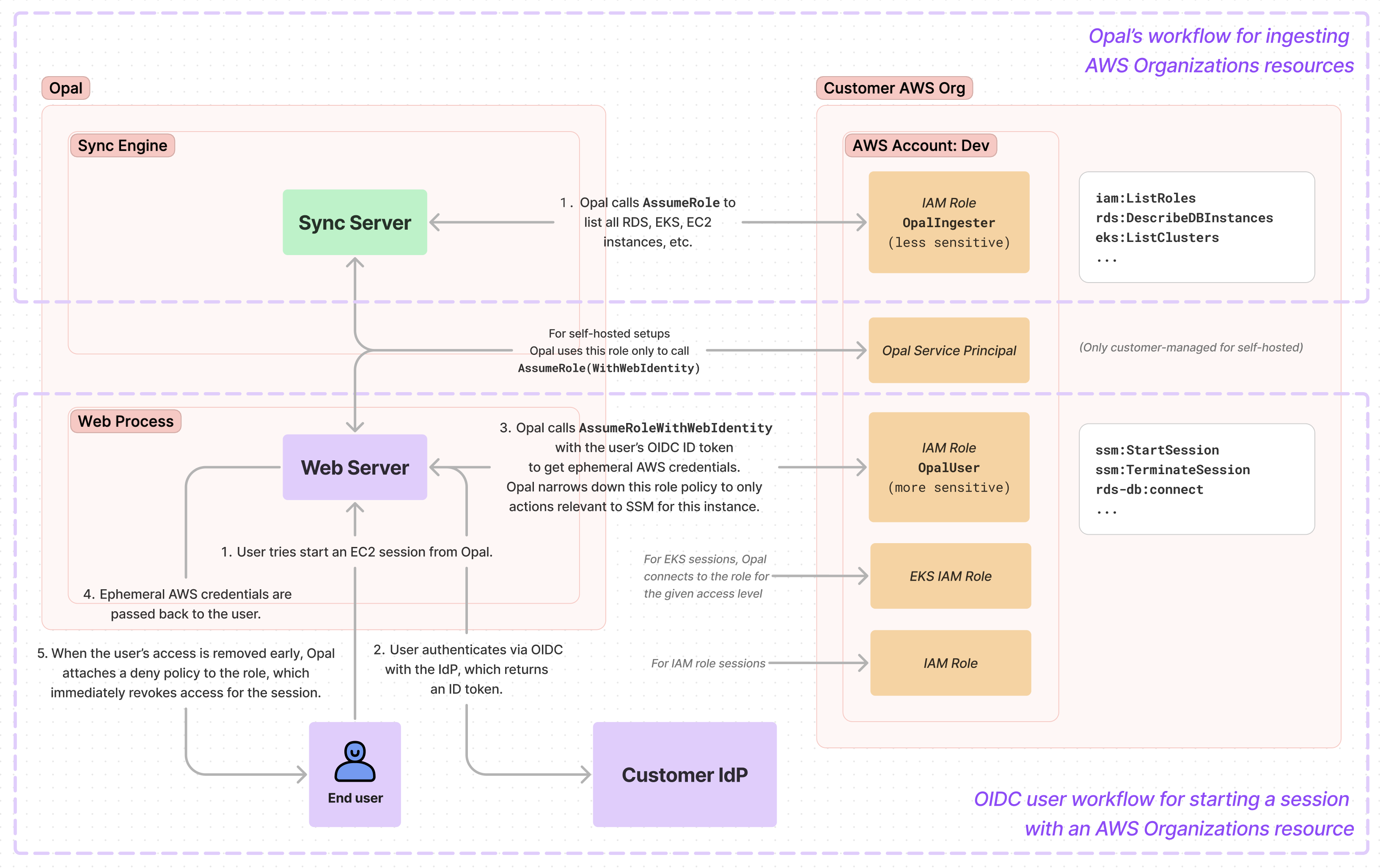
The following shows a high-level summary of how Opal authenticates for two major workflows:
1. Synchronizing your AWS Organizations resources in Opal
2. Granting Opal users sessions to AWS resources
 ## Requirements
To configure your AWS organization in Opal, you must:
* Be an Opal Admin
* Have an AWS Management or Delegated Administrator account
* Set up an OIDC provider in Opal, if you want to use Opal to manage IAM roles, EC2 instances, EKS instances, or RDS databases.
Setting up an OpenID Connect (OIDC) provider in Opal is required to use Opal to manage IAM roles, EC2 instances, EKS instances, or RDS databases. Opal uses OIDC to authenticate users when they start an AWS session with these accounts. This adds an extra layer of security by preventing Opal from being able to give access to users that aren't registered with your Identity Provider.
To configure an OIDC identity provider:
1. Register Opal with your OIDC provider to receive a **Client ID** and **Client Secret** that will be used to establish a trust relationship between Opal and your OIDC provider.
2. Use the callback URL `https://{{YOUR_OPAL_BASE_URL}/callback/oidc`, substituting in your Opal base URL, which is usually `app.opal.dev` for Opal Cloud organizations. For example, `https://app.opal.dev/callback/oidc`.
To learn more about obtaining these credentials, refer to your OIDC
documentation -- for example, see [Okta OIDC
docs](https://help.okta.com/en-us/Content/Topics/Apps/Apps_App_Integration_Wizard_OIDC.htm)
or [Google OIDC
docs](https://developers.google.com/identity/openid-connect/openid-connect).
If you use Okta, set application type to **Web Application**. In Opal, go to
the **Configuration > Settings** tab at the bottom of the left sidebar.
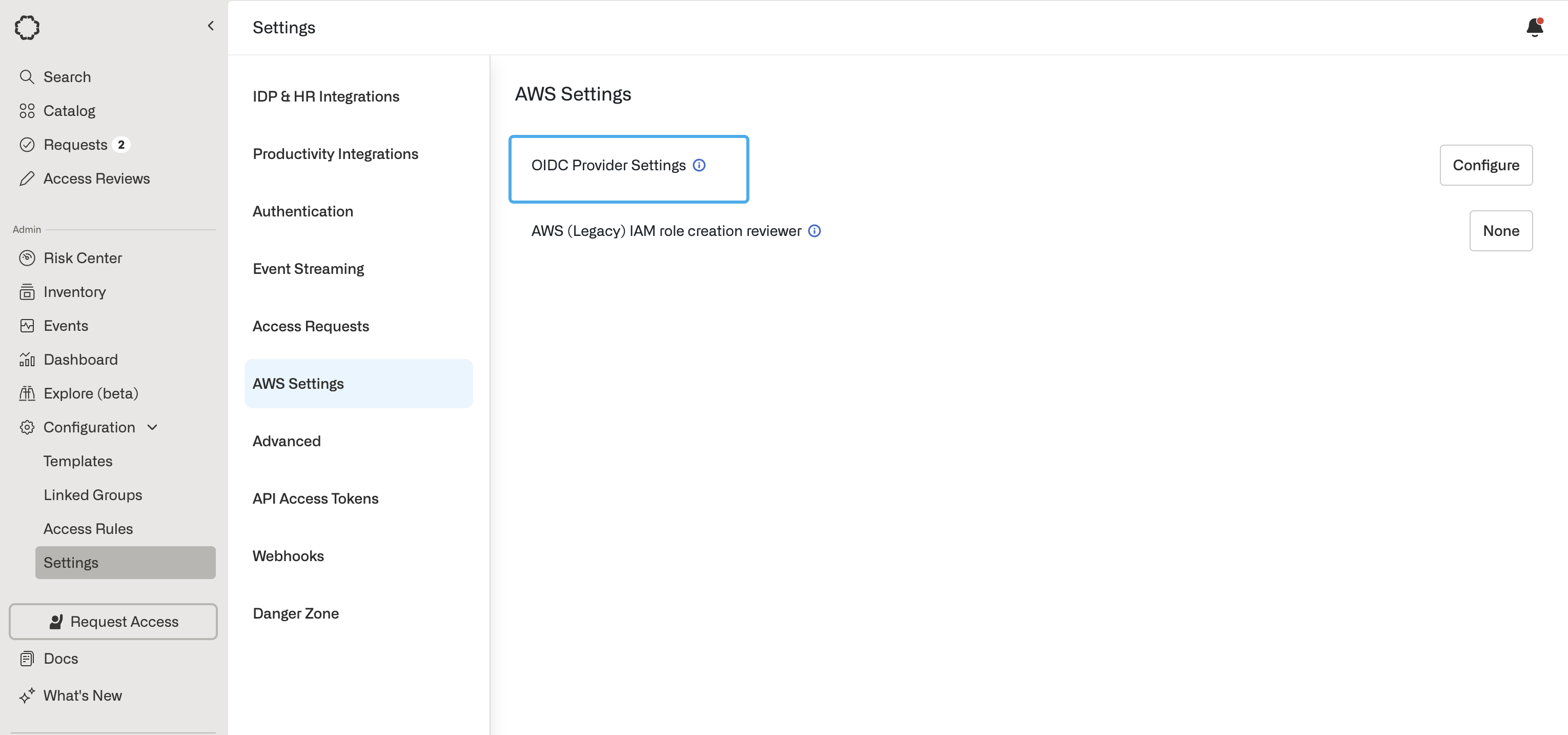
3. Find the **OIDC Provider Settings** setting under **AWS Settings**. Select **Configure**.
4. Enter the Client ID, Client Secret, and Issuer URL from your OIDC provider.
5. Save the Client ID and Issuer URLs, as you'll need them in a subsequent step.
## Requirements
To configure your AWS organization in Opal, you must:
* Be an Opal Admin
* Have an AWS Management or Delegated Administrator account
* Set up an OIDC provider in Opal, if you want to use Opal to manage IAM roles, EC2 instances, EKS instances, or RDS databases.
Setting up an OpenID Connect (OIDC) provider in Opal is required to use Opal to manage IAM roles, EC2 instances, EKS instances, or RDS databases. Opal uses OIDC to authenticate users when they start an AWS session with these accounts. This adds an extra layer of security by preventing Opal from being able to give access to users that aren't registered with your Identity Provider.
To configure an OIDC identity provider:
1. Register Opal with your OIDC provider to receive a **Client ID** and **Client Secret** that will be used to establish a trust relationship between Opal and your OIDC provider.
2. Use the callback URL `https://{{YOUR_OPAL_BASE_URL}/callback/oidc`, substituting in your Opal base URL, which is usually `app.opal.dev` for Opal Cloud organizations. For example, `https://app.opal.dev/callback/oidc`.
To learn more about obtaining these credentials, refer to your OIDC
documentation -- for example, see [Okta OIDC
docs](https://help.okta.com/en-us/Content/Topics/Apps/Apps_App_Integration_Wizard_OIDC.htm)
or [Google OIDC
docs](https://developers.google.com/identity/openid-connect/openid-connect).
If you use Okta, set application type to **Web Application**. In Opal, go to
the **Configuration > Settings** tab at the bottom of the left sidebar.
3. Find the **OIDC Provider Settings** setting under **AWS Settings**. Select **Configure**.
4. Enter the Client ID, Client Secret, and Issuer URL from your OIDC provider.
5. Save the Client ID and Issuer URLs, as you'll need them in a subsequent step.
 ## 1. Find your External ID
1. In Opal, go to the **Inventory** and select the **+ App** button in the top right corner to create a new app. Select **Amazon Web Services**.
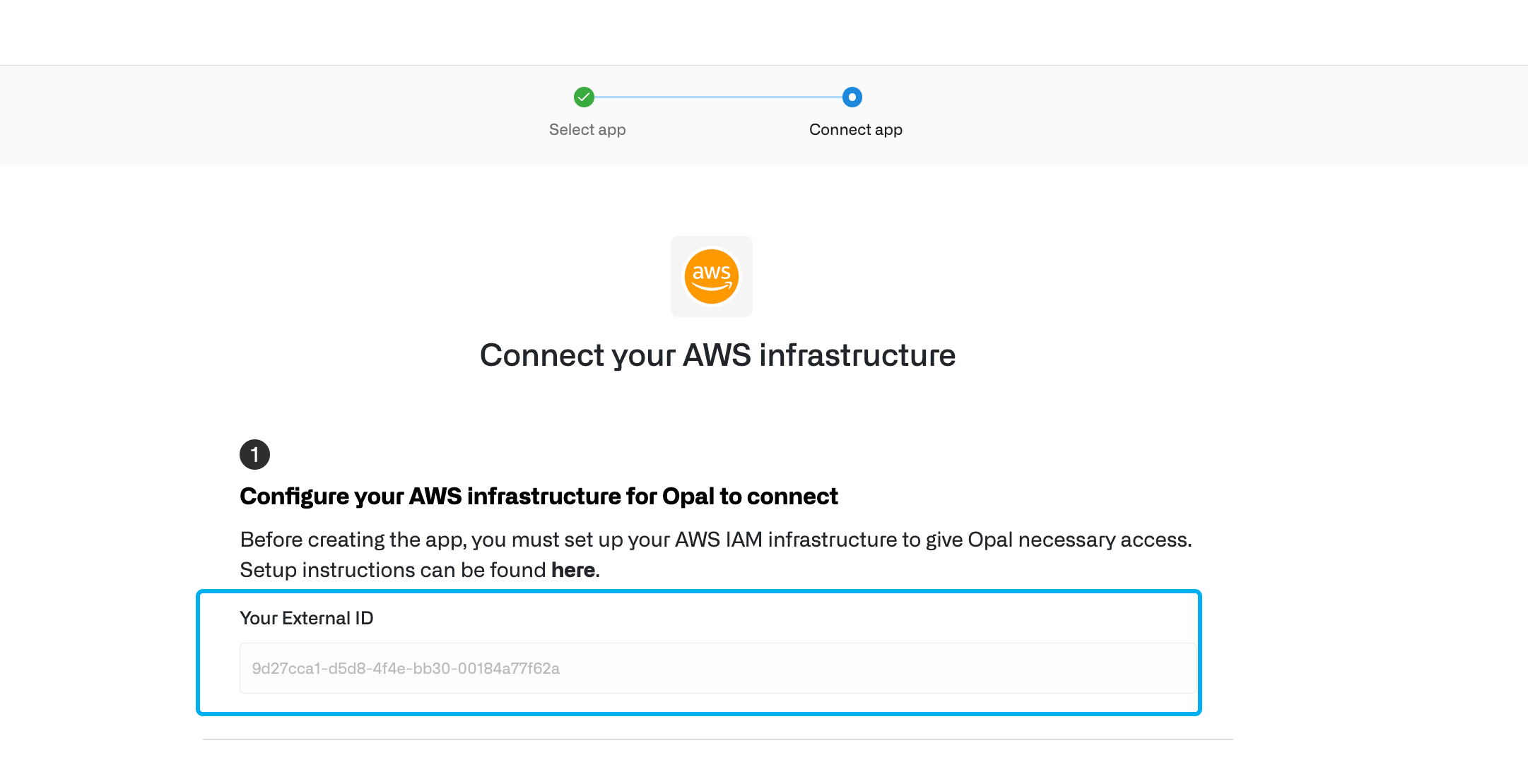
2. Save the **External ID**, which is unique to your Opal organization and is necessary for the following step. Opal uses this to [safeguard Opal’s third-party access to your data](https://docs.aws.amazon.com/IAM/latest/UserGuide/confused-deputy.html).
## 1. Find your External ID
1. In Opal, go to the **Inventory** and select the **+ App** button in the top right corner to create a new app. Select **Amazon Web Services**.
2. Save the **External ID**, which is unique to your Opal organization and is necessary for the following step. Opal uses this to [safeguard Opal’s third-party access to your data](https://docs.aws.amazon.com/IAM/latest/UserGuide/confused-deputy.html).
 ## 2. Configure your AWS management account
If your Opal instance is self-hosted, follow the [AWS setup for self-hosted Opal guide](/integrations/aws-integration-on-prem-setup) to set up the trust policy for the **OpalIngester** IAM role.
Once complete, return to these instructions to add the permissions policy for the role and complete the following steps.
In order for Opal to manage access to your AWS infrastructure, you must configure an IAM Role in your AWS management account. In the AWS console, create a new IAM role called **OpalIngester**. Give your role the following trust policy, replacing `${EXTERNAL_ID}` with the External ID from the *Create App* page in Opal:
```json Opal-hosted theme={null}
{
"Version": "2012-10-17",
"Statement": [
{
"Effect": "Allow",
"Principal": {
"AWS": "arn:aws:iam::602387580983:root"
},
"Action": [
"sts:AssumeRole"
],
"Condition": {
"StringEquals": {
"sts:ExternalId": "${EXTERNAL_ID}"
}
}
},
{
"Effect": "Allow",
"Principal": {
"AWS": "arn:aws:iam::602387580983:root"
},
"Action": [
"sts:TagSession"
]
}
]
}
```
Next, attach the following permissions policy to the role. Note that some permissions are always required, some are required to manage non-Identity Center resources (EC2 instances, IAM roles, etc.), and some are required specifically to manage Identity Center-managed roles. Use the **Explanation** tab to learn how to customize permissions for your use case, and the **Policy** tab for a policy you can copy and paste.
```json Explanation theme={null}
// IMPORTANT: This snippet is meant for documenting why Opal requires each of
// these permissions, allowing you to customize based on your needs. For a valid
// pasteable policy document, open the "Policy" tab above.
{
"Version": "2012-10-17",
"Statement": [
{
// This statement is required in all setups.
// The Opal AWS integration will not function correctly without it.
"Sid": "AlwaysRequired",
"Effect": "Allow",
"Action": [
// Required to show information about your AWS accounts in Opal.
"organizations:DescribeAccount",
"organizations:ListAccounts",
"organizations:ListTagsForResource",
// Required for Opal to validate what access it has
"iam:SimulatePrincipalPolicy"
// Required to ingest AWS Organizational Units (OUs).
"organizations:ListRoots",
"organizations:ListOrganizationalUnitsForParent",
"organizations:ListAccountsForParent",
"organizations:DescribeOrganizationalUnit"
],
"Resource": "_"
},
{
// Required to import your non-Identity Center resources from this account.
// This includes IAM Roles, EC2 instances, EKS clusters, and RDS databases.
// This statement can be removed for configurations that opt out of AWS
// Organization management in Opal.
"Sid": "RequiredToManageNonIdentityCenterResourcesInThisAccount",
"Effect": "Allow",
"Action": [
// Required to show IAM Roles in Opal.
"iam:ListRoleTags",
"iam:ListRoles",
"iam:GetRolePolicy",
"iam:GetPolicy",
"iam:GetRole",
// Required to show RDS databases in Opal
"rds:DescribeDBInstances",
"rds:DescribeDBClusters",
// Required to show EC2 instances in Opal
"ec2:DescribeInstances",
// Required to show EKS clusters in Opal
"eks:DescribeCluster",
"eks:ListClusters",
],
"Resource": "_"
},
{
// Required to manage your Identity Center resources from all accounts. This statement
// can be removed for configurations that opt out of Identity Center management in Opal.
"Sid": "RequiredToManageIdentityCenter",
"Effect": "Allow",
"Action": [
// Required to show Permission sets and their assignments in Opal
"sso:ListPermissionSets",
"sso:ListPermissionSetsProvisionedToAccount",
"sso:DescribePermissionSet",
"sso:ListAccountAssignments",
// Required to populate user access to permission sets
"sso:CreateAccountAssignment",
"sso:DeleteAccountAssignment",
"sso:DescribeAccountAssignmentCreationStatus",
"sso:DescribeAccountAssignmentDeletionStatus",
// Required to provision Identity Center group memberships
"identitystore:ListUsers",
"identitystore:ListGroups",
"identitystore:DescribeUser",
"identitystore:DescribeGroup",
"identitystore:GetGroupMembershipId",
"identitystore:ListGroupMemberships",
"identitystore:CreateGroupMembership",
"identitystore:DeleteGroupMembership"
],
},
{
// Required to provision permission sets. When account assignments are modified,
// iam:GetSAMLProvider is called under the hood by AWS. Permission Set provisioning
// operations do not function without this permission. This statement can be removed
// for configurations that opt out of IAM Identity Center management in Opal.
"Sid": "RequiredForIdentityCenterIAMRoleProvisioning",
"Effect": "Allow",
"Action": "iam:GetSAMLProvider",
"Resource": "arn:aws:iam::_:saml-provider/AWSSSO\__\_DO_NOT_DELETE"
},
{
// Required to provision permission sets in Management account. This statement
// can be removed for configurations that do not require provisioning IAM
// Identity Center permission sets in their management account with Opal.
"Sid": "RequiredForIdentityCenterIAMRoleProvisioningInManagementAccount",
"Effect": "Allow",
"Action": [
// In certain cases, you may also need to add iam:UpdateSAMLProvider here.
// See the AWS documentation for more detail:
// https://docs.aws.amazon.com/singlesignon/latest/userguide/iam-auth-access-using-id-policies.html#policyexamplemanageconnecteddirectory
"iam:AttachRolePolicy",
"iam:PutRolePolicy",
"iam:GetRole",
"iam:CreateRole",
"iam:UpdateRole",
"iam:DeleteRole",
"iam:ListRoles",
"iam:ListRolePolicies",
"iam:ListAttachedRolePolicies"
],
"Resource": [
"arn:aws:iam::_:role/aws-reserved/sso.amazonaws.com/_"
],
"Condition": {
"StringEquals": {
"aws:PrincipalOrgMasterAccountId": "${aws:PrincipalAccount}"
}
}
},
{
// Required to display usage data in Opal.
"Sid": "RequiredToReadUsageData",
"Effect": "Allow",
"Action": [
"cloudtrail:LookupEvents",
// Required for viewing EC2 usage data
"ssm:DescribeSessions"
],
"Resource": "_"
},
]
}
```
```json Policy theme={null}
{
"Version": "2012-10-17",
"Statement": [
{
"Sid": "AlwaysRequired",
"Effect": "Allow",
"Action": [
"organizations:DescribeAccount",
"organizations:ListAccounts",
"organizations:ListTagsForResource",
"iam:SimulatePrincipalPolicy",
"organizations:ListRoots",
"organizations:ListOrganizationalUnitsForParent",
"organizations:ListAccountsForParent",
"organizations:DescribeOrganizationalUnit"
],
"Resource": "*"
},
{
"Sid": "RequiredToManageNonIdentityCenterResourcesInThisAccount",
"Effect": "Allow",
"Action": [
"iam:ListRoleTags",
"iam:ListRoles",
"iam:ListPolicies",
"iam:ListAttachedRolePolicies",
"iam:GetRolePolicy",
"iam:GetPolicy",
"iam:GetRole",
"rds:DescribeDBInstances",
"rds:DescribeDBClusters",
"ec2:DescribeInstances",
"eks:DescribeCluster",
"eks:ListClusters",
"ssm:DescribeSessions"
],
"Resource": "*"
},
{
"Sid": "RequiredToManageIdentityCenter",
"Effect": "Allow",
"Action": [
"sso:ListPermissionSets",
"sso:ListPermissionSetsProvisionedToAccount",
"sso:DescribePermissionSet",
"sso:ListAccountAssignments",
"sso:CreateAccountAssignment",
"sso:DeleteAccountAssignment",
"sso:DescribeAccountAssignmentCreationStatus",
"sso:DescribeAccountAssignmentDeletionStatus",
"identitystore:ListUsers",
"identitystore:ListGroups",
"identitystore:DescribeUser",
"identitystore:DescribeGroup",
"identitystore:GetGroupMembershipId",
"identitystore:ListGroupMemberships",
"identitystore:CreateGroupMembership",
"identitystore:DeleteGroupMembership"
],
"Resource": "*"
},
{
"Sid": "RequiredForIdentityCenterIAMRoleProvisioning",
"Effect": "Allow",
"Action": "iam:GetSAMLProvider",
"Resource": "arn:aws:iam::*:saml-provider/AWSSSO_*_DO_NOT_DELETE"
},
{
"Sid": "RequiredForIdentityCenterIAMRoleProvisioningInManagementAccount",
"Effect": "Allow",
"Action": [
"iam:AttachRolePolicy",
"iam:PutRolePolicy",
"iam:GetRole",
"iam:CreateRole",
"iam:UpdateRole",
"iam:DeleteRole",
"iam:ListRoles",
"iam:ListRolePolicies",
"iam:ListAttachedRolePolicies"
],
"Resource": ["arn:aws:iam::*:role/aws-reserved/sso.amazonaws.com/*"],
"Condition": {
"StringEquals": {
"aws:PrincipalOrgMasterAccountId": "${aws:PrincipalAccount}"
}
}
},
{
"Sid": "RequiredToReadUsageData",
"Effect": "Allow",
"Action": ["cloudtrail:LookupEvents", "ssm:DescribeSessions"],
"Resource": "*"
}
]
}
```
## 3. Configure additional AWS accounts to be managed by Opal
If you are only setting up **AWS IAM Identity Center** to use Opal to manage
AWS IAM Identity Center groups and resources, you can skip to Step 4.
[Configure each additional AWS account](/integrations/configure-additional-aws-accounts-to-manage-in-opal)—IAM role, RDS database, etc.—you want Opal to manage, then return to this guide to complete steps 4-6.
## 4. Configure Opal app
1. In Opal, return to the **Create App** form and enter your AWS configuration details.
2. Enter your AWS **Account ID** in the **AWS Management or Delegated Administrator Account ID** field. In the AWS console, this is in the upper right corner.
3. **Optional**. If you're using [real-time sync](/integrations/aws-real-time-sync), enter your **CloudTrail events SQS queue URL**. You can also configure real-time sync after you create the app.
4. Enable or disable the following toggles based on your use cases. You can change these settings later from your app's **Setup** page.
* **AWS Organization management**: Enable if you want to manage IAM roles, EC2 instances, EKS instances, or RDS databases in Opal.
* **IAM Identity Center management**: Enable if you want to manage AWS IAM Identity Center groups and permission sets in Opal.
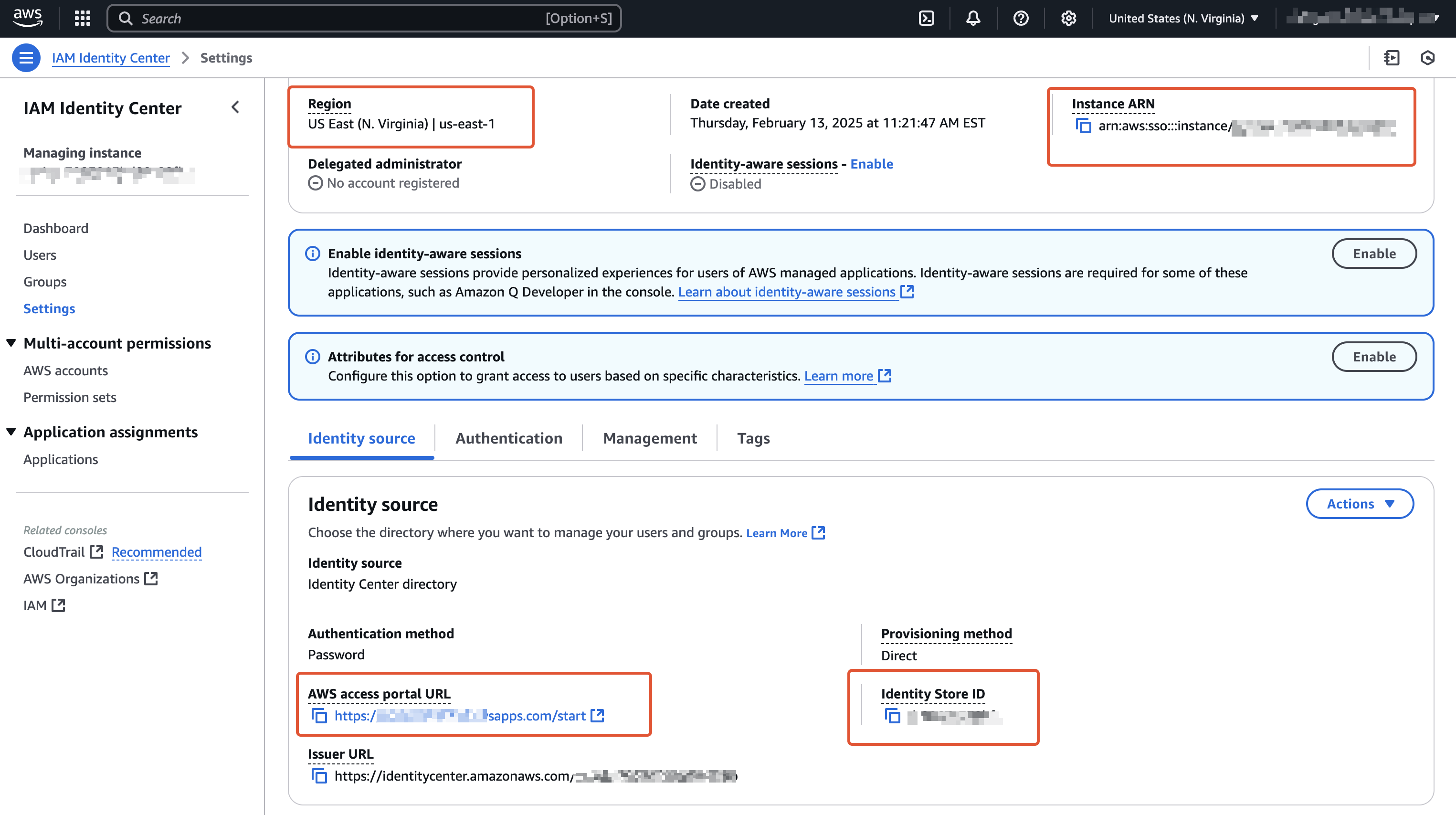
5. If you want to manage AWS IAM Identity Center groups and permissions in Opal, enter the following additional settings, which you can find in your AWS console in **IAM Identity Center > Settings**.
| Field in Opal | Field in AWS |
| -------------------------------- | --------------------- |
| AWS IAM Identity Center Region | Region |
| AWS Identity Center Instance ARN | Instance ARN |
| AWS Identity Store ID | Identity Store ID |
| AWS Access Portal URL | AWS access portal URL |
## 2. Configure your AWS management account
If your Opal instance is self-hosted, follow the [AWS setup for self-hosted Opal guide](/integrations/aws-integration-on-prem-setup) to set up the trust policy for the **OpalIngester** IAM role.
Once complete, return to these instructions to add the permissions policy for the role and complete the following steps.
In order for Opal to manage access to your AWS infrastructure, you must configure an IAM Role in your AWS management account. In the AWS console, create a new IAM role called **OpalIngester**. Give your role the following trust policy, replacing `${EXTERNAL_ID}` with the External ID from the *Create App* page in Opal:
```json Opal-hosted theme={null}
{
"Version": "2012-10-17",
"Statement": [
{
"Effect": "Allow",
"Principal": {
"AWS": "arn:aws:iam::602387580983:root"
},
"Action": [
"sts:AssumeRole"
],
"Condition": {
"StringEquals": {
"sts:ExternalId": "${EXTERNAL_ID}"
}
}
},
{
"Effect": "Allow",
"Principal": {
"AWS": "arn:aws:iam::602387580983:root"
},
"Action": [
"sts:TagSession"
]
}
]
}
```
Next, attach the following permissions policy to the role. Note that some permissions are always required, some are required to manage non-Identity Center resources (EC2 instances, IAM roles, etc.), and some are required specifically to manage Identity Center-managed roles. Use the **Explanation** tab to learn how to customize permissions for your use case, and the **Policy** tab for a policy you can copy and paste.
```json Explanation theme={null}
// IMPORTANT: This snippet is meant for documenting why Opal requires each of
// these permissions, allowing you to customize based on your needs. For a valid
// pasteable policy document, open the "Policy" tab above.
{
"Version": "2012-10-17",
"Statement": [
{
// This statement is required in all setups.
// The Opal AWS integration will not function correctly without it.
"Sid": "AlwaysRequired",
"Effect": "Allow",
"Action": [
// Required to show information about your AWS accounts in Opal.
"organizations:DescribeAccount",
"organizations:ListAccounts",
"organizations:ListTagsForResource",
// Required for Opal to validate what access it has
"iam:SimulatePrincipalPolicy"
// Required to ingest AWS Organizational Units (OUs).
"organizations:ListRoots",
"organizations:ListOrganizationalUnitsForParent",
"organizations:ListAccountsForParent",
"organizations:DescribeOrganizationalUnit"
],
"Resource": "_"
},
{
// Required to import your non-Identity Center resources from this account.
// This includes IAM Roles, EC2 instances, EKS clusters, and RDS databases.
// This statement can be removed for configurations that opt out of AWS
// Organization management in Opal.
"Sid": "RequiredToManageNonIdentityCenterResourcesInThisAccount",
"Effect": "Allow",
"Action": [
// Required to show IAM Roles in Opal.
"iam:ListRoleTags",
"iam:ListRoles",
"iam:GetRolePolicy",
"iam:GetPolicy",
"iam:GetRole",
// Required to show RDS databases in Opal
"rds:DescribeDBInstances",
"rds:DescribeDBClusters",
// Required to show EC2 instances in Opal
"ec2:DescribeInstances",
// Required to show EKS clusters in Opal
"eks:DescribeCluster",
"eks:ListClusters",
],
"Resource": "_"
},
{
// Required to manage your Identity Center resources from all accounts. This statement
// can be removed for configurations that opt out of Identity Center management in Opal.
"Sid": "RequiredToManageIdentityCenter",
"Effect": "Allow",
"Action": [
// Required to show Permission sets and their assignments in Opal
"sso:ListPermissionSets",
"sso:ListPermissionSetsProvisionedToAccount",
"sso:DescribePermissionSet",
"sso:ListAccountAssignments",
// Required to populate user access to permission sets
"sso:CreateAccountAssignment",
"sso:DeleteAccountAssignment",
"sso:DescribeAccountAssignmentCreationStatus",
"sso:DescribeAccountAssignmentDeletionStatus",
// Required to provision Identity Center group memberships
"identitystore:ListUsers",
"identitystore:ListGroups",
"identitystore:DescribeUser",
"identitystore:DescribeGroup",
"identitystore:GetGroupMembershipId",
"identitystore:ListGroupMemberships",
"identitystore:CreateGroupMembership",
"identitystore:DeleteGroupMembership"
],
},
{
// Required to provision permission sets. When account assignments are modified,
// iam:GetSAMLProvider is called under the hood by AWS. Permission Set provisioning
// operations do not function without this permission. This statement can be removed
// for configurations that opt out of IAM Identity Center management in Opal.
"Sid": "RequiredForIdentityCenterIAMRoleProvisioning",
"Effect": "Allow",
"Action": "iam:GetSAMLProvider",
"Resource": "arn:aws:iam::_:saml-provider/AWSSSO\__\_DO_NOT_DELETE"
},
{
// Required to provision permission sets in Management account. This statement
// can be removed for configurations that do not require provisioning IAM
// Identity Center permission sets in their management account with Opal.
"Sid": "RequiredForIdentityCenterIAMRoleProvisioningInManagementAccount",
"Effect": "Allow",
"Action": [
// In certain cases, you may also need to add iam:UpdateSAMLProvider here.
// See the AWS documentation for more detail:
// https://docs.aws.amazon.com/singlesignon/latest/userguide/iam-auth-access-using-id-policies.html#policyexamplemanageconnecteddirectory
"iam:AttachRolePolicy",
"iam:PutRolePolicy",
"iam:GetRole",
"iam:CreateRole",
"iam:UpdateRole",
"iam:DeleteRole",
"iam:ListRoles",
"iam:ListRolePolicies",
"iam:ListAttachedRolePolicies"
],
"Resource": [
"arn:aws:iam::_:role/aws-reserved/sso.amazonaws.com/_"
],
"Condition": {
"StringEquals": {
"aws:PrincipalOrgMasterAccountId": "${aws:PrincipalAccount}"
}
}
},
{
// Required to display usage data in Opal.
"Sid": "RequiredToReadUsageData",
"Effect": "Allow",
"Action": [
"cloudtrail:LookupEvents",
// Required for viewing EC2 usage data
"ssm:DescribeSessions"
],
"Resource": "_"
},
]
}
```
```json Policy theme={null}
{
"Version": "2012-10-17",
"Statement": [
{
"Sid": "AlwaysRequired",
"Effect": "Allow",
"Action": [
"organizations:DescribeAccount",
"organizations:ListAccounts",
"organizations:ListTagsForResource",
"iam:SimulatePrincipalPolicy",
"organizations:ListRoots",
"organizations:ListOrganizationalUnitsForParent",
"organizations:ListAccountsForParent",
"organizations:DescribeOrganizationalUnit"
],
"Resource": "*"
},
{
"Sid": "RequiredToManageNonIdentityCenterResourcesInThisAccount",
"Effect": "Allow",
"Action": [
"iam:ListRoleTags",
"iam:ListRoles",
"iam:ListPolicies",
"iam:ListAttachedRolePolicies",
"iam:GetRolePolicy",
"iam:GetPolicy",
"iam:GetRole",
"rds:DescribeDBInstances",
"rds:DescribeDBClusters",
"ec2:DescribeInstances",
"eks:DescribeCluster",
"eks:ListClusters",
"ssm:DescribeSessions"
],
"Resource": "*"
},
{
"Sid": "RequiredToManageIdentityCenter",
"Effect": "Allow",
"Action": [
"sso:ListPermissionSets",
"sso:ListPermissionSetsProvisionedToAccount",
"sso:DescribePermissionSet",
"sso:ListAccountAssignments",
"sso:CreateAccountAssignment",
"sso:DeleteAccountAssignment",
"sso:DescribeAccountAssignmentCreationStatus",
"sso:DescribeAccountAssignmentDeletionStatus",
"identitystore:ListUsers",
"identitystore:ListGroups",
"identitystore:DescribeUser",
"identitystore:DescribeGroup",
"identitystore:GetGroupMembershipId",
"identitystore:ListGroupMemberships",
"identitystore:CreateGroupMembership",
"identitystore:DeleteGroupMembership"
],
"Resource": "*"
},
{
"Sid": "RequiredForIdentityCenterIAMRoleProvisioning",
"Effect": "Allow",
"Action": "iam:GetSAMLProvider",
"Resource": "arn:aws:iam::*:saml-provider/AWSSSO_*_DO_NOT_DELETE"
},
{
"Sid": "RequiredForIdentityCenterIAMRoleProvisioningInManagementAccount",
"Effect": "Allow",
"Action": [
"iam:AttachRolePolicy",
"iam:PutRolePolicy",
"iam:GetRole",
"iam:CreateRole",
"iam:UpdateRole",
"iam:DeleteRole",
"iam:ListRoles",
"iam:ListRolePolicies",
"iam:ListAttachedRolePolicies"
],
"Resource": ["arn:aws:iam::*:role/aws-reserved/sso.amazonaws.com/*"],
"Condition": {
"StringEquals": {
"aws:PrincipalOrgMasterAccountId": "${aws:PrincipalAccount}"
}
}
},
{
"Sid": "RequiredToReadUsageData",
"Effect": "Allow",
"Action": ["cloudtrail:LookupEvents", "ssm:DescribeSessions"],
"Resource": "*"
}
]
}
```
## 3. Configure additional AWS accounts to be managed by Opal
If you are only setting up **AWS IAM Identity Center** to use Opal to manage
AWS IAM Identity Center groups and resources, you can skip to Step 4.
[Configure each additional AWS account](/integrations/configure-additional-aws-accounts-to-manage-in-opal)—IAM role, RDS database, etc.—you want Opal to manage, then return to this guide to complete steps 4-6.
## 4. Configure Opal app
1. In Opal, return to the **Create App** form and enter your AWS configuration details.
2. Enter your AWS **Account ID** in the **AWS Management or Delegated Administrator Account ID** field. In the AWS console, this is in the upper right corner.
3. **Optional**. If you're using [real-time sync](/integrations/aws-real-time-sync), enter your **CloudTrail events SQS queue URL**. You can also configure real-time sync after you create the app.
4. Enable or disable the following toggles based on your use cases. You can change these settings later from your app's **Setup** page.
* **AWS Organization management**: Enable if you want to manage IAM roles, EC2 instances, EKS instances, or RDS databases in Opal.
* **IAM Identity Center management**: Enable if you want to manage AWS IAM Identity Center groups and permission sets in Opal.
5. If you want to manage AWS IAM Identity Center groups and permissions in Opal, enter the following additional settings, which you can find in your AWS console in **IAM Identity Center > Settings**.
| Field in Opal | Field in AWS |
| -------------------------------- | --------------------- |
| AWS IAM Identity Center Region | Region |
| AWS Identity Center Instance ARN | Instance ARN |
| AWS Identity Store ID | Identity Store ID |
| AWS Access Portal URL | AWS access portal URL |
 ## 5. Run app validation checks
After you save your app, you can view existing sync issues from the **Setup** tab on the app detail page. Missing permissions and sync issues show in the **App Validations** section. Select the refresh icon to rerun validation checks.
## 5. Run app validation checks
After you save your app, you can view existing sync issues from the **Setup** tab on the app detail page. Missing permissions and sync issues show in the **App Validations** section. Select the refresh icon to rerun validation checks.
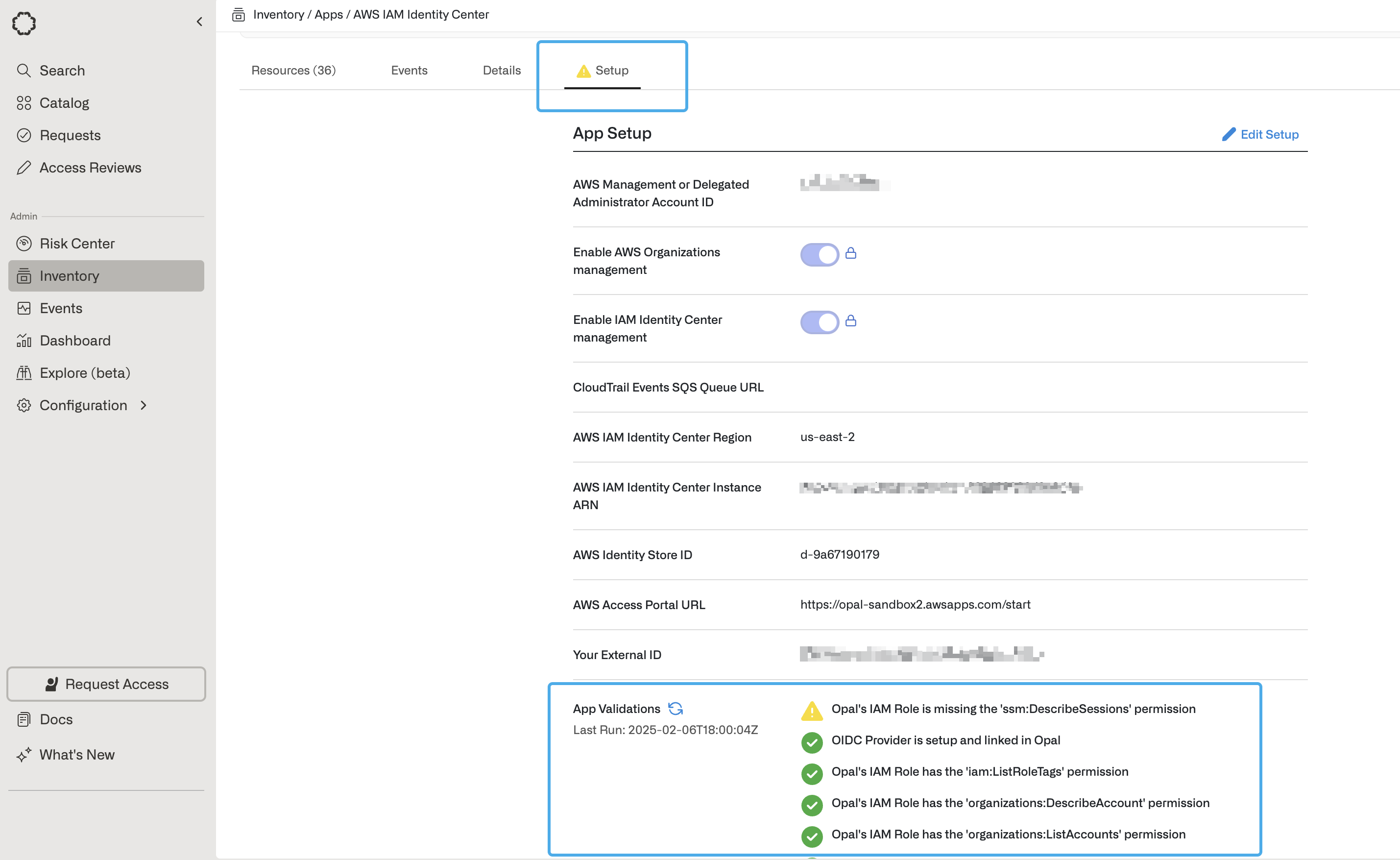 You can hover over the validation icons to learn why Opal needs a given permission. To correctly sync your app to Opal, ensure you address any sync errors, marked with the red **!** icon. Inspect warnings on a case-by-case basis: warnings might impact features you’re not using and may be safely ignored, but this depends on your use case.
## 6. Connect individual AWS accounts
After you've configured your AWS app, use the additional guides to configure [IAM roles](/integrations/adding-an-iam-role), [RDS databases](/integrations/adding-an-rds-database), [EC2 instances](/integrations/adding-an-ec2-instance), and [EKS clusters](/integrations/adding-an-eks-cluster). These guides contain instructions on how to let users connect to your AWS accounts.
***
You can hover over the validation icons to learn why Opal needs a given permission. To correctly sync your app to Opal, ensure you address any sync errors, marked with the red **!** icon. Inspect warnings on a case-by-case basis: warnings might impact features you’re not using and may be safely ignored, but this depends on your use case.
## 6. Connect individual AWS accounts
After you've configured your AWS app, use the additional guides to configure [IAM roles](/integrations/adding-an-iam-role), [RDS databases](/integrations/adding-an-rds-database), [EC2 instances](/integrations/adding-an-ec2-instance), and [EKS clusters](/integrations/adding-an-eks-cluster). These guides contain instructions on how to let users connect to your AWS accounts.
***