> ## Documentation Index
> Fetch the complete documentation index at: https://docs.opal.dev/llms.txt
> Use this file to discover all available pages before exploring further.
# GitHub
> Connect Opal to your GitHub organization to manage and review access.
Learn how to connect GitHub to Opal to manage access to your GitHub organization's repositories and teams.
## Supported resources
Opal does not yet support personal repositories. Opal also does not yet
support access management for GitHub users that are not members of your
organization.
| Resource | Read | Grant and revoke access | Available in Risk Center |
| ------------------------------ | ---- | ----------------------- | ------------------------ |
| GitHub teams | ✔️ | ✔️ | ✔️ |
| GitHub repositories | ✔️ | ✔️ | ✔️ |
| GitHub organization roles | ✔️ | ✔️ | ✔️ |
| GitHub organization owner role | ✔️ | ✔️ | ✔️ |
When users request access to GitHub repositories, they can also request to assume specific roles.
## 1. Create an Opal app
To set up a new connection, go to the **Inventory** page and select the **+ App** button on the top right. Then select the GitHub tile.
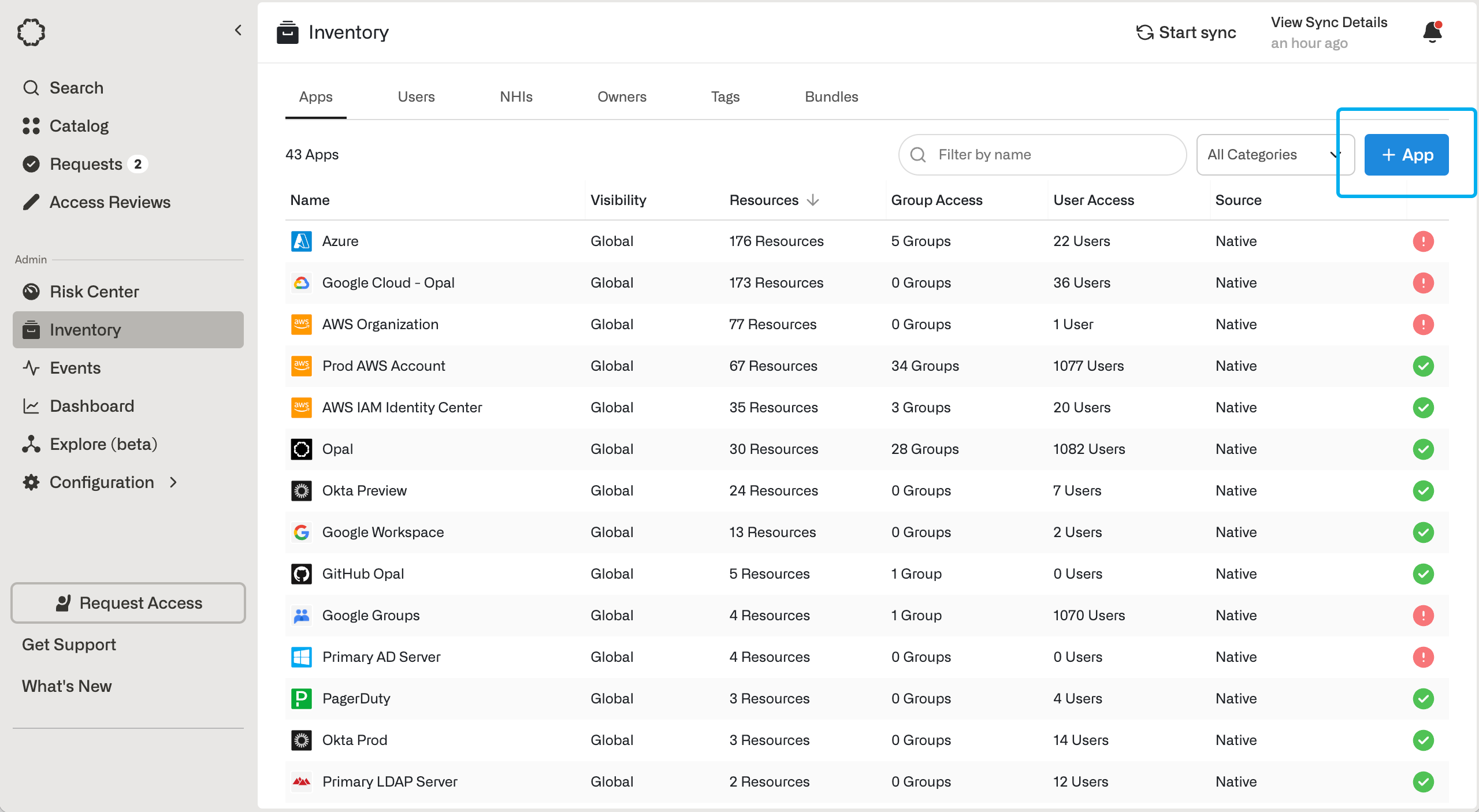 To upgrade an existing Opal app, go to the **Setup** tab in the **Inventory** and select **Register App**.
## 2. Create the GitHub App
Ensure you have permissions to create a GitHub App in your GitHub
organization.
If you're creating the app for the first time, enter an app name, GitHub organization name, app admin, and description.
If your organization uses SAML SSO, setting **Enable SAML SSO Ingestion** syncs users from your GitHub organization's SAML SSO identities.
SAML SSO ingestion only includes users who have signed into GitHub at least
once using your organization's SAML SSO. Users provisioned in your IdP (e.g.,
Okta) who have never completed a GitHub SSO login will not appear in Opal
until they do so. If you need all IdP users synced automatically without
requiring a GitHub SSO sign-in, consider setting up a{" "}
GitHub Enterprise connection{" "}
with SCIM provisioning configured in your IdP.
After you create the Opal app or select **Register App** for an existing integration, you'll be directed to GitHub to create the [GitHub App](https://docs.github.com/en/apps/creating-github-apps/about-creating-github-apps/about-creating-github-apps).
## 3. Optional: Link GitHub identities to Opal accounts
GitHub only makes the email address of a GitHub account available via its API if a user has elected to publicly display their email address. Thus, Opal needs another way to match GitHub identities with Opal accounts.
If your organization does not use SAML SSO, each user must link their GitHub account to their Opal account. If you've enabled SAML SSO ingestion, users can still manually link GitHub identities, but SAML usernames will take precedence.
For security reasons, we ask users to log in to both Opal and GitHub to link their accounts.
For the following steps, the GitHub account you wish to integrate **must have
a verified email address corresponding to your Opal email address**.
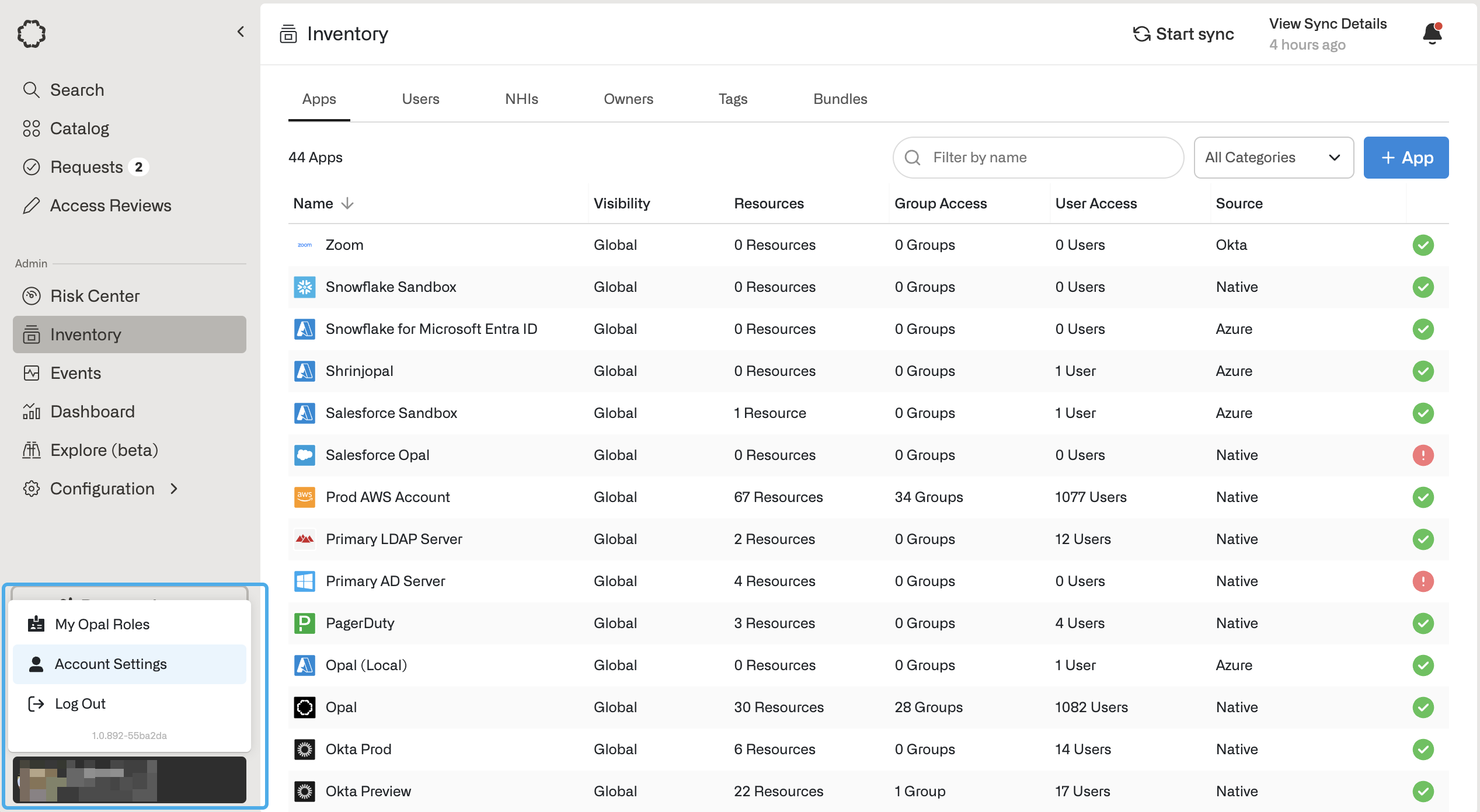
1. In the bottom left, click your **User** > **Account Settings**.
To upgrade an existing Opal app, go to the **Setup** tab in the **Inventory** and select **Register App**.
## 2. Create the GitHub App
Ensure you have permissions to create a GitHub App in your GitHub
organization.
If you're creating the app for the first time, enter an app name, GitHub organization name, app admin, and description.
If your organization uses SAML SSO, setting **Enable SAML SSO Ingestion** syncs users from your GitHub organization's SAML SSO identities.
SAML SSO ingestion only includes users who have signed into GitHub at least
once using your organization's SAML SSO. Users provisioned in your IdP (e.g.,
Okta) who have never completed a GitHub SSO login will not appear in Opal
until they do so. If you need all IdP users synced automatically without
requiring a GitHub SSO sign-in, consider setting up a{" "}
GitHub Enterprise connection{" "}
with SCIM provisioning configured in your IdP.
After you create the Opal app or select **Register App** for an existing integration, you'll be directed to GitHub to create the [GitHub App](https://docs.github.com/en/apps/creating-github-apps/about-creating-github-apps/about-creating-github-apps).
## 3. Optional: Link GitHub identities to Opal accounts
GitHub only makes the email address of a GitHub account available via its API if a user has elected to publicly display their email address. Thus, Opal needs another way to match GitHub identities with Opal accounts.
If your organization does not use SAML SSO, each user must link their GitHub account to their Opal account. If you've enabled SAML SSO ingestion, users can still manually link GitHub identities, but SAML usernames will take precedence.
For security reasons, we ask users to log in to both Opal and GitHub to link their accounts.
For the following steps, the GitHub account you wish to integrate **must have
a verified email address corresponding to your Opal email address**.
1. In the bottom left, click your **User** > **Account Settings**.
 2. Click **Identities** > **Connect** next to the GitHub integration.
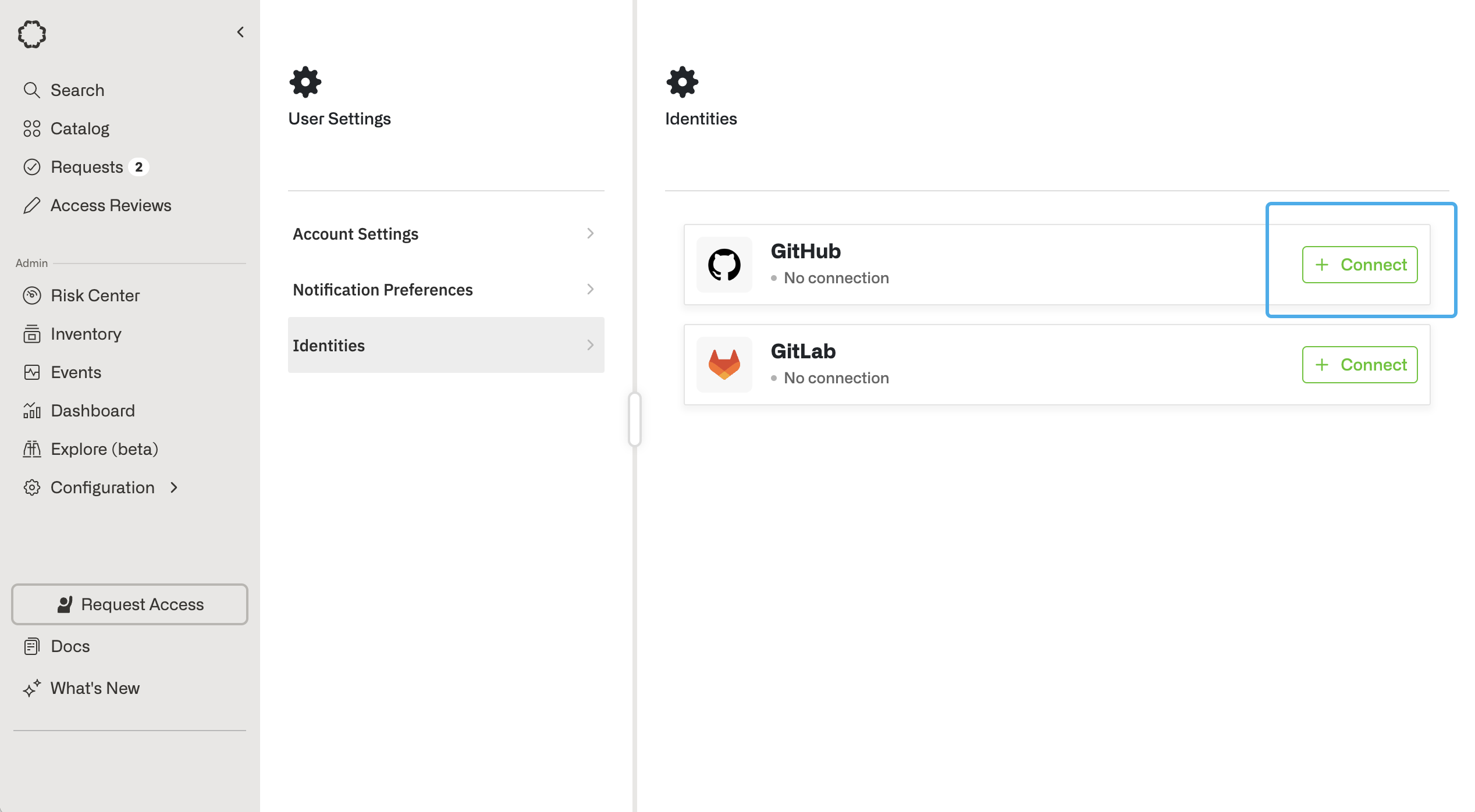 3. You will be redirected to a GitHub page, which will prompt you to log into your GitHub account.
### Programmatically map GitHub usernames
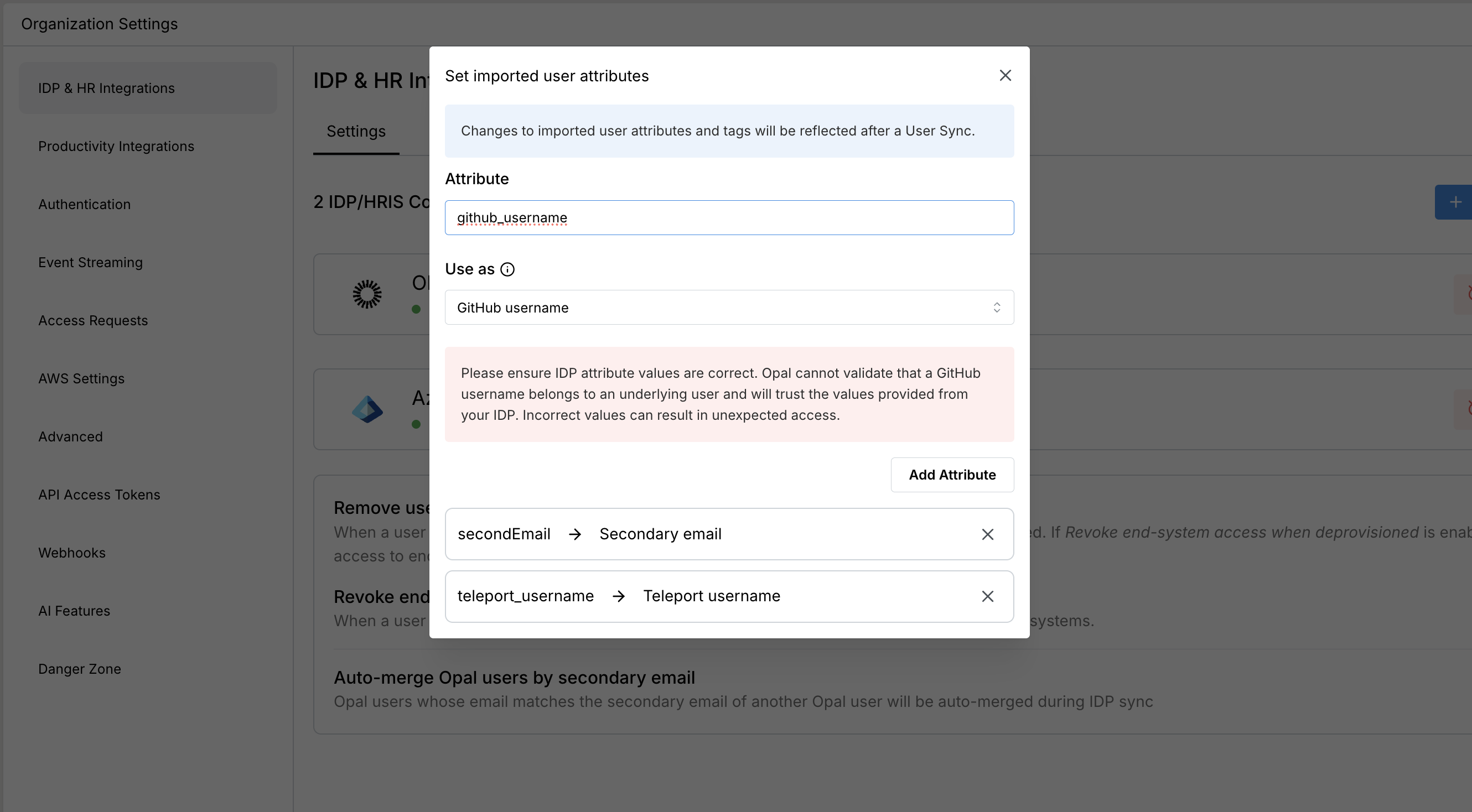
If your end users cannot manually link accounts—e.g., if you're connecting service accounts to Opal—you can alternatively set the GitHub username as an attribute in your IdP and [import it as a user attribute]().
3. You will be redirected to a GitHub page, which will prompt you to log into your GitHub account.
### Programmatically map GitHub usernames
If your end users cannot manually link accounts—e.g., if you're connecting service accounts to Opal—you can alternatively set the GitHub username as an attribute in your IdP and [import it as a user attribute]().
 ## Github Organization Owner Support
To leverage Github Organization Owner Support in your Opal environment, go to your **Github App** > import the **Github Organization** resource. The member / admin (owner) roles will be automatically populated and show up as access levels on the Organization in the request modal.
## Github Organization Owner Support
To leverage Github Organization Owner Support in your Opal environment, go to your **Github App** > import the **Github Organization** resource. The member / admin (owner) roles will be automatically populated and show up as access levels on the Organization in the request modal.