> ## Documentation Index
> Fetch the complete documentation index at: https://docs.opal.dev/llms.txt
> Use this file to discover all available pages before exploring further.
# Azure Infrastructure Setup
If you have an existing Azure app in Opal that has not been configured to
manage infrastructure resources, you can enable infrastructure management
under the app's **Setup** tab in Opal.
To manage access to Azure Subscriptions and Resource Groups, you must grant additional permissions to the Opal application.
## Requirements
You must have admin access to the Azure root management group.
## 1. Create Opal Service Role
1. In the Azure Portal, navigate to **Tenant Root Management Group** -> **Access Control (IAM)** -> **Add** -> **Add custom role**.
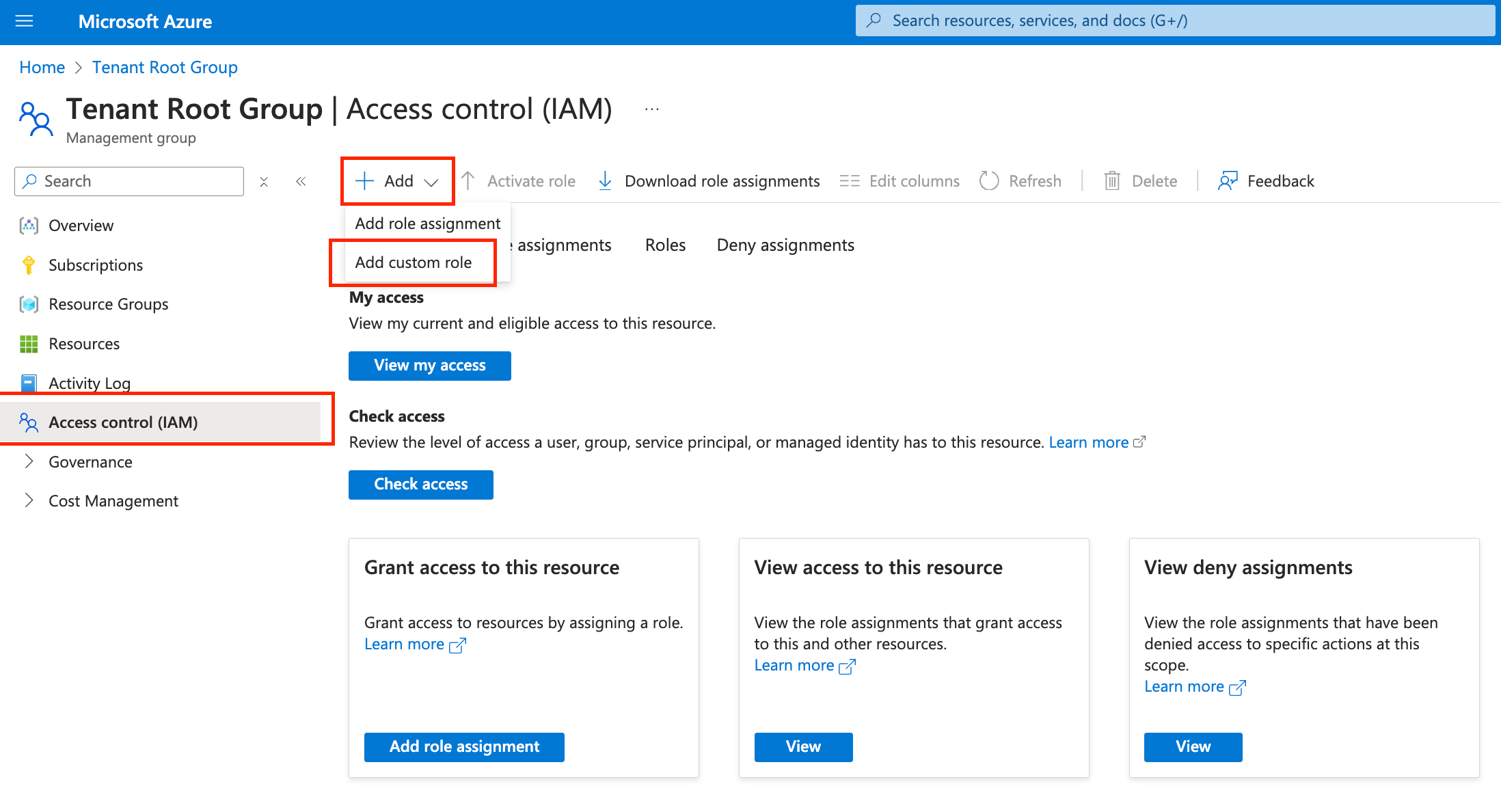 2. Go to **JSON** > **Edit**. Replace the default definition with the following snippet in the **Definition** tab, substituting in your management group ID. **Note**: The `roleName` must be `Opal Service Role`. Use the **Explanation** tab to see why permissions are required, and the **Definition** tab for a valid definition to copy and paste.
```json Explanation theme={null}
// NOTE: This snippet documents why Opal requires each of these permissions,
// allowing you to customize based on your needs. For a valid pasteable policy
// document, use the "Definition" tab.
{
"properties": {
"roleName": "Opal Service Role",
"description": "Contains the necessary permissions for Opal to provision access",
"assignableScopes": [
"/providers/Microsoft.Management/managementGroups/"
],
"permissions": [
{
"actions": [
// Required. Used to import management groups and subscriptions.
"Microsoft.Management/getEntities/action",
// Required. Used to import management groups.
"Microsoft.Management/managementGroups/read",
// Required. Used to import resource groups.
"Microsoft.Resources/subscriptions/resourceGroups/read",
// Required. Used to import resources under resource groups.
"Microsoft.Resources/subscriptions/resourcegroups/resources/read",
// Required. Used to view IAM access to Azure resources.
"Microsoft.Authorization/permissions/read",
// Required. Used to view IAM access to Azure resources.
"Microsoft.Authorization/roleAssignments/read",
// Required. Used to push access to Azure resources.
"Microsoft.Authorization/roleAssignments/write",
// Required. Used to remove access to Azure resources.
"Microsoft.Authorization/roleAssignments/delete",
// Optional. Used to import user-assigned identities.
"Microsoft.ManagedIdentity/userAssignedIdentities/read",
// Optional. Used to import virtual machines.
"Microsoft.ClassicCompute/virtualMachines/read",
// Optional. Used to import storage accounts.
"Microsoft.Storage/storageAccounts/read",
// Optional. Used to import SQL servers.
"Microsoft.SQL/servers/read",
// Optional. Used to import SQL managed databases.
"Microsoft.Sql/managedInstances/databases/read",
// Optional. Used to import SQL databases.
"Microsoft.Sql/servers/databases/read",
// Optional. Used to import storage containers.
"Microsoft.Storage/storageAccounts/blobServices/containers/read"
],
"notActions": [],
"dataActions": [],
"notDataActions": []
}
]
}
}
```
```Text Definition theme={null}
{
"properties": {
"roleName": "Opal Service Role",
"description": "Contains the necessary permissions for Opal to provision access",
"assignableScopes": [
"/providers/Microsoft.Management/managementGroups/"
],
"permissions": [
{
"actions": [
"Microsoft.Management/getEntities/action",
"Microsoft.Management/managementGroups/read",
"Microsoft.Resources/subscriptions/resourceGroups/read",
"Microsoft.Resources/subscriptions/resourcegroups/resources/read",
"Microsoft.Authorization/permissions/read",
"Microsoft.Authorization/roleAssignments/read",
"Microsoft.Authorization/roleAssignments/write",
"Microsoft.Authorization/roleAssignments/delete",
"Microsoft.ManagedIdentity/userAssignedIdentities/read",
"Microsoft.ClassicCompute/virtualMachines/read",
"Microsoft.Storage/storageAccounts/read",
"Microsoft.SQL/servers/read",
"Microsoft.Sql/managedInstances/databases/read",
"Microsoft.Sql/servers/databases/read",
"Microsoft.Storage/storageAccounts/blobServices/containers/read"
],
"notActions": [],
"dataActions": [],
"notDataActions": []
}
]
}
}
```
3. Click **Next**, and then **Create** to create the role.
## 2. Create Role Assignment
1. In the Azure portal, navigate to **Tenant Root Management Group** -> **Access control (IAM)** -> **Add role assignment**.
2. Go to **JSON** > **Edit**. Replace the default definition with the following snippet in the **Definition** tab, substituting in your management group ID. **Note**: The `roleName` must be `Opal Service Role`. Use the **Explanation** tab to see why permissions are required, and the **Definition** tab for a valid definition to copy and paste.
```json Explanation theme={null}
// NOTE: This snippet documents why Opal requires each of these permissions,
// allowing you to customize based on your needs. For a valid pasteable policy
// document, use the "Definition" tab.
{
"properties": {
"roleName": "Opal Service Role",
"description": "Contains the necessary permissions for Opal to provision access",
"assignableScopes": [
"/providers/Microsoft.Management/managementGroups/"
],
"permissions": [
{
"actions": [
// Required. Used to import management groups and subscriptions.
"Microsoft.Management/getEntities/action",
// Required. Used to import management groups.
"Microsoft.Management/managementGroups/read",
// Required. Used to import resource groups.
"Microsoft.Resources/subscriptions/resourceGroups/read",
// Required. Used to import resources under resource groups.
"Microsoft.Resources/subscriptions/resourcegroups/resources/read",
// Required. Used to view IAM access to Azure resources.
"Microsoft.Authorization/permissions/read",
// Required. Used to view IAM access to Azure resources.
"Microsoft.Authorization/roleAssignments/read",
// Required. Used to push access to Azure resources.
"Microsoft.Authorization/roleAssignments/write",
// Required. Used to remove access to Azure resources.
"Microsoft.Authorization/roleAssignments/delete",
// Optional. Used to import user-assigned identities.
"Microsoft.ManagedIdentity/userAssignedIdentities/read",
// Optional. Used to import virtual machines.
"Microsoft.ClassicCompute/virtualMachines/read",
// Optional. Used to import storage accounts.
"Microsoft.Storage/storageAccounts/read",
// Optional. Used to import SQL servers.
"Microsoft.SQL/servers/read",
// Optional. Used to import SQL managed databases.
"Microsoft.Sql/managedInstances/databases/read",
// Optional. Used to import SQL databases.
"Microsoft.Sql/servers/databases/read",
// Optional. Used to import storage containers.
"Microsoft.Storage/storageAccounts/blobServices/containers/read"
],
"notActions": [],
"dataActions": [],
"notDataActions": []
}
]
}
}
```
```Text Definition theme={null}
{
"properties": {
"roleName": "Opal Service Role",
"description": "Contains the necessary permissions for Opal to provision access",
"assignableScopes": [
"/providers/Microsoft.Management/managementGroups/"
],
"permissions": [
{
"actions": [
"Microsoft.Management/getEntities/action",
"Microsoft.Management/managementGroups/read",
"Microsoft.Resources/subscriptions/resourceGroups/read",
"Microsoft.Resources/subscriptions/resourcegroups/resources/read",
"Microsoft.Authorization/permissions/read",
"Microsoft.Authorization/roleAssignments/read",
"Microsoft.Authorization/roleAssignments/write",
"Microsoft.Authorization/roleAssignments/delete",
"Microsoft.ManagedIdentity/userAssignedIdentities/read",
"Microsoft.ClassicCompute/virtualMachines/read",
"Microsoft.Storage/storageAccounts/read",
"Microsoft.SQL/servers/read",
"Microsoft.Sql/managedInstances/databases/read",
"Microsoft.Sql/servers/databases/read",
"Microsoft.Storage/storageAccounts/blobServices/containers/read"
],
"notActions": [],
"dataActions": [],
"notDataActions": []
}
]
}
}
```
3. Click **Next**, and then **Create** to create the role.
## 2. Create Role Assignment
1. In the Azure portal, navigate to **Tenant Root Management Group** -> **Access control (IAM)** -> **Add role assignment**.
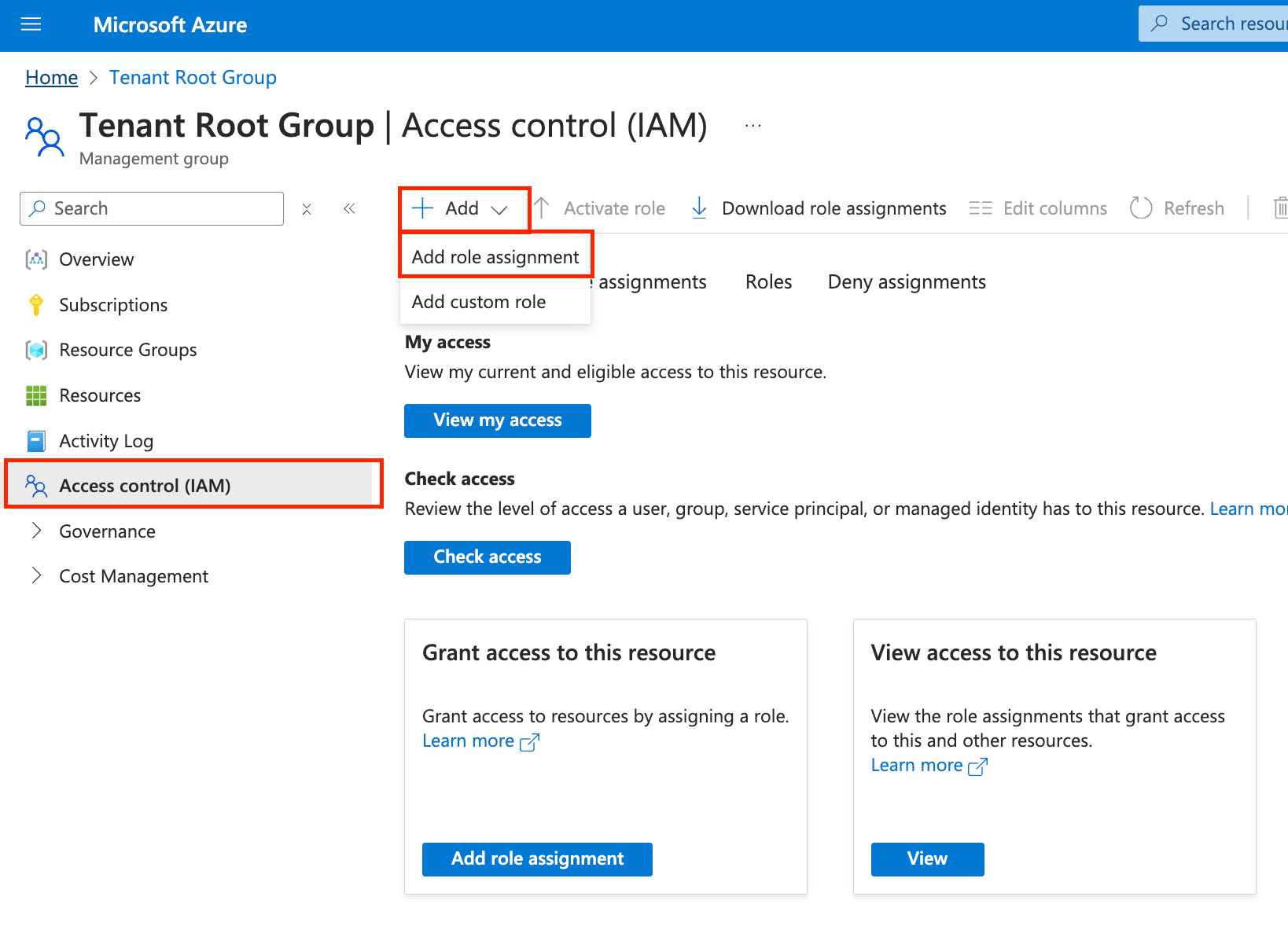 1. Under Role, select the Opal Service Role (found under "Privileged administrator roles").
2. Select the **Members** tab. Add the Opal application as a member.
3. Select the **Conditions** tab -> **Select roles and principals**.
1. Under Role, select the Opal Service Role (found under "Privileged administrator roles").
2. Select the **Members** tab. Add the Opal application as a member.
3. Select the **Conditions** tab -> **Select roles and principals**.
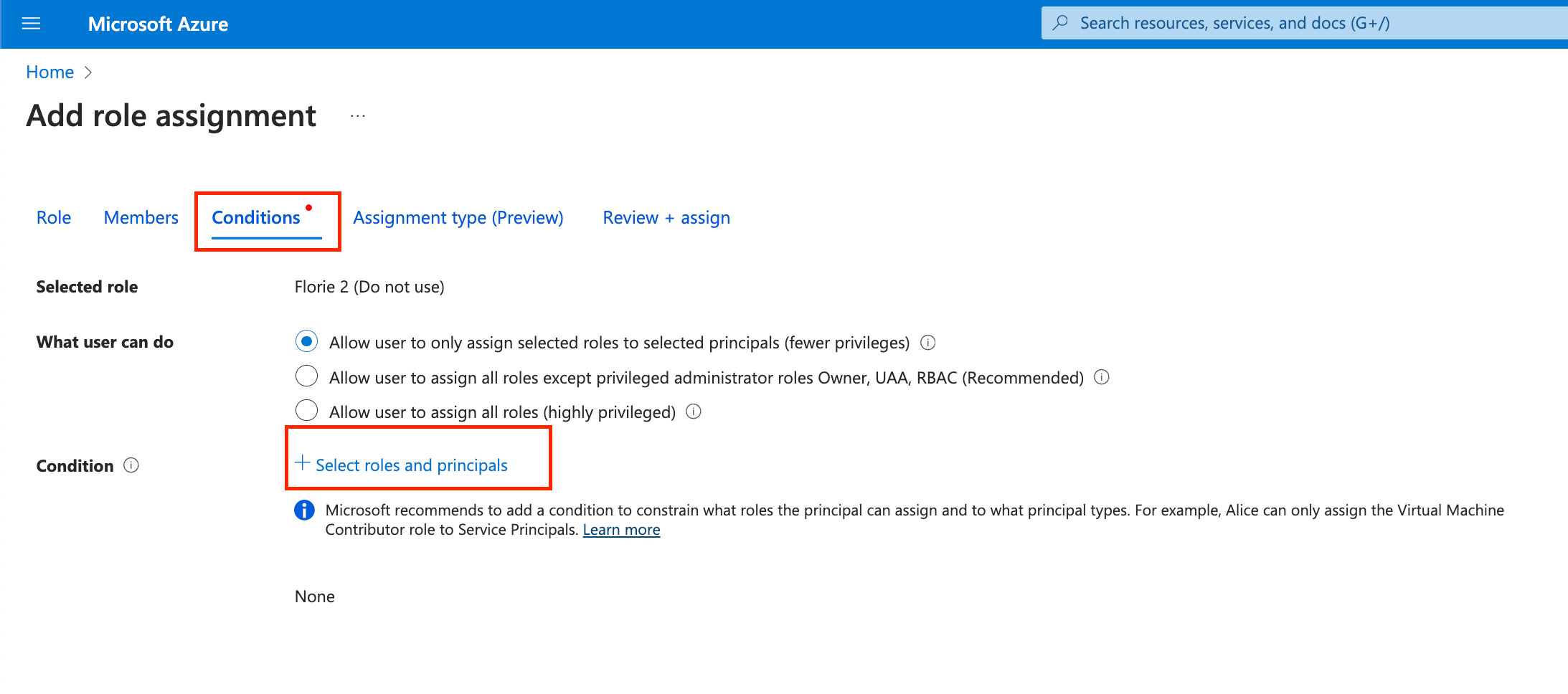 5. Select **Open advanced condition editor**. Toggle **Editor type** from "Visual" to "Code".
6. Paste in the following code, substituting in your Opal app's Object ID, and save. This condition prevents the Opal application from having the ability to escalate its own access by assigning roles to itself.
```json json theme={null}
(
(
!(ActionMatches{'Microsoft.Authorization/roleAssignments/write'})
)
OR
(
@Request[Microsoft.Authorization/roleAssignments:PrincipalId] GuidNotEquals
)
)
```
7. Go to **Review + assign**. Complete assigning the role by clicking **Review + assign**.
## 3. Allow sessions for SQL Databases \[Optional]
Follow instructions [to add Azure Databases](/integrations/adding-azure-sql-databases) if you want to enable Opal to manage SQL Database logins.
5. Select **Open advanced condition editor**. Toggle **Editor type** from "Visual" to "Code".
6. Paste in the following code, substituting in your Opal app's Object ID, and save. This condition prevents the Opal application from having the ability to escalate its own access by assigning roles to itself.
```json json theme={null}
(
(
!(ActionMatches{'Microsoft.Authorization/roleAssignments/write'})
)
OR
(
@Request[Microsoft.Authorization/roleAssignments:PrincipalId] GuidNotEquals
)
)
```
7. Go to **Review + assign**. Complete assigning the role by clicking **Review + assign**.
## 3. Allow sessions for SQL Databases \[Optional]
Follow instructions [to add Azure Databases](/integrations/adding-azure-sql-databases) if you want to enable Opal to manage SQL Database logins.