> ## Documentation Index
> Fetch the complete documentation index at: https://docs.opal.dev/llms.txt
> Use this file to discover all available pages before exploring further.
# Add an EKS cluster
> Add your AWS EKS clusters to Opal to allow your developers to request temporary access.
This guide assumes you've already [configured your AWS organization in
Opal](/integrations/setting-up-your-aws-organization-in-opal).
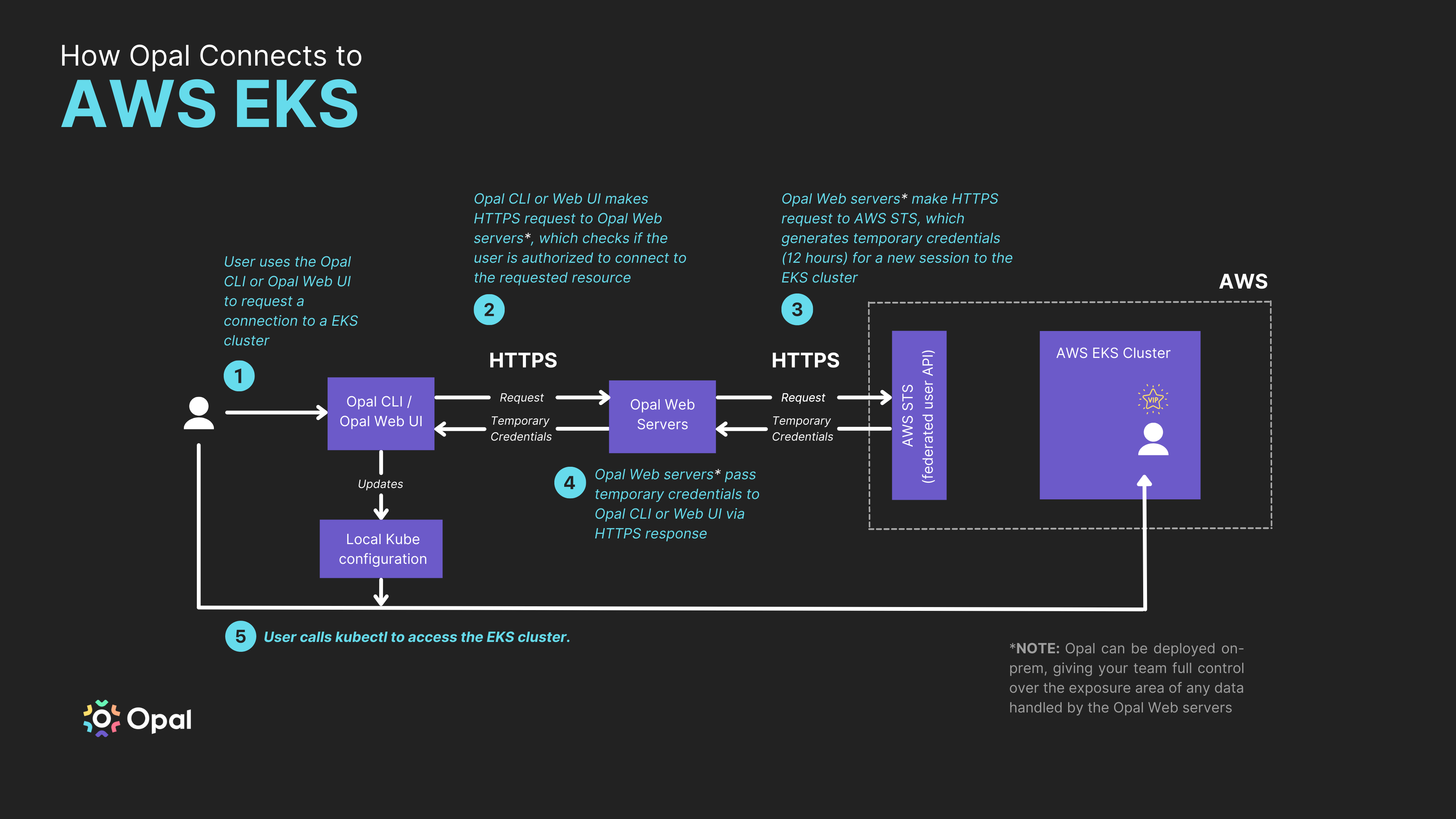
The following diagram illustrates how Opal connects to AWS EKS. Use this guide to learn how you can add EKS clusters to Opal.
 To set up Opal to grant access to your AWS EKS cluster roles, follow the steps below.
## Add an EKS cluster
### 1. Create an IAM role
First, you need an IAM role that can be mapped a Kubernetes role that you want to make available in Opal. You can use an existing IAM role or create a new one - at the minimum, the role must have the `eks:DescribeCluster` permission on the EKS cluster(s) you want to manage.
If creating an IAM role, we've provided two ways to do this below, via AWS CLI commands or Terraform:
```shell AWS CLI commands theme={null}
# Add your AWS account ID to an environment variable
ACCOUNT_ID=
# Add your IdP issuer URL to an environment variable
IDP_ISSUER_URL=
# Add your Opal Client ID to an environment variable
OPAL_CLIENT_ID=
# Create the IAM role naming it something your developers will understand
ROLE_NAME=
# Add your cluster ARN to an environment variable
CLUSTER_ARN=
# Create the role trust policy locally
TRUST="{ \"Version\": \"2012-10-17\",
Statement\": [
{
\"Effect\": \"Allow\",
\"Principal\": {
\"Federated\": \"arn:aws:iam::${ACCOUNT_ID}:oidc-provider/${IDP_ISSUER_URL}\"
},
\"Action\": \"sts:AssumeRoleWithWebIdentity\",
\"Condition\": {
\"StringEquals\": {
\"${IDP_ISSUER_URL}:aud\": \"${OPAL_CLIENT_ID}\"
}
}
}
]
}"
echo "{ \"Version\": \"2012-10-17\", \"Statement\": [ { \"Effect\": \"Allow\", \"Action\": \"eks:DescribeCluster\", \"Resource\": \"${CLUSTER_ARN}\" } ] }" > /tmp/iam-role-policy
# Create the IAM role
aws iam create-role --role-name "$ROLE_NAME" --assume-role-policy-document "$TRUST" --output text --query 'Role.Arn'
# Attach the policy to the role
aws iam put-role-policy --role-name "$ROLE_NAME" --policy-name eks-admin --policy-document file:///tmp/iam-role-policy
```
Make sure to set the following variables when running the above code:
* `ACCOUNT_ID=`
* `IDP_ISSUER_URL=`
* `OPAL_CLIENT_ID=`
* `ROLE_NAME=`
* `CLUSTER_ARN=`
### 2. Update the aws-auth Configmap
The `aws-auth` Configmap exists on every EKS cluster and is what AWS uses to map IAM roles to Kubernetes roles. To map the role you created above to a `cluster-admin` level role in Kubernetes, please run the following commands:
```shell Shell commands theme={null}
ROLE=" - rolearn: arn:aws:iam::$ACCOUNT_ID:role/$ROLE_NAME\n username: eks-cluster-admin:{{SessionName}}\n groups:\n - system:masters"
kubectl get -n kube-system configmap/aws-auth -o yaml | awk "/mapRoles: \|/{print;print \"$ROLE\";next}1" > /tmp/aws-auth-patch.yml
kubectl patch configmap/aws-auth -n kube-system --patch "$(cat /tmp/aws-auth-patch.yml)"
```
The aws-auth Configmap lets you map IAM roles to different Kubernetes roles. You'll need to do this if you want to allow users to request access to custom access levels, like a "read-only" role. You can manually edit the Configmap by running the following command:
`kubectl edit configmaps aws-auth -n kube-system`
Then, you can map different roles to your IAM role ARN. See the following articles to learn how:
* [Adding limited-access IAM users to EKS clusters](https://www.freecodecamp.org/news/adding-limited-access-iam-user-to-eks-cluster/)
* [Kubernetes RBAC concepts](https://kubernetes.io/docs/reference/access-authn-authz/rbac/)
If this part of the setup is confusing, feel free to [reach out](mailto:support@opal.dev)—we're happy to help.
### 3. Tag your EKS cluster
You'll need to tag your EKS cluster in two ways to properly set it up for Opal.
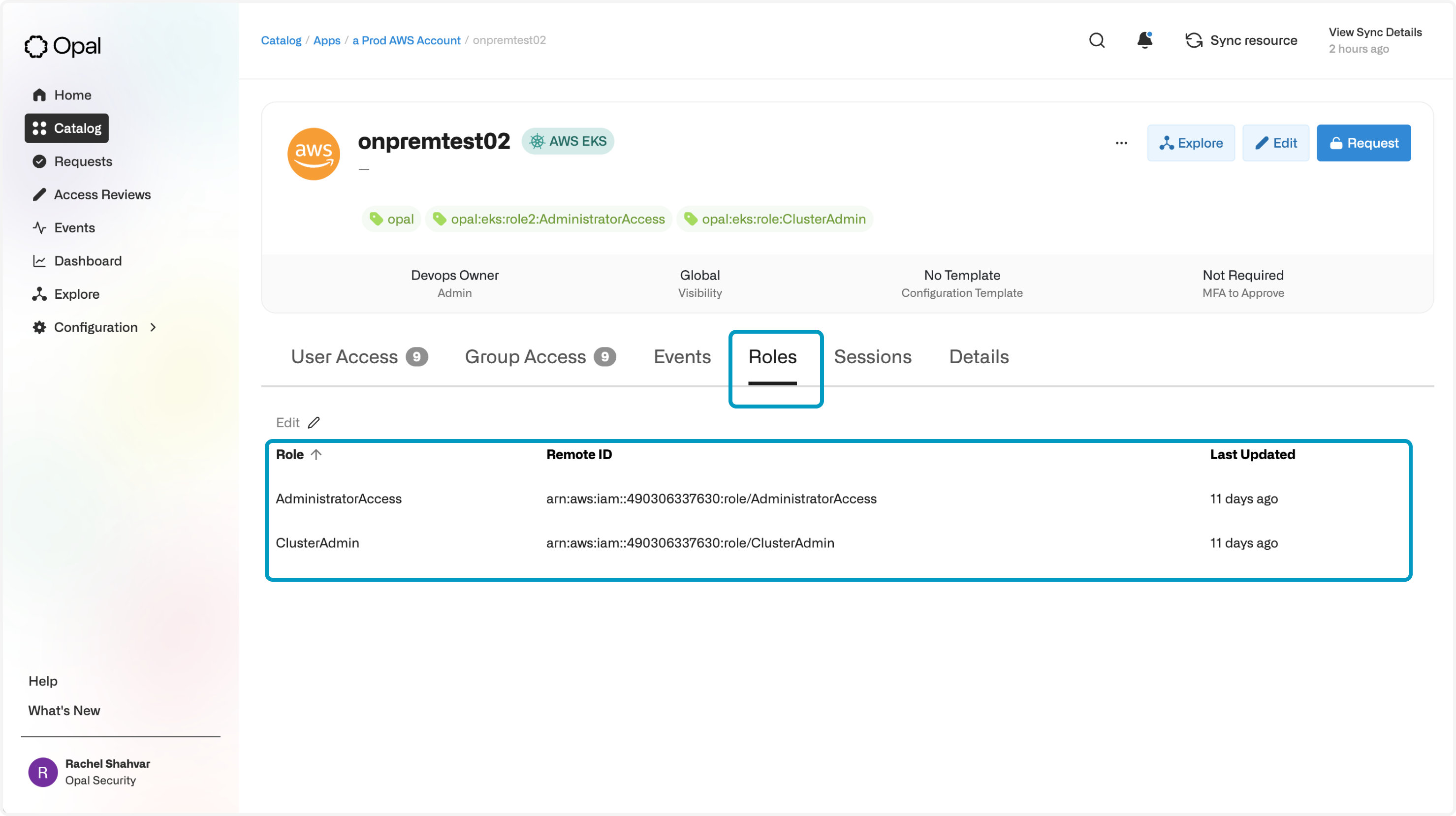
First, you must tag the cluster with any IAM roles that you set up in Step 1. For each IAM role, create a tag whose key is prefixed with `opal:eks:role`, and whose value is the name of the AWS IAM role. Below, we show an example of a cluster tagged with 2 IAM roles:
```shell AWS CLI commands theme={null}
aws eks tag-resource --resource-arn "$CLUSTER_ARN" --region $REGION —tags "opal:eks:role:1=ClusterAdmin,opal:eks:role:2=ClusterView"
```
```text Terraform theme={null}
module "eks" {
# ... other configuration
cluster_tags = {
"opal:eks:role:1" = ClusterAdmin
"opal:eks:role:2" = ClusterView
}
}
```
Each of these roles will be auto-imported as a Role on the cluster in Opal.
To set up Opal to grant access to your AWS EKS cluster roles, follow the steps below.
## Add an EKS cluster
### 1. Create an IAM role
First, you need an IAM role that can be mapped a Kubernetes role that you want to make available in Opal. You can use an existing IAM role or create a new one - at the minimum, the role must have the `eks:DescribeCluster` permission on the EKS cluster(s) you want to manage.
If creating an IAM role, we've provided two ways to do this below, via AWS CLI commands or Terraform:
```shell AWS CLI commands theme={null}
# Add your AWS account ID to an environment variable
ACCOUNT_ID=
# Add your IdP issuer URL to an environment variable
IDP_ISSUER_URL=
# Add your Opal Client ID to an environment variable
OPAL_CLIENT_ID=
# Create the IAM role naming it something your developers will understand
ROLE_NAME=
# Add your cluster ARN to an environment variable
CLUSTER_ARN=
# Create the role trust policy locally
TRUST="{ \"Version\": \"2012-10-17\",
Statement\": [
{
\"Effect\": \"Allow\",
\"Principal\": {
\"Federated\": \"arn:aws:iam::${ACCOUNT_ID}:oidc-provider/${IDP_ISSUER_URL}\"
},
\"Action\": \"sts:AssumeRoleWithWebIdentity\",
\"Condition\": {
\"StringEquals\": {
\"${IDP_ISSUER_URL}:aud\": \"${OPAL_CLIENT_ID}\"
}
}
}
]
}"
echo "{ \"Version\": \"2012-10-17\", \"Statement\": [ { \"Effect\": \"Allow\", \"Action\": \"eks:DescribeCluster\", \"Resource\": \"${CLUSTER_ARN}\" } ] }" > /tmp/iam-role-policy
# Create the IAM role
aws iam create-role --role-name "$ROLE_NAME" --assume-role-policy-document "$TRUST" --output text --query 'Role.Arn'
# Attach the policy to the role
aws iam put-role-policy --role-name "$ROLE_NAME" --policy-name eks-admin --policy-document file:///tmp/iam-role-policy
```
Make sure to set the following variables when running the above code:
* `ACCOUNT_ID=`
* `IDP_ISSUER_URL=`
* `OPAL_CLIENT_ID=`
* `ROLE_NAME=`
* `CLUSTER_ARN=`
### 2. Update the aws-auth Configmap
The `aws-auth` Configmap exists on every EKS cluster and is what AWS uses to map IAM roles to Kubernetes roles. To map the role you created above to a `cluster-admin` level role in Kubernetes, please run the following commands:
```shell Shell commands theme={null}
ROLE=" - rolearn: arn:aws:iam::$ACCOUNT_ID:role/$ROLE_NAME\n username: eks-cluster-admin:{{SessionName}}\n groups:\n - system:masters"
kubectl get -n kube-system configmap/aws-auth -o yaml | awk "/mapRoles: \|/{print;print \"$ROLE\";next}1" > /tmp/aws-auth-patch.yml
kubectl patch configmap/aws-auth -n kube-system --patch "$(cat /tmp/aws-auth-patch.yml)"
```
The aws-auth Configmap lets you map IAM roles to different Kubernetes roles. You'll need to do this if you want to allow users to request access to custom access levels, like a "read-only" role. You can manually edit the Configmap by running the following command:
`kubectl edit configmaps aws-auth -n kube-system`
Then, you can map different roles to your IAM role ARN. See the following articles to learn how:
* [Adding limited-access IAM users to EKS clusters](https://www.freecodecamp.org/news/adding-limited-access-iam-user-to-eks-cluster/)
* [Kubernetes RBAC concepts](https://kubernetes.io/docs/reference/access-authn-authz/rbac/)
If this part of the setup is confusing, feel free to [reach out](mailto:support@opal.dev)—we're happy to help.
### 3. Tag your EKS cluster
You'll need to tag your EKS cluster in two ways to properly set it up for Opal.
First, you must tag the cluster with any IAM roles that you set up in Step 1. For each IAM role, create a tag whose key is prefixed with `opal:eks:role`, and whose value is the name of the AWS IAM role. Below, we show an example of a cluster tagged with 2 IAM roles:
```shell AWS CLI commands theme={null}
aws eks tag-resource --resource-arn "$CLUSTER_ARN" --region $REGION —tags "opal:eks:role:1=ClusterAdmin,opal:eks:role:2=ClusterView"
```
```text Terraform theme={null}
module "eks" {
# ... other configuration
cluster_tags = {
"opal:eks:role:1" = ClusterAdmin
"opal:eks:role:2" = ClusterView
}
}
```
Each of these roles will be auto-imported as a Role on the cluster in Opal.
 Second, to have your EKS cluster auto-imported into Opal in Opal's hourly sync, tag the cluster with key `opal`:
```shell AWS CLI commands theme={null}
aws eks tag-resource --resource-arn "$CLUSTER_ARN" --region $REGION --tags "opal="
```
```text Terraform theme={null}
module "eks" {
# ... other configuration
cluster_tags = {
# Note: the tag value can be empty; however currently terraform-aws-provider has an issue
# adding tags with empty values
# https://github.com/hashicorp/terraform-provider-aws/issues/21896
"opal" = "x"
}
}
```
## Access your cluster in Opal
Any EKS clusters tagged using with key `opal` will be auto-imported into the "Resources" page in the "Kubernetes" folder.
Permissions to EKS clusters are session-based, meaning users must initiate temporary sessions to them. They can do so using the **Connect** button after clicking into an EKS cluster resource.
Second, to have your EKS cluster auto-imported into Opal in Opal's hourly sync, tag the cluster with key `opal`:
```shell AWS CLI commands theme={null}
aws eks tag-resource --resource-arn "$CLUSTER_ARN" --region $REGION --tags "opal="
```
```text Terraform theme={null}
module "eks" {
# ... other configuration
cluster_tags = {
# Note: the tag value can be empty; however currently terraform-aws-provider has an issue
# adding tags with empty values
# https://github.com/hashicorp/terraform-provider-aws/issues/21896
"opal" = "x"
}
}
```
## Access your cluster in Opal
Any EKS clusters tagged using with key `opal` will be auto-imported into the "Resources" page in the "Kubernetes" folder.
Permissions to EKS clusters are session-based, meaning users must initiate temporary sessions to them. They can do so using the **Connect** button after clicking into an EKS cluster resource.
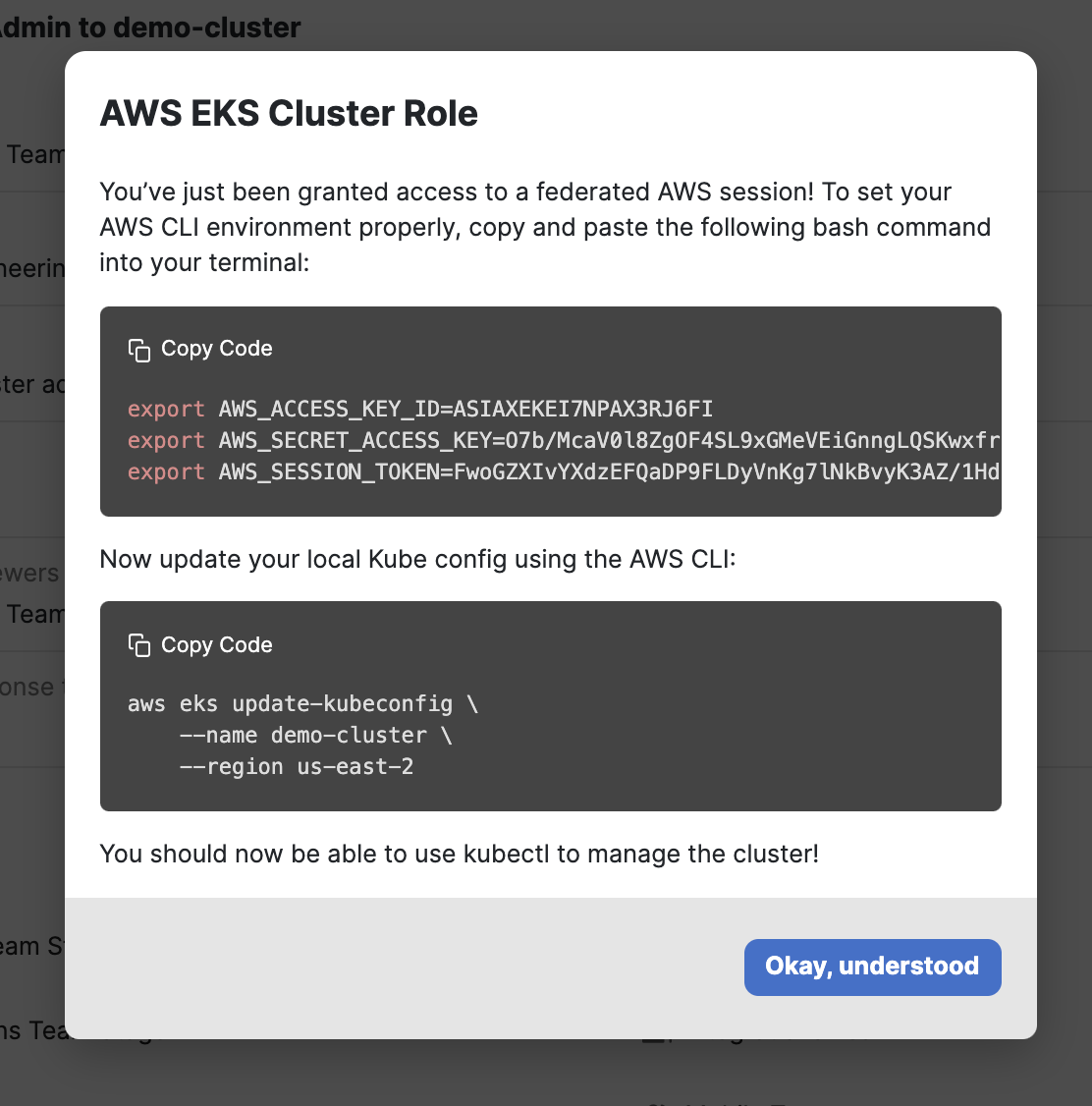
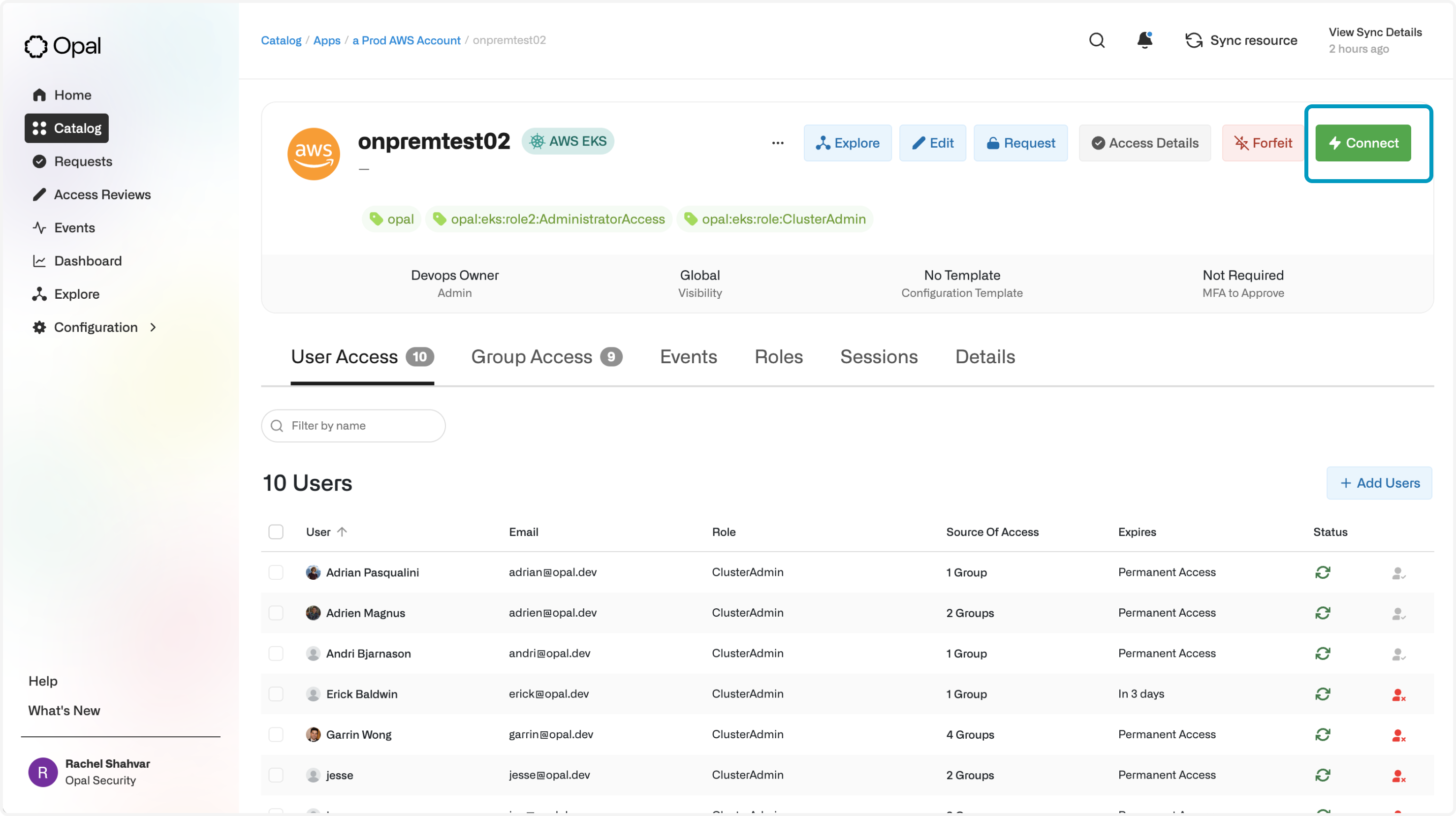 Once they're connected, they'll be given temporary credentials to access the Kubernetes cluster.