> ## Documentation Index
> Fetch the complete documentation index at: https://docs.opal.dev/llms.txt
> Use this file to discover all available pages before exploring further.
# Webhooks
> Learn how to configure webhooks to push changes on access requests.
In this guide, you'll learn how to use **Webhooks** to integrate a custom app with Opal. See the [Custom Integrations overview](/docs/custom-integrations-overview) to learn when to use webhooks.
You can currently only configure one webhook per organization.
## Setup
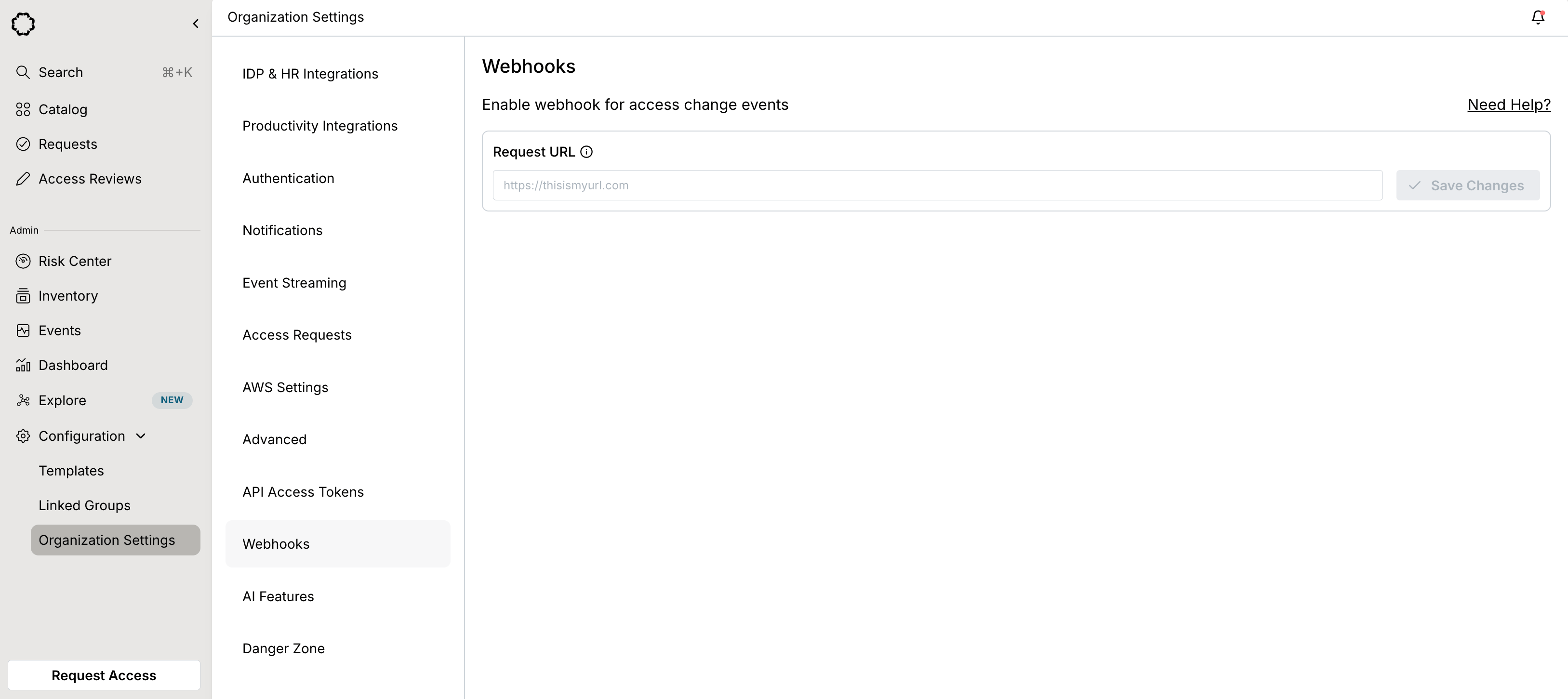
Under **Configuration** > **Organization Settings** in the left panel, go to **Webhooks**, enter the URL for your webhook endpoint, and select **Save Changes**.
 A signing secret will be generated. Your system should use this secret to validate the webhook's origin. Please see [this section](/docs/webhooks#verifying-requests-from-opal) for more details.
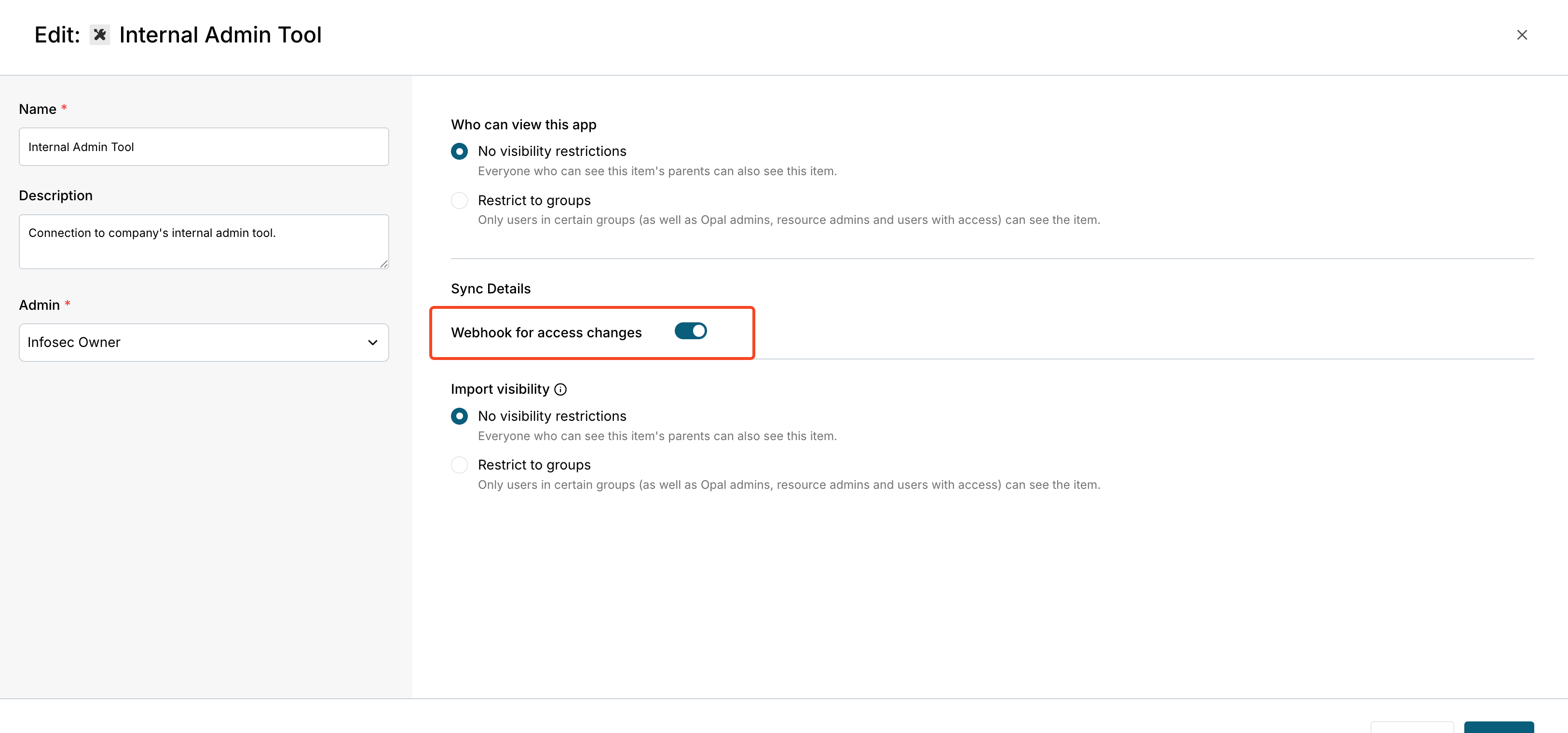
Next, create or edit a **Push-only app** from the **Inventory**, then toggle **Webhook for access changes**.
A signing secret will be generated. Your system should use this secret to validate the webhook's origin. Please see [this section](/docs/webhooks#verifying-requests-from-opal) for more details.
Next, create or edit a **Push-only app** from the **Inventory**, then toggle **Webhook for access changes**.
 The webhook endpoint is expected to reply to the HTTP POST request with an HTTP 200 response within 10 seconds of receiving the payload.
## Payload samples
Opal sends different payloads depending on the event type. The following event types are supported.
### Add users to resource
```json json theme={null}
{
event_ts: 1643355931,
organization_id: 'eec5dcd9-fb0a-4726-b283-4379b524a772',
events: [
{
event_type: 'USER_ADDED_TO_RESOURCE',
resource_type: 'CUSTOM',
user_id: '[email protected]',
resource_id: '0eb35db24007c8148',
access_level: 'admin'
}
]
}
```
### Remove users from resource
```json json theme={null}
{
event_ts: 1643355980,
organization_id: 'eec5dcd9-fb0a-4726-b283-4379b524a772',
events: [
{
event_type: 'USER_REMOVED_FROM_RESOURCE',
resource_type: 'CUSTOM',
user_id: '[email protected]',
resource_id: '0eb35db24007c8148',
access_level: 'admin'
}
]
}
```
### Add users to group
```json json theme={null}
{
event_ts: 1643346009,
organization_id: 'eec5dcd9-fb0a-4726-b283-4379b524a772',
events: [
{
event_type: 'USER_ADDED_TO_GROUP',
group_type: 'CONNECTOR_GROUP',
user_id: '[email protected]',
group_id: '00g1835ro5hxRmpel5d7'
}
]
}
```
### Remove users from group
```json json theme={null}
{
event_ts: 1643355811,
organization_id: 'eec5dcd9-fb0a-4726-b283-4379b524a772',
events: [
{
event_type: 'USER_REMOVED_FROM_GROUP',
group_type: 'CONNECTOR_GROUP',
user_id: '[email protected]',
group_id: '00g1838z8y1VJcoTG5d7'
}
]
}
```
### Add resources to group
```json json theme={null}
{
event_ts: 1643356058,
organization_id: 'eec5dcd9-fb0a-4726-b283-4379b524a772',
events: [
{
event_type: 'RESOURCE_ADDED_TO_GROUP',
group_type: 'CONNECTOR_GROUP',
resource_type: 'CUSTOM',
group_id: '00g1838z8y1VJcoTG5d7',
resource_id: '0eb35db24007c8148'
}
]
}
```
### Remove resources from group
```json json theme={null}
{
event_ts: 1643356091,
organization_id: 'eec5dcd9-fb0a-4726-b283-4379b524a772',
events: [
{
event_type: 'RESOURCE_REMOVED_FROM_GROUP',
group_type: 'CONNECTOR_GROUP',
resource_type: 'CUSTOM',
group_id: '00g1838z8y1VJcoTG5d7',
resource_id: '0eb35db24007c8148'
}
]
}
```
## Verify requests from Opal
Verify requests from Opal with confidence by checking signatures using your signing secret.
Opal includes an `X-Opal-Signature` HTTP header on each HTTP request sent. The signature is created by combining the signing secret with the body of the request we're sending using a standard HMAC-SHA256 keyed hash.
Here is an example with Node to compute the signature using your signing secret. You can compare it against the value retrieved from the `X-Opal-Signature` header.
```js js theme={null}
const timestamp = request.header('X-Opal-Request-Timestamp')
const signingSecret = 'SIGNING_SECRET'
const sigBaseString = 'v0:' + timestamp + ':' + JSON.stringify(request.body)
const hmac = crypto.createHmac('sha256', signingSecret);
hmac.write(sigBaseString)
console.log(hmac.digest('hex'))
```
The webhook endpoint is expected to reply to the HTTP POST request with an HTTP 200 response within 10 seconds of receiving the payload.
## Payload samples
Opal sends different payloads depending on the event type. The following event types are supported.
### Add users to resource
```json json theme={null}
{
event_ts: 1643355931,
organization_id: 'eec5dcd9-fb0a-4726-b283-4379b524a772',
events: [
{
event_type: 'USER_ADDED_TO_RESOURCE',
resource_type: 'CUSTOM',
user_id: '[email protected]',
resource_id: '0eb35db24007c8148',
access_level: 'admin'
}
]
}
```
### Remove users from resource
```json json theme={null}
{
event_ts: 1643355980,
organization_id: 'eec5dcd9-fb0a-4726-b283-4379b524a772',
events: [
{
event_type: 'USER_REMOVED_FROM_RESOURCE',
resource_type: 'CUSTOM',
user_id: '[email protected]',
resource_id: '0eb35db24007c8148',
access_level: 'admin'
}
]
}
```
### Add users to group
```json json theme={null}
{
event_ts: 1643346009,
organization_id: 'eec5dcd9-fb0a-4726-b283-4379b524a772',
events: [
{
event_type: 'USER_ADDED_TO_GROUP',
group_type: 'CONNECTOR_GROUP',
user_id: '[email protected]',
group_id: '00g1835ro5hxRmpel5d7'
}
]
}
```
### Remove users from group
```json json theme={null}
{
event_ts: 1643355811,
organization_id: 'eec5dcd9-fb0a-4726-b283-4379b524a772',
events: [
{
event_type: 'USER_REMOVED_FROM_GROUP',
group_type: 'CONNECTOR_GROUP',
user_id: '[email protected]',
group_id: '00g1838z8y1VJcoTG5d7'
}
]
}
```
### Add resources to group
```json json theme={null}
{
event_ts: 1643356058,
organization_id: 'eec5dcd9-fb0a-4726-b283-4379b524a772',
events: [
{
event_type: 'RESOURCE_ADDED_TO_GROUP',
group_type: 'CONNECTOR_GROUP',
resource_type: 'CUSTOM',
group_id: '00g1838z8y1VJcoTG5d7',
resource_id: '0eb35db24007c8148'
}
]
}
```
### Remove resources from group
```json json theme={null}
{
event_ts: 1643356091,
organization_id: 'eec5dcd9-fb0a-4726-b283-4379b524a772',
events: [
{
event_type: 'RESOURCE_REMOVED_FROM_GROUP',
group_type: 'CONNECTOR_GROUP',
resource_type: 'CUSTOM',
group_id: '00g1838z8y1VJcoTG5d7',
resource_id: '0eb35db24007c8148'
}
]
}
```
## Verify requests from Opal
Verify requests from Opal with confidence by checking signatures using your signing secret.
Opal includes an `X-Opal-Signature` HTTP header on each HTTP request sent. The signature is created by combining the signing secret with the body of the request we're sending using a standard HMAC-SHA256 keyed hash.
Here is an example with Node to compute the signature using your signing secret. You can compare it against the value retrieved from the `X-Opal-Signature` header.
```js js theme={null}
const timestamp = request.header('X-Opal-Request-Timestamp')
const signingSecret = 'SIGNING_SECRET'
const sigBaseString = 'v0:' + timestamp + ':' + JSON.stringify(request.body)
const hmac = crypto.createHmac('sha256', signingSecret);
hmac.write(sigBaseString)
console.log(hmac.digest('hex'))
```