> ## Documentation Index
> Fetch the complete documentation index at: https://docs.opal.dev/llms.txt
> Use this file to discover all available pages before exploring further.
# Use Terraform with Opal
> Learn how to set up Opal's Terraform provider.
You can use Opal’s Terraform provider to manage your Opal infrastructure with code. Use the following instructions to install and get started with Terraform in Opal.
## Overview
Most functionality in the Opal UI is also supported using Terraform. Refer to the provider [documentation](https://registry.terraform.io/providers/opalsecurity/opal/latest/docs/resources/access_rule) to see available resources, and reach out if you have specific requests.
You should generally use Terraform to manage stateless settings, e.g., request configurations or adding users as permanent members of groups. Once you start using Terraform to manage settings, try to minimize modifications to the same settings in the Opal UI.
Terraform is not suited for managing settings which depend on actions occurring at a specific moment in time—e.g., converting users to timebound access—because Terraform maintains its own internal state.
You also cannot create [custom apps](/docs/how-to-create-your-own-connector) with Terraform.
## Requirements
Before you begin, you must:
* Create a full-access [API token](/reference/authentication) in Opal
* [Install Terraform](https://developer.hashicorp.com/terraform/tutorials/aws-get-started/install-cli)
## Install Opal’s Terraform provider
To install Terraform for Opal:
1. Go to [Opal’s Terraform provider](https://registry.terraform.io/providers/opalsecurity/opal/latest/docs).
2. Select **Use Provider** and copy the dropdown code block. Ensure you use the latest version.
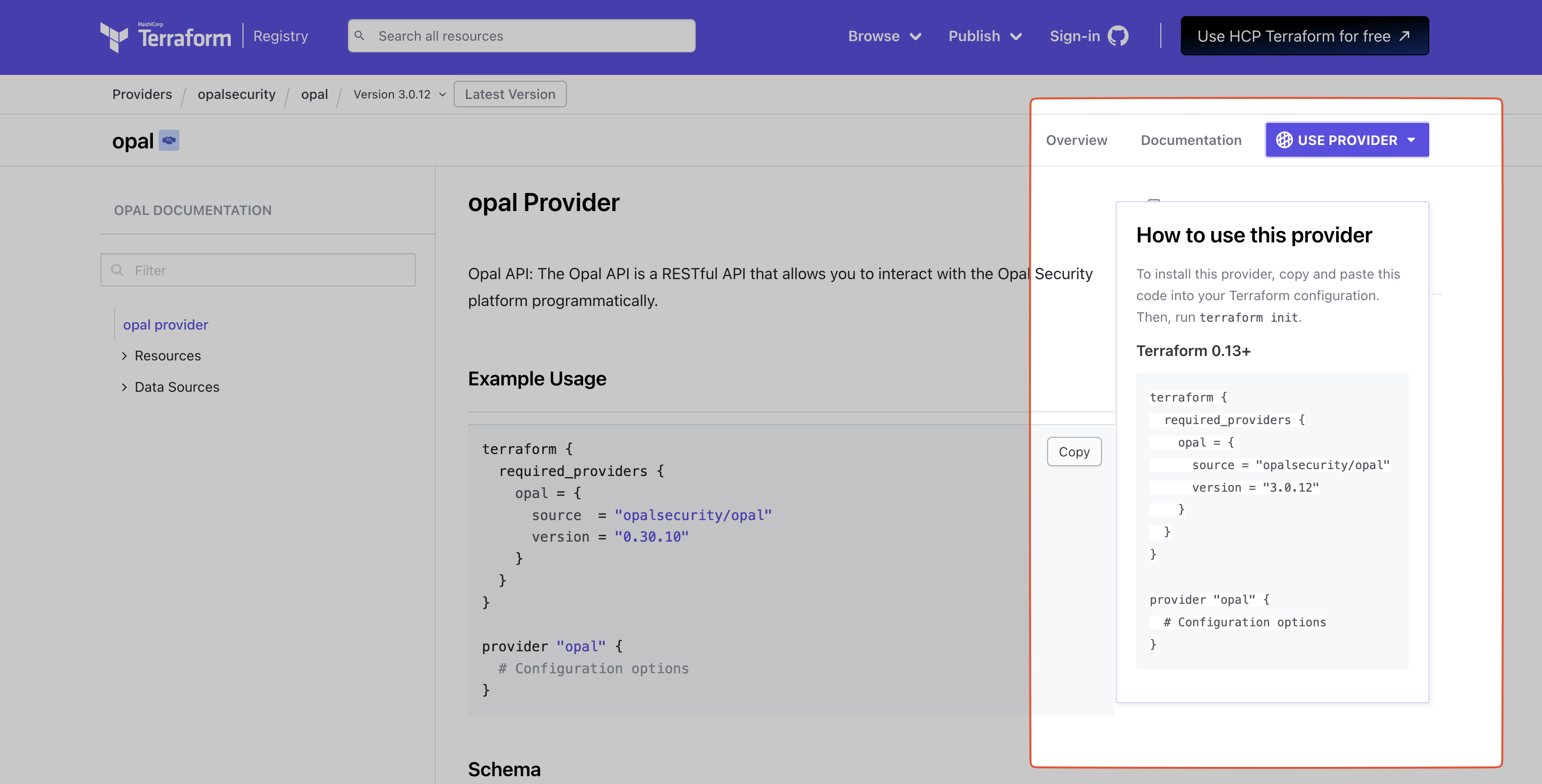 3. Create a configuration file and paste in the code block.
4. If you self-host Opal, in the `provider` section, add `server_url = “"`, replacing `SERVER_URL` with your self-hosted domain and the suffix `/v1`—for example, `https://company-name-opal.dev/v1`. If you use cloud Opal, skip this step.
5. Save your Opal API key in an environment variable named `OPAL_AUTH_TOKEN`. Alternatively, or if you're on a version earlier than 3.0.2, add `bearer_auth = "”` to the `provider` section, replacing `API_KEY` with your Opal API key.
6. Save the configuration file.
7. Run `terraform init`.
8. Run `terraform apply`.
## Use Opal’s Terraform provider
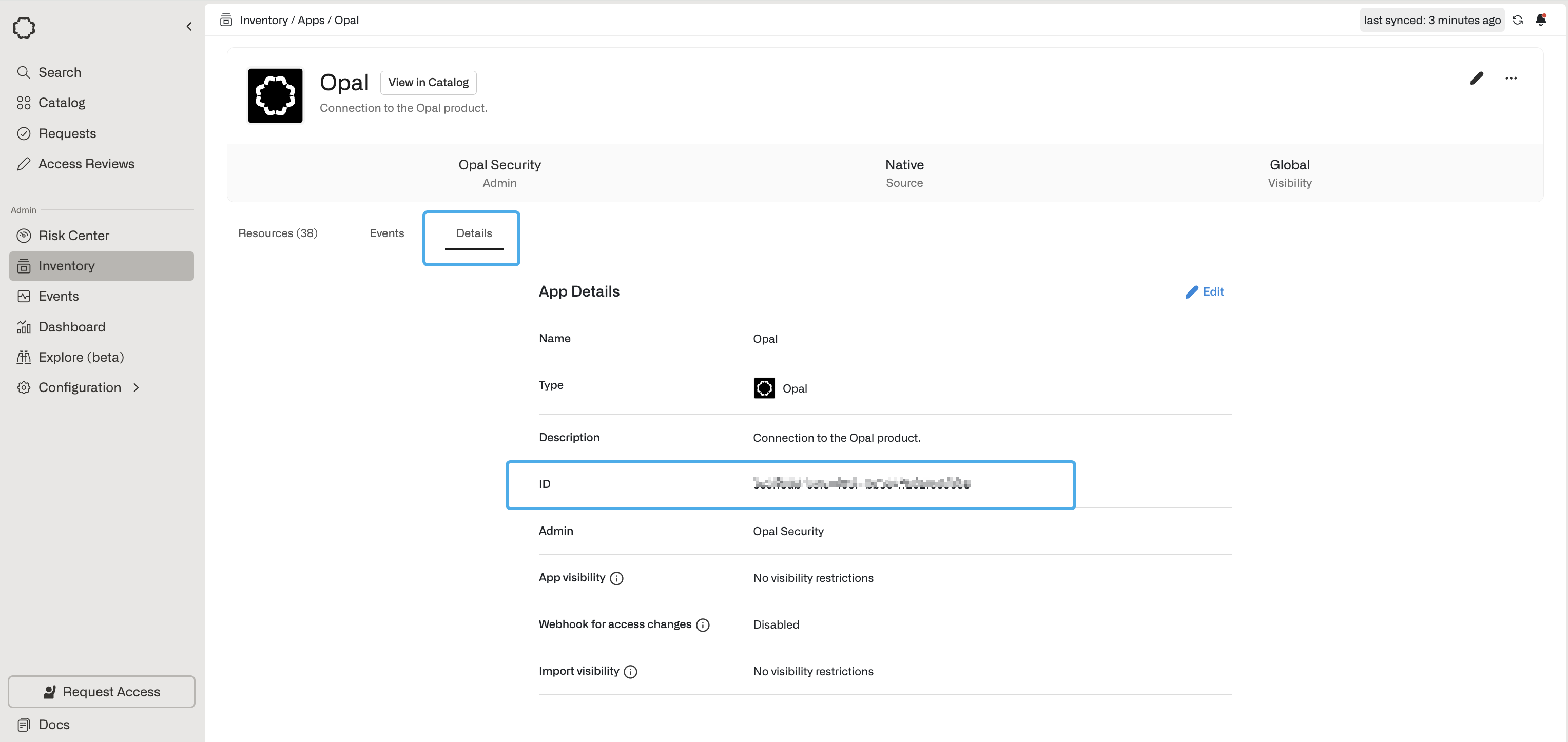
See the [Terraform provider](https://registry.terraform.io/providers/opalsecurity/opal/latest/docs) documentation for example usage. To create certain resources, you may need to provide IDs, which you can find for most objects on the **Detail** tab in the **Inventory** in the Opal dashboard.
For example, to [create a group](https://registry.terraform.io/providers/opalsecurity/opal/latest/docs/resources/group) with the Terraform provider, you must provide an `app_id` to contain the group. You can find this ID from the app's **Detail** tab.
3. Create a configuration file and paste in the code block.
4. If you self-host Opal, in the `provider` section, add `server_url = “"`, replacing `SERVER_URL` with your self-hosted domain and the suffix `/v1`—for example, `https://company-name-opal.dev/v1`. If you use cloud Opal, skip this step.
5. Save your Opal API key in an environment variable named `OPAL_AUTH_TOKEN`. Alternatively, or if you're on a version earlier than 3.0.2, add `bearer_auth = "”` to the `provider` section, replacing `API_KEY` with your Opal API key.
6. Save the configuration file.
7. Run `terraform init`.
8. Run `terraform apply`.
## Use Opal’s Terraform provider
See the [Terraform provider](https://registry.terraform.io/providers/opalsecurity/opal/latest/docs) documentation for example usage. To create certain resources, you may need to provide IDs, which you can find for most objects on the **Detail** tab in the **Inventory** in the Opal dashboard.
For example, to [create a group](https://registry.terraform.io/providers/opalsecurity/opal/latest/docs/resources/group) with the Terraform provider, you must provide an `app_id` to contain the group. You can find this ID from the app's **Detail** tab.
 ### Example configuration and usage
The following is an example resource block used to create a new Opal group.
```json example.tf theme={null}
terraform {
required_providers {
opal = {
source = "opalsecurity/opal"
version = "3.0.12"
}
}
}
provider "opal" {
// Define OPAL_AUTH_TOKEN as an environment variable, otherwise include the following line:
// bearer_auth = 'API_KEY_HERE'
}
resource "opal_group" "tf_test" {
name = "tf_test_group"
group_type = "OPAL_GROUP"
app_id = "3ecff5db-e3fc-40c7-bb36-ff202f033095" // Retrieved from Opal dashboard
visibility = "GLOBAL"
request_configurations = [
{
priority = 0
require_mfa_to_request = false
allow_requests = false
require_support_ticket = false
auto_approval = false
}
]
}
```
After running `terraform plan` and `terraform apply`, the group is created.
### Example configuration and usage
The following is an example resource block used to create a new Opal group.
```json example.tf theme={null}
terraform {
required_providers {
opal = {
source = "opalsecurity/opal"
version = "3.0.12"
}
}
}
provider "opal" {
// Define OPAL_AUTH_TOKEN as an environment variable, otherwise include the following line:
// bearer_auth = 'API_KEY_HERE'
}
resource "opal_group" "tf_test" {
name = "tf_test_group"
group_type = "OPAL_GROUP"
app_id = "3ecff5db-e3fc-40c7-bb36-ff202f033095" // Retrieved from Opal dashboard
visibility = "GLOBAL"
request_configurations = [
{
priority = 0
require_mfa_to_request = false
allow_requests = false
require_support_ticket = false
auto_approval = false
}
]
}
```
After running `terraform plan` and `terraform apply`, the group is created.