> ## Documentation Index
> Fetch the complete documentation index at: https://docs.opal.dev/llms.txt
> Use this file to discover all available pages before exploring further.
# Node queries
> Find and inventory entities — users, resources, and groups — that match filters and access relationships.
A **node query** returns a set of **nodes** — users, resources, or groups. Use it to find or inventory entities: "which AWS IAM roles are tagged `prod`?", "list every service account", or "which users are in the Engineering group?"
For how to open the builder, enter natural language, and run a query, see the [Overview](/docs/opal-query#build-a-query). This page covers the filters available to node queries and walks through a few examples.
You shape a node query with two kinds of filters:
* **Node filters** define which nodes are returned, based on the node's own properties (type, name, tags, etc.).
* **Access filters** further narrow the result by traversing edges in the access graph — either *outbound* (what the node has access to) or *inbound* (what has access to the node).
Access filters accept the same set of filters as node filters: you describe the entity on the other end of the edge the same way you describe the nodes you want returned.
## Node filters
Node filters narrow down nodes by their own properties.
| Filter | Description |
| -------------------- | ----------------------------------------------------------------------------------------- |
| **Entity** | A specific entity (user, resource, or group) |
| **Entity Type** | The broad category: User, Group, or Resource |
| **Entity Item Type** | A more specific subtype, such as AWS IAM Role, Google Group, or Service User |
| **Entity Name** | Match by name: EQUALS, CONTAINS, STARTS\_WITH, ENDS\_WITH |
| **App** | Entities imported from a specific App (e.g., AWS Identity Center) |
| **Tag** | Key-value tags applied to entities |
| **IDP Status** | A user's HR/IDP lifecycle status: Active, Suspended, Deprovisioned, Deleted, or Not found |
| **Admin Owner** | The admin owner of a resource or group |
## Access filters
Access filters traverse edges in the access graph. Each relationship takes the same filter set as node filters — used to describe the entity on the other end of the edge. Traversal considers all access managed in Opal, including both **direct** access and **indirect** access (e.g. access granted through nested group memberships).
| Relationship | Direction | Question it answers |
| ----------------- | ------------- | ----------------------------------- |
| **Has access to** | Outbound edge | What does this node have access to? |
| **Accessible by** | Inbound edge | Who has access to this node? |
When using **Has access to**, you can also filter the access edge itself by **Role Name** or **Role Remote ID** — for example, GitHub repos a user accesses with the `write` role. These filters are only available on the "Has access to" relationship.
Combine multiple filters and relationships using **All of** / **Any of** boolean logic to narrow or broaden your results. Each entity filter operator can also be flipped from **is** to **is NOT** to exclude matching entities — for example, "users who are NOT in the Engineering group."
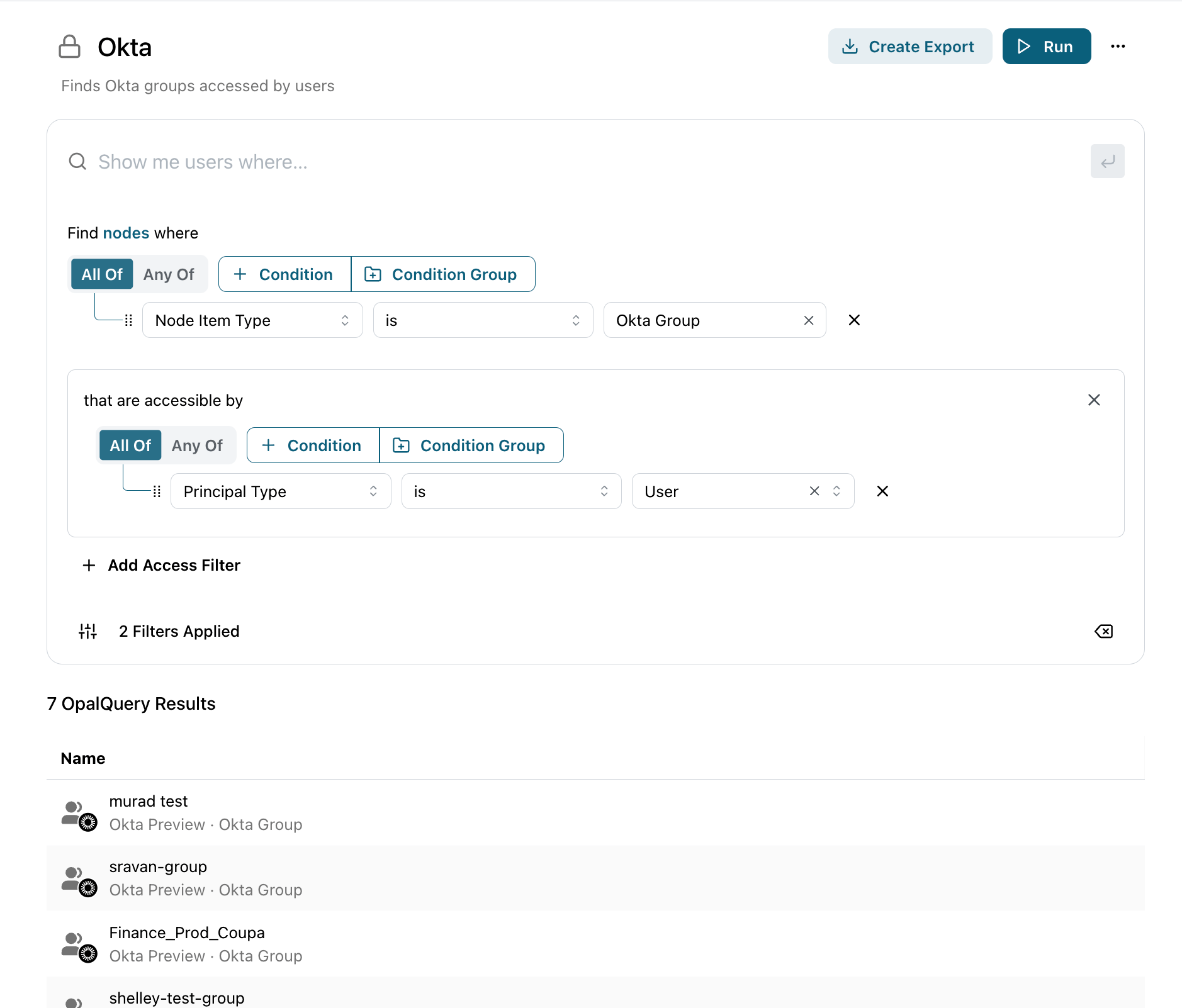 ## Walkthrough: production IAM roles accessible by contractors
This example finds AWS IAM roles tagged `env=prod` that any contractor can reach — a common review before an audit.
From the **Welcome to Queries** page, choose **Node query** and open a blank builder.
Add a **Node filter** for **Entity Item Type** `is` `AWS IAM Role`, then add a **Tag** filter for `env` = `prod`. The query now returns only production IAM roles.
Add an **Access filter**: **Accessible by** an entity where **Entity Type** `is` `User` and **Tag** `is` `contractor`. This keeps only the roles that at least one contractor can reach.
Click **Run**. Each row is a matching IAM role; click a name to inspect the entity.
## More examples
| Goal | How to build it |
| ------------------------------------------------------------------------------------ | ----------------------------------------------------------------------------------------------------------------------------------------- |
| List every service account | **Node filter:** Entity Item Type `is` Service User |
| Users in the Engineering group who do **not** have access to the production database | **Node filter:** Entity Type `is` User, in Engineering group; **Access filter:** Has access to production database, flipped to **is NOT** |
| GitHub repos a specific user can write to | **Node filter:** Entity Item Type `is` GitHub Repo; **Access filter:** Accessible by that user with **Role Name** `write` |
| Resources with no admin owner | **Node filter:** Entity Type `is` Resource, Admin Owner **is NOT** set |
To trace *how* a principal reaches an asset — the access level and the full path — use an [access query](/docs/opal-query-access) instead.
## Walkthrough: production IAM roles accessible by contractors
This example finds AWS IAM roles tagged `env=prod` that any contractor can reach — a common review before an audit.
From the **Welcome to Queries** page, choose **Node query** and open a blank builder.
Add a **Node filter** for **Entity Item Type** `is` `AWS IAM Role`, then add a **Tag** filter for `env` = `prod`. The query now returns only production IAM roles.
Add an **Access filter**: **Accessible by** an entity where **Entity Type** `is` `User` and **Tag** `is` `contractor`. This keeps only the roles that at least one contractor can reach.
Click **Run**. Each row is a matching IAM role; click a name to inspect the entity.
## More examples
| Goal | How to build it |
| ------------------------------------------------------------------------------------ | ----------------------------------------------------------------------------------------------------------------------------------------- |
| List every service account | **Node filter:** Entity Item Type `is` Service User |
| Users in the Engineering group who do **not** have access to the production database | **Node filter:** Entity Type `is` User, in Engineering group; **Access filter:** Has access to production database, flipped to **is NOT** |
| GitHub repos a specific user can write to | **Node filter:** Entity Item Type `is` GitHub Repo; **Access filter:** Accessible by that user with **Role Name** `write` |
| Resources with no admin owner | **Node filter:** Entity Type `is` Resource, Admin Owner **is NOT** set |
To trace *how* a principal reaches an asset — the access level and the full path — use an [access query](/docs/opal-query-access) instead.