> ## Documentation Index
> Fetch the complete documentation index at: https://docs.opal.dev/llms.txt
> Use this file to discover all available pages before exploring further.
# Access queries
> Investigate access itself — who can reach which assets, at what access level, and how.
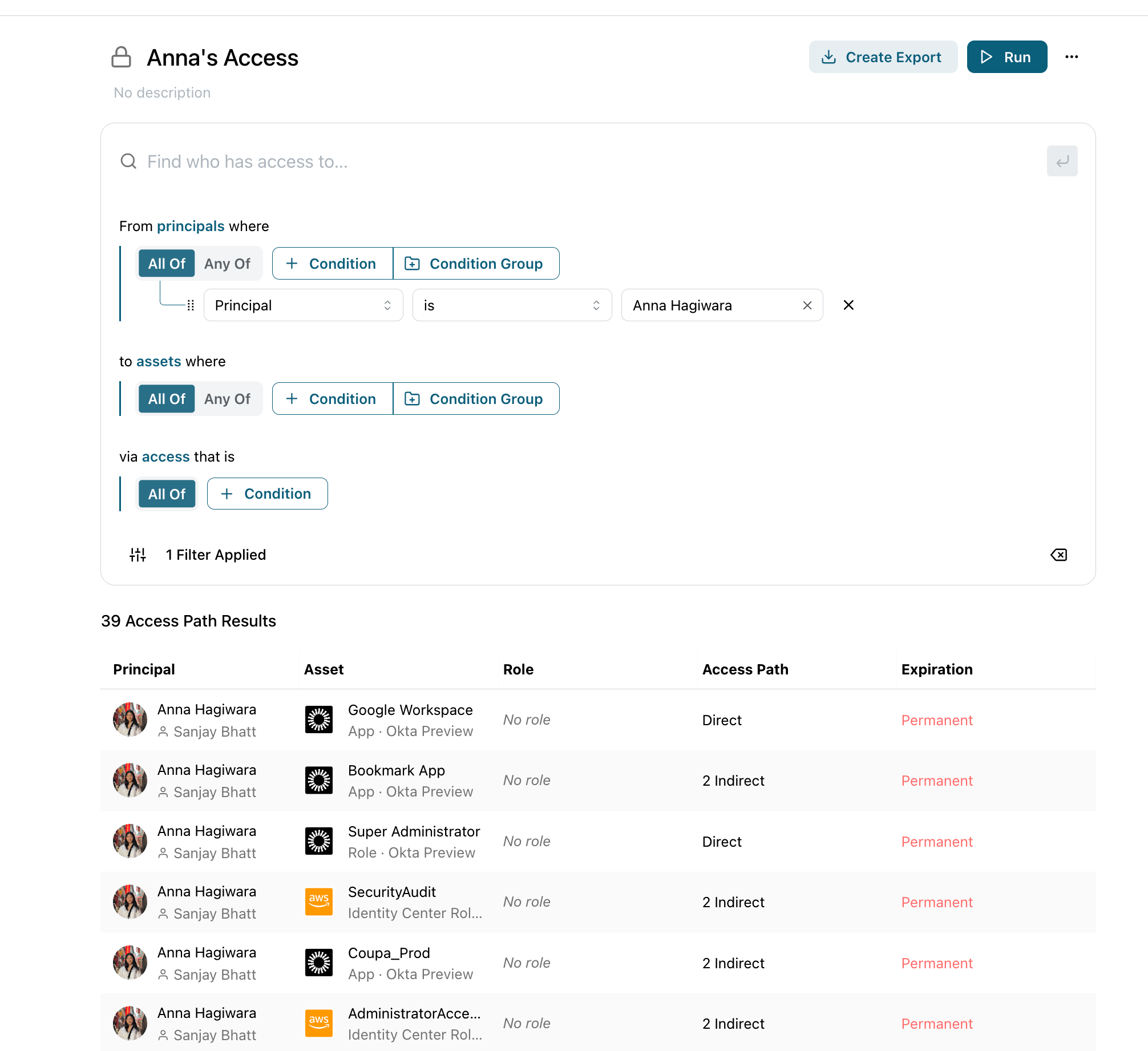
An **access query** returns **access relationships** instead of a flat list of entities — one row for each principal → asset → access level. Rather than asking "which entities match?", you describe the two sides of an access relationship:
* **Principal** — the identity that holds the access (a user or group). Filter it with the same entity filters as node queries.
* **Asset** — the resource or group being accessed. Filter it the same way.
Leave a side blank to match everything on it. Set only the **Asset** to a production database to see *everyone* who can reach it; set only the **Principal** to a departing employee to see *everything* they can still reach.
For how to open the builder, enter natural language, and run a query, see the [Overview](/docs/opal-query#build-a-query).
 ## Direct and indirect access
Each result row summarizes how the principal reaches the asset. The access column reads **Direct**, **N Indirect**, or a combination such as **Direct + 2 Indirect** — indirect access is granted through nested group memberships or other chains. Click a row to expand every underlying **access path** and see exactly how the access is granted.
## Edge filters
Edge filters constrain the access relationship itself, not the entities on either end:
| Filter | Description |
| -------------------------- | ---------------------------------------------------------------------------------- |
| **Direct only** | Show only directly granted access, excluding access inherited through group chains |
| **Time-bound access only** | Show only access that expires |
| **Permanent access only** | Show only access with no expiry |
| **Role name** | Match the access level by display name (e.g. `write`, `Admin`) |
| **Role remote ID** | Match the access level by the identifier used by the source system |
## Advanced access filters
The **Principal** and **Asset** sides each expose an **Advanced access filters** section that scopes that side by its *own* access edges — nested one level in:
* On the **Principal** side — keep only principals that **also have access to**, or **are also accessible by**, a matching entity. For example, "principals who **also** have access to `AdministratorAccess`."
* On the **Asset** side — keep only assets that **also have access to**, or **are also accessible by**, a matching entity.
This powers separation-of-duties and toxic-combination investigations — for example, "who can reach `billing-prod` **and** also holds admin access somewhere?"
## Templates
The starter page includes ready-made access queries you can run as-is or customize:
* **Orphaned access — inactive users** — permanent access still held by users who are no longer active in your IDP.
* **All permanent access** — every direct permanent grant to any asset; the standing access admins most often want to reduce.
## Walkthrough: what can a departing employee still reach?
Before offboarding, confirm exactly what access a user still holds.
From the **Welcome to Queries** page, choose **Access** and open a blank builder.
Set the **Principal** to the departing user. Leaving the **Asset** side blank returns *everything* they can reach.
Run the query. Each row is an asset the user can reach with a given access level. Rows marked **Indirect** are inherited — click to expand the path and see which group grants the access.
Add **Permanent access only** to focus on standing grants that won't expire on their own, or **Direct only** to see access you can revoke directly.
## More examples
| Goal | How to build it |
| ----------------------------------------------------------------------------------- | -------------------------------------------------------------------------------------------------------------------------- |
| Everyone who can reach a production database | **Asset:** the database; leave **Principal** blank |
| Separation of duties — who can reach `billing-prod` **and** also holds admin access | **Asset:** name contains `billing-prod`; **Principal → Advanced access filters:** also has access to `AdministratorAccess` |
| Orphaned access held by inactive users | **Principal:** Entity Type `is` User, IDP Status `is` Suspended or Deprovisioned; **Edge filter:** Permanent access only |
| Expiring `write` access to a GitHub repo | **Asset:** the repo; **Edge filters:** Role Name `write` + Time-bound access only |
To run access queries programmatically, see the [Query API](/docs/opal-query-api) (`type: "ACCESS_PATH"`).
## Direct and indirect access
Each result row summarizes how the principal reaches the asset. The access column reads **Direct**, **N Indirect**, or a combination such as **Direct + 2 Indirect** — indirect access is granted through nested group memberships or other chains. Click a row to expand every underlying **access path** and see exactly how the access is granted.
## Edge filters
Edge filters constrain the access relationship itself, not the entities on either end:
| Filter | Description |
| -------------------------- | ---------------------------------------------------------------------------------- |
| **Direct only** | Show only directly granted access, excluding access inherited through group chains |
| **Time-bound access only** | Show only access that expires |
| **Permanent access only** | Show only access with no expiry |
| **Role name** | Match the access level by display name (e.g. `write`, `Admin`) |
| **Role remote ID** | Match the access level by the identifier used by the source system |
## Advanced access filters
The **Principal** and **Asset** sides each expose an **Advanced access filters** section that scopes that side by its *own* access edges — nested one level in:
* On the **Principal** side — keep only principals that **also have access to**, or **are also accessible by**, a matching entity. For example, "principals who **also** have access to `AdministratorAccess`."
* On the **Asset** side — keep only assets that **also have access to**, or **are also accessible by**, a matching entity.
This powers separation-of-duties and toxic-combination investigations — for example, "who can reach `billing-prod` **and** also holds admin access somewhere?"
## Templates
The starter page includes ready-made access queries you can run as-is or customize:
* **Orphaned access — inactive users** — permanent access still held by users who are no longer active in your IDP.
* **All permanent access** — every direct permanent grant to any asset; the standing access admins most often want to reduce.
## Walkthrough: what can a departing employee still reach?
Before offboarding, confirm exactly what access a user still holds.
From the **Welcome to Queries** page, choose **Access** and open a blank builder.
Set the **Principal** to the departing user. Leaving the **Asset** side blank returns *everything* they can reach.
Run the query. Each row is an asset the user can reach with a given access level. Rows marked **Indirect** are inherited — click to expand the path and see which group grants the access.
Add **Permanent access only** to focus on standing grants that won't expire on their own, or **Direct only** to see access you can revoke directly.
## More examples
| Goal | How to build it |
| ----------------------------------------------------------------------------------- | -------------------------------------------------------------------------------------------------------------------------- |
| Everyone who can reach a production database | **Asset:** the database; leave **Principal** blank |
| Separation of duties — who can reach `billing-prod` **and** also holds admin access | **Asset:** name contains `billing-prod`; **Principal → Advanced access filters:** also has access to `AdministratorAccess` |
| Orphaned access held by inactive users | **Principal:** Entity Type `is` User, IDP Status `is` Suspended or Deprovisioned; **Edge filter:** Permanent access only |
| Expiring `write` access to a GitHub repo | **Asset:** the repo; **Edge filters:** Role Name `write` + Time-bound access only |
To run access queries programmatically, see the [Query API](/docs/opal-query-api) (`type: "ACCESS_PATH"`).