> ## Documentation Index
> Fetch the complete documentation index at: https://docs.opal.dev/llms.txt
> Use this file to discover all available pages before exploring further.
# Escalate if no response
> Automatically move an access request to a second set of reviewers when the first reviewers don't respond in time.
Access requests stall when the assigned reviewer is asleep, on vacation, or buried in their inbox. Escalation adds a timer to a stage of your approval workflow: if nobody reviews the request within the time you set, Opal automatically escalates it to an additional set of reviewers.
## Prerequisites
* You must be an Opal Admin, or an **Admin** of the resource or group you're configuring.
* The stage you add escalation to must use **Any** logic. Escalation can't be added to a stage that requires **All** reviewers to approve. See [Approval flow](/docs/configure-reviewers#approval-flow).
## How escalation works
When you add escalation to a stage, Opal adds an **Escalation stage** directly after it. The escalation stage contains the original stage's reviewers *plus* the owners and users you escalate to.
* If any original reviewer responds before the timer expires, the request proceeds normally and the escalation stage is satisfied at the same time. Nothing extra happens.
* If nobody responds before the timer expires, the request advances to the escalation stage, and the escalated reviewers are notified.
* The original reviewers stay on the escalation stage, so they can still approve after escalation. Escalation widens the pool of people who can act; it doesn't take the request away from anyone.
The escalation stage is derived from the stage above it. To change its reviewers, edit the original stage—reviewers you add there are copied forward automatically.
Escalation only widens the pool of reviewers. It never grants access on its own—a request that nobody acts on still expires the way it normally would.
## Configure escalation
1. Go to the resource or group's **Edit** page and expand **Request Configuration**.
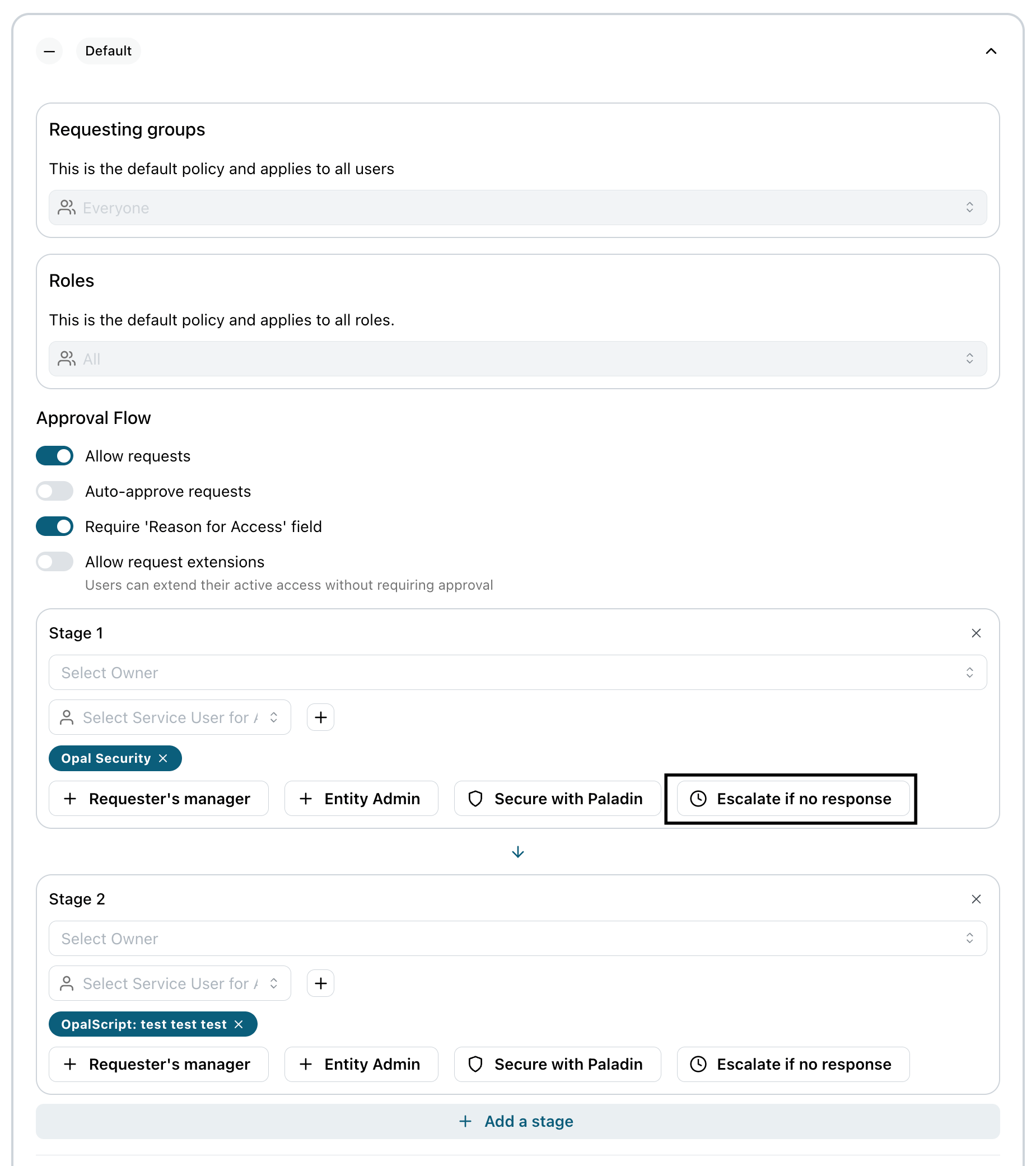
2. In the **Approval Flow** section, find the stage you want to add a timer to and select **Escalate if no response**.
 3. Under **Escalate after**, choose how long to wait before escalating:
| Option | Wait time |
| ---------- | ------------------------------------------- |
| 30 minutes | 30 minutes |
| 1 hour | 1 hour |
| 2 hours | 2 hours |
| 4 hours | 4 hours |
| 8 hours | 8 hours |
| 24 hours | 24 hours |
| Custom | Any value from 1 to 1440 minutes (24 hours) |
4. Select the **owners** and **users** to escalate to. You can pick any combination, but you must select at least one.
3. Under **Escalate after**, choose how long to wait before escalating:
| Option | Wait time |
| ---------- | ------------------------------------------- |
| 30 minutes | 30 minutes |
| 1 hour | 1 hour |
| 2 hours | 2 hours |
| 4 hours | 4 hours |
| 8 hours | 8 hours |
| 24 hours | 24 hours |
| Custom | Any value from 1 to 1440 minutes (24 hours) |
4. Select the **owners** and **users** to escalate to. You can pick any combination, but you must select at least one.
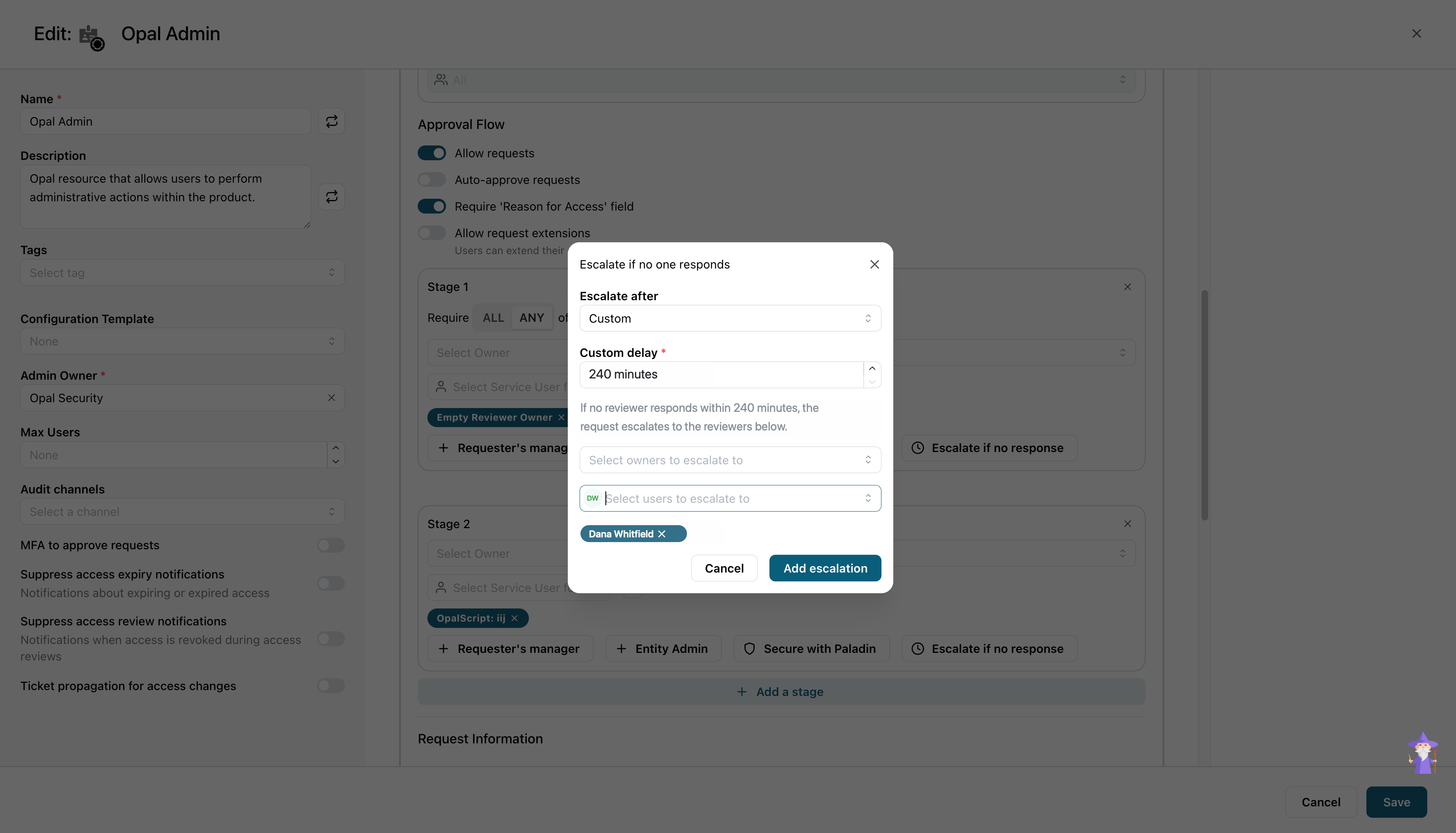 5. Select **Add escalation**. The new **Escalation stage** appears below the stage you configured.
6. Save the request configuration.
To remove escalation later, delete the **Escalation stage**. The original stage keeps its reviewers.
## What escalation looks like on a request
On a pending request, the **Reviewers** section labels both halves of the pair. The original stage is tagged with the wait time you configured, and the stage below it is tagged **ESCALATION**.
5. Select **Add escalation**. The new **Escalation stage** appears below the stage you configured.
6. Save the request configuration.
To remove escalation later, delete the **Escalation stage**. The original stage keeps its reviewers.
## What escalation looks like on a request
On a pending request, the **Reviewers** section labels both halves of the pair. The original stage is tagged with the wait time you configured, and the stage below it is tagged **ESCALATION**.
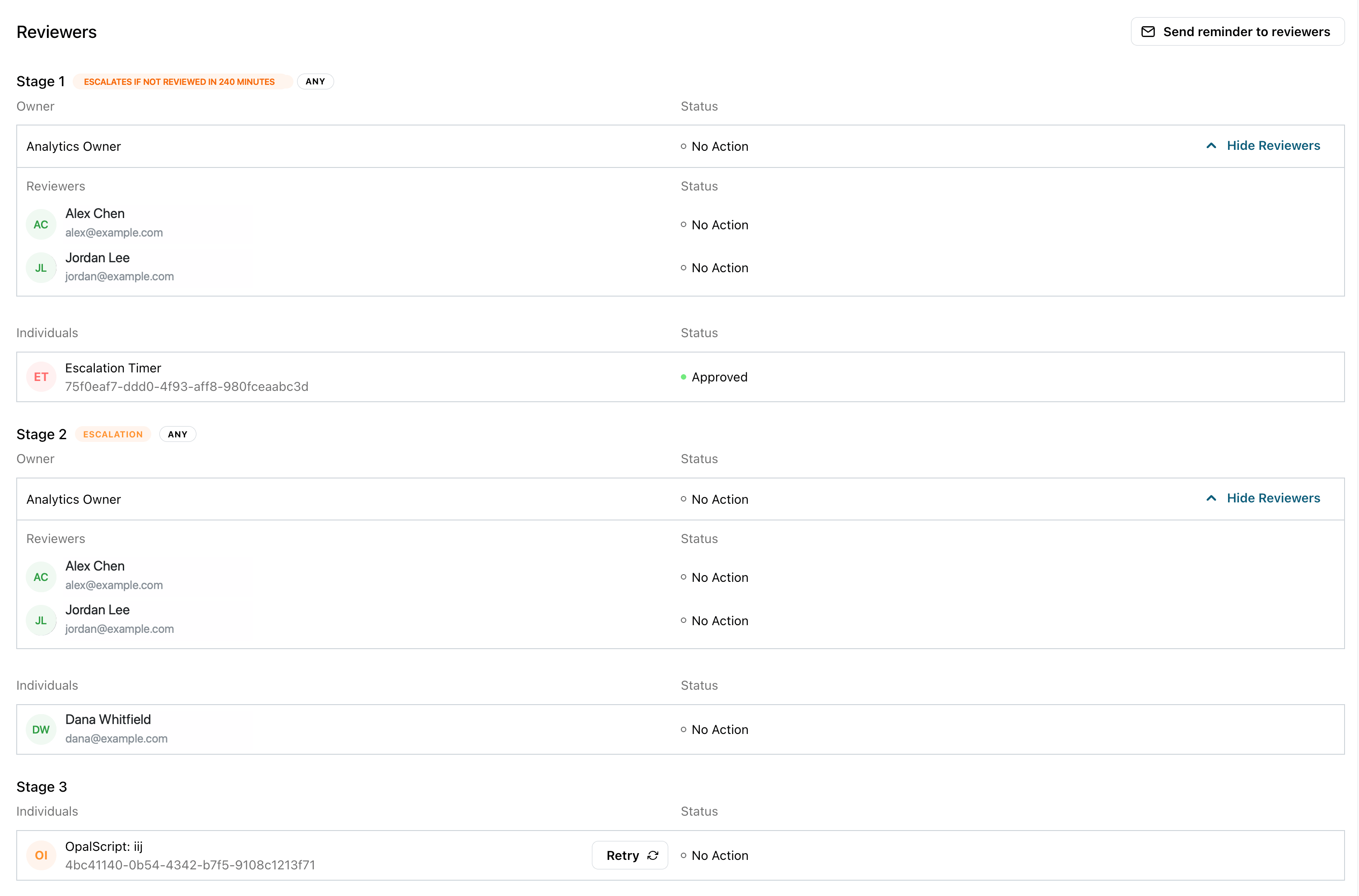 Opal carries out the timeout with an **Escalation Timer** service user, which Opal provisions for you and adds as a read-only reviewer on the timed stage. When the window expires, the timer clears that stage so the request advances, and comments on the request—`No reviewer responded in time - escalating.`—so the handoff is visible in the **Activity** feed.
The timer only moves the request forward to the escalation stage. It is not an approval of the request: the escalated reviewers still have to approve before access is granted.
## Examples
### Production database access — 4 hours
An engineer requests read access to the production database during an incident. First-line reviewers are the database owners; the escalation reviewers are the on-call SRE rotation.
* **Escalate after:** 4 hours
* **Escalate to:** SRE on-call
If the database owners don't respond within 4 hours, the on-call engineer picks it up. Nobody stays blocked during an incident waiting for a specific person to wake up.
### Marketing tool seat — 24 hours
A new hire requests a seat in a marketing SaaS tool. The team manager reviews these, and the escalation reviewers are the marketing ops team.
* **Escalate after:** 24 hours
* **Escalate to:** Marketing Ops
The window is deliberately loose. A seat request isn't urgent, but it also shouldn't disappear for two weeks while the manager is travelling.
### Admin role on a sensitive system — 8 hours, escalating to security
A developer requests an admin role on a system holding customer data. The resource owner reviews first; the escalation reviewers are the security team.
* **Escalate after:** 8 hours
* **Escalate to:** Security
Here escalation isn't about speed, it's about making sure a high-risk request always gets looked at by someone. It never quietly sits in one person's inbox.
## Related
* [Configure reviewers](/docs/configure-reviewers)
* [Notifications](/docs/notifications)
Opal carries out the timeout with an **Escalation Timer** service user, which Opal provisions for you and adds as a read-only reviewer on the timed stage. When the window expires, the timer clears that stage so the request advances, and comments on the request—`No reviewer responded in time - escalating.`—so the handoff is visible in the **Activity** feed.
The timer only moves the request forward to the escalation stage. It is not an approval of the request: the escalated reviewers still have to approve before access is granted.
## Examples
### Production database access — 4 hours
An engineer requests read access to the production database during an incident. First-line reviewers are the database owners; the escalation reviewers are the on-call SRE rotation.
* **Escalate after:** 4 hours
* **Escalate to:** SRE on-call
If the database owners don't respond within 4 hours, the on-call engineer picks it up. Nobody stays blocked during an incident waiting for a specific person to wake up.
### Marketing tool seat — 24 hours
A new hire requests a seat in a marketing SaaS tool. The team manager reviews these, and the escalation reviewers are the marketing ops team.
* **Escalate after:** 24 hours
* **Escalate to:** Marketing Ops
The window is deliberately loose. A seat request isn't urgent, but it also shouldn't disappear for two weeks while the manager is travelling.
### Admin role on a sensitive system — 8 hours, escalating to security
A developer requests an admin role on a system holding customer data. The resource owner reviews first; the escalation reviewers are the security team.
* **Escalate after:** 8 hours
* **Escalate to:** Security
Here escalation isn't about speed, it's about making sure a high-risk request always gets looked at by someone. It never quietly sits in one person's inbox.
## Related
* [Configure reviewers](/docs/configure-reviewers)
* [Notifications](/docs/notifications)