> ## Documentation Index
> Fetch the complete documentation index at: https://docs.opal.dev/llms.txt
> Use this file to discover all available pages before exploring further.
# Custom Opal roles
> Learn how to create custom Opal roles.
Custom Opal roles consist of granular sets of permissions which you can assign to users and groups. Use custom roles to manage users and teams with differing access requirements.
See [Special roles in Opal](/docs/roles-in-opal) for an overview of existing, reserved Opal roles—Admin, Auditor, etc.
## Requirements
To create custom Opal roles, you must:
* Be an [Opal Admin](/docs/roles-in-opal)
* Be on version 1.1008 or later, if you self-host Opal
## Create and edit custom roles
To create a custom role:
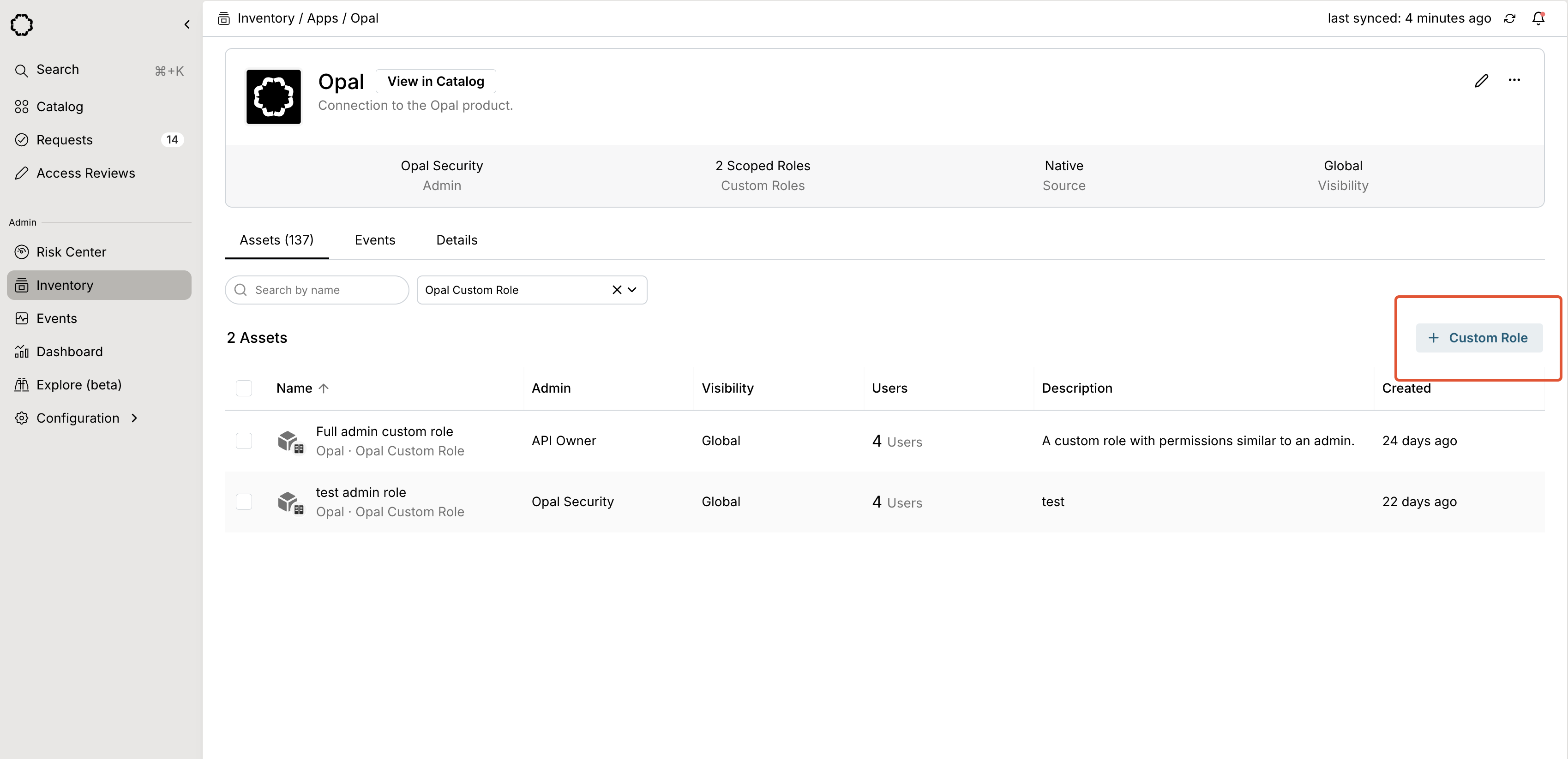
1. Go to the **Inventory** and search for the **Opal** app.
2. From the **Assets** tab, select **+ Custom Role**.
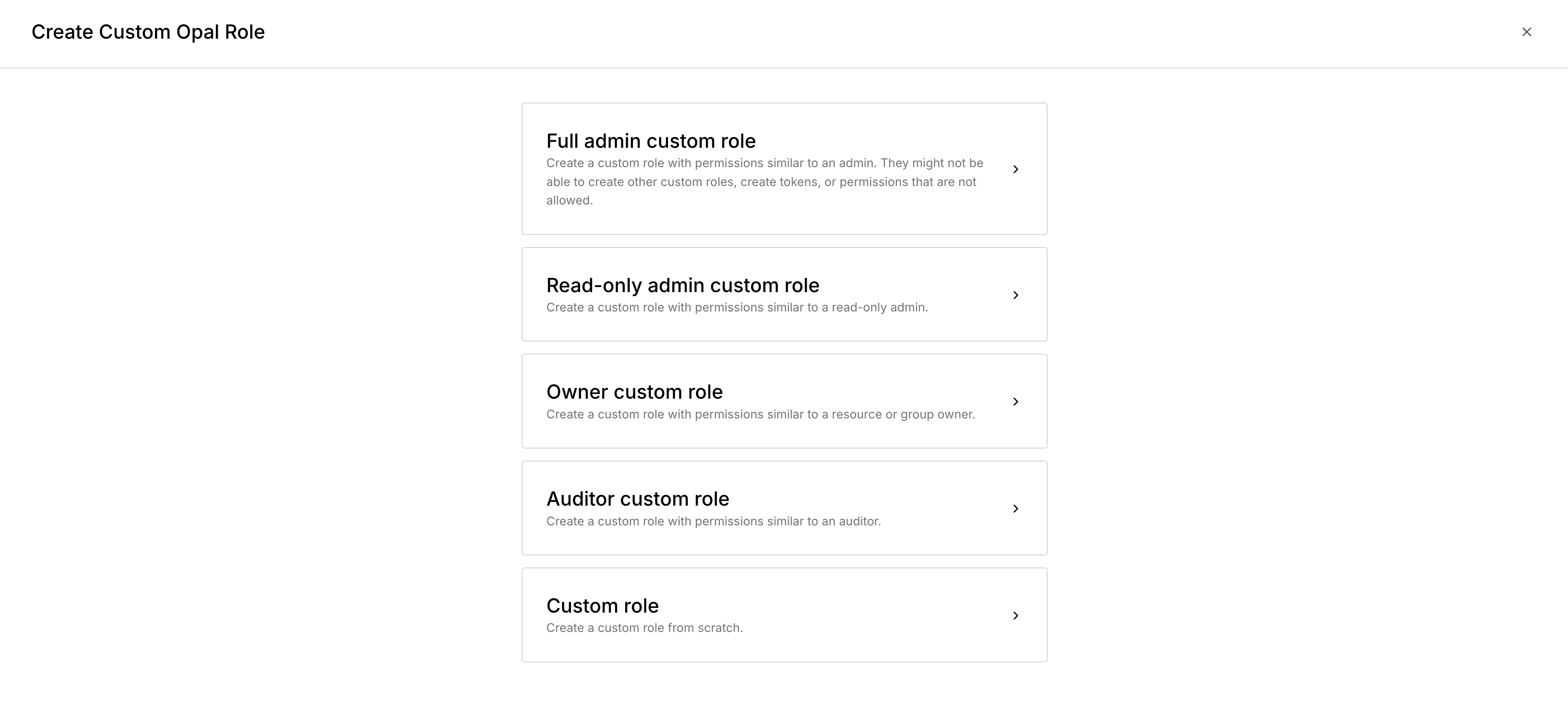
 3. Start with a templated set of permissions based on the given role, or create your role from scratch. You can add and remove granular permissions in the following step.
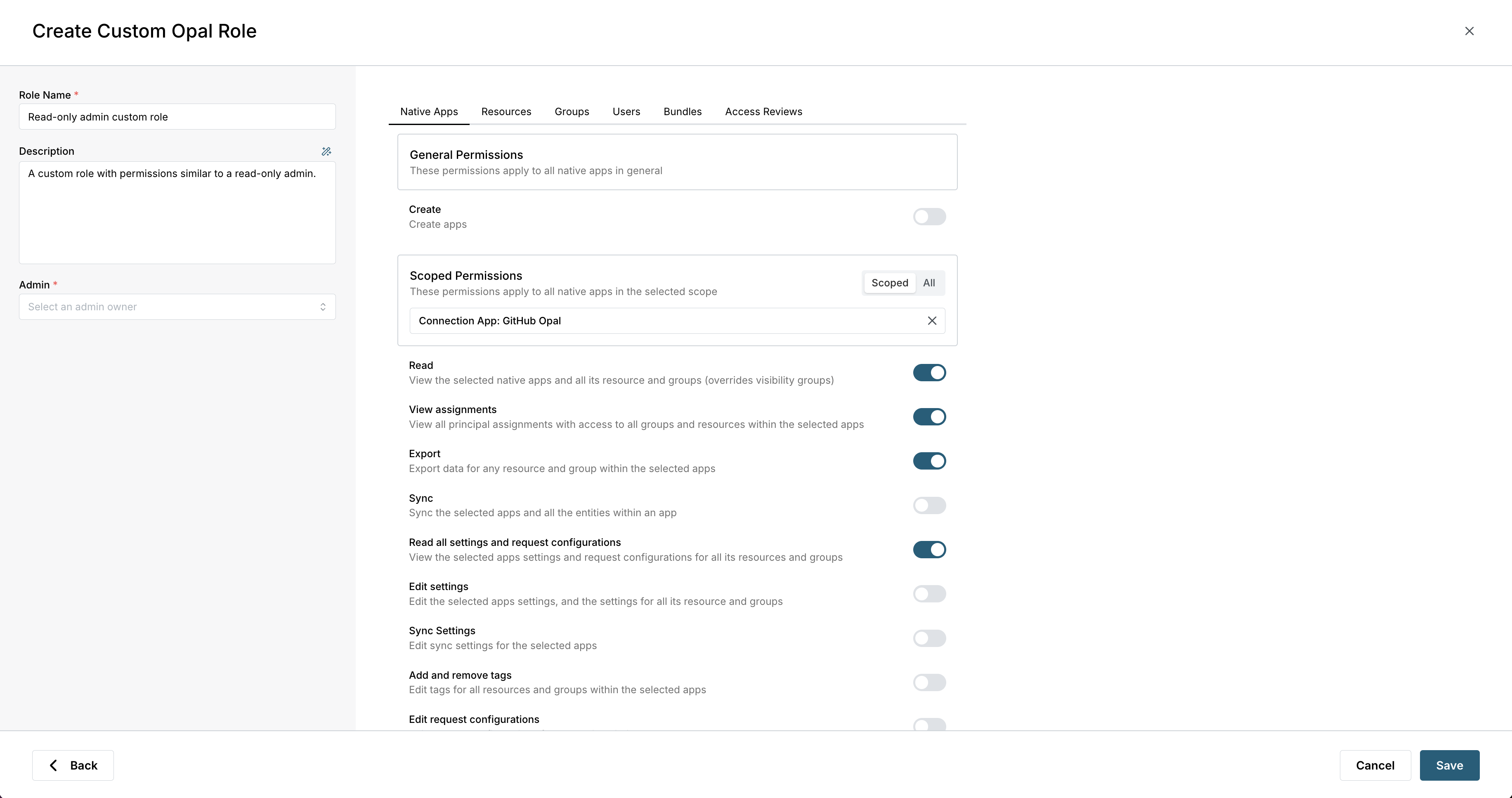
 3. Set the role's name, description, and [admin](/docs/configure-reviewers#owners), and optionally update [permissions](#permissions) for the role. Some permissions can be scoped to specified groups, resources, or users, and some apply to all assets.
 After you save the role, add users and groups to the role from the **User Access** and **Group Access** tabs, as you would grant access to any other resource.
To edit a custom role's scopes, select the edit icon on the role scopes from the **Scope** tab.
### Permissions
You can edit permissions on a custom role at any time. Permissions are non-additive, and do not depend on each other. You may need to explicitly add read permissions for edit permissions to take effect.
In this table, **View** permissions indicate the role can access the item in the Inventory and Catalog. See [Role and visibility hierarchy](#role-and-visibility-hierarchy) for examples of how roles interact with existing settings.
Note that **Admin Owner** refers to the Admin set on a resource or group, not the Opal Admin role.
| Permission | Applicable roles | Applies to [sub-resources](#inherited-permissions) | Available on custom roles |
| -------------------------------------------------------------- | ---------------------------------------------- | -------------------------------------------------- | ------------------------- |
| View apps, resources, groups, and sync status in the Inventory | Admin, Read-only Admin, Admin Owner\*, Auditor | Y | Y |
| Sync apps, resources, and groups | Admin, Admin Owner\* | Y | Y |
| Import or create resources within apps | Admin, Admin Owner\* | Y | Y |
| Create apps | Admin | N | Y |
| Edit app, resource, and group settings | Admin, Admin Owner\* | Y | Y |
| Edit app sync settings | Admin | Y | Y |
| Edit app, resource, and group tags | Admin, Admin Owner\* | Y | Y |
| Export app, resource, and group data | Admin, Read-only Admin, Admin Owner\*, Auditor | Y | Y |
| Edit app, resource, and group request configuration | Admin, Admin Owner\* | Y | Y |
| Edit app, resource, and group assignments | Admin, Admin Owner\*, Group Leader\*\* | Y | Y |
| Delete apps and resources | Admin, Admin Owner\* | Y | Y |
| View bundles | Admin, Admin Owner\*, Read-only Admin | N | Y |
| Delete bundles | Admin, Admin Owner\* | N | Y |
| Create bundles | Admin | N | Y |
| Edit bundle assignments | Admin, Admin Owner\* | N | Y |
| Edit bundle settings | Admin, Admin Owner\* | N | Y |
| Create access reviews | Admin, Auditor | N | N |
| View access reviews | Admin, Read-only Admin, Auditor | N | N |
| Stop access reviews | Admin, Auditor | N | N |
| Edit access review settings | Admin, Auditor | N | N |
| Assign reviewers | Admin, Auditor | N | N |
| Send access review reminders | Admin, Auditor | N | N |
| View access review templates | Admin, Read-only Admin, Auditor | N | N |
| Create, edit, and delete access review templates | Admin, Auditor | N | N |
| Edit user tags | Admin | N | Y |
| Edit user settings | Admin | N | Y |
| View all users | Admin, Read-only Admin, Auditor | N | Y |
| Export users | Admin, Read-only Admin, Auditor | N | Y |
| Create users | Admin | N | Y |
| View configuration templates | Admin | N | N |
| Create and delete configuration templates | Admin | N | N |
| Edit configuration template settings | Admin | N | N |
| View Risk Center | Admin, Read-only Admin | N | N |
| View events | Admin, Read-only Admin, Admin Owner\*, Auditor | N | N |
| View global settings | Admin, Read-only Admin | N | N |
| Edit global settings | Admin | N | N |
\*Admin Owners can only view and modify the groups or resources they own.
\*\*[Group leaders](/docs/group-projects) can only edit assignments for groups they lead.
## Role and visibility hierarchy
Custom roles take precedence over [visibility settings](/docs/organize-access-via-tags#visibility). If a user is assigned a role which gives view access to an asset (resource, group, etc.), but the asset's visibility settings do not include the user's groups, the user can still view the asset.
Note that edit permissions do **not** imply view permissions. If you grant a role the permission to edit a resource, but not permission to view it, permission to view the resource is not included in the role. In that case, the user may be prevented from viewing the resource, depending on visibility settings.
For example:
* Custom Role A has permissions to edit, but **not** view, Resource B.
* Resource B has group visibility settings set to allow Group C to view the group.
* User D and User E are granted access to Custom Role A.
* User D is a member of Group C.
* In this case, User D will be able to view and edit Resource B, but User E will not.
## Inherited permissions
Permissions applied to apps, resources, and groups automatically apply to any nested resources. If Resource A contains nested Resource B, scoped permissions granted to Resource A also grant the same permissions to Resource B.
## Manage roles via API
To create a scoped role with the API, use [POST /resources](/api-reference/resources/post-resources) with `app_id` set to the Opal connection ID and `resource_type` set to `OPAL_SCOPED_ROLE`.
To set scoped permissions, use `PUT /v1/resources/:resourceId/scoped-role-permissions`.
To read scoped permissions assigned to a role, use `GET /v1/resources/:resourceId/scoped-role-permissions`.
After you save the role, add users and groups to the role from the **User Access** and **Group Access** tabs, as you would grant access to any other resource.
To edit a custom role's scopes, select the edit icon on the role scopes from the **Scope** tab.
### Permissions
You can edit permissions on a custom role at any time. Permissions are non-additive, and do not depend on each other. You may need to explicitly add read permissions for edit permissions to take effect.
In this table, **View** permissions indicate the role can access the item in the Inventory and Catalog. See [Role and visibility hierarchy](#role-and-visibility-hierarchy) for examples of how roles interact with existing settings.
Note that **Admin Owner** refers to the Admin set on a resource or group, not the Opal Admin role.
| Permission | Applicable roles | Applies to [sub-resources](#inherited-permissions) | Available on custom roles |
| -------------------------------------------------------------- | ---------------------------------------------- | -------------------------------------------------- | ------------------------- |
| View apps, resources, groups, and sync status in the Inventory | Admin, Read-only Admin, Admin Owner\*, Auditor | Y | Y |
| Sync apps, resources, and groups | Admin, Admin Owner\* | Y | Y |
| Import or create resources within apps | Admin, Admin Owner\* | Y | Y |
| Create apps | Admin | N | Y |
| Edit app, resource, and group settings | Admin, Admin Owner\* | Y | Y |
| Edit app sync settings | Admin | Y | Y |
| Edit app, resource, and group tags | Admin, Admin Owner\* | Y | Y |
| Export app, resource, and group data | Admin, Read-only Admin, Admin Owner\*, Auditor | Y | Y |
| Edit app, resource, and group request configuration | Admin, Admin Owner\* | Y | Y |
| Edit app, resource, and group assignments | Admin, Admin Owner\*, Group Leader\*\* | Y | Y |
| Delete apps and resources | Admin, Admin Owner\* | Y | Y |
| View bundles | Admin, Admin Owner\*, Read-only Admin | N | Y |
| Delete bundles | Admin, Admin Owner\* | N | Y |
| Create bundles | Admin | N | Y |
| Edit bundle assignments | Admin, Admin Owner\* | N | Y |
| Edit bundle settings | Admin, Admin Owner\* | N | Y |
| Create access reviews | Admin, Auditor | N | N |
| View access reviews | Admin, Read-only Admin, Auditor | N | N |
| Stop access reviews | Admin, Auditor | N | N |
| Edit access review settings | Admin, Auditor | N | N |
| Assign reviewers | Admin, Auditor | N | N |
| Send access review reminders | Admin, Auditor | N | N |
| View access review templates | Admin, Read-only Admin, Auditor | N | N |
| Create, edit, and delete access review templates | Admin, Auditor | N | N |
| Edit user tags | Admin | N | Y |
| Edit user settings | Admin | N | Y |
| View all users | Admin, Read-only Admin, Auditor | N | Y |
| Export users | Admin, Read-only Admin, Auditor | N | Y |
| Create users | Admin | N | Y |
| View configuration templates | Admin | N | N |
| Create and delete configuration templates | Admin | N | N |
| Edit configuration template settings | Admin | N | N |
| View Risk Center | Admin, Read-only Admin | N | N |
| View events | Admin, Read-only Admin, Admin Owner\*, Auditor | N | N |
| View global settings | Admin, Read-only Admin | N | N |
| Edit global settings | Admin | N | N |
\*Admin Owners can only view and modify the groups or resources they own.
\*\*[Group leaders](/docs/group-projects) can only edit assignments for groups they lead.
## Role and visibility hierarchy
Custom roles take precedence over [visibility settings](/docs/organize-access-via-tags#visibility). If a user is assigned a role which gives view access to an asset (resource, group, etc.), but the asset's visibility settings do not include the user's groups, the user can still view the asset.
Note that edit permissions do **not** imply view permissions. If you grant a role the permission to edit a resource, but not permission to view it, permission to view the resource is not included in the role. In that case, the user may be prevented from viewing the resource, depending on visibility settings.
For example:
* Custom Role A has permissions to edit, but **not** view, Resource B.
* Resource B has group visibility settings set to allow Group C to view the group.
* User D and User E are granted access to Custom Role A.
* User D is a member of Group C.
* In this case, User D will be able to view and edit Resource B, but User E will not.
## Inherited permissions
Permissions applied to apps, resources, and groups automatically apply to any nested resources. If Resource A contains nested Resource B, scoped permissions granted to Resource A also grant the same permissions to Resource B.
## Manage roles via API
To create a scoped role with the API, use [POST /resources](/api-reference/resources/post-resources) with `app_id` set to the Opal connection ID and `resource_type` set to `OPAL_SCOPED_ROLE`.
To set scoped permissions, use `PUT /v1/resources/:resourceId/scoped-role-permissions`.
To read scoped permissions assigned to a role, use `GET /v1/resources/:resourceId/scoped-role-permissions`.