> ## Documentation Index
> Fetch the complete documentation index at: https://docs.opal.dev/llms.txt
> Use this file to discover all available pages before exploring further.
# Configure reviewers
> Learn how to configure required reviewers for access requests.
All resources and groups in Opal can be requestable with configurable approval options and reviewers. Use this guide to learn how admins can configure the reviewers of access requests.
## Owners
Owners are users who can be:
* **Reviewers**: Users who can review and approve access requests
* **Admins**: Users who can manage the full configuration of policies for resources and groups
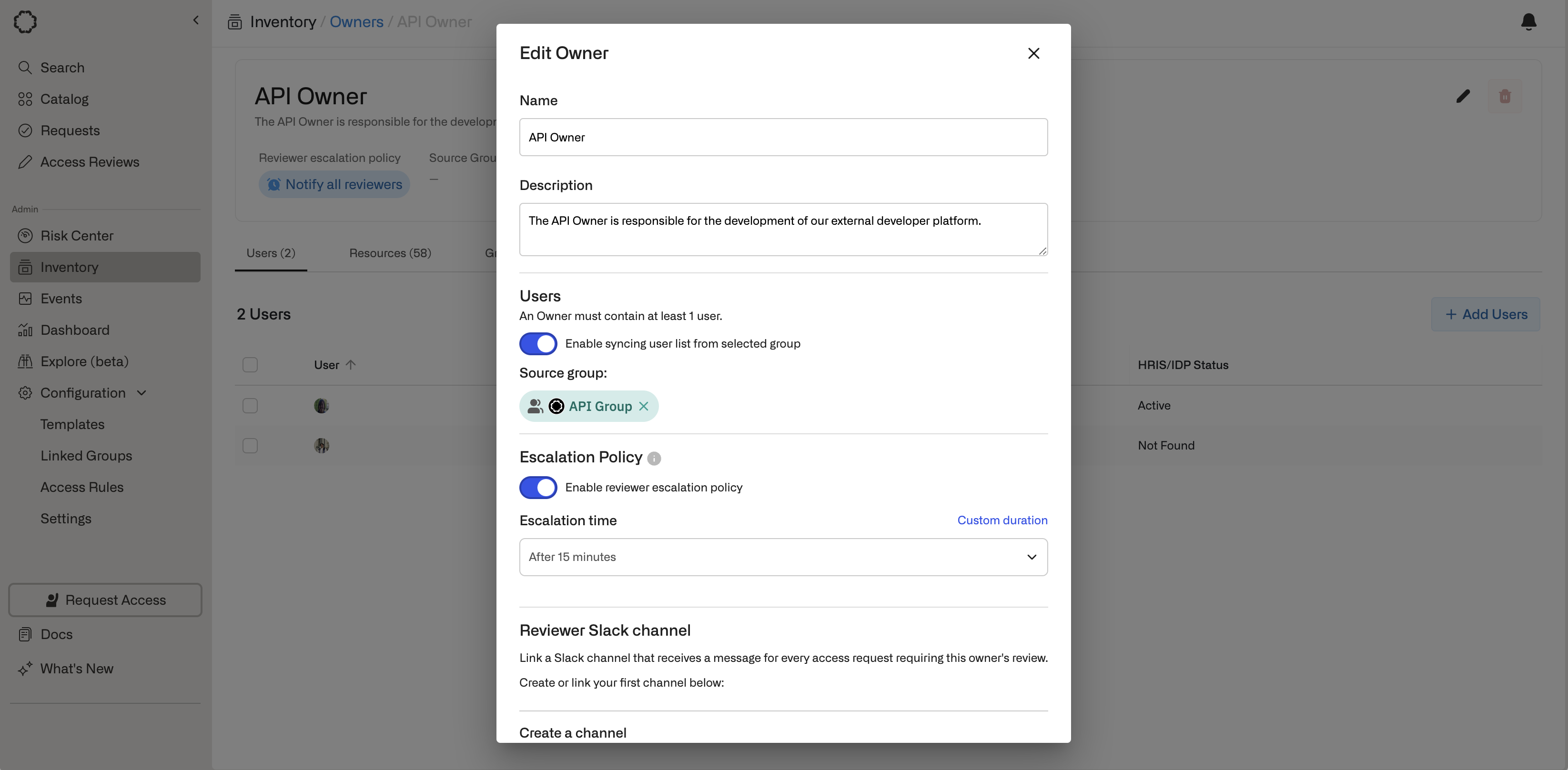
You can manage owners from the **Inventory** > **Owners** tab. There, you can find the following settings for reviewers:
1. **Reviewer Escalation Policy:**
* **Notify everyone**: As the default option, Opal notifies all required reviewers at once. Opal requires just one approval from all required reviewers to complete the request.
* **Reviewer escalation policy**: Once configured, Opal creates an explicit escalation order. In this example, Opal notifies the first reviewer. After the escalation time has passed, Opal notifies the next reviewer, and so on.
2. **Linked reviewer Slack channel:** Opal creates a channel that receives a message for every access request.
3. **Source group:** Opal keeps the user list for this owner synchronized with a group of your choice. You can still edit the escalation path in the Users tab, but you can't add or remove users from this owner directly.
 ### Empty owner notifications
Access reviews that require owner approval will fail when owner groups are empty. To receive [notifications](/docs/notifications) about empty owner groups, enable **Error notification setting** in **Configuration** > **Organization Settings** > **Advanced**.
## Approval workflows
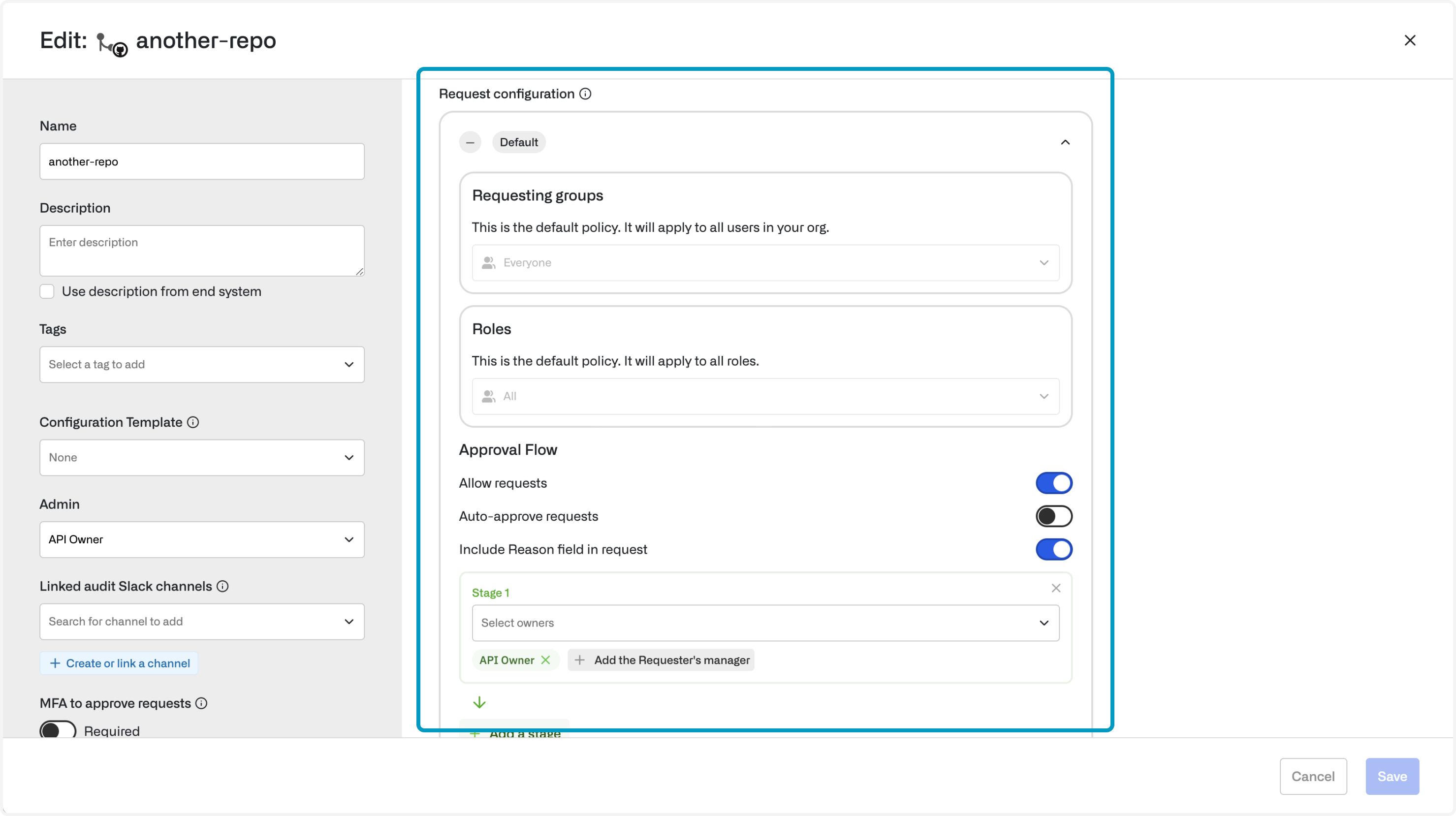
For resources and groups, the **Request Configuration** section gives admins an overview of the approval logic. You can create multiple request configurations if you want to apply different approval logic for different requesting users, groups, or roles.
### Empty owner notifications
Access reviews that require owner approval will fail when owner groups are empty. To receive [notifications](/docs/notifications) about empty owner groups, enable **Error notification setting** in **Configuration** > **Organization Settings** > **Advanced**.
## Approval workflows
For resources and groups, the **Request Configuration** section gives admins an overview of the approval logic. You can create multiple request configurations if you want to apply different approval logic for different requesting users, groups, or roles.
 ### Custom notification text
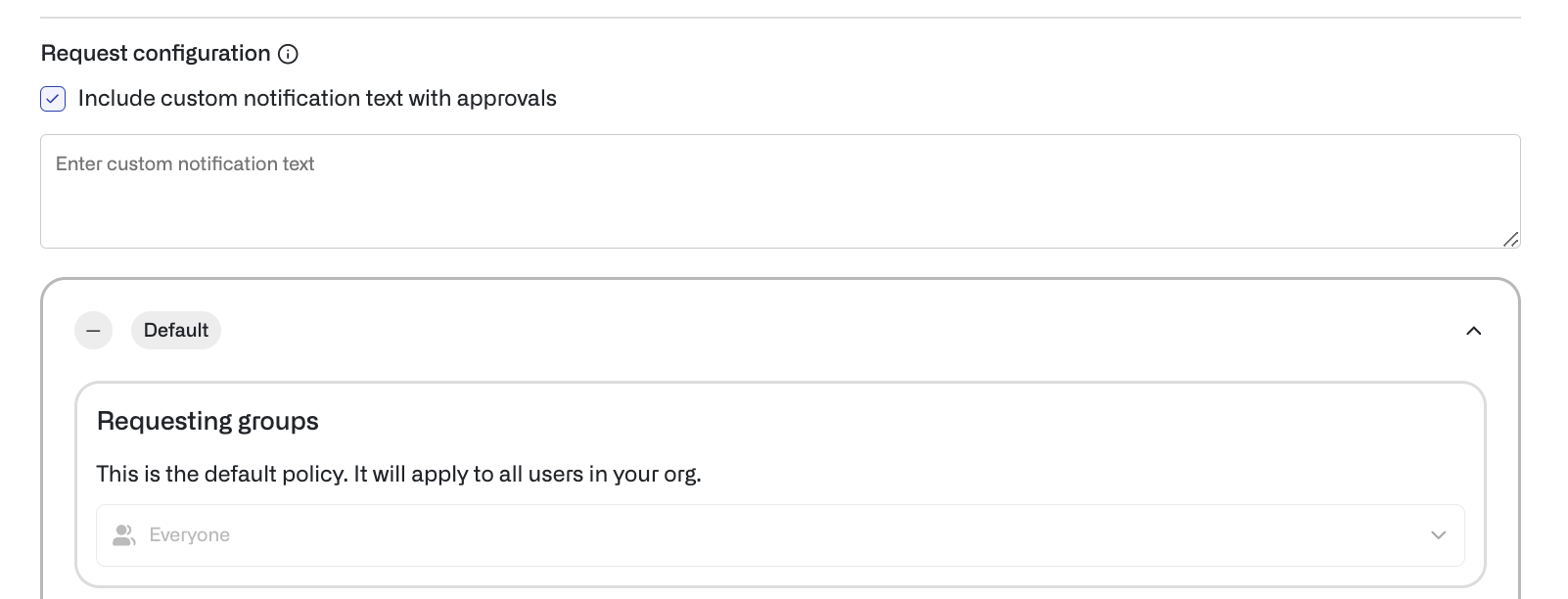
To send users notifications when they are approved for resources or groups, check the **Include custom notification text with approvals** checkbox in the request configuration or template, then specify a custom message.
### Custom notification text
To send users notifications when they are approved for resources or groups, check the **Include custom notification text with approvals** checkbox in the request configuration or template, then specify a custom message.
 ### Approval flow
In the **Approval Flow** section, admins can:
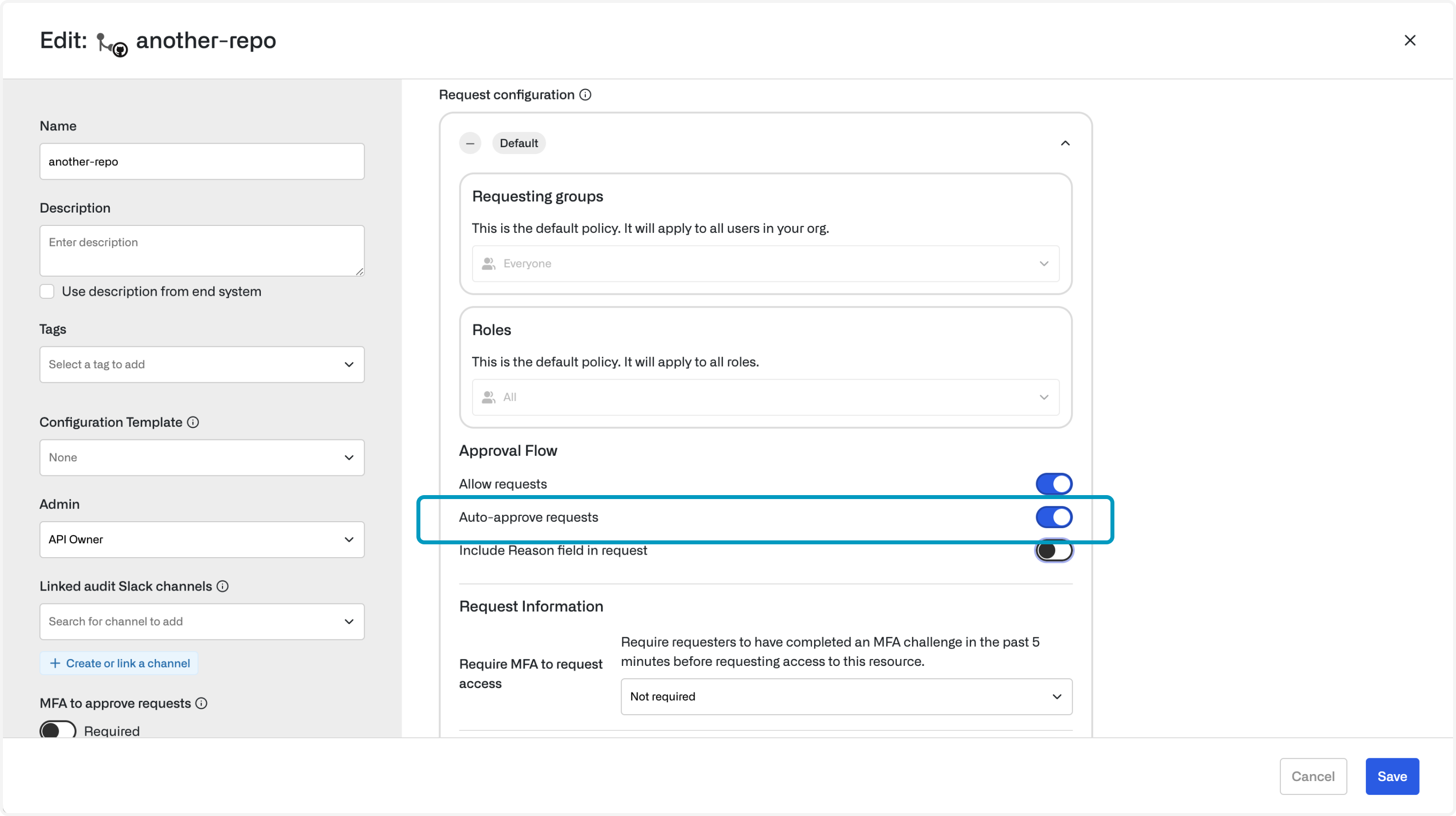
1. Set approval logic to **Auto-Approve**. When this setting is enabled, access requests are automatically approved.
### Approval flow
In the **Approval Flow** section, admins can:
1. Set approval logic to **Auto-Approve**. When this setting is enabled, access requests are automatically approved.
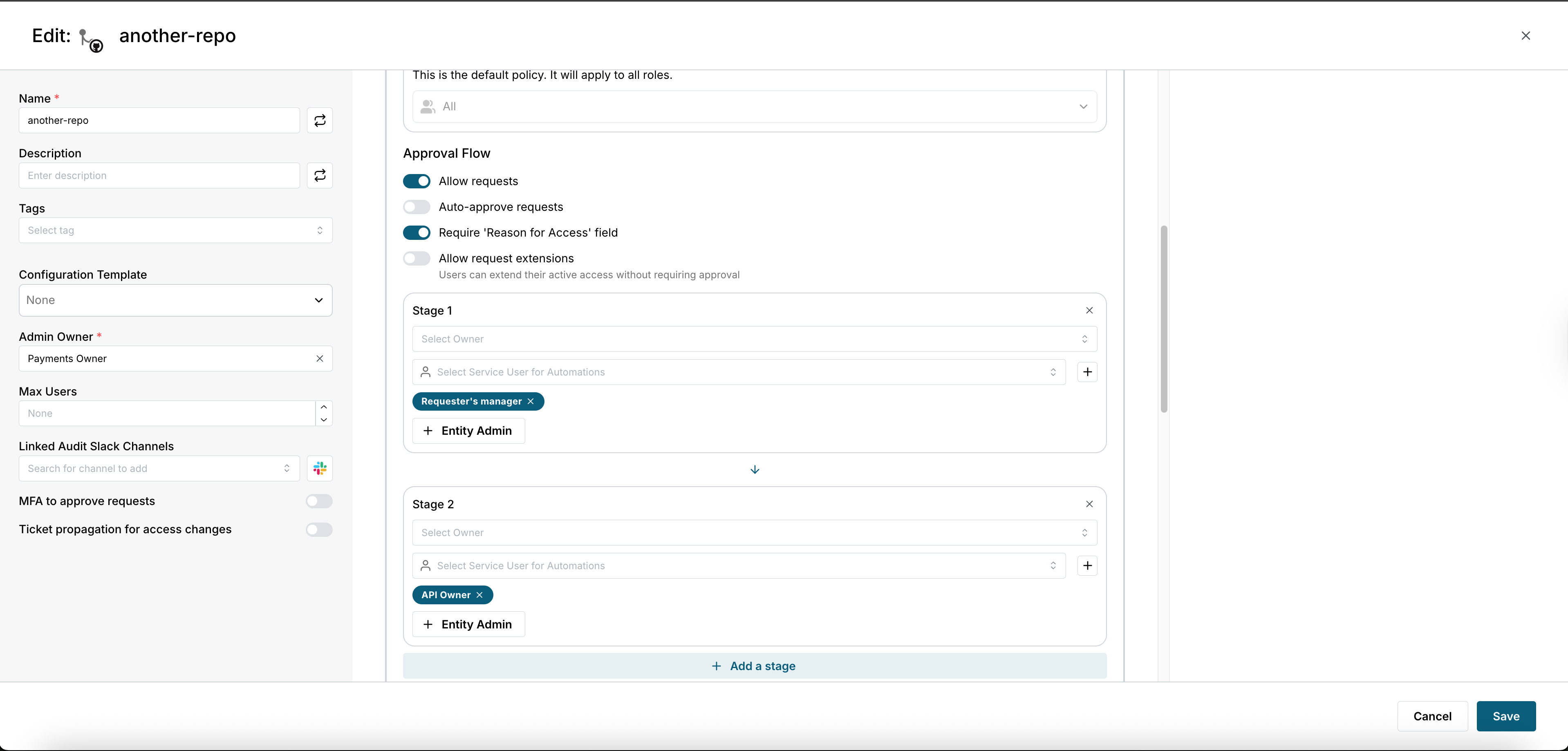
 2. Configure an **Approval Workflow**.
* You can include up to three approval **stages**.
* Within each stage, approvers can be the resource's **Manager**, an **Owner** or an [**Automation**](/reference/authentication#using-the-api-with-opal-service-users)
* If multiple approvers are selected, admins can choose to require **All** or **Any** reviewers.
> * **All**: All reviewers must approve the access request to proceed to the next stage. This is **AND** logic.
> * **Any**: Any reviewers can approve before the access request proceeds to the next stage. This is **OR** logic.
2. Configure an **Approval Workflow**.
* You can include up to three approval **stages**.
* Within each stage, approvers can be the resource's **Manager**, an **Owner** or an [**Automation**](/reference/authentication#using-the-api-with-opal-service-users)
* If multiple approvers are selected, admins can choose to require **All** or **Any** reviewers.
> * **All**: All reviewers must approve the access request to proceed to the next stage. This is **AND** logic.
> * **Any**: Any reviewers can approve before the access request proceeds to the next stage. This is **OR** logic.
 ## Automate Approvals with Service Users
Service Users can be assigned as request reviewers to automate approvals based on dynamic conditions. This can be integrated with your own tooling to evaluate if users are compliant with your access policies, such as if security training is complete or if the user is in their authorized work location.
## Automate Approvals with Service Users
Service Users can be assigned as request reviewers to automate approvals based on dynamic conditions. This can be integrated with your own tooling to evaluate if users are compliant with your access policies, such as if security training is complete or if the user is in their authorized work location.
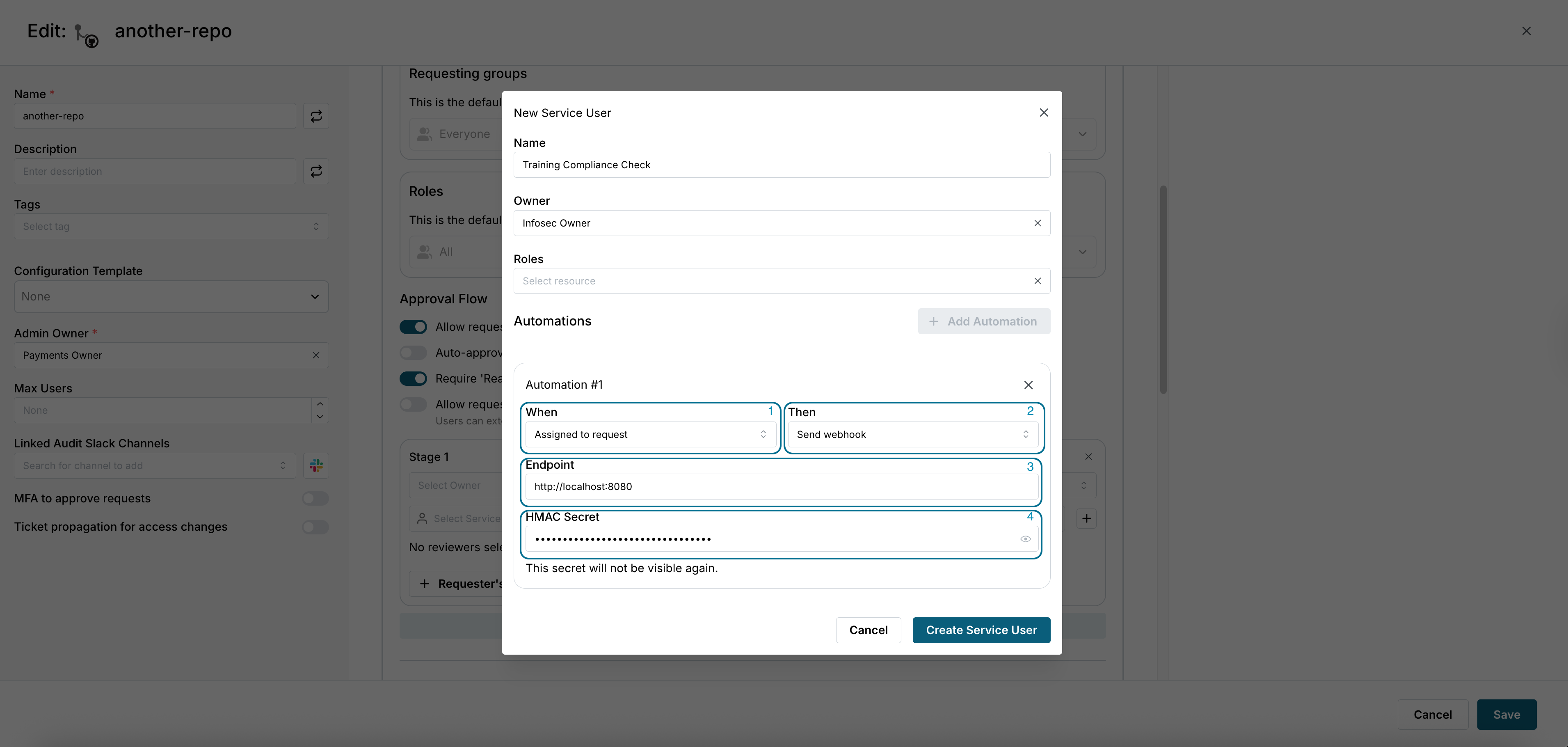
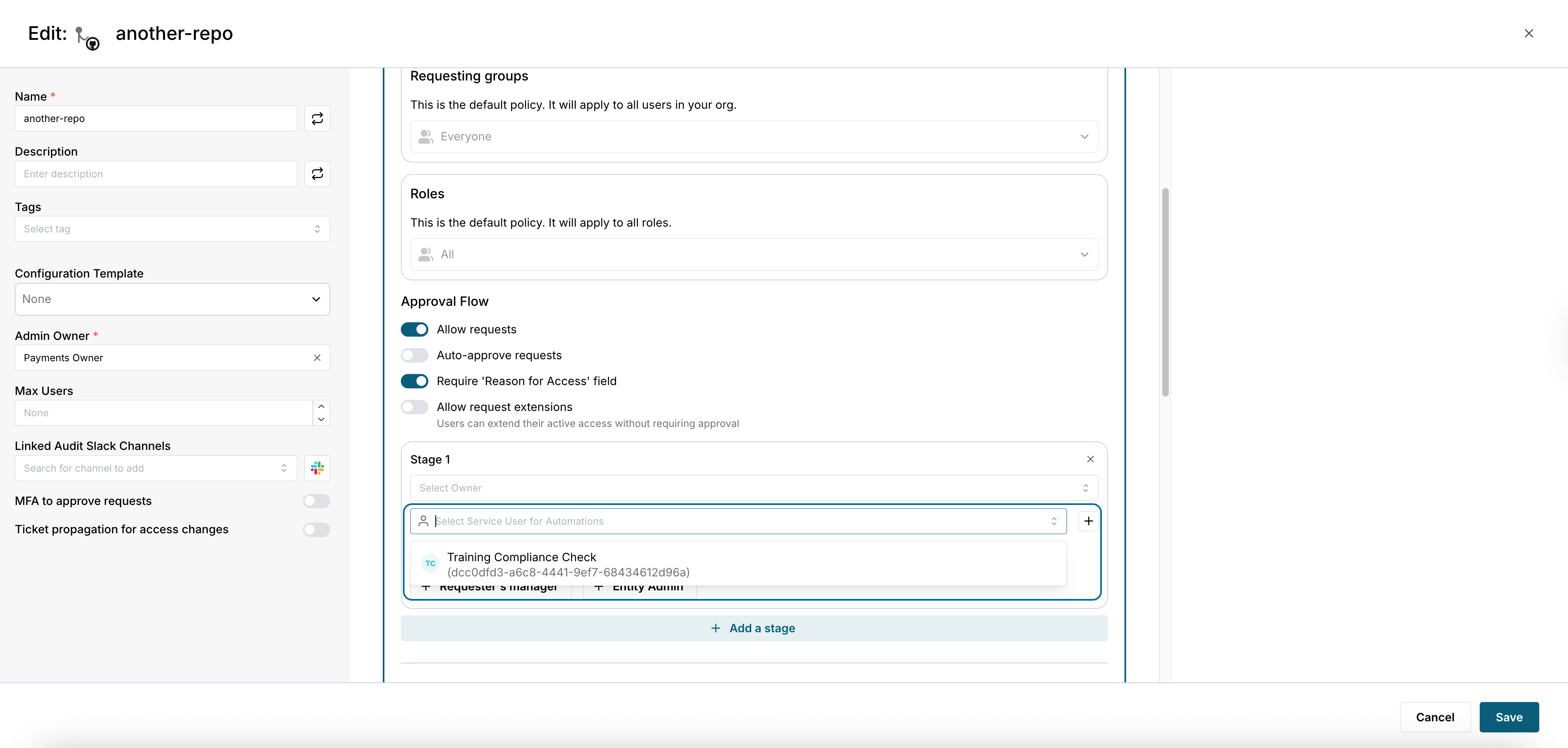 When assigning a service user to a request, an automation is configured for that service user. An automation consists of:
1. **When** the automation is triggered. For access requests, use **Assigned to request**.
2. **Then** the action that is taken. For access requests, use **Send webhook**.
3. **Endpoint** that a webhook is sent to. The webhook handler must be able to make Opal API calls to provide an approve, deny, or comment decision.
4. **HMAC Secret** that is used to sign the webhook payload.
When assigning a service user to a request, an automation is configured for that service user. An automation consists of:
1. **When** the automation is triggered. For access requests, use **Assigned to request**.
2. **Then** the action that is taken. For access requests, use **Send webhook**.
3. **Endpoint** that a webhook is sent to. The webhook handler must be able to make Opal API calls to provide an approve, deny, or comment decision.
4. **HMAC Secret** that is used to sign the webhook payload.
 The payload sent in the webhook is:
```json json theme={null}
{
"created_at": "2025-10-30T01:09:29.332217Z",
"custom_fields_responses": [],
"duration_minutes": 60,
"id": "47cfe906-cf21-4c70-9b76-bf4c749fc4da",
"reason": "I need admin access to change the branch protection rules.",
"requested_items_list": [
{
"access_level_name": "admin",
"access_level_remote_id": "admin",
"name": "another-repo",
"resource_id": "50031716-6485-4998-bb11-8fb1360385da"
}
],
"requester_id": "ee84c7db-42f4-4664-a313-fe6102f20e93",
"status": "PENDING",
"target_user_id": "ee84c7db-42f4-4664-a313-fe6102f20e93",
"updated_at": "2025-10-30T01:09:29.382338Z"
}
```
Once the webhook is received, you must make an Opal API request as the service user to one of:
* [POST /requests/\{id}/approve ](/api-reference/requests/post-requests-approve)to approve the request.
* [POST /requests/\{id}/comments](/api-reference/requests/post-requests-comments) to add a comment and leave the request open.
* [POST /requests/\{id}/deny](/api-reference/requests/post-requests-deny) to deny the request.
Follow the instructions under ["Using the API with Opal Service Users"](/reference/authentication#using-the-api-with-opal-service-users) when making your API request.
The payload sent in the webhook is:
```json json theme={null}
{
"created_at": "2025-10-30T01:09:29.332217Z",
"custom_fields_responses": [],
"duration_minutes": 60,
"id": "47cfe906-cf21-4c70-9b76-bf4c749fc4da",
"reason": "I need admin access to change the branch protection rules.",
"requested_items_list": [
{
"access_level_name": "admin",
"access_level_remote_id": "admin",
"name": "another-repo",
"resource_id": "50031716-6485-4998-bb11-8fb1360385da"
}
],
"requester_id": "ee84c7db-42f4-4664-a313-fe6102f20e93",
"status": "PENDING",
"target_user_id": "ee84c7db-42f4-4664-a313-fe6102f20e93",
"updated_at": "2025-10-30T01:09:29.382338Z"
}
```
Once the webhook is received, you must make an Opal API request as the service user to one of:
* [POST /requests/\{id}/approve ](/api-reference/requests/post-requests-approve)to approve the request.
* [POST /requests/\{id}/comments](/api-reference/requests/post-requests-comments) to add a comment and leave the request open.
* [POST /requests/\{id}/deny](/api-reference/requests/post-requests-deny) to deny the request.
Follow the instructions under ["Using the API with Opal Service Users"](/reference/authentication#using-the-api-with-opal-service-users) when making your API request.